1. Introducción
The Fenton FPC8T is a versatile and portable wireless speaker designed for various audio applications. It features 100W of power, Bluetooth connectivity for wireless audio streaming, an integrated MP3 player, and dynamic LED lighting effects. This speaker is equipped with an extendable handle and wheels for easy transport, making it suitable for outdoor use, parties, or public speaking. A wired microphone and remote control are included for enhanced functionality, including a vocal echo effect.
2. Instrucciones de seguridad
- Lea atentamente todas las instrucciones antes de utilizar el dispositivo.
- Mantenga el dispositivo alejado del agua, la humedad y las temperaturas extremas.
- No abra la casing; no contiene piezas que el usuario pueda reparar. Encargue cualquier reparación a personal cualificado.
- Utilice únicamente el adaptador de corriente especificado para cargar.
- Asegúrese de que haya una ventilación adecuada para evitar el sobrecalentamiento.
- Evite colocar objetos pesados sobre el altavoz.
- No exponga la batería a calor excesivo ni a la luz solar directa.
3. Contenido del paquete
Verifique que todos los artículos estén presentes en el paquete:
- Fenton FPC8T Portable Speaker
- Micrófono con cable
- Mando a distancia
- Cable de carga USB
- Manual de usuario (este documento)

Image: The Fenton FPC8T portable speaker shown with its wired microphone and remote control, illustrating the main components included in the package.

Imagen: Un primer plano view of the wired microphone, featuring an on/off switch and a standard audio jack connector.

Image: The remote control for the FPC8T speaker, showing buttons for mute, mode, repeat, track control, volume adjustment, EQ, and numeric input.
4. Producto terminadoview
The Fenton FPC8T is designed for portability and ease of use. It features a robust casing, an integrated battery, and a control panel for managing audio sources and settings.
4.1. Panel de control
The top panel of the speaker houses all essential controls and input ports.

Imagen: Un detalle view of the FPC8T's control panel, showing knobs for microphone volume and echo, a master volume knob, an LED display, media control buttons, USB and Micro-SD card slots, an AUX input, and a microphone input jack.
- VOL MICRO: Ajusta el volumen del micrófono.
- ECO: Ajusta el nivel del efecto de eco del micrófono.
- VOLUMEN: Control de volumen maestro para todas las fuentes de audio.
- MODO: Cambia entre los modos de entrada Bluetooth, USB, Micro-SD y AUX.
- Reproducir/Pausa: Controls playback for USB/Micro-SD and Bluetooth.
- Anterior Siguiente: Skips tracks for USB/Micro-SD and Bluetooth.
- Puerto USB: Para conectar unidades flash USB.
- Ranura Micro-SD: For inserting Micro-SD cards.
- Entrada auxiliar: Conector de 3.5 mm para conectar dispositivos de audio externos.
- ENTRADA DE MICRÓFONO: Jack de 6.3 mm para conectar el micrófono con cable.
- DC 5V EN: Puerto de carga para el altavoz.
- CHARGE/FULL Indicator: Muestra el estado de carga.
4.2. Características de portabilidad
The FPC8T is designed for easy movement.
- Mango extensible: Allows for comfortable pulling of the speaker.
- Ruedas: Facilitate smooth transport.
- Batería integrada: Provides power for use without a mains connection.
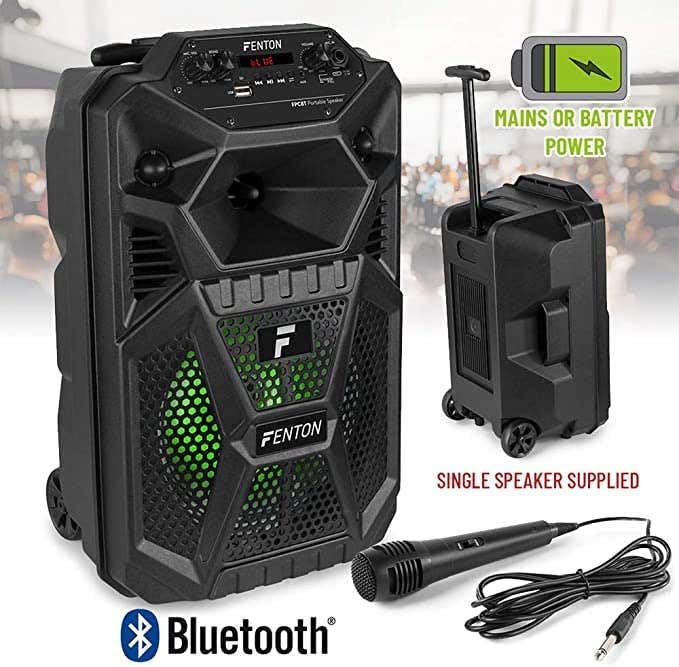
Image: The Fenton FPC8T speaker with icons indicating its battery and mains power capabilities, Bluetooth connectivity, and included microphone and remote control. The speaker is shown with its extendable handle and wheels.
5. Configuración
5.1. Carga de la batería
Antes del primer uso, cargue completamente la batería interna del altavoz.
- Connect the USB charging cable to the DC 5V IN port on the speaker.
- Conecte el otro extremo del cable USB a un adaptador de corriente USB compatible (no incluido) o a un puerto USB con alimentación.
- The CHARGE indicator light will illuminate during charging. It will turn FULL when the battery is fully charged.
5.2. Encendido / apagado
Localice el interruptor de encendido en el panel de control.
- Para encender, deslice el interruptor a la posición 'ON'.
- Para apagar, deslice el interruptor a la posición “APAGADO”.
5.3. Conexión del micrófono
The included wired microphone can be connected for vocal use.
- Insert the microphone's 6.3mm jack into the MIC IN port on the control panel.
- Adjust the MIC VOL and ECHO knobs to your desired levels.
6. Instrucciones de funcionamiento
6.1. Modo Bluetooth
Transmita audio de forma inalámbrica desde su teléfono inteligente, tableta u otros dispositivos habilitados para Bluetooth.
- Power on the speaker. The speaker will automatically enter Bluetooth mode or you can press the 'MODE' button until 'BLUE' appears on the display.
- Habilite Bluetooth en su dispositivo y busque dispositivos disponibles.
- Select 'FPC8T' from the list of devices to pair. A confirmation sound will indicate successful pairing.
- Start playing music on your device. The audio will stream through the FPC8T speaker.
- Adjust the volume using the 'VOLUME' knob on the speaker or your connected device.

Image: The Fenton FPC8T speaker positioned next to a smartphone, illustrating its Bluetooth connectivity for wireless music playback.
6.2. USB/Micro-SD Playback
Reproducir audio MP3 files directly from a USB flash drive or Micro-SD card.
- Insert a USB flash drive into the USB port or a Micro-SD card into the Micro-SD slot.
- The speaker will automatically switch to USB/Micro-SD mode and begin playing audio. If not, press the 'MODE' button to select the correct source.
- Use the Play/Pause and Previous/Next buttons on the control panel or remote control to manage playback.
6.3. Entrada AUX
Conecte dispositivos de audio externos mediante un cable de audio de 3.5 mm.
- Conecte un extremo de un cable de audio de 3.5 mm (no incluido) al puerto AUX IN del altavoz.
- Conecte el otro extremo al conector de auriculares o a la salida de audio de su dispositivo externo (por ejemplo, reproductor de MP3, computadora portátil).
- Press the 'MODE' button until 'AUX' appears on the display.
- Reproduzca audio desde su dispositivo externo.
6.4. Microphone Usage and Echo Effect
Use the wired microphone for announcements or karaoke.
- Ensure the microphone is connected to the MIC IN port.
- Ajuste la perilla 'MIC VOL' para controlar el nivel de salida del micrófono.
- Turn the 'ECHO' knob clockwise to increase the echo effect for vocals, or counter-clockwise to reduce it.
6.5. Efectos de luz LED
The speaker features integrated LED lights that enhance the listening experience.
- Las luces LED se activan automáticamente cuando se enciende el altavoz.
- The lights will cycle through various colors and patterns, synchronizing with the music.

Image: The Fenton FPC8T speaker displaying active green LED lighting behind its front grille, indicating the light effects feature.

Image: The Fenton FPC8T speaker displaying active red LED lighting behind its front grille, showcasing another color option of the light effects.

Image: The Fenton FPC8T speaker displaying active blue LED lighting behind its front grille, demonstrating a third color in its light effects sequence.
6.6. Funciones de control remoto
El control remoto incluido proporciona acceso conveniente a varias funciones.
| Botón | Función |
|---|---|
| MUTE | Silencia o reactiva la salida de audio. |
| MODO | Switches between input sources (Bluetooth, USB, Micro-SD, AUX). |
| REPE | Repite la pista actual o todas las pistas. |
| ESCANEAR | Scans for radio stations (if applicable, not explicitly mentioned for this model). |
| Reproducir/Pausa | Reproduce o pausa la pista actual. |
| Anterior/Siguiente | Salta a la pista anterior o siguiente. |
| EQ | Recorre los ajustes preestablecidos del ecualizador. |
| VOL- / VOL + | Decreases or increases the master volume. |
| 0-9 | Direct track selection (for USB/Micro-SD). |
| PLAY RECO / RECO | Playback or record function (if applicable, not explicitly mentioned for this model). |
7. Mantenimiento
7.1. Limpieza
- Siempre apague el dispositivo y desconéctelo de la fuente de alimentación antes de limpiarlo.
- Utilice un paño suave y seco para limpiar las superficies exteriores.
- No utilice limpiadores líquidos, aerosoles o productos químicos abrasivos, ya que pueden dañar el acabado o los componentes internos.
7.2. Cuidado de la batería
- Para prolongar la vida útil de la batería, evite descargarla por completo con frecuencia.
- If the speaker will not be used for an extended period, charge it to approximately 50% and store it in a cool, dry place. Recharge every 3-6 months to prevent deep discharge.
8. Solución de problemas
If you encounter issues with your Fenton FPC8T speaker, refer to the following common problems and solutions:
| Problema | Posible causa | Solución |
|---|---|---|
| Sin poder | La batería está agotada; el interruptor de encendido está apagado. | Cargue el altavoz; asegúrese de que el interruptor de encendido esté en la posición 'ON'. |
| Sin sonido | Volume is too low; Incorrect input mode selected; Device not paired (Bluetooth); Cable not connected (AUX/MIC). | Increase volume; Press 'MODE' to select correct input; Re-pair Bluetooth device; Check cable connections. |
| El emparejamiento de Bluetooth falla | El altavoz no está en modo de emparejamiento; Dispositivo demasiado lejos; Interferencia. | Asegúrese de que el altavoz esté en modo Bluetooth; acerque el dispositivo; apague otros dispositivos Bluetooth. |
| El micrófono no funciona | Microphone not connected; MIC VOL is low; Microphone switch is off. | Ensure microphone is fully plugged in; Increase MIC VOL; Check if the microphone's own switch is 'ON'. |
| USB/Micro-SD no reproduce | Incorrecto file formato; Unidad/tarjeta no insertada correctamente; Dañado files. | Asegurar files are MP3 format; Re-insert drive/card; Try different files o dispositivo de almacenamiento. |
9. Especificaciones
| Característica | Especificación |
|---|---|
| Potencia de salida | 100 W |
| Tamaño del woofer | 8 pulgadas |
| Batería | 3.7 V - 1.5 Ah (Integrated) |
| Conectividad | Bluetooth, USB, Micro-SD, AUX (3.5mm), Microphone (6.3mm) |
| Características especiales | LED Light Effects, Microphone Echo Effect, Extendable Handle, Wheels |
| Dimensiones (L x An x Al) | 19.5 x 22 x 34 cm (7.68 x 8.66 x 13.39 pulgadas) |
| Peso | 3.45 kg (7.6 libras) |
| Entrada de potencia | 5 V a través de USB |
| Dispositivos compatibles | Portátil, teléfono inteligente, tableta |
10. Garantía y soporte
This product is covered by a standard manufacturer's warranty. Please refer to the warranty card included in your package or contact your retailer for specific warranty terms and conditions. For technical support or service inquiries, please contact the Fenton customer service department or visit their official websitio.


