Introducción
The Sangean FMT-02 (GoTune 200) is a versatile DAB+ and FM-TX car radio adapter designed to enhance your in-car audio experience. It allows you to receive digital DAB+ radio stations and transmit them via FM to your existing car radio. Additionally, it features integrated Bluetooth for wireless audio streaming from your compatible devices and an auxiliary input for wired connections. This manual provides detailed instructions for installation, operation, and maintenance of your FMT-02.
Características principales
- 20 preset stations (10 DAB, 10 FM TX) for quick access to your favorite channels.
- FM transmitter with Radio Power Scan (RPS) function to automatically find an available FM frequency.
- Integrated Bluetooth for wireless audio streaming from smartphones, tablets, and other compatible devices.
- Auxiliary input for connecting external audio sources via a 3.5mm cable.
- DAB reception supports TA (Traffic Announcement) and SF (Service Following) functions for enhanced navigation and listening.
- Easy connection via cigarette lighter socket or USB port.
Producto terminadoview
Familiarize yourself with the main components and controls of your Sangean FMT-02.

Imagen 1: Frente view of the Sangean FMT-02 showing the display, rotary knob, and control buttons including MODE ON/OFF, PAIR PRESET, INFO MENU, and BACK/SF AUTOTUNE.

Imagen 2: Trasero view of the Sangean FMT-02 displaying the connection ports: Ext. Ant. (External Antenna), Aux In, Line Out, and DC In (Power Input).
Controles:
- Botón giratorio: Turn to navigate menus or adjust volume. Press to confirm selections.
- MODE ON/OFF: Press to switch between modes (DAB, FM-TX, Bluetooth, Aux In). Press and hold to power the device on or off.
- PAIR PRESET: Press to access preset stations. Press and hold to initiate Bluetooth pairing.
- INFO MENU: Press to display information. Press and hold to enter the system menu.
- BACK/SF AUTOTUNE: Press to go back in menus. Press and hold to initiate FM Radio Power Scan (RPS) or DAB autotune.
Configuración e instalación
Follow these steps to properly install your Sangean FMT-02 in your vehicle.
1. Montaje del dispositivo:

Imagen 3: The Sangean FMT-02 attached to its adjustable suction cup mount.
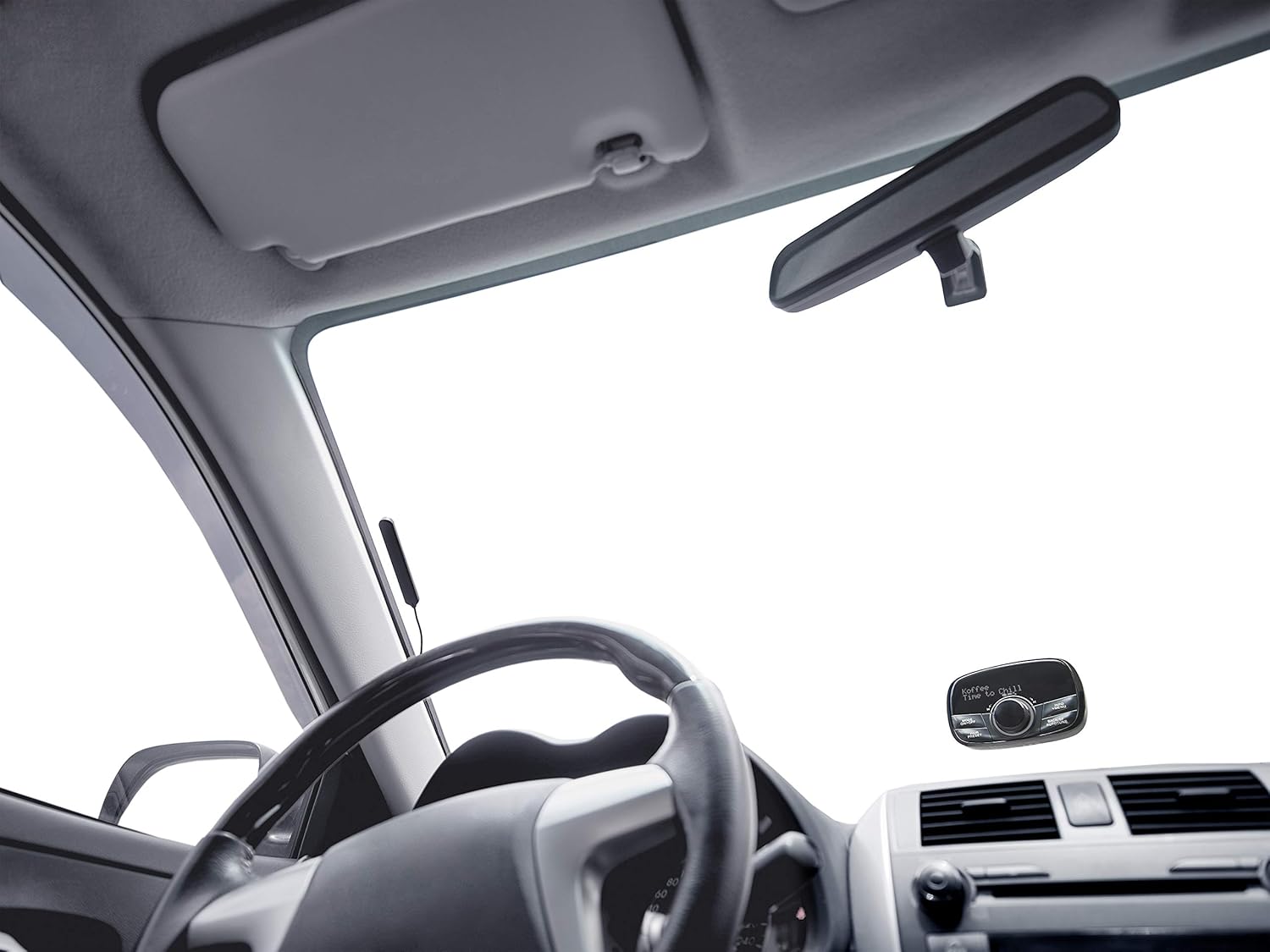
Imagen 4: The Sangean FMT-02 mounted on the lower right corner of a car windshield, visible from the driver's perspective.
- Attach the provided suction cup mount to the back of the FMT-02 unit.
- Choose a suitable location on your car's windshield or dashboard that does not obstruct your view o interferir con las bolsas de aire.
- Clean the chosen surface thoroughly.
- Presione la ventosa firmemente contra la superficie y active el mecanismo de bloqueo para asegurarla.
- Adjust the angle of the FMT-02 for optimal viewing y acceso.
2. Conexión de energía:
Connect the FMT-02 to your car's power supply using one of the following methods:
- Toma de encendedor de cigarrillos: Plug the provided car charger into your vehicle's 12V cigarette lighter socket and connect the other end to the DC In port on the FMT-02.
- Puerto USB: If your vehicle has a USB power port, connect the FMT-02 using a compatible USB cable to the DC In port.
3. Instalación de la antena:
For optimal DAB+ reception, install the external antenna provided.
- Connect the antenna cable to the 'Ext. Ant.' port on the rear of the FMT-02.
- Carefully route the antenna cable along the edges of your windshield or dashboard to a location that provides clear reception, typically near the top of the windshield or on a side window. Avoid placing it near metal objects that could cause interference.
- Secure the antenna in place using adhesive clips or tape if necessary.
Instrucciones de funcionamiento
Encendido/apagado:
- Para encender, mantenga presionada la tecla MODO ACTIVADO/DESACTIVADO botón hasta que la pantalla se ilumine.
- Para apagar, mantenga pulsado el MODO ACTIVADO/DESACTIVADO hasta que la pantalla se apague.
DAB+ Radio Operation:
- Presione el MODO ACTIVADO/DESACTIVADO button repeatedly until 'DAB' mode is selected.
- Upon first use or if stations are not found, the device will automatically perform a full scan for available DAB+ stations. To manually initiate a scan, press and hold the BACK/SF AUTOTUNE botón.
- Turn the rotary knob to browse through the list of available stations. Press the rotary knob to select a station.
- Guardar ajustes preestablecidos: Mientras escucha una estación, mantenga presionada la tecla PAIR PRESET button. Use the rotary knob to select a preset number (1-10) and press the knob to confirm.
- Recuperación de preajustes: Presione el PAIR PRESET button. Use the rotary knob to select a preset and press the knob to tune in.
- TA (Traffic Announcement) and SF (Service Following): These functions are automatically supported by the FMT-02 when available from the DAB+ broadcast.
FM-TX Operation:
The FMT-02 transmits DAB+ audio to your car's FM radio. Ensure your car radio is tuned to the selected FM frequency.
- Presione el MODO ACTIVADO/DESACTIVADO button repeatedly until 'FM-TX' mode is selected.
- Radio Power Scan (RPS): Mantenga pulsado el BACK/SF AUTOTUNE button. The device will scan for the clearest available FM frequency.
- Manually adjust the FM transmitting frequency by turning the rotary knob.
- Tune your car's FM radio to the same frequency displayed on the FMT-02.
- Guardar ajustes preestablecidos: While on an FM-TX frequency, press and hold the PAIR PRESET button. Use the rotary knob to select a preset number (1-10) and press the knob to confirm.
- Recuperación de preajustes: Presione el PAIR PRESET button. Use the rotary knob to select a preset and press the knob to tune in.
Emparejamiento y transmisión por Bluetooth:
- Presione el MODO ACTIVADO/DESACTIVADO button repeatedly until 'Bluetooth' mode is selected.
- The device will enter pairing mode automatically, indicated by a flashing Bluetooth icon or message on the display. If not, press and hold the PAIR PRESET Botón para iniciar el emparejamiento.
- En su teléfono inteligente, tableta u otro dispositivo con Bluetooth habilitado, vaya a la configuración de Bluetooth y busque los dispositivos disponibles.
- Select 'Sangean FMT-02' (or similar name) from the list to pair.
- Once paired, you can stream audio wirelessly from your device to the FMT-02. The audio will then be transmitted via FM-TX to your car radio.
Entrada auxiliar:
To connect an external audio source via cable:
- Connect a 3.5mm audio cable from your external audio device (e.g., MP3 player) to the 'Aux In' port on the rear of the FMT-02.
- Presione el MODO ACTIVADO/DESACTIVADO button repeatedly until 'Aux In' mode is selected.
- Play audio from your connected device. The audio will be transmitted via FM-TX to your car radio.
Mantenimiento
- Limpieza: Utilice un paño suave y seco para limpiar el exterior de la unidad. No utilice limpiadores abrasivos ni disolventes.
- Almacenamiento: Si va a almacenar el dispositivo durante un período prolongado, desconéctelo de la alimentación y guárdelo en un lugar fresco y seco.
- Cuidado de la antena: Ensure the antenna cable is not kinked or damaged. A damaged antenna can affect reception quality.
Solución de problemas
| Problema | Posible causa | Solución |
|---|---|---|
| Sin energía / El dispositivo no se enciende | Loose power connection; Blown fuse in car charger; Faulty power source. | Check power cable connection. Ensure car's cigarette lighter or USB port is functional. Try a different power source. |
| No DAB+ reception or poor signal | Antenna not connected; Poor antenna placement; Weak DAB+ signal in area. | Ensure antenna is securely connected. Reposition antenna for better reception. Perform a full DAB+ scan. Check DAB+ coverage in your area. |
| No audio from car radio | Car radio not tuned to correct FM frequency; FMT-02 not transmitting. | Ensure your car radio is tuned to the exact FM frequency displayed on the FMT-02. Perform an FM Radio Power Scan (RPS) on the FMT-02 to find a clear frequency. Increase volume on both FMT-02 and car radio. |
| El dispositivo Bluetooth no se empareja | FMT-02 not in pairing mode; Bluetooth on source device is off; Device too far. | Ensure FMT-02 is in Bluetooth pairing mode (flashing icon). Turn Bluetooth on your source device off and on again. Move devices closer. |
| Aux In not working | Cable not connected properly; Incorrect mode selected; Faulty cable. | Ensure 3.5mm cable is fully inserted into both devices. Select 'Aux In' mode on the FMT-02. Try a different audio cable. |
Presupuesto
- Marca: Sangeano
- Número de modelo: A500430
- Color: Negro
- Tecnología de conectividad: Bluetooth
- Tecnología de sintonizador: FM, DAB+
- Fuente de energía: Car cigarette lighter (12V), USB
- Bandas de radio compatibles: DAB+, FM-TX
- Características especiales: Built-In Bluetooth wireless audio streaming, Radio Power Scan (RPS), TA/SF functions
- Dispositivos compatibles: MP3 Player, Laptop, Smartphone, Tablet
- Componentes incluidos: 1 x Sangean FMT-02 (GoTune 200) unit, Suction cup mount, Power cable, Antenna
Garantía y soporte
Sangean products are manufactured to high-quality standards. For warranty information, please refer to the warranty card included with your product or visit the official Sangean webSitio web. Para asistencia técnica o consultas de servicio, contacte con el servicio de atención al cliente de Sangean a través de sus canales oficiales.