Introducción
The Sonoff S26 Smart WiFi Socket is an intelligent plug designed to bring smart automation to your home. It allows you to remotely control connected devices via the eWeLink app, set schedules, and integrate with voice assistants like Amazon Alexa and Google Home. This manual provides detailed instructions for setting up, operating, and maintaining your Sonoff S26 Smart WiFi Socket.

Figura 1: Frente view of the Sonoff S26 Smart WiFi Socket, showing the power button and the Brazilian standard outlet.
Información de seguridad
- Ensure the socket is used within its specified voltage (220 Volts) and load limits (Max. load: 2200W/10A).
- No desmonte ni modifique el dispositivo.
- Mantenga el dispositivo alejado del agua, la humedad y las altas temperaturas.
- Sólo para uso en interiores.
- Desenchufe el dispositivo de la toma de corriente antes de limpiarlo.
Contenido del paquete
- 1 x Sonoff S26 Smart WiFi Socket
- 1 x Manual de usuario (este documento)
Guía de configuración
1. Instalación Física
- Plug the Sonoff S26 Smart WiFi Socket into a standard Brazilian wall outlet.
- Plug the appliance you wish to control into the Sonoff S26 socket.
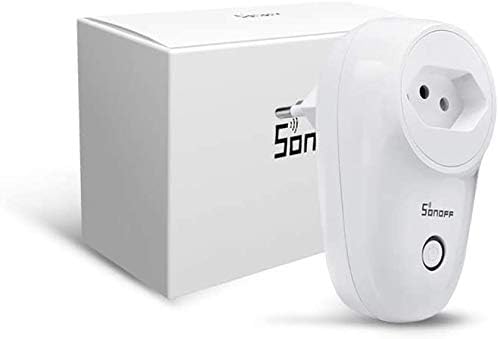
Figure 2: Sonoff S26 Smart WiFi Socket alongside its packaging, illustrating the compact design.
2. Instalación de la aplicación
Download the eWeLink app from the App Store (iOS) or Google Play Store (Android). Alternatively, scan the QR code usually found on the product packaging or quick start guide.
- Buscar "eWeLink" in your app store.
- Install the app and register a new account if you don't have one.
3. Device Pairing (Wi-Fi Connection)
- Ensure your Sonoff S26 is plugged in and the indicator light is blinking rapidly (Quick Pairing Mode). If not, press and hold the manual control button for 5-7 seconds until it blinks rapidly.
- Open the eWeLink app, tap the "+" icon at the bottom center, and select "Quick Pairing".
- Confirm the indicator light is blinking rapidly and tap "Next".
- Enter your Wi-Fi network name (SSID) and password. Ensure your Wi-Fi is 2.4GHz.
- The app will search for and connect to the device. Once connected, you can rename your device.
Instrucciones de funcionamiento
1. Control básico de encendido y apagado
- Control manual: Press the physical button on the Sonoff S26 to manually turn the connected appliance on or off.
- Control de la aplicación: Open the eWeLink app, select your Sonoff S26 device, and tap the power icon to toggle its status. The app will display the real-time status of the device.
2. Programación y temporizadores
The eWeLink app allows you to set various timers for automated control:
- Temporizador de programación: Establezca horarios específicos para que el dispositivo se encienda o apague diariamente o en días seleccionados de la semana.
- Contador regresivo: Establezca una cuenta regresiva para que el dispositivo se encienda o se apague después de una duración específica.
- Temporizador de bucle: Program the device to cycle on and off repeatedly for set intervals.
3. Scene Creation
Create "Scenes" in the eWeLink app to automate actions based on conditions or to control multiple devices simultaneously:
- Escena inteligente: Trigger actions based on environmental conditions (e.g., temperature, humidity) or other device statuses.
- One-Tap Scene: Create a shortcut to turn on/off a group of devices with a single tap.
4. Integración del control por voz
The Sonoff S26 is compatible with popular voice assistants:
- Amazon Alexa: Link your eWeLink account in the Alexa app. Once linked, you can say commands like, "Alexa, turn on [device name]."
- Página principal de Google: Link your eWeLink account in the Google Home app. Use commands such as, "Hey Google, turn off [device name]."
- IFTTT: Integrate with IFTTT (If This Then That) for advanced automation recipes.
Mantenimiento
- Limpieza: Utilice un paño suave y seco para limpiar la superficie del dispositivo. No utilice limpiadores líquidos ni aerosoles.
- Almacenamiento: Guarde el dispositivo en un lugar fresco y seco cuando no esté en uso.
- Actualizaciones de firmware: Revise periódicamente la aplicación eWeLink para ver si hay actualizaciones de firmware disponibles para garantizar un rendimiento y una seguridad óptimos.
Solución de problemas
| Problema | Posible causa | Solución |
|---|---|---|
| El dispositivo no puede conectarse a Wi-Fi. | Incorrect Wi-Fi password, 5GHz Wi-Fi network, device too far from router. |
|
| El dispositivo está fuera de línea en la aplicación. | Apagado automáticotage, Wi-Fi disconnected, device malfunction. |
|
| El control de voz no funciona. | Incorrect device name, eWeLink account not linked, voice assistant issues. |
|
Presupuesto
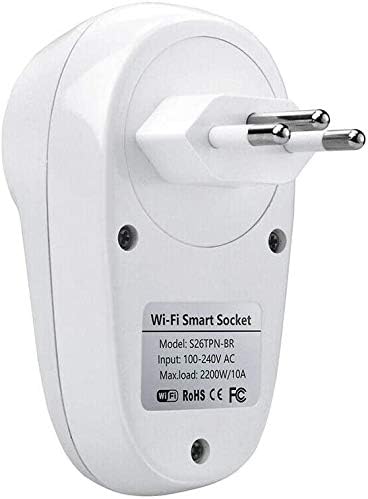
Figura 3: Posterior view of the Sonoff S26 Smart WiFi Socket, displaying the model number (S26TPN-BR) and electrical input/load details.
| Característica | Detalle |
|---|---|
| Modelo | S26 (Part Number: 0301XNWG30V) |
| Marca | SONOFF |
| Vol de entradatage | 100-240V AC (Bivolt) |
| Carga máx. | 2200W / 10A |
| Estándar Wi-Fi | IEEE 802.11 b / g / n 2.4GHz |
| Material | PC V0 |
| Dimensiones | 6 x 5 x 9 cm (Largo x Ancho x Alto) |
| Peso | 120 gramos |
| Color | Blanco |
| Compatibilidad | Amazon Alexa, Google Home, IFTTT |
Garantía y soporte
Garantía limitada: SONOFF products typically come with a limited warranty covering manufacturing defects. Please refer to the warranty card included with your product or visit the official SONOFF webSitio para conocer los términos y condiciones específicos de la garantía.
Atención al cliente: For technical assistance, troubleshooting, or product inquiries, please contact SONOFF customer support through their official webo la aplicación eWeLink. También puede visitar el Tienda SONOFF en Amazon Para más información.


