1. Introducción
The AMTAST AMT212 is a portable digital Leeb hardness tester designed for accurate hardness measurements of large, hard metallic materials. It features a built-in printer for immediate result output, a true color TFT display, and supports multiple hardness scales. This manual provides essential information for the safe and effective operation, maintenance, and troubleshooting of your AMT212 device.
2. Información de seguridad
Please read and understand all safety instructions before operating the AMT212 hardness tester. Failure to follow these instructions may result in injury or damage to the device.
- Seguridad general: Always wear appropriate personal protective equipment (PPE) when conducting hardness tests.
- Dispositivo de impacto: Handle the impact device with care. Avoid dropping or subjecting it to strong impacts, as this can affect measurement accuracy.
- Seguridad de la batería: Use only the specified rechargeable Li-battery. Do not attempt to open or modify the battery. Dispose of batteries according to local regulations.
- Condiciones ambientales: Operate the device within the specified working temperature range (-20°C to 55°C). Avoid exposure to extreme temperatures, humidity, or corrosive environments.
- Limpieza: Utilice un paño suave y seco para limpiar. No utilice limpiadores abrasivos ni disolventes.
3. Contenido del paquete
Verifique que todos los artículos estén presentes en el paquete:
- AMT212 Portable Leeb Hardness Tester with Built-in Printer
- Standard D Impact Device
- Rechargeable Li-battery (pre-installed or separate)
- Cargador / Adaptador de corriente
- Cable USB
- Cepillo de limpieza
- Manual de usuario (este documento)
- Estuche de transporte
4. Producto terminadoview
The AMT212 features an intuitive interface and robust design for reliable hardness testing.
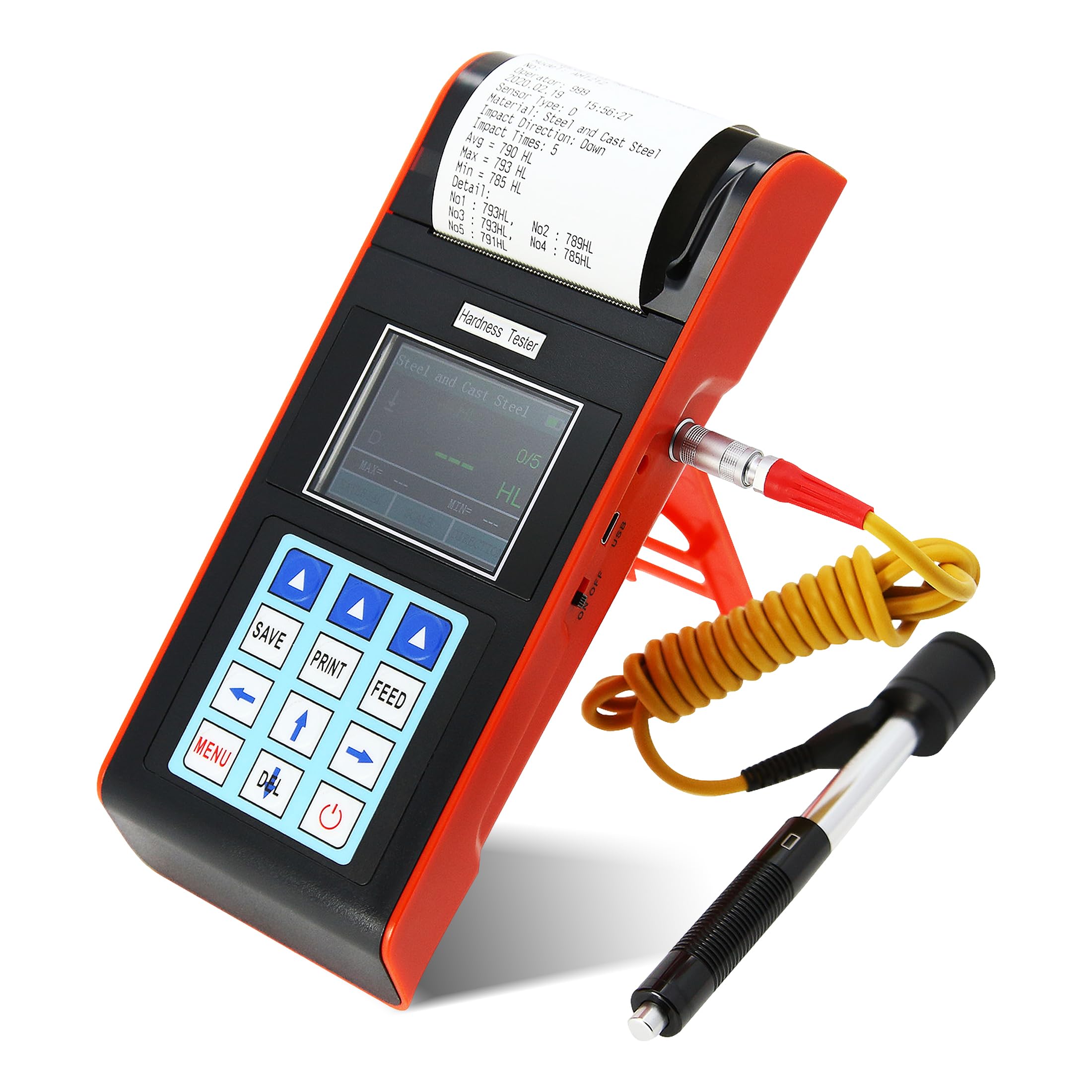
Figura 4.1: Frente view of the AMTAST AMT212 Portable Leeb Hardness Tester, showing the display, control buttons, and built-in printer.
Características principales:
- Impresora incorporada: Allows for immediate printing of test results.
- True Color TFT Display: 320x240 resolution for clear and intuitive menu operation.
- Multifuncional: Includes customized material function, user calibration, automatic alarm, and starting value calibration.
- Gran memoria: Stores up to 600 groups of information (adjustable impact times 1-32).
- Amplio rango de medición: Capable of measuring hardness for most metallic materials across various scales.
- Automatic Impact Device Identification: Recognizes 7 types of impact devices.
- Pantalla de estado de la batería: Clearly shows remaining battery capacity and charge status.

Figure 4.2: Visual representation of the AMT212's core functionalities, including the built-in printer, automatic alarm, dual hardness scale display, and battery indicator. The image also illustrates the device's versatility for use at various angles and in narrow spaces, and shows the standard D impact device.

Figura 4.3: Lado view of the AMT212, highlighting the integrated kickstand for angled viewing, the USB port for data transfer or charging, and the power ON/OFF switch.

Figura 4.4: Posterior view of the AMT212, showing the connection point for the standard D impact device and product labeling with model number, battery type, charger specifications, and printer paper width.
5. Configuración
5.1 Carga de la batería
Before first use, ensure the device is fully charged. Connect the charger to the device's charging port and plug it into a power outlet. The battery status indicator on the display will show the charging progress.
5.2 Conexión del dispositivo de impacto
Carefully connect the standard D impact device cable to the designated port on the AMT212. Ensure a secure connection. The device will automatically identify the connected impact device type.
5.3 Carga de papel para impresora
Open the printer cover located at the top of the device. Insert a roll of 58mm thermal paper, ensuring the paper feeds correctly through the mechanism. Close the cover securely.
6. Instrucciones de funcionamiento
6.1 Encendido / Apagado
Mantenga presionado el botón de encendido (generalmente marcado con un símbolo de encendido) para encender o apagar el dispositivo.
6.2 Navegación por menús
The AMT212 features a menu-driven interface. Use the arrow keys (Up, Down, Left, Right) and the 'MENU' or 'OK' button to navigate through options and confirm selections. The true color TFT screen provides rich and intuitive information.
6.3 Selecting Material and Hardness Scale
From the main menu, select the appropriate material type (e.g., Steel, Cast Iron, Aluminum Alloy) and the desired hardness scale (e.g., HL, HRC, HB). The device allows for arbitrary switching between materials and hardness scales.
6.4 Realización de una medición
- Ensure the surface of the test piece is clean, smooth, and free from scale, oil, or other contaminants.
- Coloque el dispositivo de impacto de forma firme y perpendicular sobre la superficie de prueba.
- Press the release button on the impact device to initiate the impact. The measurement will be displayed on the screen.
- Repeat the measurement multiple times (typically 3-5 times) at different points on the test piece to ensure accuracy and consistency.
- The device can be used at any angle, including upside down, in narrow spaces, or other challenging working conditions.
6.5 Saving and Printing Results
Use the 'SAVE' button to store measurement data in the device's memory. The 'PRINT' button will immediately print the current test results via the built-in printer. The 'FEED' button advances the paper.
6.6 Automatic Alarm Function
The device features an automatic alarm function suitable for batch testing. If a test result falls outside pre-set tolerance limits, the device will automatically alert the user.
6.7 funciones de calibración
The AMT212 includes a starting value calibration function to ensure data applicability and accuracy across different codes and standards, as well as a user calibration function for fine-tuning.
7. Hardness Scales and Applicable Materials

Figure 7.1: Display showing the available hardness scales (HL, HB, HRB, HRC, HRA, HV, HS) and their respective measuring ranges. The image also illustrates a typical measurement display with MAX and MIN values.
7.1 Measuring Range:
- DAN: 170~960
- Consejo de Derechos Humanos: 17.9~69.5
- MEDIA PENSIÓN: 19~683
- Alto voltaje: 80~1042
- Escuela Secundaria: 30.6~102.6
- HRA: 59.1~88
- HRB: 13.5~101.7
The device can also switch to Strength (σb) mode.
7.2 Materiales aplicables:
The AMT212 is suitable for testing a wide range of metallic materials:
- Steel and Cast Steel
- Alloy Tool Steel
- Acero inoxidable
- Hierro fundido gris
- Fundición nodular
- Aleación de aluminio fundido
- Copper Zinc Alloys (Brass)
- Copper and Tin Alloy
- Copper (Bronze)
- Acero forjado

Figure 7.2: Graphical representation of the various material categories that can be tested using the AMT212, including different types of steel, cast iron, various alloys, and copper-based materials.
8. Mantenimiento
8.1 Limpieza del dispositivo
Regularly wipe the exterior of the device with a soft, dry cloth. Do not use liquid cleaners or solvents, as they may damage the display or internal components.
8.2 Cleaning the Impact Device
Use the provided cleaning brush to remove any debris from the impact device, especially the impact body and guide tube. Ensure the impact body moves freely. Do not lubricate the impact device.
8.3 Almacenamiento
When not in use, store the AMT212 and its accessories in the provided carrying case in a dry, dust-free environment, away from direct sunlight and extreme temperatures.
8.4 Cuidado de la batería
To prolong battery life, avoid fully discharging the battery frequently. If storing the device for an extended period, charge the battery to approximately 50% and recharge every few months.
9. Solución de problemas
| Problema | Posible causa | Solución |
|---|---|---|
| El dispositivo no se enciende. | Batería baja o agotada. | Cargue la batería con el cargador proporcionado. |
| Lecturas inexactas. |
|
|
| La impresora no imprime. |
|
|
| Display issues (e.g., frozen screen). | Fallo de software o error temporal. | Turn off the device, wait a few seconds, then turn it back on. If the problem persists, contact customer support. |
10. Especificaciones

Figure 10.1: Detailed specifications of the AMT212, highlighting its precision and technical capabilities.
| Parámetro | Valor |
|---|---|
| Rango de medición | HLD:170~960, HRC:17.9~69.5, HB:19~683, HV:80~1042, HS:30.6~102.6, HRA:59.1~88, HRB:13.5~101.7 |
| Measuring Materials | Steel and cast steel, alloy tool steel, stainless steel, gray cast iron, nodular cast iron, cast aluminum alloy, copper zinc alloys (brass), copper and tin alloy, copper(bronze), forged steel |
| Escalas de dureza | HL, HB, HRB, HRC, HRA, HV, HS (can switch to Strength σb mode) |
| Dirección de medición | 360° |
| Error de indicación | ±6HLD (D impact device) |
| Mostrar | 320x240 true color TFT screen |
| Fuerza | Batería de litio recargable |
| Temperatura de trabajo | -20 °C ~ 55 °C |
| Tamaño | 210 x 85 x 45 mm |
| Peso | 0.6 kg |
| Memoria | Max 600 groups (relative to impact times 1~32 adjustable) |
11. Información de garantía
AMTAST products are manufactured to high quality standards. This product is covered by a limited warranty against defects in materials and workmanship for a period of one (1) year from the original date of purchase. This warranty does not cover damage caused by misuse, accident, unauthorized modification, or normal wear and tear. Please retain your proof of purchase for warranty claims.
12. Atención al cliente
For technical assistance, troubleshooting, or warranty inquiries, please contact AMTAST customer support. Refer to the contact information provided with your product packaging or visit the official AMTAST webSitio para obtener los detalles de soporte más actualizados.
When contacting support, please have your product model number (AMT212) and purchase date available.


