1. Introducción
The Amcrest ASH21-B is a 1080P WiFi Pan/Tilt Indoor Security Camera designed for comprehensive indoor surveillance. It offers live streaming, remote pan, tilt, and digital zoom capabilities, human detection with smart tracking, two-way audio, night vision, and flexible storage options. This manual provides detailed instructions for setting up, operating, and maintaining your camera.

Figure 1: Amcrest ASH21-B 1080P WiFi Pan/Tilt Indoor Camera.
2. ¿Qué hay en la caja?
- Amcrest ASH21-B 1080P WiFi Pan/Tilt Indoor Camera
- Adaptador de corriente (eléctrico con cable)
- Tornillos de montaje y soporte
- Guía de configuración rápida
- Información de garantía
3. Configuración
3.1 Encendido de la cámara
Connect the provided power adapter to the camera's power port and plug it into a standard electrical outlet. The camera will power on and initiate its startup sequence.

Figura 2: Posterior view of the camera showing power port, Ethernet port, and microSD card slot.
3.2 Descarga e instalación de aplicaciones
Download the Amcrest Smart Home app from the Apple App Store or Google Play Store. Follow the on-screen instructions to create an account or log in.

Figure 3: Amcrest SmartHome app interface for mobile devices.
3.3 Conexión a wifi
- Open the Amcrest Smart Home app and tap the '+' icon to add a new device.
- Select your camera model (ASH21-B).
- Escanee el código QR ubicado en la parte inferior de la cámara.
- Follow the app's prompts to connect the camera to your 2.4GHz Wi-Fi network. Note: This camera is only compatible with 2.4GHz networks and does not work with 5GHz networks.
- Set a strong password for your device.
3.4 Montaje de la cámara
The camera can be placed on a flat surface or mounted to a wall or ceiling. Use the provided mounting screws and bracket for secure installation. If mounting on the ceiling, ensure to adjust the image orientation in the app settings.

Figure 4: Amcrest ASH21-B camera dimensions and features.
4. Instrucciones de funcionamiento
4.1 Panorámica, inclinación y zoom digital
From the Amcrest Smart Home app, you can remotely control the camera's pan (355°) and tilt (80°) movements to adjust the viewing angle. The camera also supports digital zoom for closer inspection of details.
4.2 Conversación bidireccional
The camera features a built-in microphone and speaker, enabling two-way audio communication. Use the 'Talk' and 'Listen' functions in the app to communicate with individuals near the camera.

Figure 5: Camera with microphone and speaker locations.
4.3 Detección humana y seguimiento inteligente
The ASH21-B utilizes a hardware-based AI chipset for human detection, reducing false alerts. When enabled, the Smart Tracking feature allows the camera to automatically record and follow moving objects, specifically humans.

Figure 6: Smart Tracking in action, showing camera movement.

Figure 7: Human Detection feature with on-screen notification.
4.4 Modo de alarma sonora del monitor de bebé
Transform your camera into an adjustable VOX monitor. This mode allows you to view and receive notifications based on adjustable sound thresholds, such as a baby crying or a dog barking. This feature can be enabled directly from the live-view pantalla de la aplicación.
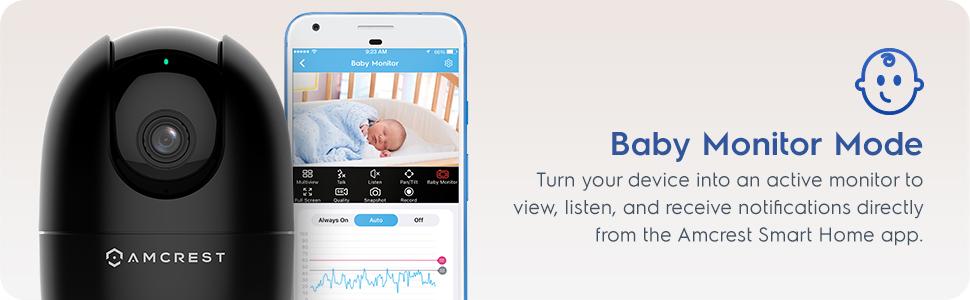
Figure 8: Baby Monitor Mode interface in the Amcrest Smart Home app.
4.5 Visión nocturna
The camera provides night vision capability up to 33 feet in absolute darkness, ensuring clear monitoring even in low-light conditions.
4.6 Opciones de almacenamiento
Recordings can be stored locally on a Class 10 MicroSD card (up to 256GB) or remotely on the Amcrest Smart Home Cloud (1-Year Free Cloud Storage plan included). The camera is also compatible with Amcrest NVRs and third-party software through SDK integration.
5. Mantenimiento
5.1 Limpieza
To clean the camera lens and body, use a soft, dry cloth. Avoid using harsh chemicals or abrasive cleaners that could damage the device.
5.2 actualizaciones de firmware
Regularly check for and install firmware updates through the Amcrest Smart Home app to ensure optimal performance, security, and access to the latest features.
6. Solución de problemas
- Problemas de conectividad: Ensure your camera is connected to a 2.4GHz Wi-Fi network. Verify your Wi-Fi password and router settings.
- Mala calidad de vídeo: Comprueba la velocidad de tu conexión a internet. Asegúrate de que la lente de la cámara esté limpia y sin obstrucciones. Ajusta la calidad del video en la app si es necesario.
- La visión nocturna no funciona: Confirm that the camera is in a dark environment for night vision to activate. Check app settings for night vision mode.
- Alertas de movimiento falso: Adjust the sensitivity of motion detection in the app settings. Utilize human detection filtering to reduce alerts from non-human movements.
- Two-Way Audio Feedback: If experiencing feedback during two-way talk, ensure your mobile device is not too close to the camera or reduce the volume.
7. Especificaciones
| Característica | Especificación |
|---|---|
| Número de modelo | ASH21-B |
| Resolución de vídeo | 1080P (1920x1080) a 30 fps |
| Conectividad | 2.4GHz Wi-Fi, Ethernet |
| Rango de movimiento horizontal y vertical | Pan 355 °, inclinación 80 ° |
| Viewángulo de ing | 93° |
| Rango de visión nocturna | Hasta 33 pies |
| Almacenamiento | MicroSD (up to 256GB), Amcrest Smart Home Cloud, Amcrest NVR |
| Audio | Audio bidireccional (micrófono y altavoz integrados) |
| Dimensiones | 4.17 x 3.04 x 3.04 pulgadas |
| Peso | 8.5 onzas |
| Fuente de poder | Eléctrico con cable (5 V CC, 5 W) |
| Uso en interiores y exteriores | Uso en interiores únicamente |
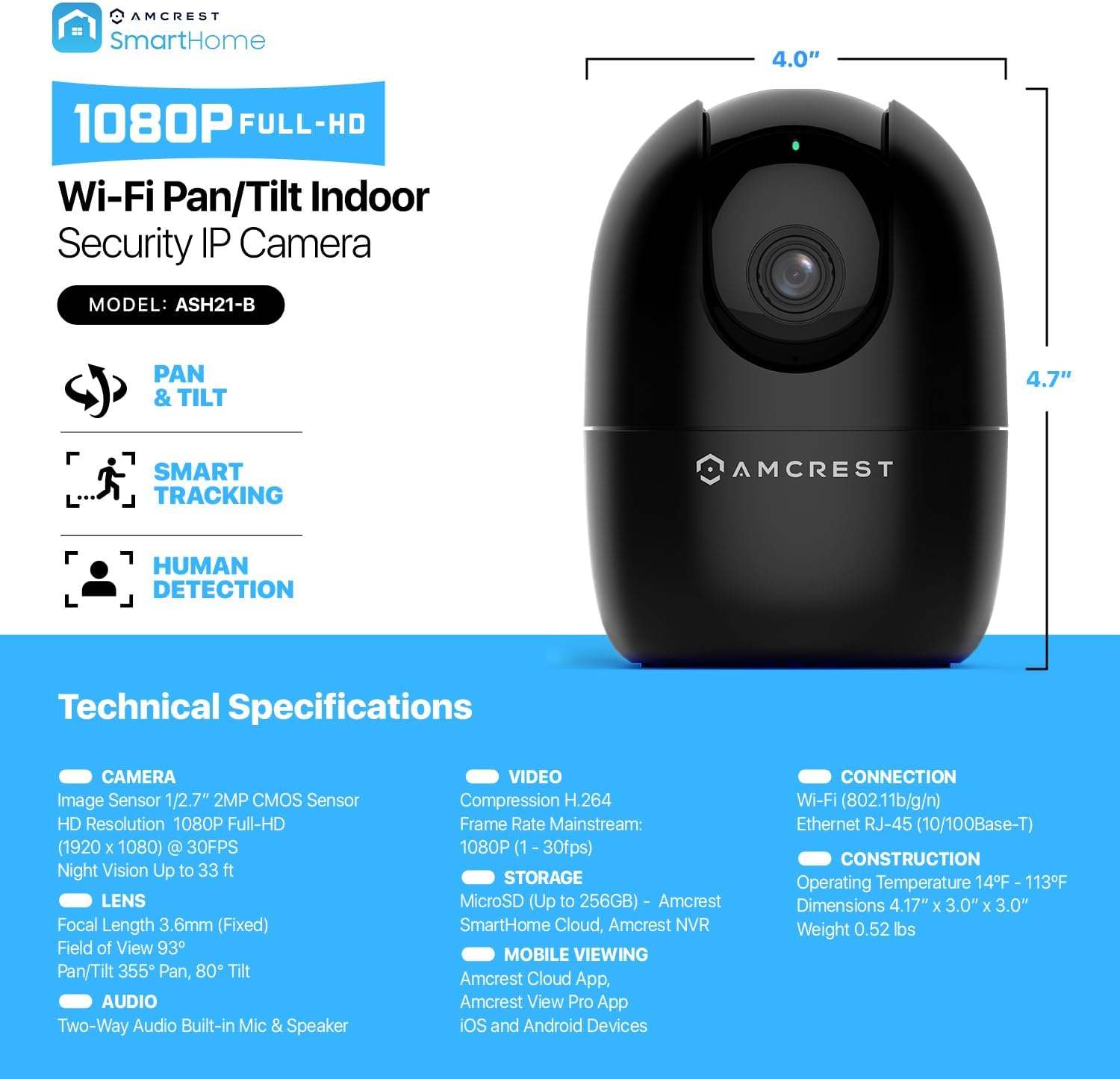
Figure 9: Detailed technical specifications of the Amcrest ASH21-B.
8. Vídeo oficial del producto
Video 1: Amcrest - Simple. Reliable. Secure. This video highlights the ease of use and reliability of Amcrest security products.
9. Garantía y soporte
The Amcrest ASH21-B camera includes a 1-Year Free SmartHome Cloud Subscription and a 1-Year US Warranty with Lifetime Support provided directly from Amcrest. For technical assistance or warranty claims, please visit the official Amcrest websitio o comuníquese con su servicio de atención al cliente.


