1. Introducción
This manual provides detailed instructions for the safe and efficient operation of your Fenton AV360BT Stereo Amplifier. Please read this manual thoroughly before using the device and retain it for future reference. The AV360BT is a compact Hi-Fi mini amplifier featuring Bluetooth connectivity, an integrated MP3 player with USB/SD inputs, and an FM radio tuner, designed for versatile audio playback.
2. Instrucciones de seguridad
- Asegúrese de que ampEl energizador está conectado a una fuente de alimentación que coincide con el volumentage especificado en el dispositivo.
- No exponga la unidad a la lluvia ni a la humedad para evitar descargas eléctricas o incendios.
- Evite colocar la unidad cerca de fuentes de calor o bajo la luz solar directa.
- No abra la casing. Deje todo servicio a personal cualificado.
- Mantenga la unidad fuera del alcance de los niños.
- Disconnect the power plug during thunderstorms or when unused for long periods.
3. Contenido del paquete
Verifique que todos los artículos estén presentes al desembalar:
- Estéreo Fenton AV360BT Ampmás vivaz
- Mando a distancia
- Manual de usuario (este documento)
4. Características del producto
- 2 x 40 W estéreo Ampmás vivaz
- Integrated Bluetooth for wireless audio streaming
- MP3 player with USB port and SD/MMC card slot
- Built-in FM radio tuner (87.5 - 108.5 MHz)
- Line input (AUX) for connecting external audio sources
- Bass, Treble, and Master Volume controls
- Output protection circuitry
- Includes remote control for MP3 player functions
5. Controles y conexiones
5.1 Panel frontal
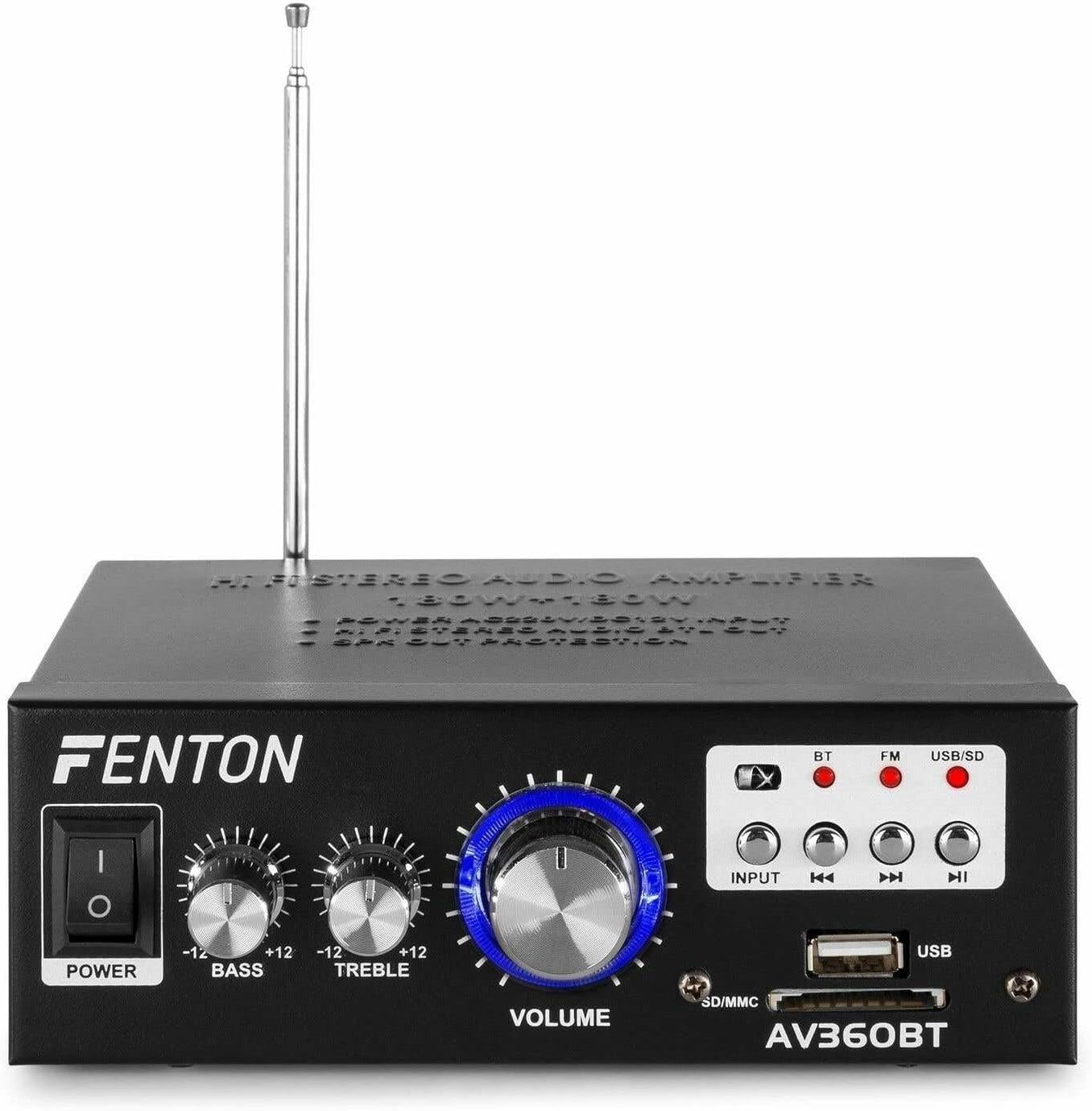
Imagen: Frente view of the Fenton AV360BT amplifier, showing the power switch, bass, treble, and volume knobs, input selection buttons, playback controls, USB port, and SD/MMC card slot.
- Interruptor de alimentación: Gira el ampmás vivaz encendido o apagado.
- Control de graves: Ajusta la salida de audio de baja frecuencia.
- Control de AGUDOS: Ajusta la salida de audio de alta frecuencia.
- Control del volumen: Ajusta el volumen de salida general.
- Botón de ENTRADA: Selects the audio source (Bluetooth, FM, USB/SD).
- Playback Controls (Previous, Play/Pause, Next): Used for MP3 playback and FM radio tuning.
- Puerto USB: Conecte unidades flash USB para reproducción de MP3.
- Ranura para tarjeta SD/MMC: Inserte tarjetas SD o MMC para reproducir MP3.
5.2 Panel trasero

Imagen: Trasera view of the Fenton AV360BT amplifier, displaying the audio input (RCA), speaker connectors, FM antenna, and power input.
- ENTRADA DE AUDIO (RCA): Connect external audio devices (e.g., CD player, TV) using RCA cables.
- CONECTORES DE ALTAVOCES: Connect passive speakers (8-16 ohms impedance). Ensure correct polarity (+ to + and - to -).
- ANTENA: Extensible para una recepción óptima de radio FM.
- Entrada CC 12 V/5 A: For external 12V DC power supply (if applicable).
- Entrada de alimentación de CA: Connect the supplied AC power cord.
5.3 control remoto

Image: The remote control for the Fenton AV360BT, showing buttons for power, mode, mute, playback, EQ, volume, repeat, and numeric selection.
The remote control allows for convenient operation of the MP3 player and other functions from a distance. Refer to the button labels for specific functions such as power, mode selection, mute, playback controls, equalizer, volume adjustment, repeat, and direct track selection.
6. Configuración
- Colocación: Coloque el amplifier on a stable, flat surface, ensuring adequate ventilation around the unit.
- Conexión de altavoz: Connect your passive speakers to the SPEAKER CONNECTORS on the rear panel. Ensure the positive (+) terminal of the amplifier connects to the positive (+) terminal of the speaker, and the negative (-) to the negative (-). Incorrect polarity can affect sound quality.
- External Audio Source (Optional): If connecting an external device via RCA, use appropriate cables to connect its audio output to the AUDIO INPUT (RCA) on the ampPanel trasero del lificador.
- Conexión de energía: Connect the AC power cord to the AC Power Input on the rear panel, then plug it into a suitable wall outlet.
- Antena: Extend the FM antenna for better radio reception.
7. Instrucciones de funcionamiento
7.1 Encendido y apagado
Presione el FUERZA Encienda el panel frontal para encenderlo. ampmás vivaz encendido o apagado.
7.2 Ajuste de volumen, graves y agudos
Utilice el VOLUMEN, BASS, y TRIPLICAR knobs on the front panel to adjust the sound output to your preference.
7.3 Funcionamiento de Bluetooth
- Enciende el ampmás duradero.
- Presione el APORTE button until the Bluetooth (BT) indicator light is illuminated.
- Habilite Bluetooth en su teléfono inteligente, tableta o computadora.
- Buscar available devices and select "AV360BT" from the list.
- Una vez emparejado, puede transmitir audio de forma inalámbrica al ampmás duradero.
7.4 Reproducción de MP3 USB/SD
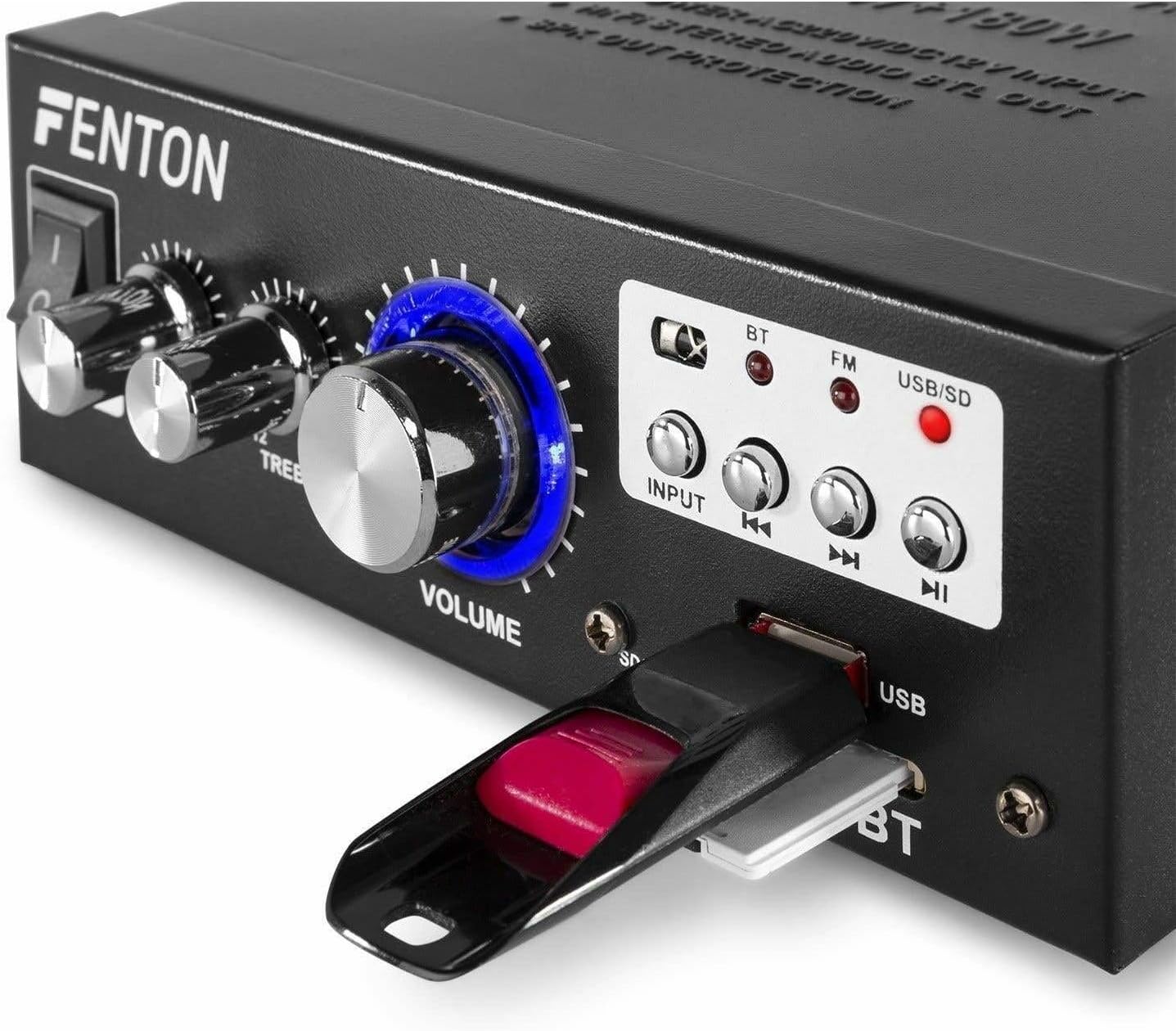
Imagen: Primer plano view of the Fenton AV360BT's front panel, showing a USB flash drive inserted into the USB port and an SD card in the SD/MMC slot.
- Inserte una unidad flash USB en el Puerto USB o una tarjeta SD/MMC en el Ranura para tarjeta SD / MMC.
- Presione el APORTE button until the USB/SD indicator light is illuminated. The amplifier will automatically detect and begin playing MP3 files.
- Utilice el Controles de reproducción (Previous, Play/Pause, Next) on the front panel or remote control to manage playback.
7.5 Funcionamiento de la radio FM
- Presione el APORTE button until the FM indicator light is illuminated.
- Utilice el Anterior y Próximo Botones para buscar estaciones de radio.
- Ensure the antenna is fully extended for optimal reception.
7.6 entrada auxiliar
When an external device is connected to the RCA AUDIO INPUT, select the AUX input mode using the APORTE botón. El amplifier reproducirá audio desde el dispositivo conectado.
8. Mantenimiento
- Limpieza: Utilice un paño suave y seco para limpiar el exterior del amplificador. No utilice limpiadores abrasivos ni disolventes.
- Almacenamiento: Guarde la unidad en un lugar fresco y seco cuando no la utilice durante períodos prolongados.
- Ventilación: Asegúrese de que las aberturas de ventilación no estén bloqueadas para evitar el sobrecalentamiento.
9. Solución de problemas
| Problema | Posible causa | Solución |
|---|---|---|
| No hay salida de sonido | Power off; incorrect input selected; speaker connections loose; volume too low. | Ensure power is on; select correct input; check speaker wiring; increase volume. |
| El Bluetooth no se conecta | AmpEl dispositivo no está en modo Bluetooth; el dispositivo está demasiado lejos; el dispositivo ya está emparejado con otra unidad. | Select Bluetooth input; move device closer; disconnect from other devices and try again. |
| Mala recepción de radio FM | Antena no extendida; señal débil. | Extienda completamente la antena FM; intente reposicionar la unidad para obtener una mejor señal. |
| Problemas de reproducción de USB/SD | Sin soporte file formato; dañado files; incorrect input selected. | Asegurar files are MP3 format; try different USB/SD media; select USB/SD input. |
10. Especificaciones
| Característica | Especificación |
|---|---|
| Potencia de salida | 2 x 40 W (80 W total) |
| Impedancia | 8~16 ohmios |
| Sensibilidad de entrada (línea) | 0 ~ 2 V / 47 kohm |
| Vol. De conexióntage | 220-240Vac/50Hz // 12Vdc-5A |
| FM Radio Frecuencia | 87.5 - 108.5 MHz |
| Dimensiones (L x An x Al) | 145 x 160 x 55 mm |
| Peso | Aproximadamente 950 g |
| Conexiones | RCA, Bluetooth, USB, SD |
| Dispositivos compatibles | Oradores |
| Fuente de alimentación (remota) | 1 non-standard battery (included) |
| Fabricante | Tronios BV |
| País natal | Porcelana |
11. Garantía y soporte
Para obtener información sobre la garantía o asistencia técnica, consulte la documentación incluida con su compra o póngase en contacto con su distribuidor. Conserve el comprobante de compra para cualquier reclamación de garantía.


