1. Introducción
This manual provides instructions for the VTech IS8151-4 Super Long Range 4 Handset Cordless Phone system. This system offers extended range, advanced call management features, and integrated Bluetooth connectivity for enhanced communication.

Image: The VTech IS8151-4 cordless phone system, featuring the main base unit and four cordless handsets in their charging cradles.
2. Configuración
2.1 Desembalaje del sistema
Your VTech IS8151-4 package includes one main base unit and four cordless handsets, along with their respective charging cradles, power adapters, and telephone line cord. Carefully remove all components from the packaging.
2.2 Instalación de la batería
Each handset requires 4 nonstandard batteries (included). Install the batteries into each handset, ensuring correct polarity. Place each handset into its charging cradle to charge for at least 12 hours before first use. A full charge ensures optimal battery performance.
2.3 Conexión de la unidad base
- Conecte un extremo del cable de la línea telefónica al conector TEL LINE en la parte posterior de la unidad base.
- Conecte el otro extremo del cable de la línea telefónica a un enchufe telefónico de pared.
- Connect the small end of the power adapter to the POWER jack on the back of the base unit.
- Conecte el extremo grande del adaptador de corriente a una toma eléctrica estándar.
Ensure all connections are secure. The base unit should be placed in a central location for optimal range.
2.4 Handset Registration
Handsets are typically pre-registered to the base unit. If a handset displays "Unregistered" or similar, refer to the troubleshooting section for manual registration steps.
2.5 Configuración inicial del sistema
The system includes a built-in voice guide to assist with initial setup, such as setting the date and time, and configuring the answering system. Follow the voice prompts on the base unit or any handset to complete these settings.
3. Instrucciones de funcionamiento
3.1 Funciones básicas de llamada
- Haciendo una llamada: Prensa INICIO / FLASH or CELL 1/2 (if connected to cell) and dial the number.
- Responder una llamada: Presione cualquier tecla de marcación (0-9, #, *) o INICIO / FLASH or CELL 1/2.
- Terminar una llamada: Prensa APAGADO/CANCELAR o coloque el teléfono en la base de carga.
3.2 Super Long Range Coverage
The VTech IS8151-4 system provides an extended range of up to 2300 feet, allowing for clear communication throughout your home, yard, and surrounding areas. This is achieved through a unique antenna design and advanced noise-filtering technology.

Image: Visual representation of the phone's super long range capability, showing coverage extending significantly beyond a typical home.
3.3 Bloqueador de llamadas inteligente
This feature allows you to block unwanted calls, including robocalls, with a single touch. You can configure the system to screen calls by asking callers to press a key or record their name. The system will announce the caller's name, allowing you to decide whether to answer, block, or send to voicemail.
- Blocking a Call: Durante una llamada, presione el BLOQUE DE LLAMADAS button on the handset or base.
- Screening Settings: Access the menu to customize how the Smart Call Blocker screens incoming calls.

Image: A hand demonstrating the one-touch call block feature on a VTech handset, with a visual representation of call blocking.
3.4 Conexión Bluetooth al celular
Pair up to two cellular phones with the base unit to make and receive cell calls using your cordless handsets. You can also connect one cell phone and one Bluetooth headset simultaneously. This feature allows you to access your smartphone's voice assistant (Siri or Google Now) from the cordless handsets.
- Emparejamiento de un teléfono celular: Follow the instructions in the handset menu to pair your Bluetooth-enabled cell phone with the base unit.
- Realizar/Recibir llamadas celulares: Utilice el CELDA 1 or CELDA 2 buttons on the handset to manage calls from your paired cell phones.

Image: An illustration depicting the ability to make and receive both cellular and landline calls using the VTech system, with coverage across different rooms in a house.
Sistema contestador digital 3.5
The integrated digital answering system records up to 22 minutes of incoming messages, outgoing announcements, and memos. It features an LED message counter on the base unit.
- Reproduciendo mensajes: Prensa REPRODUCIR/DETENER on the base unit or access the answering system menu on a handset.
- Setting Outgoing Announcement: Use the voice guide or handset menu to record your personalized outgoing message.

Image: The VTech base unit with a message playing, highlighting the digital answering system's features including message capacity and voice guide.
3.6 Anuncio de identificación de llamadas
When an incoming call is received, the system will audibly announce the caller's name (if available in your Caller ID service and phonebook), allowing you to screen calls without looking at the display.

Image: The phone system announcing an incoming call, showing the caller's name on the display and through an audio prompt.
3.7 Phonebook and Directory
The system allows you to store frequently called numbers in the phonebook. Additionally, you can download and store up to 4,000 cellular phone book entries from your paired cell phones to the cordless system.

Image: A visual representation of transferring a cell phone directory to the VTech cordless phone system.
3.8 Función de intercomunicación
The system supports intercom calls between handsets. This allows for convenient room-to-room communication.
- Pulsar para hablar (PTT): Presione el PTT button on a handset, select the desired extension, and speak.
- Standard Intercom: Access the intercom function through the handset menu for a two-way conversation.
3.9 Visual Ringer
Each handset features a visual ringer, which illuminates when an incoming call is detected. This provides an additional alert, especially useful in noisy environments or for users with hearing impairments.

Image: A close-up of the handset's top, illustrating the visual ringer in action.
3.10 Headset Jack and Belt Clip
Each handset is equipped with a 2.5mm headset jack for hands-free communication and a belt clip for portability.

Image: Demonstrating the headset jack and belt clip features for convenient, hands-free use.
3.11 Respaldo de energía
En caso de un corte de energíatage, the system's power backup feature allows a charged handset to temporarily power the base unit, enabling you to make and receive calls on the landline.

Image: The phone system illustrating its power backup capability, ensuring functionality during electrical interruptions.
3.12 Large Screens and Backlit Keypad
The handsets feature a 2-inch screen, and the base unit has a 3.5-inch screen. Both displays offer high-contrast text for easy readability. The enlarged font and backlit keypad on the handsets facilitate dialing in low-light conditions and are beneficial for users with visual impairments.

Imagen: Detallada view of the large, easy-to-read screens on both the handset and base unit.
4. Mantenimiento
4.1 Limpieza
Limpie las superficies del teléfono con un paño suave y húmedo.amp cloth. Avoid using harsh chemicals or abrasive cleaners, as these can damage the finish. Ensure the phone is unplugged from the power source before cleaning.
4.2 Cuidado de la batería
To maintain optimal battery life, fully charge the handsets for 12 hours before initial use. If a handset will not be used for an extended period, remove the batteries to prevent leakage. Replace batteries when performance diminishes.
5. Solución de problemas
If you experience issues with your VTech IS8151-4 system, try the following common solutions:
- No hay tono de marcado: Ensure the telephone line cord is securely connected to both the base unit and the wall jack. Verify that the base unit's power adapter is plugged in.
- Handset Displays "Unregistered": To register a handset, place it in the base unit's charging cradle. If it doesn't register automatically, refer to the full user manual for specific manual registration steps.
- Rango deficiente/estática: Move the base unit to a more central location, away from large metal objects, other electronic devices, or thick walls that may interfere with the signal.
- El contestador automático no graba: Check if the answering system is turned ON. Ensure there is sufficient recording time available.
- Smart Call Blocker Issues: Review your Smart Call Blocker settings in the handset menu to ensure it is configured as desired. Confirm that the numbers you wish to receive are added to your allowed list.
- Problemas de conexión Bluetooth: Ensure your cell phone's Bluetooth is enabled and within range of the base unit. Try unpairing and re-pairing the device.
For more detailed troubleshooting, consult the complete VTech IS8151-4 user manual available on the VTech support websitio.
6. Especificaciones
| Característica | Especificación |
|---|---|
| Número de modelo | IS8151-4 |
| Tipo de teléfono | DECT 6.0 inalámbrico |
| Número de teléfonos | 4 (Ampliable hasta 12) |
| Rango | Hasta 2300 pies |
| Tipo de sistema de contestación | Digital |
| Tiempo de grabación del contestador automático | Hasta 22 minutos |
| Conectividad Bluetooth | Connect to Cell (Pair up to 2 cell phones) |
| Pantalla del teléfono | 2-inch, high-contrast, backlit |
| Pantalla de la unidad base | 3.5-inch, high-contrast, backlit |
| Baterías | 4 batería no estándar (incluida) |
| Dimensiones del producto (base) | 8.73 x 4.48 x 7.4 pulgadas |
| Peso del artículo | 3.63 libras |
| Color | Plata/Negro |
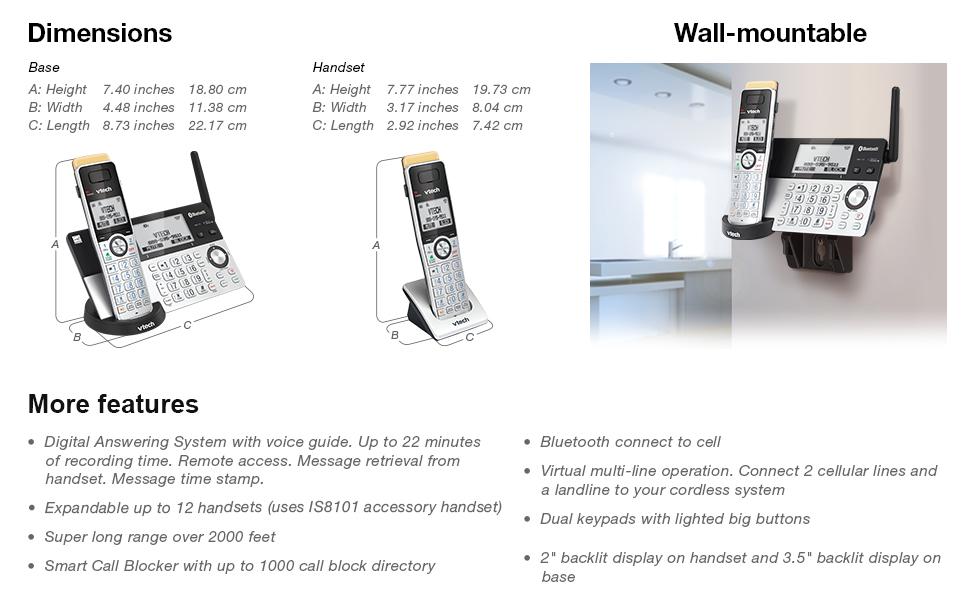
Image: Detailed dimensions for the base and handset, along with an example of the wall-mountable base.
7. Garantía y soporte
7.1 Información de garantía
VTech products are manufactured with quality components and are designed for reliable performance. For specific warranty details, including coverage period and terms, please refer to the warranty card included with your product or visit the official VTech websitio.
7.2 Atención al cliente
If you require assistance with setup, operation, or troubleshooting that is not covered in this manual, please contact VTech customer support. Support contact information can typically be found on the VTech websitio o en el embalaje del producto.


