Introducción
The Elgato Wave:1 is a premium cardioid USB condenser microphone designed for high-quality audio capture in streaming, gaming, and home office environments. It features proprietary Clipguard technology to prevent distortion and integrates with the Wave Link app for advanced audio mixing. This manual provides comprehensive instructions for setting up, operating, maintaining, and troubleshooting your Wave:1 microphone.
Configuración
1. Unboxing y componentes
Carefully unpack your Elgato Wave:1 microphone. Ensure all the following components are present:
- Elgato Wave:1 Microphone
- Cable USB-C
- Soporte de escritorio
- Adaptador de brazo de pluma
- Guía de inicio rápido

Image: Elgato Wave:1 and its included components, including the microphone, USB-C cable, desktop stand, boom arm adapter, and quick start guide.
2. Conexión física
- Attach the Wave:1 microphone to the included desktop stand or a compatible boom arm using the boom arm adapter.
- Connect the supplied USB-C cable to the USB-C port on the back of the Wave:1 microphone.
- Connect the other end of the USB-C cable to an available USB port on your computer (Mac or PC).

Imagen: Trasera view of the Elgato Wave:1 microphone, highlighting the USB-C port for connection and the 3.5mm headphone jack for direct monitoring.
3. Instalación del software
For full functionality and advanced audio control, download and install the Elgato Wave Link software from the official Elgato website. This software is compatible with Windows 10 and macOS.
Operating the Wave:1 Microphone
1. Controles básicos
The Wave:1 features a multi-function control knob on the front:
- Press to Mute: A single press of the knob will mute or unmute the microphone. The LED ring around the knob indicates the microphone status.
- Gire para ajustar: Rotate the knob to adjust microphone input gain, headphone volume, or crossfade between microphone and PC audio, depending on the selected mode in Wave Link software.
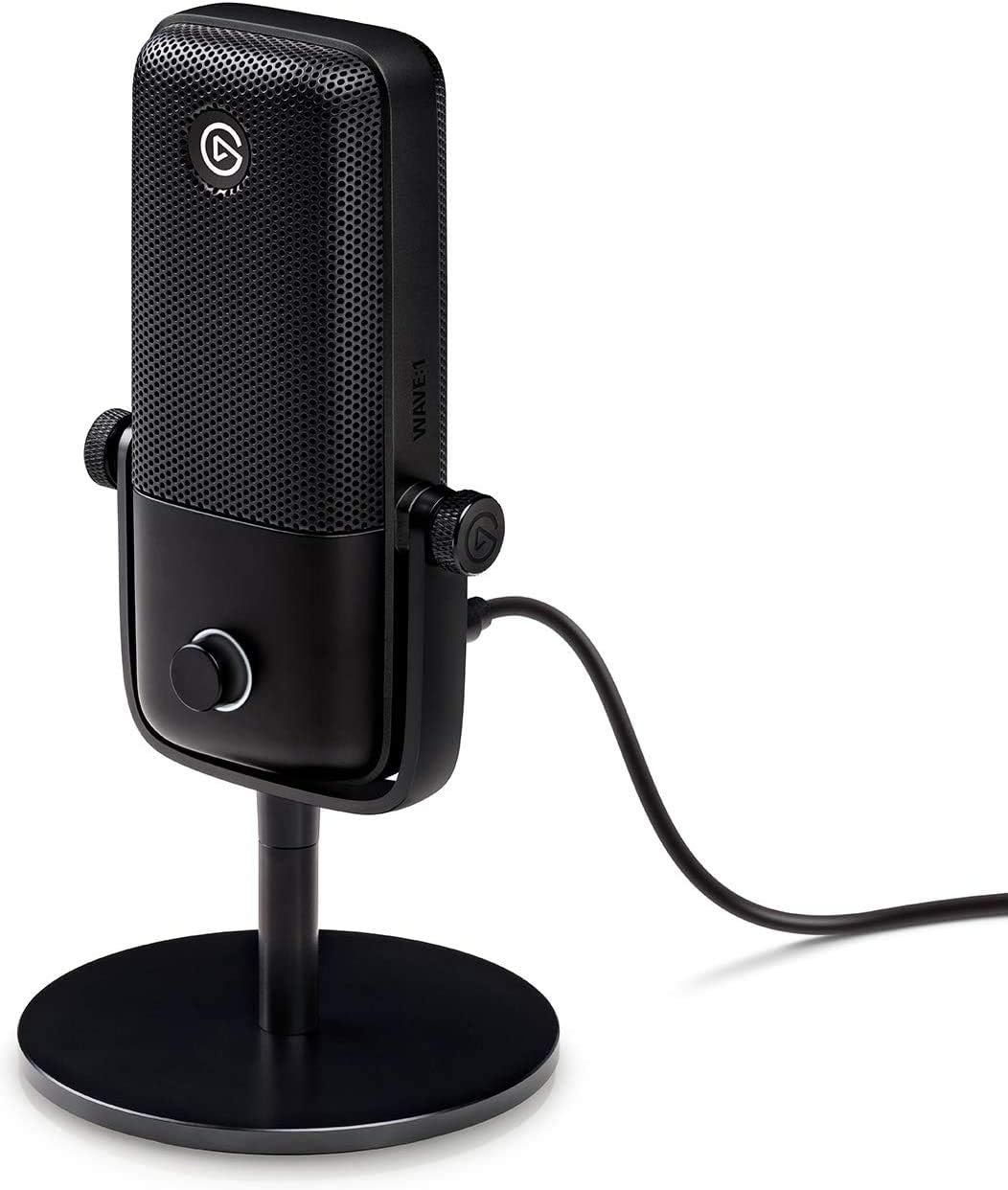
Imagen: Frente view of the Elgato Wave:1 microphone, showcasing its sleek design and the prominent multi-function control knob.
2. Cardioid Condenser Capsule
The Wave:1 utilizes a cardioid condenser capsule, which is optimized to capture sound directly in front of the microphone while minimizing background noise from the sides and rear. This ensures clear and detailed speech capture.

Imagen: Un interno view of the Elgato Wave:1, revealing the cardioid condenser capsule and highlighting its LEWITT audio technology.
3. Clipguard Technology
Elgato's proprietary Clipguard technology automatically reroutes audio through a secondary signal path that runs at a lower volume. This prevents audio clipping and distortion, even when input levels peak unexpectedly, ensuring your audio remains clean and clear.

Image: The Elgato Wave:1 microphone positioned against a background depicting sound waves, emphasizing its Clipguard anti-distortion technology.
4. Wave Link Software
The Wave Link application is a digital mixer that allows you to control the Wave:1 and up to eight other audio sources. It enables you to create two independent output mixes: one for yourself (monitor mix) and one for your audience (stream mix). This software also supports VST plugins for advanced audio processing.

Image: A computer screen displaying the Elgato Wave Link software interface, showing multiple audio input channels and independent output mixes.
5. Stream Deck Compatibility
The Wave:1 integrates seamlessly with Elgato Stream Deck devices. This allows for tactile control over microphone functions, such as muting, adjusting levels, and switching between audio sources, directly from your Stream Deck.

Image: The Elgato Wave:1 microphone positioned alongside an Elgato Stream Deck, illustrating their seamless integration for audio control.
6. Flexible Mounting
The Wave:1 can be used with its included desktop stand or mounted onto a boom arm for optimal positioning. The included boom arm adapter ensures compatibility with standard microphone mounts.

Image: The Elgato Wave:1 microphone mounted on a boom arm, demonstrating its flexible mounting options for various setups.
Mantenimiento
To ensure the longevity and optimal performance of your Elgato Wave:1 microphone, follow these maintenance guidelines:
- Limpieza: Use a soft, dry cloth to wipe the exterior of the microphone. Avoid using abrasive cleaners, solvents, or harsh chemicals. Do not spray liquids directly onto the microphone.
- Almacenamiento: Cuando no esté en uso, guarde el micrófono en un entorno limpio y seco, lejos de temperaturas extremas y humedad.
- Manejo: Manipule el micrófono con cuidado. Evite dejarlo caer o someterlo a impactos fuertes, ya que esto podría dañar los componentes internos.
Solución de problemas
If you encounter issues with your Elgato Wave:1 microphone, refer to the following common solutions:
- Sin salida de sonido:
- Asegúrese de que el cable USB-C esté conectado de forma segura tanto al micrófono como a la computadora.
- Check your computer's sound settings to confirm 'Elgato Wave:1' is selected as the input and output device.
- Verify the microphone is not muted (check the LED ring on the control knob).
- Confirm the input gain in Wave Link software is set appropriately.
- Audio distorsionado:
- While Clipguard technology minimizes distortion, ensure your input gain is not excessively high. Adjust it in Wave Link.
- Check for any physical obstructions or damage to the microphone capsule.
- Wave Link Software Not Recognizing Microphone:
- Restart your computer and the Wave Link software.
- Try connecting the Wave:1 to a different USB port on your computer.
- Ensure you have the latest version of Wave Link installed from the Elgato websitio.
- Conectividad intermitente:
- Use the original Elgato USB-C cable.
- Avoid connecting the microphone through unpowered USB hubs. Connect directly to your computer if possible.
For further assistance, please visit the official Elgato support websitio.
Presupuesto
| Característica | Detalle |
|---|---|
| Número de modelo | 10MAA9901 |
| Patrón polar | Unidireccional (cardioide) |
| Tipo de micrófono | Condensador |
| Conectividad | USB tipo C |
| Convertidor de analógico a digital | 24 bits / 48kHz |
| Relación señal a ruido | 95 dB |
| Plataforma de hardware | Mac, PC |
| Peso del artículo | 1.29 libras |
| Dimensiones del producto | 1.57 x 2.6 x 5.55 pulgadas |
| Material | Metal, Plástico |
| Característica especial | Mute Function, Clipguard Technology |
Garantía y soporte
The Elgato Wave:1 microphone comes with a manufacturer's warranty. Please refer to the warranty card included in your product packaging or visit the official Elgato webSitio para conocer los términos y condiciones de garantía detallados específicos de su región.
For technical support, software updates, and additional resources, please visit the official Elgato support portal:


