1. Producto terminadoview
The Philips SRP5016/10 is a modern and elegant 6-in-1 universal remote control designed to simplify your home entertainment experience. It allows you to control up to six different devices, such as televisions, DTVs, DVRs, home theater systems, soundbars, and streaming devices. This remote features a learning function, enabling it to receive and store infrared codes from your original remote controls, providing comprehensive control over various brands and models.
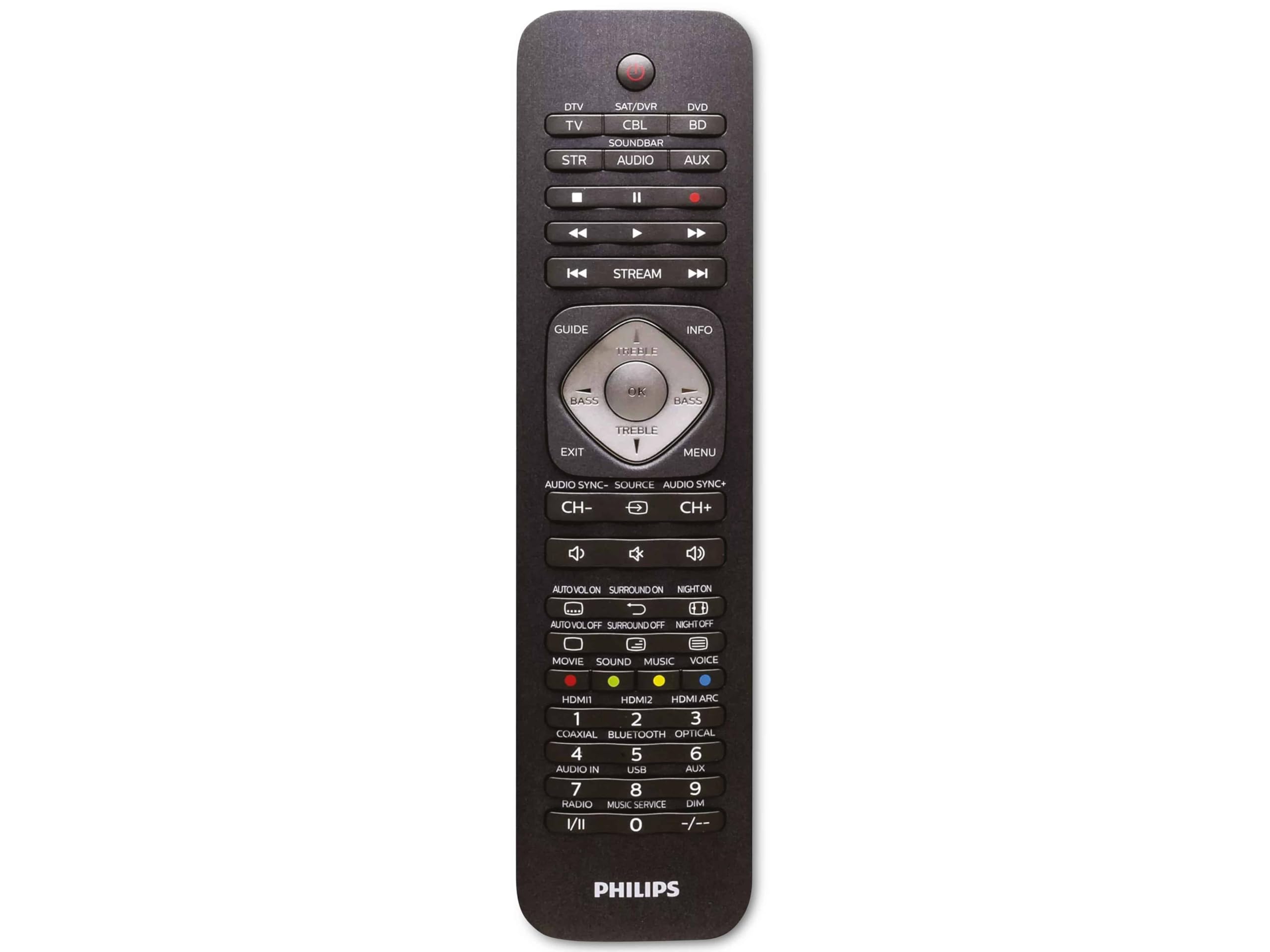
Image 1.1: Philips SRP5016/10 6-in-1 Universal Remote Control. This image displays the front view of the black universal remote control, highlighting its ergonomic design and button layout.
2. Configuración
2.1. Instalación de la batería
- Abra la tapa del compartimiento de la batería ubicada en la parte posterior del control remoto.
- Inserte dos pilas AAA, asegurándose de la polaridad correcta (+ y -) como se indica dentro del compartimento.
- Cierre bien la tapa del compartimento de la batería.
Nota: Las pilas no están incluidas y deben comprarse por separado.
2.2. Dispositivos de programación
The Philips SRP5016/10 can be programmed using either direct code entry or the learning function.
2.2.1. Direct Code Entry (Recommended for common brands)
- Encienda el dispositivo que desea controlar (por ejemplo, TV, reproductor de DVD).
- Press and hold the desired device button on the universal remote (e.g., TV, DVD) for approximately 3 seconds until the device button lights up.
- Enter the 4-digit code for your device's brand (refer to the code list provided with your remote, if available, or search online for Philips universal remote codes).
- If the device turns off or responds, the code is correct. Press the device button again to save the code. If not, try the next code for your brand.
2.2.2. Learning Function (For devices not in the code list or advanced functions)
- Place the universal remote and your original remote control head-to-head, approximately 1-3 cm apart.
- Press and hold the desired device button on the universal remote (e.g., TV) for approximately 3 seconds until the device button lights up.
- Mantenga pulsado el APRENDER button on the universal remote until the device button starts blinking.
- On your original remote, press the button you wish to teach (e.g., FUERZA). The device button on the universal remote will blink rapidly and then stay solid, indicating successful learning.
- Repeat step 4 for all other buttons you wish to learn.
- Presione el APRENDER Presione nuevamente el botón para salir del modo de aprendizaje.
3. Instrucciones de funcionamiento
3.1. Seleccionar un dispositivo
To control a specific device, press the corresponding device button (e.g., TV, DVD, SE SENTÓ, Auxiliar, BARRA DE SONIDO, ARROYO) once. The selected device button will light up briefly to confirm your selection. You can then use the remote's buttons to control that device.
3.2. Funciones básicas
- FUERZA: Enciende o apaga el dispositivo seleccionado.
- VOLUMEN +/-: Ajusta el volumen del dispositivo de audio seleccionado.
- CANAL +/-: Changes channels on the selected TV or DTV device.
- MUDO: Silencia el audio.
- BOTONES NUMÉRICOS (0-9): Para entrada directa de canal u otras entradas numéricas.
- NAVIGATION (Arrow buttons, OK): Para navegar y seleccionar el menú.
4. Mantenimiento
4.1. Reemplazo de la batería
When the remote control's range decreases or buttons become unresponsive, it is time to replace the batteries. Follow the battery installation steps in Section 2.1. Always replace both AAA batteries simultaneously with new ones.
4.2. Limpieza
Para limpiar el control remoto, utilice un paño suave y seco. Para la suciedad difícil, frote ligeramente.ampen the cloth with water or a mild cleaning solution. Avoid using abrasive cleaners, solvents, or alcohol, as these can damage the remote's surface or internal components.
5. Solución de problemas
- El control remoto no funciona:
- Compruebe que las pilas estén correctamente insertadas y no estén agotadas. Reemplácelas si es necesario.
- Asegúrese de que no haya obstrucciones entre el control remoto y el dispositivo.
- Verifique que esté seleccionado el botón del dispositivo correcto (por ejemplo, TV, DVD).
- El dispositivo no responde a los comandos:
- The device code may be incorrect. Try reprogramming the device using a different code from the code list or use the learning function.
- Ensure the remote's infrared emitter is pointed directly at the device's infrared receiver.
- La función de aprendizaje no funciona:
- Asegúrese de que las pilas del control remoto original estén nuevas y funcione correctamente.
- Make sure the remotes are positioned correctly (head-to-head, 1-3 cm apart) during the learning process.
- Try learning the button again. Some original remotes have weaker IR signals that require multiple attempts.
6. Especificaciones
| Característica | Especificación |
|---|---|
| Marca | Philips |
| Nombre del modelo | 6 en 1 |
| Número de modelo | SRP5016/10 |
| Dispositivos compatibles | Home Theater, DVD/Blu-ray Player, SoundBar, Television, Streaming Device |
| Característica especial | Función universal de aprendizaje |
| Tecnología de conectividad | Infrarrojo |
| Número máximo de dispositivos compatibles | 6 |
| Tipo de controlador | Control de botones |
| Número de botones | Not specified (typical universal remote layout) |
| Alcance máximo | 10 metros |
| Fuente de poder | Pilas 2 x AAA (no incluidas) |
| Tipo de material | Plástico |
| Dimensiones del producto | 21.4 x 5.3 x 2.2 cm |
| Peso del producto | 130 gramos |
7. Garantía y soporte
For warranty information, please refer to the documentation provided at the time of purchase or contact your retailer. Philips offers customer support for their products. If you encounter issues that cannot be resolved using this manual, please visit the official Philips support websitio o póngase en contacto con su servicio de atención al cliente para obtener ayuda.
Conserve su comprobante de compra para reclamos de garantía.