1. Introducción
Thank you for choosing the ErGear Laptop and Monitor Arm, Model EGCM16. This product is designed to enhance your workspace by providing a versatile and ergonomic solution for mounting your laptop or monitor. It allows for flexible positioning, helping to reduce strain and improve productivity. Please read this manual carefully before installation and use to ensure proper setup and operation.

Figure 1: ErGear Laptop and Monitor Arm (Model EGCM16) with laptop tray and clamp montar.
Características del producto:
- Compatibilidad dual: Supports laptops up to 15.6 inches (max 10kg) and monitors from 13 to 27 inches (max 10kg) with VESA 75x75mm or 100x100mm patterns.
- Ergonomía ajustable: Offers height, tilt, swivel, and rotation adjustments for optimal viewángulos de ing.
- Diseño que ahorra espacio: Elevates your device, freeing up valuable desk space.
- Dos opciones de montaje: Incluye ambos C-clamp and grommet mounting hardware for versatile installation.
- Gestión de cables integrada: Keeps your workspace tidy by routing cables along the arm.
2. Información de seguridad
Tenga en cuenta las siguientes precauciones de seguridad para evitar lesiones o daños al producto:
- Do not exceed the maximum weight capacity of 10kg (22 lbs) for either laptop or monitor.
- Ensure the mounting surface (desk) is stable and strong enough to support the combined weight of the arm and your device.
- Apriete bien todos los tornillos durante la instalación. Las conexiones flojas pueden causar inestabilidad.
- Mantenga a los niños y las mascotas alejados del área de instalación.
- Do not attempt to disassemble or modify the product. Contact customer support if you encounter issues.
- Exercise caution when adjusting the arm to avoid pinching fingers or damaging devices.
3. Contenido del paquete
Verifique que todos los componentes estén presentes antes de comenzar la instalación:
- Polo principal
- Brazo giratorio
- Bandeja para portátil
- C-Clamp Asamblea
- Conjunto de montaje de ojal
- Placa VESA
- Clips para cables
- Kit de hardware (tornillos, arandelas, llaves Allen)
- Manual de usuario
4. Configuración e instalación
This arm supports two installation methods: C-clamp Y montaje con ojal. Elija el método adecuado para su escritorio.

Figure 2: Illustration of C-clamp y opciones de montaje con ojales.
4.1 Compatibilidad de escritorio
- C-Clamp: Compatible with desk thickness from 10mm to 78mm.
- Montaje con ojal: Compatible with desk thickness from 10mm to 60mm. Requires a pre-drilled hole in the desk.

Figure 3: Product dimensions and compatible desk thickness for mounting.
4.2 Cl Camp Instalación
- Coloque el C-clamp montaje en la parte inferior del poste principal.
- Position the main pole on your desk edge.
- Apriete el C-clamp screw until the pole is securely fastened to the desk.
4.3 Grommet Mount Installation
- Desmontar el C-clamp from the main pole and attach the grommet mount assembly.
- Insert the main pole through the pre-drilled hole in your desk.
- Secure the grommet plate and tighten the nut from underneath the desk until the pole is stable.
4.4 Attaching the Arm and Device
- Slide the swivel arm onto the main pole at your desired height and secure it with the provided collar and screw.
- Para computadora portátil: Attach the laptop tray to the end of the swivel arm. Place your laptop on the tray.
- Para monitorear: Remove the laptop tray. Attach the VESA plate to the back of your monitor using the appropriate screws from the hardware kit. Ensure your monitor is VESA 75x75mm or 100x100mm compatible.

Figure 4: VESA mounting patterns (75x75mm and 100x100mm) for monitor installation.

Figure 5: Compatibility for laptops up to 17 inches and monitors from 15-32 inches, both up to 10kg.
- Slide the monitor (with VESA plate attached) onto the end of the swivel arm.
- Asegúrese de que todas las conexiones estén firmes y seguras.
5. Operación y ajustes
The ErGear arm offers multiple adjustment points to customize your viewExperiencia de aprendizaje.

Figure 6: Demonstrates the tilt (±90°), swivel (±90°), and 360° rotation capabilities of the arm.
5.1 Ajuste de altura
To adjust the height of your device, loosen the collar on the main pole, slide the arm to the desired height, and then re-tighten the collar securely.
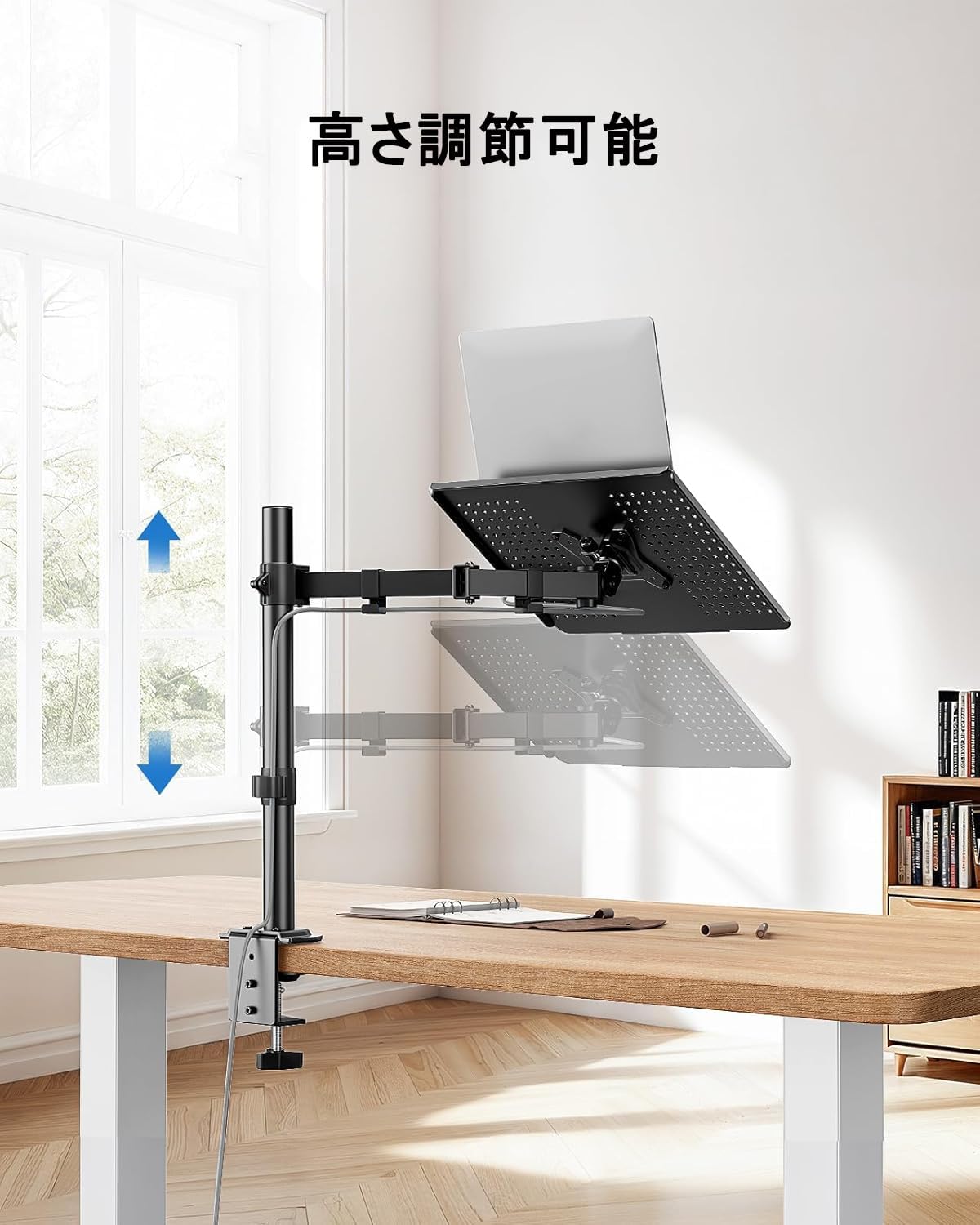
Figure 7: The arm allows for vertical height adjustment along the main pole.
5.2 Inclinación, giro y rotación
- Inclinación: The laptop tray or monitor can be tilted up or down by ±90 degrees to reduce glare and find a comfortable viewing angle. Adjust the tilt mechanism on the arm.
- Girar: The arm can swivel left or right by ±90 degrees, allowing you to share your screen or adjust your position.
- Rotación: The VESA plate (for monitors) allows for 360-degree rotation, enabling portrait or landscape orientation.
5.3 Gestión de cables
Utilize the integrated cable clips along the arm to route your power and data cables. This helps maintain a clean and organized workspace.

Figure 8: Cables can be neatly routed along the arm using the integrated clips.
5.4 Ventilation Design
The laptop tray features a perforated design to promote airflow and prevent your laptop from overheating during extended use.

Figure 9: The laptop tray's ventilated surface helps dissipate heat from your device.
5.5 Beneficios ergonómicos
Proper adjustment of the arm can significantly improve your posture and reduce discomfort. Position your screen so that the top of the display is at or slightly below eye level, and your arms are comfortable when typing.

Figure 10: Illustrates how proper arm adjustment can lead to a more comfortable and ergonomic desk setup.
6. Mantenimiento
Regular maintenance ensures the longevity and optimal performance of your ErGear arm.
- Limpieza: Wipe the arm and tray with a soft, damp Paño. Evite limpiadores abrasivos o disolventes.
- Comprobación de estanqueidad: Revise periódicamente todos los tornillos y conexiones para asegurarse de que estén bien apretados. Vuelva a apretarlos si es necesario.
- Lubricación: Normalmente no se requiere lubricación para este producto.
7. Solución de problemas
Si encuentra algún problema, consulte los siguientes problemas y soluciones comunes:
- Arm is unstable/wobbly:
- Asegúrese de que el C-clamp o el soporte de ojal está firmemente fijado al escritorio.
- Verify that the swivel arm is properly secured to the main pole.
- Check that the laptop tray or VESA plate is firmly attached to the arm.
- Device is too heavy/arm sags:
- Confirm that your device's weight does not exceed the 10kg (22 lbs) capacity.
- Ensure all adjustment points are tightened sufficiently to hold the weight.
- Difficulty adjusting arm:
- Loosen the relevant screws slightly before attempting to adjust, then re-tighten.
- Do not force adjustments.
- Cables are not neat:
- Re-route cables through the provided cable clips.
- Ensure cables have enough slack for full arm movement.
Si los problemas persisten, comuníquese con el servicio de atención al cliente de ErGear.
8. Especificaciones
| Característica | Especificación |
|---|---|
| Número de modelo | EGCM16 |
| Marca | Equipo ErGear |
| Color | Gris |
| Material | Acero inoxidable |
| Tipo de montaje | Montaje de escritorio (C-Clamp, Ojal) |
| Tipo de movimiento | Ajustable (altura, inclinación, giro, rotación) |
| Capacidad de carga máxima | 10 kg (22 libras) |
| Compatibilidad con portátiles | Hasta 15.6 pulgadas |
| Compatibilidad de monitores | 13-27 pulgadas |
| Compatibilidad VESA | 75 x 75 mm, 100 x 100 mm |
| Ángulo de inclinación máximo | ±90 grados |
| Ángulo de giro | ±90 grados |
| Rotación | 360 grados |
| C-Clamp Grosor del escritorio | 10-78 milímetros |
| Grosor del escritorio con ojales | 10-60 milímetros |
| Dimensiones del producto (L x An x Al) | 52 x 31 x 10 cm |
| Peso del producto | 3.55 kilogramos |
| Código Postal | 619191841493 |
9. Garantía y soporte
ErGear products are manufactured with quality and reliability in mind. This product comes with a standard manufacturer's warranty against defects in materials and workmanship. Please refer to the product packaging or the ErGear official websitio para conocer los términos y la duración específicos de la garantía.
For technical assistance, troubleshooting, or warranty claims, please contact ErGear customer support through the retailer where you purchased the product or visit the official ErGear websitio para información de contacto.


