1. Introducción
Thank you for choosing the MateStar 40W USB C Charger Block. This product is designed to provide efficient and fast charging for multiple devices simultaneously. With its compact design and advanced safety features, it is an ideal charging solution for home, office, and travel. This manual provides essential information on how to safely and effectively use your new charger.

Image: Two MateStar 40W USB C Charger Blocks, showcasing their compact form factor and multiple ports.
2. Información de seguridad
Your MateStar charger block is equipped with a smart chip to ensure safe and reliable operation. It includes multiple protection mechanisms:
- Protección contra la sobretensión: Previene daños por corriente excesiva.
- sobrevoltajetagy Protección: Salvaguardias contra el voltage surge.
- Protección contra sobrecalentamiento: Regulates temperature to prevent overheating.
- Protección contra cortocircuitos: Protege contra cortocircuitos eléctricos.
The charger is constructed from ABS + PC fireproof material for enhanced stability and safety. Always ensure the charger is used in a well-ventilated area and avoid covering it during operation. Do not expose the charger to liquids or extreme temperatures.

Image: An illustration highlighting the internal smart chip and various safety protections, including over-voltage, over-current, over-temperature, and short circuit protection.
3. Contenido del paquete
Al abrir el paquete, debería encontrar los siguientes elementos:
- 2 x MateStar 40W USB Charger Block (Black)
Si falta algún artículo o está dañado, comuníquese con atención al cliente de inmediato.
4. Características del producto
The MateStar 40W USB C Charger Block offers a range of features designed for optimal charging performance:
- Carga rápida de 40 W: Supports Power Delivery (PD) and Quick Charge (QC) functions for rapid charging. The USB-C port delivers up to 20W, and the USB-A port offers 3.1A/5V.
- 4-in-1 Compact Design: Features dual USB-C ports and dual USB-A ports, allowing simultaneous charging of up to four devices. This design minimizes the need for multiple wall sockets and saves space.
- Compatibilidad universal: Compatible with a wide range of devices, including iPhones, Samsung Galaxy phones, iPads, tablets, and more.
- Seguro y confiable: Built-in smart chip with multi-protection features (overcurrent, overvoltage, overheating, short circuit) and fireproof ABS + PC material.

Image: A visual representation of the MateStar 4-port charger highlighting its key features: dual USB-C ports, dual USB-A ports, quick charging capability, and travel-friendly design.

Image: A graphic illustrating the speed of PD fast charging, indicating it is 3 times faster than standard charging methods.
5. Configuración
Setting up your MateStar 40W USB C Charger Block is straightforward:
- Unpack the charger block from its packaging.
- Insert the charger block into a standard wall outlet (110 Volts input).
- Connect your device's charging cable to one of the available USB-C or USB-A ports on the charger.
- Conecte el otro extremo del cable de carga a su dispositivo.
The charger is designed to be compact and space-saving, reducing clutter from multiple adapters.

Image: A visual comparison demonstrating how the 4-in-1 compact design of the charger reduces cable and adapter clutter compared to using multiple individual chargers.
6. Instrucciones de funcionamiento
Once connected, the charger will automatically detect your device and begin charging. The smart chip optimizes power delivery to ensure efficient and safe charging for each connected device.
- For optimal fast charging, use high-quality USB-C to USB-C cables for devices supporting Power Delivery (PD) and appropriate USB-A cables for Quick Charge (QC) compatible devices.
- You can charge up to four devices simultaneously. The charger intelligently distributes power across the ports.
- Disconnect devices once fully charged or when not in use.

Image: A person utilizing the MateStar charger to power multiple electronic devices, including a smartphone, tablet, and e-reader, demonstrating its multi-device charging capability in a practical setting.
7. Compatibilidad
The MateStar 40W USB C Charger Block offers broad compatibility with a wide range of electronic devices:
- Teléfonos inteligentes: Compatible with iPhone 16/16 Plus/16 Pro/16 Pro Max, iPhone 15/15 Plus/15 Pro/15 Pro Max, iPhone 14/14 Plus/14 Pro/14 Pro Max, iPhone 13/13 Mini/13 Pro/13 Pro Max, iPhone 12/12 Mini/12 Pro/12 Pro Max, iPhone 11/11 Pro/11 Pro Max, iPhone XS Max/XS/XR/X/8/8 Plus/7/7 Plus/6/6S/SE. Also compatible with Samsung Galaxy S24/S23/S22/S21/S20/Note 10/Note 20/S10/S9/S8, Google Pixel series, LG, Huawei, Xiaomi, OPPO, Vivo, and more.
- Tabletas: Compatible with iPad Pro/mini, iPad Air/Mini, Samsung Galaxy Tab S8/S7/S6/Tab A8/A7, Amazon Fire HD, and other tablets.
- Otros dispositivos: Nintendo Switch, Echo/Alexa devices, AirPods, Smart Buds, iWatch Series, and other USB-powered devices.
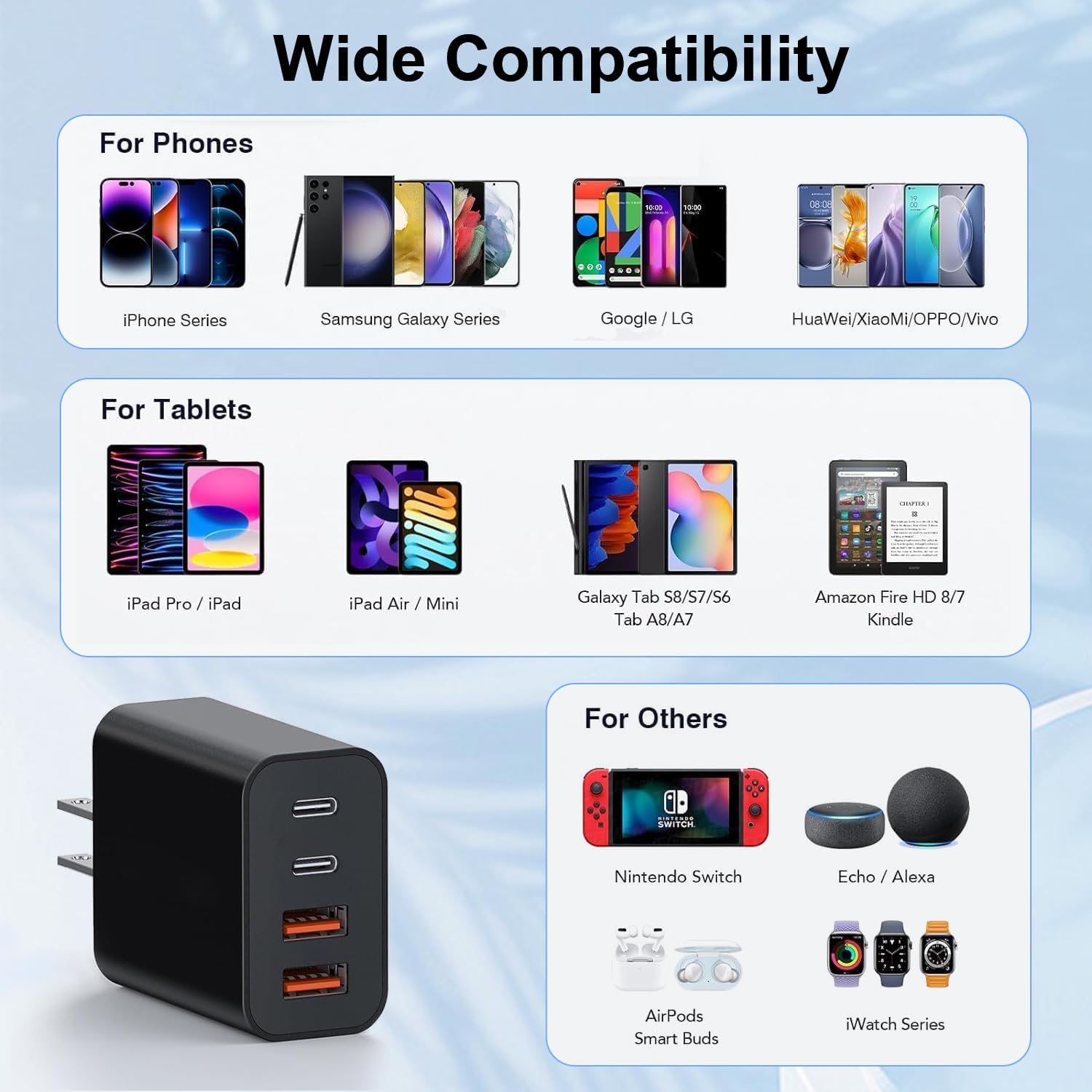
Image: A comprehensive compatibility chart displaying various phone models (iPhone, Samsung Galaxy, Google/LG, Huawei/Xiaomi/OPPO/Vivo), tablets (iPad Pro/iPad, iPad Air/Mini, Galaxy Tab, Amazon Fire HD/Kindle), and other devices (Nintendo Switch, Echo/Alexa, AirPods, iWatch Series) that are compatible with the charger.
8. Especificaciones
| Característica | Detalle |
|---|---|
| Número de modelo | BlackBlue4p10ft_1208 |
| Potencia de salida total | 40 W (máximo) |
| Salida de puerto USB-C | 20 W (máximo) |
| Salida de puerto USB-A | 3.1 A/5 V |
| Vol de entradatage | 110 voltios |
| Tecnología de conectividad | USB |
| Tipo de conector | USB tipo C, USB tipo A |
| Características especiales | Lightweight Design, Fast Charging |
| Dimensiones | 3.58 x 2.09 x 1.14 pulgadas |
| Peso del artículo | 0.212 onzas |
| Material | Material ignífugo ABS + PC |
9. Mantenimiento
To ensure the longevity and optimal performance of your MateStar charger block, follow these maintenance guidelines:
- Limpieza: Desconecte el cargador de la toma de corriente antes de limpiarlo. Utilice un paño suave y seco para limpiar la superficie. No utilice limpiadores líquidos ni productos abrasivos.
- Almacenamiento: Guarde el cargador en un lugar fresco y seco, alejado de la luz solar directa y de la humedad cuando no esté en uso.
- Manejo: Evite dejar caer el cargador o someterlo a impactos fuertes. No intente desmontarlo ni modificarlo.
- Cuidado de cables: Asegúrese de que los cables de carga no estén doblados bruscamente ni enredados, ya que esto puede dañarlos y afectar el rendimiento de la carga.
10. Solución de problemas
If you encounter any issues with your MateStar charger block, please refer to the following common troubleshooting steps:
- El dispositivo no se carga:
- Asegúrese de que el cargador esté enchufado de forma segura a un tomacorriente de pared que funcione.
- Compruebe si el cable de carga está conectado correctamente tanto al cargador como al dispositivo.
- Intente utilizar un cable de carga diferente para descartar que el cable esté defectuoso.
- Pruebe el cargador con un dispositivo diferente para confirmar la funcionalidad del cargador.
- Carga lenta:
- Verify that your device and cable support fast charging (PD or QC) and are connected to the appropriate port (USB-C for PD, USB-A for QC).
- Ensure no background applications on your device are consuming excessive power.
- Charging multiple devices simultaneously may distribute the total 40W output, potentially reducing individual port speeds.
- Sobrecalentamiento del cargador:
- Disconnect the charger and allow it to cool down.
- Asegúrese de que el cargador esté en un área bien ventilada y no cubierto.
- Si el sobrecalentamiento persiste, suspenda su uso y comuníquese con el servicio de atención al cliente.
Si estos pasos no resuelven su problema, comuníquese con el servicio de atención al cliente para obtener más ayuda.
11. Garantía y soporte
MateStar provides a Garantía de 24 meses for your USB C Charger Block. This warranty covers manufacturing defects and ensures your product performs as expected under normal use.
For any questions, concerns, or warranty claims, please contact MateStar customer support. We are committed to resolving your problems within 24 hours.
You can visit the official MateStar store for more information and support: MateStar Store


