Introducción
This manual provides essential information for the proper setup, operation, and maintenance of your NEC DTZ-12D-3 DT400 12-Button Display Phone. Please read these instructions carefully to ensure optimal performance and longevity of your device. This phone is designed for business communication environments, offering a range of features to enhance productivity.
Producto terminadoview
The NEC DTZ-12D-3 DT400 is a corded 12-button display phone, featuring a clear LCD screen for call information and menu navigation. It is designed for efficient communication in a professional setting.
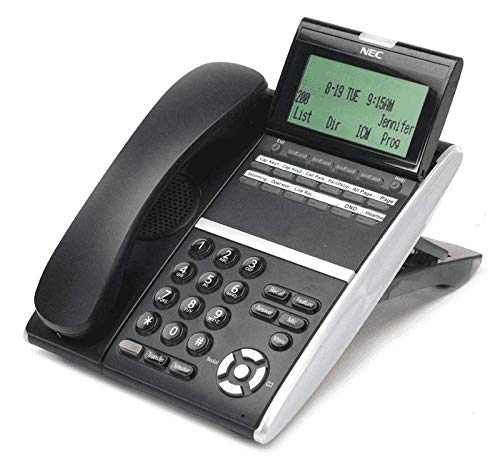
Figura 1: NEC DTZ-12D-3 DT400 12-Button Display Phone. This image shows the black corded desk phone with its adjustable display unit. The display shows time, date, and soft-key options. The phone features a standard dial pad, 12 programmable function keys, and dedicated buttons for speaker, transfer, redial, and navigation.
Componentes clave:
- Auricular: Para conversaciones privadas.
- Pantalla de visualización: Shows call status, time, date, and menu options.
- Programmable Feature Keys (12): Customizable buttons for speed dials, line access, or specific functions.
- Teclado de marcación: Teclas numéricas estándar (0-9, *, #) para marcar.
- Teclas de navegación: For scrolling through menus and lists.
- Botón del altavoz: Activates the speakerphone function.
- Botón de transferencia: Used to transfer an active call to another extension.
- Botón de rellamada: Marca el último número llamado.
- DND (Do Not Disturb) Button: Activates/deactivates the Do Not Disturb feature.
Configuración
1. Desembalaje
- Retire con cuidado todos los componentes del embalaje.
- Verify that all items are present: phone unit, handset, coiled handset cord, and telephone line cord.
2. Conexión del teléfono
Connect one end of the coiled handset cord to the handset and the other end to the handset jack located on the side or back of the phone unit.
3. Conexión a la línea telefónica
Plug one end of the telephone line cord into the LINE jack on the phone unit and the other end into a standard telephone wall jack.
4. Conexión de energía
This phone is designed for corded electric operation. Ensure it is connected to a compatible telephone system that provides power, or use the appropriate power adapter if supplied separately (check your system's requirements).
Instrucciones de funcionamiento
Realizar una llamada
- Levante el auricular o presione el Vocero botón.
- Dial the desired telephone number using the dial pad.
- Espere a que la llamada se conecte.
Respondiendo una llamada
- Cuando suene el teléfono, levante el auricular o presione el Vocero botón.
Using Programmable Feature Keys
The 12 programmable keys can be configured for various functions such as speed dialing, line access, or system features. Consult your system administrator for specific programming details and assigned functions.
Caller Identification (Caller ID)
If subscribed to Caller ID service, the incoming caller's number and name (if available) will be displayed on the screen before you answer the call.
Transferencia de una llamada
- Durante una llamada activa, presione el Transferir botón.
- Dial the extension or number to which you want to transfer the call.
- Wait for the recipient to answer, then announce the call and hang up. Alternatively, you may hang up immediately for an unsupervised transfer.
Volver a marcar el último número
Levante el auricular o presione el Vocero botón, luego presione el Remarcar Botón para llamar al último número marcado.
No molestar (DND)
Presione el No molestar button to activate or deactivate the Do Not Disturb feature. When active, incoming calls may be redirected to voicemail or a busy signal, depending on system configuration.
Mantenimiento
Limpieza
- Limpie el exterior del teléfono con un paño suave.amp paño.
- No utilice productos químicos agresivos, limpiadores abrasivos ni humedad excesiva.
- Asegúrese de que el teléfono esté desconectado de la fuente de alimentación antes de limpiarlo.
Almacenamiento
Guarde el teléfono en un lugar fresco y seco, alejado de la luz solar directa y de temperaturas extremas cuando no lo utilice durante períodos prolongados.
Solución de problemas
Sin tono de marcado
- Check all cable connections, especially the telephone line cord.
- Ensure the phone system is operational.
- Test with another phone if available to rule out line issues.
La pantalla no funciona
- Verify the phone is properly connected to the system and receiving power.
- Adjust the display contrast if applicable (refer to system administrator).
No puedo hacer ni recibir llamadas
- Check if the DND feature is accidentally activated.
- Ensure the telephone line is active.
- Contact your system administrator for assistance with line configuration.
Presupuesto
| Característica | Detalle |
|---|---|
| Modelo | DTZ-12D-3 DT400 |
| Marca | NEC Co |
| Tipo de teléfono | Cortado |
| Color | Negro |
| Material | Plástico |
| Peso del artículo | 2.9 libras |
| Dimensiones del paquete | 12.28 x 9.21 x 4.61 pulgadas |
| Fuente de poder | Eléctrico con cable |
| Tipo de marcador | Single Keypad (tone dialing) |
| Tipo de sistema de contestación | Digital |
| Operación multilínea | Operación de una sola línea |
| Identificación de llamadas | Sí |
| Dispositivos compatibles | Traditional telephone networks (PSTN, ISDN), potential integration with other communication devices. |
Garantía y soporte
For warranty information and technical support, please refer to the documentation provided by your system vendor or contact your NEC authorized dealer. As this product may be a renewed item, specific warranty terms may vary from new products. Please consult your purchase agreement for details.
For further assistance, it is recommended to contact your IT department or the telecommunications system administrator responsible for your NEC phone system.


