1. Introducción
This manual provides essential information for the setup, operation, and maintenance of your Bernette B70 DECO embroidery machine. The Bernette B70 is a specialized embroidery machine designed for decorating and personalizing textiles. It features a color touch screen for design editing and comes with over 200 pre-installed embroidery motifs. Users can also upload custom designs via a USB flash drive.

Image 1.1: The Bernette B70 DECO Embroidery Machine with included accessories.
2. Qué incluye
Your Bernette B70 embroidery machine package includes the following components:
- Bernette B70 DECO Embroidery Machine
- Three Embroidery Hoops:
- Large Hoop (6" x 10")
- Medium Hoop (4.7" x 7")
- Small Hoop (2" x 3")
- Accessory Kit (includes various tools and supplies)
- 5 So Fontsy Access Design Cards (each valued at $100 for SVGs, JPGs, and commercial use designs)
- Guardapolvo
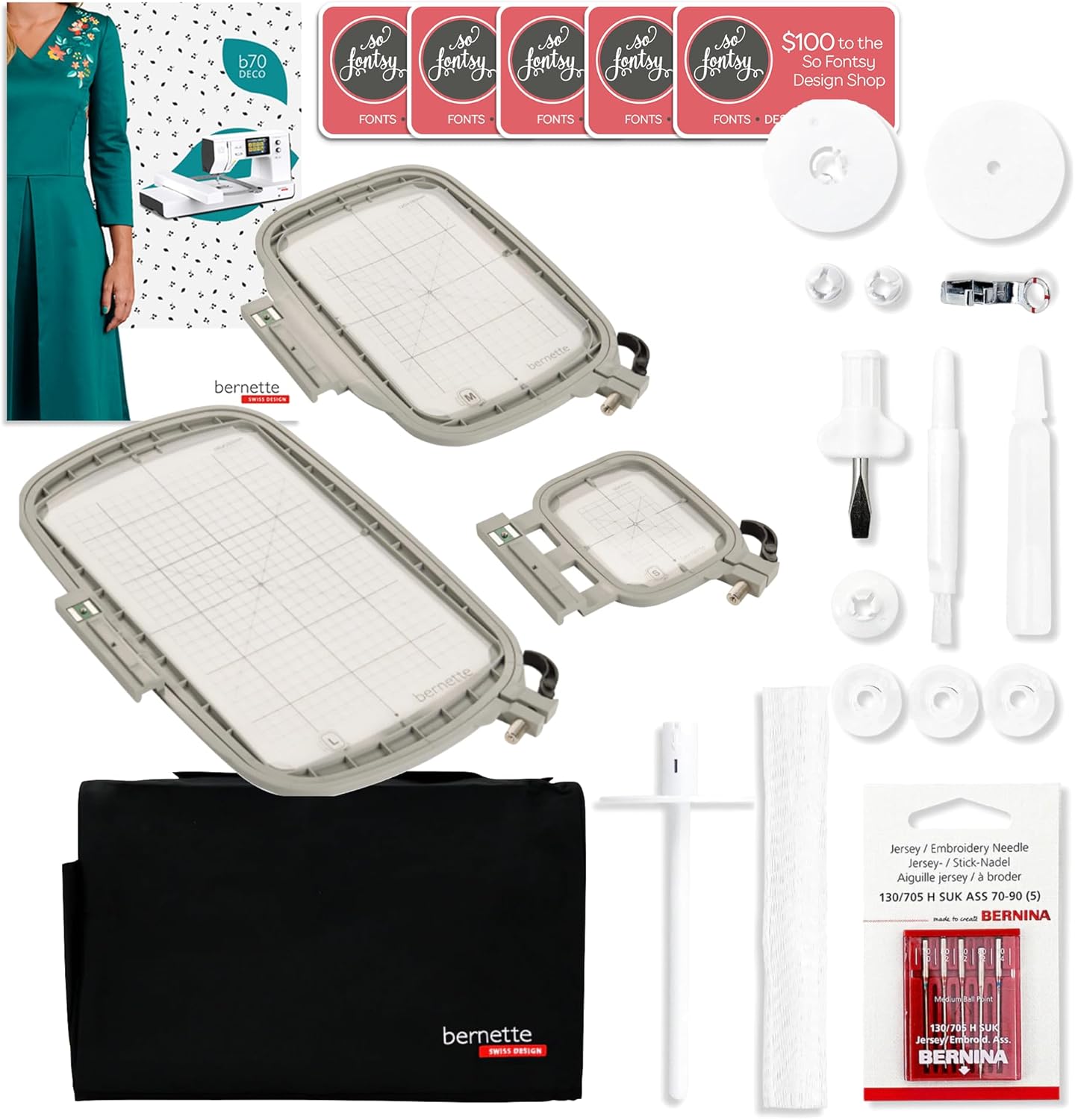
Image 2.1: All components included with the Bernette B70 DECO embroidery machine.
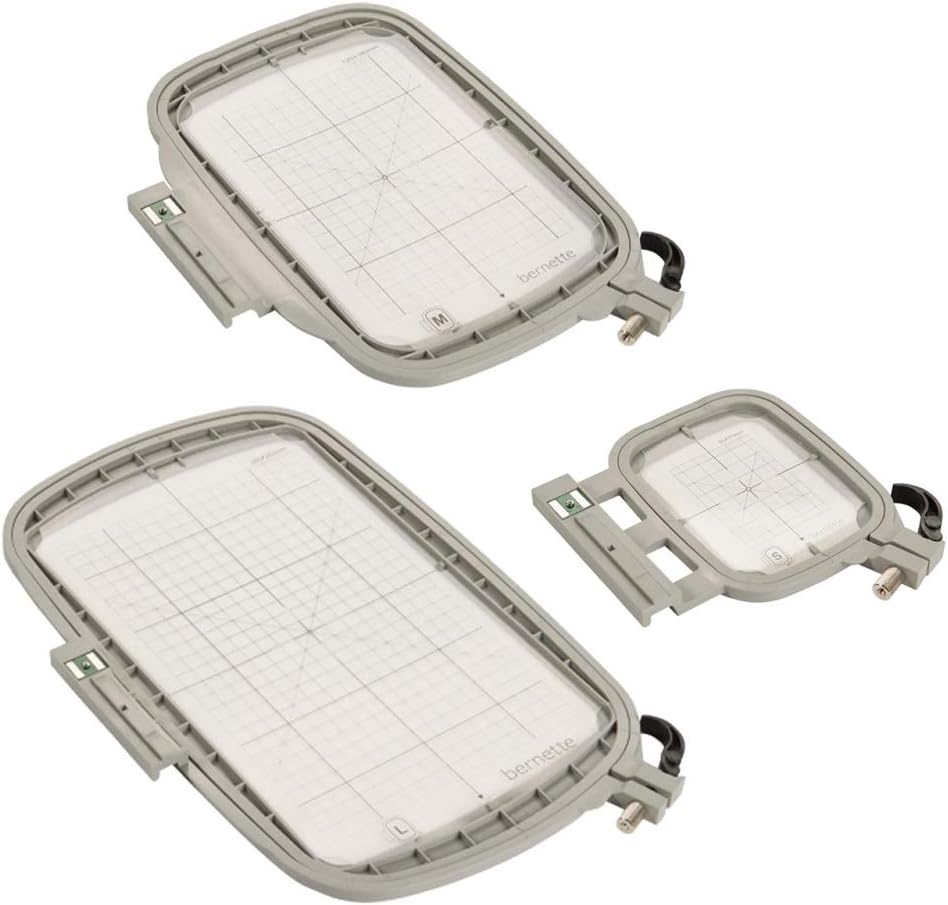
Image 2.2: The three included embroidery hoops (Small, Medium, Large).

Image 2.3: The five So Fontsy access design cards for additional embroidery motifs.
3. Configuración
3.1 Desembalaje y colocación
- Retire con cuidado la máquina y todos los accesorios del embalaje.
- Place the Bernette B70 on a stable, level surface with adequate space for embroidery projects.
- Ensure the area is well-lit and free from obstructions.
3.2 Conexión de alimentación
- Connect the power cord to the machine's power input.
- Conecte el cable de alimentación a una toma eléctrica adecuada.
- Turn on the machine using the main power switch, typically located on the side or back of the unit.

Image 3.1: The Bernette B70 DECO machine, showing its compact design suitable for various workspaces.
4. Instrucciones de funcionamiento
4.1 Navegación por la pantalla táctil
The Bernette B70 features a 5-inch color touch screen for intuitive control. Use the stylus or your finger to select options, browse designs, and adjust settings.

Image 4.1: Close-up of the touch screen interface, showing various pre-installed embroidery designs.
4.2 Selecting and Editing Embroidery Designs
- From the main menu, select the 'Designs' icon.
- Browse through the 208 pre-installed motifs or access designs from a connected USB flash drive.
- Select a design to view Está en la pantalla.
- Use the on-screen tools to resize, rotate, mirror, or combine designs as needed.

Image 4.2: The Bernette B70 machine with its touch screen showing design selection options.
4.3 Enhebrado de la máquina
Proper threading is crucial for successful embroidery. Follow the numbered guides on the machine for both upper thread and bobbin threading. Refer to the detailed threading diagrams in the full user manual for precise steps.

Image 4.3: Close-up of the needle and presser foot area, highlighting the threading path.
4.4 Attaching Embroidery Hoops
- Select the appropriate hoop size for your chosen design.
- Securely hoop your fabric with stabilizer.
- Attach the hooped fabric to the embroidery unit, ensuring it clicks firmly into place.
4.5 Starting an Embroidery Project
- After selecting and positioning your design, ensure the fabric is correctly hooped and attached.
- Bajar el pie prensatela.
- Press the 'Start/Stop' button to begin the embroidery process.
- Monitor the machine during operation and be prepared to change thread colors as prompted by the machine.
5. Mantenimiento
Regular maintenance ensures the longevity and optimal performance of your Bernette B70 embroidery machine.
5.1 Limpieza
- Eliminación de pelusa: Regularly clean lint and dust from the bobbin area, feed dogs, and needle plate using a small brush or vacuum cleaner.
- Limpieza exterior: Limpie las superficies exteriores de la máquina con un paño suave y húmedo.amp paño. Evite los productos químicos agresivos.
5.2 Reemplazo de la aguja
Replace the embroidery needle frequently, especially after 8-10 hours of embroidery or if you notice skipped stitches or thread breaks. Always use the correct type and size of needle for your fabric and thread.
6. Solución de problemas
This section addresses common issues you might encounter with your Bernette B70. For more detailed troubleshooting, refer to the comprehensive manual.
6.1 Rotura del hilo
- Check Threading: Ensure both the upper thread and bobbin thread are correctly threaded according to the machine's guides.
- Estado de la aguja: A bent, dull, or incorrect needle can cause thread breaks. Replace the needle.
- Ajustes de tensión: Incorrect thread tension can lead to breaks. Adjust tension as needed, typically starting with automatic settings or recommended values.
- Calidad del hilo: Use high-quality embroidery thread. Old or poor-quality thread can be brittle.
6.2 Bobbin Issues
- Incorrect Winding: Ensure the bobbin is wound evenly and not too full or too loose.
- Inserción incorrecta: Verify the bobbin is inserted correctly into the bobbin case, following the machine's specific instructions.
- Lint in Bobbin Area: Clean any lint or debris from the bobbin case and surrounding area.
6.3 Puntos saltados
- Needle Type/Size: Ensure the needle is appropriate for the fabric and thread.
- Needle Insertion: Check that the needle is inserted correctly and fully into the needle clamp.
- Estabilizador: Ensure adequate and appropriate stabilizer is used for the fabric and design density.
7. Especificaciones técnicas
| Marca | Bernette |
| Número de modelo | B70 |
| Dimensiones del producto | 70 x 6 x 10 inches (machine only); 6"D x 70"W x 10"H (overall) |
| Peso del artículo | 15 libras |
| Color | Blanco |
| Código Postal | 665788974112 |
| Embroidery Hoops Included | 3 (6"x10", 4.7"x7", 2"x3") |
| Tamaño de pantalla táctil | Pantalla táctil a color de 5 pulgadas |
| Pre-installed Designs | 208 |
8. Garantía y soporte
Your Bernette B70 embroidery machine is covered by the following warranty:
- Partes mecánicas: 5 años
- Circuito: 1 año
- Componentes eléctricos: 1 año
Lifetime support is also provided. For warranty claims, technical assistance, or further support, please contact your authorized Bernette dealer or visit the official Bernette websitio para información de contacto.


