1. Introducción
Thank you for choosing Senso Wireless Earbuds. These True Wireless Stereo (TWS) earphones are designed for an active lifestyle, featuring a secure fit, high-quality audio, and sweatproof construction. This manual will guide you through the setup, operation, and maintenance of your new earbuds.
2. ¿Qué hay en la caja?
- Senso Wireless Earbuds (Left and Right)
- Estuche de carga portátil
- Cable de carga USB
- Guía del usuario
- Puntas para los oídos de varios tamaños
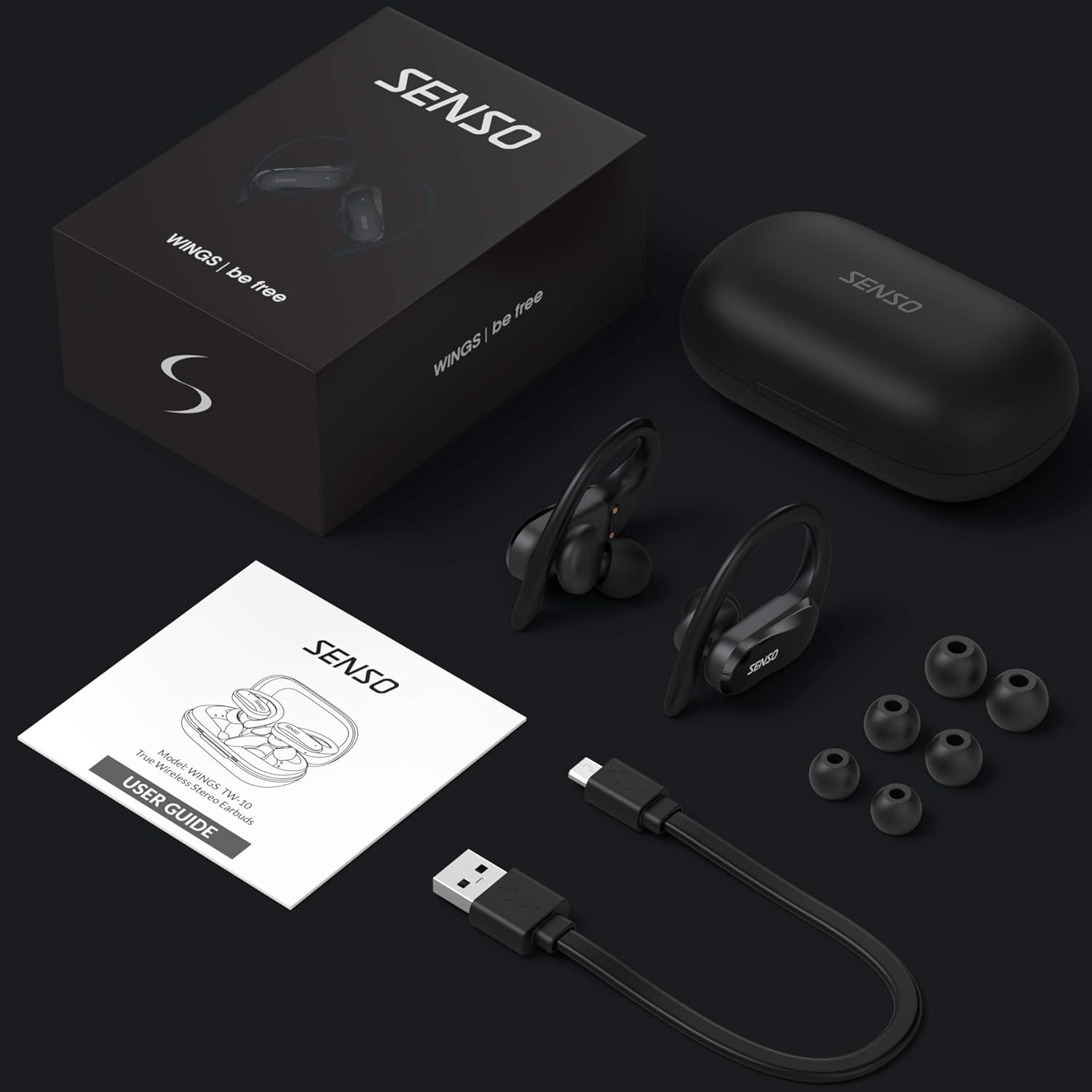
Image: The Senso Wireless Earbuds packaging, displaying the earbuds, charging case, user guide, USB charging cable, and various ear tip sizes.
3. Producto terminadoview
The Senso Wings TW10 earbuds are designed for comfort and performance, featuring advanced audio technology and a durable build.

Imagen: Una explosión view of the earbud, illustrating the 13mm dynamic driver responsible for delivering premium sound quality with intense bass and dynamic range.

Imagen: Un detalle view of the earbud's internal circuitry, emphasizing the Bluetooth 5.0 chipset and CVC 8.0 Noise Cancellation Technology for stable connection and clear audio.

Image: Two scenarios demonstrating the earbuds' versatility: one earbud in use for mono mode (e.g., driving) and both earbuds for dual mode (e.g., binaural calls).

Image: The earbuds are shown resisting water splashes, indicating their IPX6 waterproof rating, suitable for sweat, water, and rain.
4. Configuración
4.1 Carga de los auriculares y el estuche
Before first use, fully charge the earbuds and the charging case. Place the earbuds into the charging case. Connect the USB charging cable to the case and a power source. The indicator lights on the case will show the charging status.
4.2 Emparejamiento inicial
- Asegúrese de que sus auriculares estén cargados.
- Abre el estuche de carga. Los auriculares se encenderán automáticamente y entrarán en modo de emparejamiento.
- En su dispositivo (teléfono inteligente, tableta, etc.), habilite Bluetooth.
- Buscar available Bluetooth devices and select "SENSO Wings TW10" from the list.
- Una vez conectado, escuchará un mensaje de audio y las luces indicadoras de los auriculares cambiarán.

Image: The earbuds are shown connecting to a smartphone, demonstrating the simple and fast pairing process upon removal from the charging case.
Video: An official product video demonstrating the features and setup of the Senso WINGS Ultra Durable Premium Audio Wireless Earbuds.
5. Instrucciones de funcionamiento
5.1 Cómo usar los auriculares
Place the earbuds in your ears and adjust the ear hooks for a secure and comfortable fit. The 60-degree twist lock system ensures they stay in place during physical activity.

Image: A user demonstrating the secure fit of the earbuds with the 60-degree twist lock system, ideal for sports and exercise.
5.2 Controles básicos
The earbuds feature touch-sensitive controls for media playback and call management. Refer to the detailed user guide included in the box for specific touch commands for functions such as play/pause, skip track, answer/end call, and voice assistant activation.
5.3 Mono or Dual Mode
You can use either earbud independently (mono mode) or both together (dual mode) for a stereo audio experience. This flexibility allows for awareness of your surroundings when needed.
5.4 Funciones de llamada
Each earbud is equipped with a microphone, enabling binaural calls for clear communication. Use the touch controls to answer, end, or reject calls.
6. Mantenimiento
6.1 Limpieza
- Limpie periódicamente los auriculares y el estuche de carga con un paño suave, seco y sin pelusa.
- Retire las puntas de los oídos y límpielas con agua y jabón suave, luego séquelas completamente antes de volver a colocarlas.
- Evite el uso de limpiadores o disolventes abrasivos.
6.2 Almacenamiento
- Guarde los auriculares en su estuche de carga cuando no los use para protegerlos y mantenerlos cargados.
- Mantenga el dispositivo en un lugar fresco y seco, alejado de temperaturas extremas y de la luz solar directa.
7. Solución de problemas
7.1 Problemas de emparejamiento
- Asegúrese de que ambos auriculares estén completamente cargados.
- Desactive el Bluetooth en su dispositivo y luego vuelva a activarlo.
- Olvide el dispositivo de su lista de Bluetooth e intente emparejarlo nuevamente.
- If only one earbud connects, try resetting the earbuds (refer to the full user guide for specific reset instructions).
7.2 No hay sonido o el volumen es bajo
- Verifique los niveles de volumen tanto en su dispositivo como en los auriculares.
- Asegúrese de que los auriculares estén correctamente colocados en sus oídos.
- Limpie cualquier residuo de los altavoces y las puntas de los auriculares.
7.3 Problemas de carga
- Verifique que el cable de carga esté conectado de forma segura tanto al estuche como a la fuente de alimentación.
- Asegúrese de que los contactos de carga de los auriculares y del interior del estuche estén limpios y libres de obstrucciones.
- Pruebe con un cable de carga o adaptador de corriente diferente.
8. Especificaciones
| Característica | Detalle |
|---|---|
| Nombre del modelo | Wings TW10 |
| Tecnología de conectividad | Bluetooth 5.0, inalámbrico |
| Tecnología de comunicación inalámbrica | Bluetooth |
| Control de ruido | Cancelación activa de ruido |
| Nivel de resistencia al agua | Resistente al agua (IPX6) |
| Duración de la batería (auriculares) | 8 horas |
| Tiempo total de juego (con estuche) | Hasta 30 horas |
| Tamaño del controlador de audio | 10 milímetros |
| Impedancia | 32 ohmios |
| Tipo de control | Control de medios |
| Método de control | Remoto |
| Colocación de orejas | En el oído |
| Factor de forma | En el oído |
| Material | Silicona |
| Peso del artículo | 7 onzas |

Image: The earbuds and charging case illustrating the extended playtime: 6 hours for the earbuds and up to 30 hours total with the portable charging case.
9. Garantía y soporte
Senso offers a standard warranty for its products. Additionally, you may be eligible for an extended warranty.
9.1 Garantía extendida
To convert to a two-year extended warranty, visit www.sensoshop.com/warranty. This must be claimed within 7 days of receiving your product.
9.2 Atención al cliente
For any product-related issues or inquiries, please contact Senso customer support. Details can be found on the warranty card included in your product packaging or on the official Senso websitio.


