1. Introducción
Welcome to your LeadsaiL Wireless Mouse LX009. This manual provides instructions for setup, operation, maintenance, and troubleshooting to ensure optimal performance and a seamless user experience. Please read this manual thoroughly before using the product.
2. Contenido del paquete
- LeadsaiL Wireless Mouse LX009
- Receptor Nano USB
- Manual de usuario
Nota: One AA battery is required and is not included in the package.
3. Producto terminadoview
Familiarize yourself with the components of your LeadsaiL Wireless Mouse LX009.

Figura 1: Arriba view of the LeadsaiL Wireless Mouse LX009 and its USB Nano Receiver.

Figure 2: Labeled components of the LeadsaiL Wireless Mouse LX009, including Left Button, Right Button, Anti-slip Scroller, DPI Switch, ON/OFF Switch, AA Battery Compartment, and Tiny USB Receiver storage.
4. Configuración
Follow these steps to set up your LeadsaiL Wireless Mouse:
- Insertar batería: Open the battery compartment cover on the underside of the mouse. Insert one AA battery, ensuring correct polarity (+/-). Close the cover securely.
- Recuperar receptor USB: The USB Nano Receiver is conveniently stored inside the battery compartment. Gently remove it.
- Conectar el receptor: Plug the USB Nano Receiver into an available USB port on your computer (laptop, desktop, etc.). Your computer should automatically detect and install the necessary drivers.
- Encendido: Slide the ON/OFF switch on the bottom of the mouse to the "ON" position. The mouse should now be ready for use.
Video 1: Demonstrates the setup process, including battery insertion, USB receiver retrieval, and connecting the mouse to a laptop.
5. Instrucciones de funcionamiento
Operación básica
The mouse features standard left and right click buttons and a scroll wheel for navigation. Use the left button for primary clicks, the right button for secondary functions, and the scroll wheel for vertical scrolling.
Función de clic silencioso
The LeadsaiL LX009 mouse is engineered for silent operation, significantly reducing click noise by over 90%. This feature allows for a quiet working environment, ideal for offices, libraries, or late-night use without disturbing others.

Figure 3: The silent click design ensures a quiet user experience.
Diseño ergonómico
The mouse features a shapely, domed design that provides comfortable support for your palm and fits seamlessly in your hand. This ergonomic design helps reduce strain during extended periods of use.

Figure 4: The ergonomic design of the mouse provides a comfortable grip.
6. Ajuste de DPI
The mouse offers three adjustable DPI (Dots Per Inch) levels to customize cursor sensitivity and tracking speed:
- 800 ppp: Adecuado para tareas precisas como diseño gráfico o trabajos detallados.
- 1200 ppp: Standard setting for general computing and everyday use.
- 1600 ppp: Ideal for faster cursor movement, such as gaming or navigating large displays.
To change the DPI setting, press the DPI switch button located below the scroll wheel. Each press cycles through the available DPI levels.

Figure 5: The DPI switch allows selection between 800, 1200, and 1600 DPI settings.
7. Funciones de ahorro de energía
The LeadsaiL Wireless Mouse LX009 incorporates features to maximize battery life:
- Interruptor de encendido/apagado: A physical ON/OFF switch is located on the bottom of the mouse. Always turn off the mouse when not in use for extended periods to conserve battery power.
- Modo de suspensión automática: The mouse automatically enters a power-saving sleep mode after a period of inactivity. To wake it up, simply click any button.
- Mayor duración de la batería: With efficient power management and proper use of the ON/OFF switch, the mouse can achieve up to 12 months of battery life on a single AA battery.
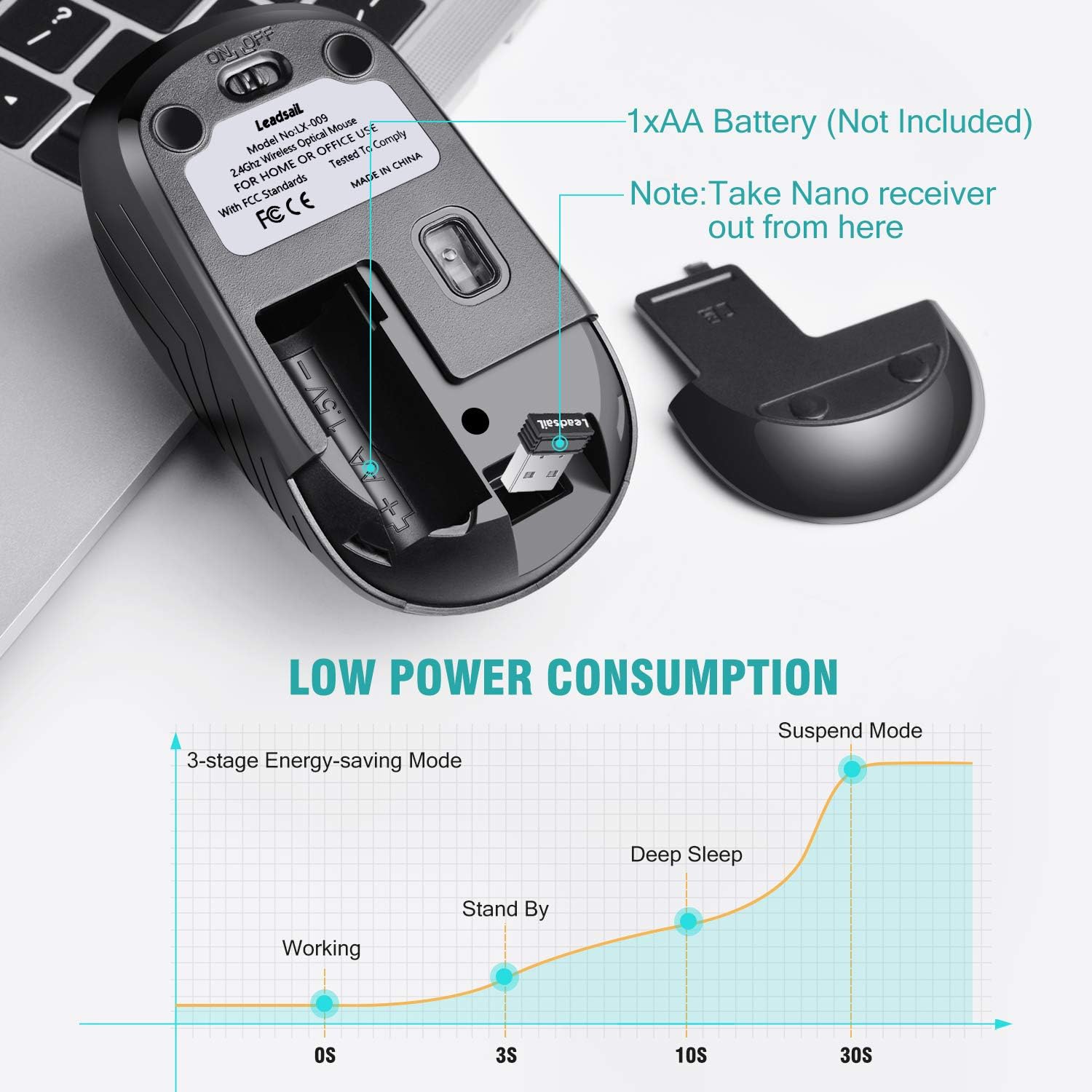
Figure 6: The mouse features a 3-stage energy-saving mode, transitioning from working to standby, deep sleep, and suspend modes to maximize battery life.
8. Mantenimiento
Para garantizar la longevidad y el rendimiento óptimo de su mouse:
- Limpieza: Utilice un paño suave y seco para limpiar el ratón. Para la suciedad difícil, utilice un paño ligeramente seco.amp cloth can be used, but ensure no moisture enters the internal components. Avoid using harsh chemicals, solvents, or abrasive materials.
- Almacenamiento: When not in use for extended periods, turn off the mouse using the ON/OFF switch. The USB receiver can be stored in its designated slot within the battery compartment to prevent loss.
- Reemplazo de batería: Replace the AA battery when the mouse performance degrades, the cursor becomes erratic, or the mouse stops responding.
9. Solución de problemas
If you encounter any issues with your LeadsaiL Wireless Mouse, please refer to the following table:
| Problema | Solución |
|---|---|
| El ratón no responde |
|
| Cursor errático o no se mueve con fluidez |
|
| Problemas de conexión |
|
| Silent click not working |
|
If issues persist after attempting these solutions, please refer to the warranty and support information provided in this manual.
10. Especificaciones
- Modelo: LX009
- Conectividad: Receptor USB inalámbrico de 2.4 GHz
- Niveles de DPI: 800 / 1200 / 1600 (Ajustable)
- Botones: 4 (Left, Right, Scroll Wheel/Middle, DPI Switch)
- Fuente de energía: 1 pilas AA (no incluidas)
- Duración de la batería: Up to 12 months (approximate, varies with usage)
- Compatibilidad del sistema operativo: Windows, macOS, Linux y sistema operativo Chrome
- Dimensiones (LxAnxAl): 4.33 x 1.97 x 1.57 pulgadas (11 x 5 x 4 cm)
- Peso: 2.39 onzas (67.7 gramos)
- Características especiales: Silent Click, Ergonomic Design, Portable, Auto-Sleep Power Saving
11. Garantía y soporte
For detailed warranty information or technical support, please contact LeadsaiL customer service. You can typically find contact details on the official LeadsaiL website or through the retailer where you purchased the product. Please retain your purchase receipt as proof of purchase for any warranty claims.

