1. Introducción
This manual provides essential information for the safe and efficient use of your MEDION P14371 (MD 30044) Full HD 43 inch Android Smart TV. Please read these instructions carefully before operating the device and retain them for future reference.
The MEDION P14371 is a 43-inch Full HD (1920x1080) Smart TV featuring Android TV, HDR support, PVR readiness, and integrated Google Chromecast and Assistant. It offers access to popular streaming services like Netflix and Amazon Prime Video, along with a triple HD tuner for DVB-T2 HD, cable, and satellite reception.
2. Información de seguridad
Observe siempre las siguientes precauciones de seguridad para evitar descargas eléctricas, incendios o lesiones:
- No exponga el televisor a la lluvia o la humedad.
- Asegúrese de que haya una ventilación adecuada; no bloquee las aberturas de ventilación.
- Utilice únicamente el cable de alimentación suministrado con el televisor.
- No abra el televisor casing; delegue cualquier servicio a personal calificado.
- Mantenga las baterías fuera del alcance de los niños y deséchelas de forma adecuada.
3. Contenido del paquete
Verifique que todos los artículos estén presentes en el embalaje:
- MEDION LIFE Smart TV P14371 (MD 30044)
- Pies con tornillos para montaje en soporte
- Mando a distancia con pilas AAA
- Manual de usuario
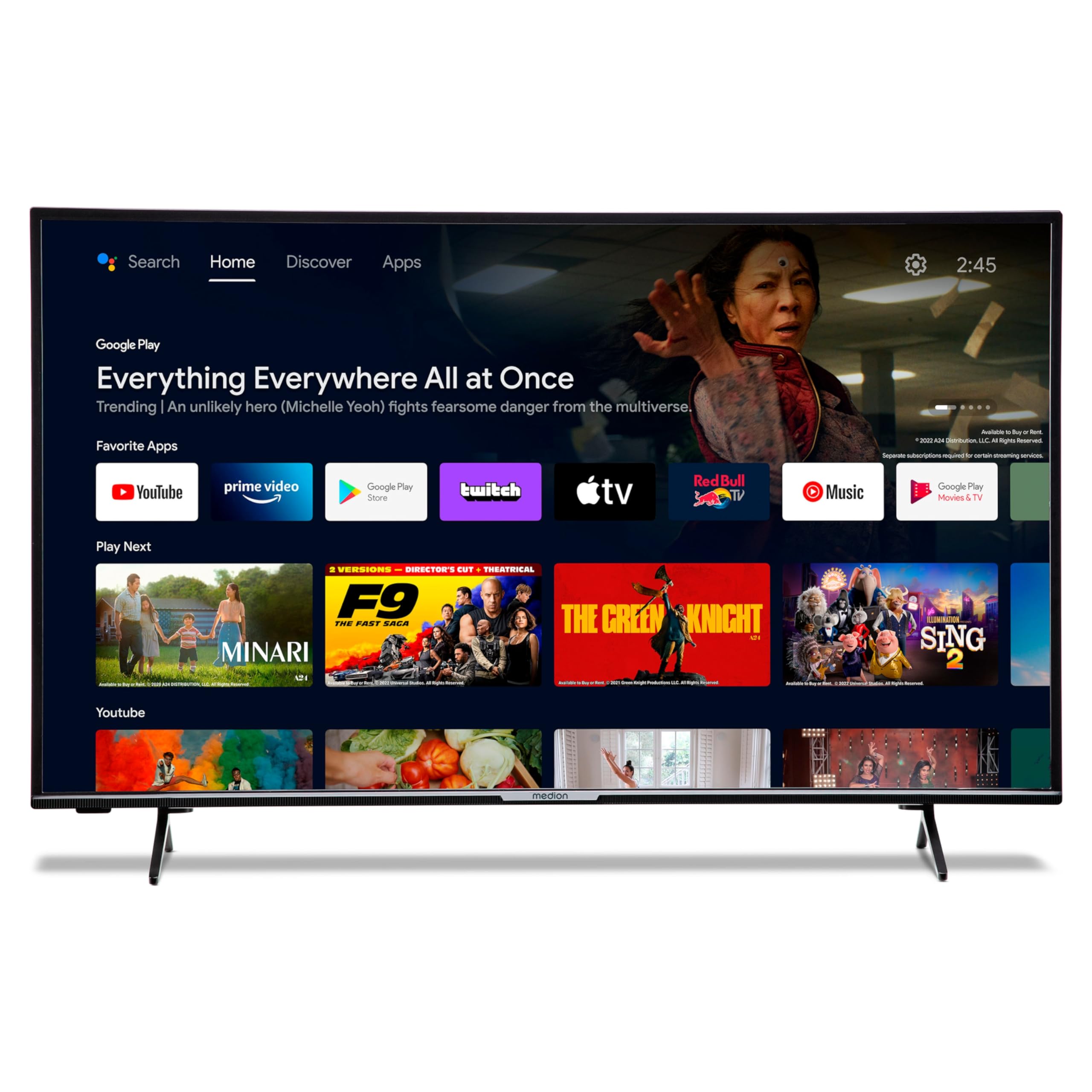
Image: The MEDION P14371 Smart TV with its remote control, illustrating the main components included in the package.
4. Configuración
4.1. Instalación Física
Colocación del soporte:
- Coloque con cuidado el televisor con la pantalla hacia abajo sobre una superficie suave y plana para evitar daños.
- Alinee las patas del televisor con los orificios para tornillos correspondientes en la parte inferior del televisor.
- Fije los pies utilizando los tornillos proporcionados.

Image: The MEDION P14371 television securely placed on its stand, ready for use.
Montaje en pared: If wall mounting, ensure you use a VESA compatible bracket (100 x 100 mm) and follow the bracket manufacturer's instructions. Remove the stand feet before mounting.
4.2. Conexiones
Conecte sus dispositivos externos a los puertos del televisor. Consulte la imagen a continuación para ver la ubicación de los puertos:
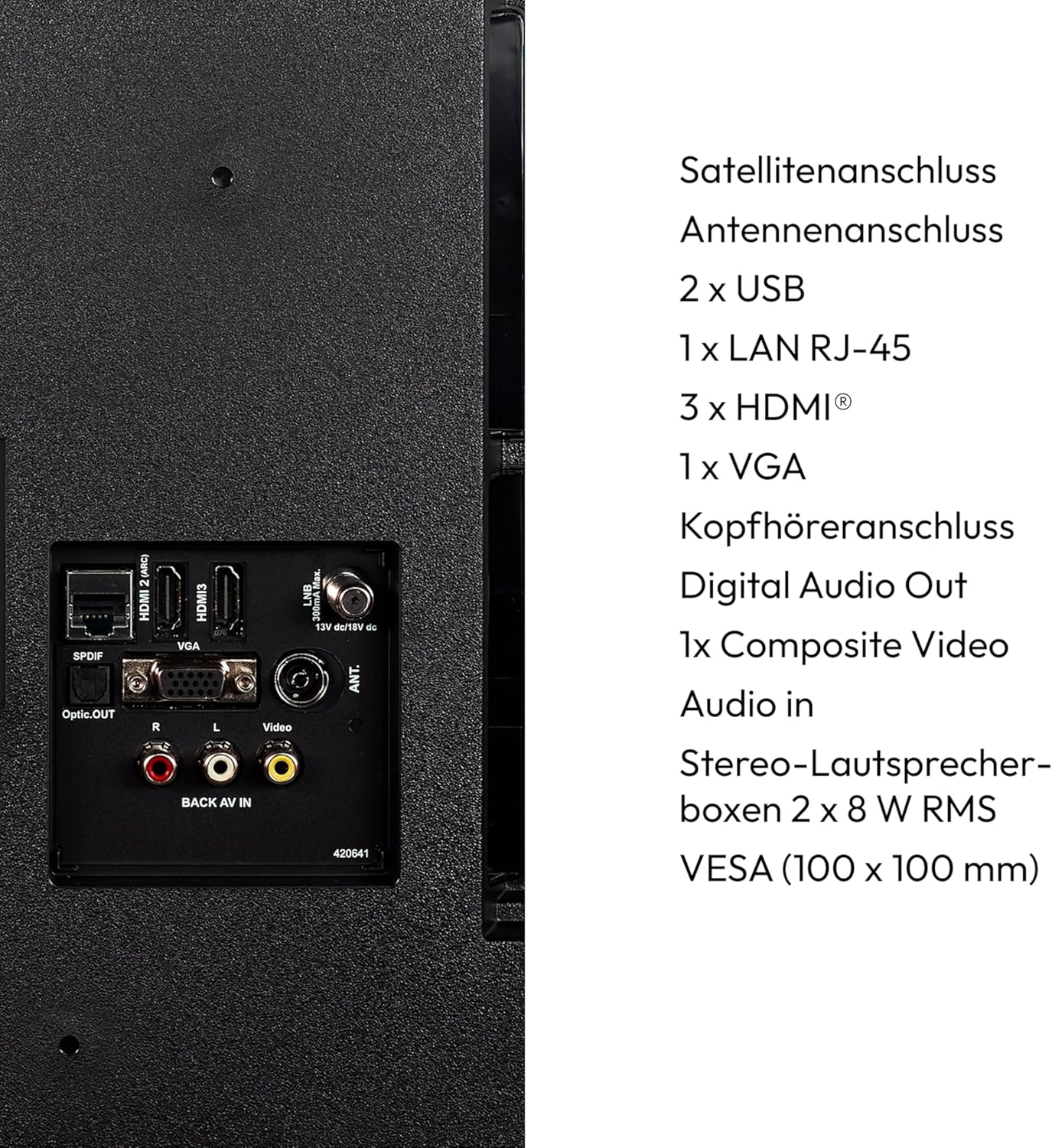
Imagen: Un detalle view of the rear panel of the MEDION P14371 TV, showing various input and output ports including Satellite, Antenna, USB, LAN, HDMI, VGA, Headphone, Digital Audio Out, Composite Video, and Audio In.
- Conexión Satelital: Connect your satellite dish cable.
- Conexión de antena: Connect your terrestrial antenna cable.
- 2 x USB: For connecting USB storage devices for media playback or PVR functionality.
- 1 x LAN RJ-45: Para una conexión a Internet por cable.
- 3 x HDMI®: Para conectar dispositivos de alta definición como reproductores de Blu-ray, consolas de juegos o decodificadores.
- 1 x VGA: Para conectar una computadora.
- Toma de auriculares: Para conectar auriculares.
- Salida de audio digital (óptica): Para conectar a un sistema de audio externo.
- 1 x Composite Video (AV In): Para conectar dispositivos más antiguos.
4.3. Encendido inicial
- After all connections are made, plug the power cord into a wall outlet.
- Presione el botón de encendido en el control remoto o en el televisor.
- Siga las instrucciones en pantalla para la configuración inicial, incluida la selección de idioma, la conexión de red y el escaneo de canales.
5. Operación del televisor
5.1. Control remoto
El control remoto incluido permite acceder a todas las funciones del televisor. Inserte las dos pilas AAA como se indica en el compartimento.
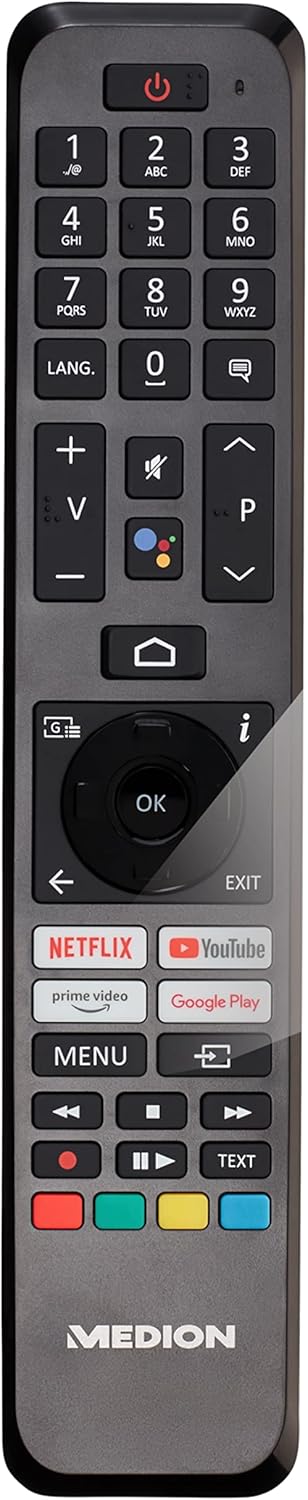
Image: The remote control for the MEDION P14371 TV, showing buttons for power, volume, channel, navigation, Netflix, Prime Video, Google Play, and Google Assistant.
- Botón de encendido: Enciende, apaga y pone en modo de espera el televisor.
- Botones numéricos (0-9): Para selección directa de canales.
- Volumen (+/-): Ajusta el nivel de volumen.
- Channel (P+/P-): Cambia de canal.
- Botones de navegación (Arriba/Abajo/Izquierda/Derecha/OK): Para navegar y seleccionar el menú.
- Botón de inicio: Accede a la pantalla de inicio de Android TV.
- Botón Atrás: Regresa a la pantalla anterior.
- Botón del Asistente de Google: Activa el control de voz (Hey Google).
- Netflix, Amazon Prime Video, Google Play Buttons: Acceso directo a estos servicios de streaming.
5.2. Funciones de Smart TV (Android TV)
Su televisor funciona con Android TV, lo que le proporciona acceso a una amplia gama de aplicaciones y servicios.

Image: The MEDION P14371 TV displaying the Google Play interface with various apps and games, highlighting its Smart TV capabilities.
- Tienda Google Play: Descargue e instale sus aplicaciones, juegos y servicios de transmisión favoritos.
- Chromecast integrado: Transmite contenido desde tu teléfono inteligente, tableta o computadora directamente al televisor.
- Asistente de Google: Utilice comandos de voz a través del control remoto para buscar contenido, controlar dispositivos domésticos inteligentes y obtener información.
- HDR (alto rango dinámico): Enjoy enhanced contrast and color detail with compatible content.
5.3. Triple HD Tuner
The integrated triple tuner allows reception of digital television signals without an external receiver:
- DVB-T2 HD: Terrestrial digital television.
- DVB-C: Televisión por cable digital.
- DVB-S2: Digital satellite television.
Perform a channel scan during initial setup or via the TV menu to find available channels.
5.4. PVR (Personal Video Recorder)
Connect a USB storage device to record TV programs. Access the PVR function through the TV menu to schedule recordings or record live TV.
5.5. Conectividad inalámbrica
- Wifi: Connect to your home wireless network for internet access and Smart TV features.
- Bluetooth: Conecte auriculares inalámbricos, barras de sonido u otros dispositivos habilitados para Bluetooth.
6. Mantenimiento
6.1. Limpieza
- Desenchufe siempre el televisor antes de limpiarlo.
- Utilice un paño suave y seco para limpiar la pantalla y el gabinete.
- Para marcas difíciles, utilice un paño ligeramente húmedo.amp cloth with a mild, non-abrasive cleaner. Do not spray cleaner directly onto the screen.
6.2. Actualizaciones de software
The TV may receive software updates to improve performance and add new features. Ensure your TV is connected to the internet to receive these updates. You can check for updates manually in the TV's settings menu.
7. Solución de problemas
Si tiene problemas con su televisor, consulte las siguientes soluciones comunes:
| Problema | Posible solución |
|---|---|
| Sin poder | Compruebe que el cable de alimentación esté bien enchufado al televisor y a la toma de corriente. Pruebe con otra toma. |
| No hay imagen, pero hay sonido | Verifique la fuente de entrada. Asegúrese de que todos los cables de video estén bien conectados. |
| No hay sonido, pero hay imagen | Check the volume level and mute settings. Ensure audio cables are connected correctly. |
| El control remoto no funciona | Reemplace las pilas. Asegúrese de que no haya obstrucciones entre el control remoto y el sensor infrarrojo del televisor. |
| Las funciones del Smart TV son lentas o no responden | Check your internet connection. Restart the TV by unplugging it for a few minutes and plugging it back in. Clear app caches in settings. |
| No se puede conectar al wifi | Ensure your router is on and working. Re-enter the Wi-Fi password. Try restarting your router and the TV. |
8. Especificaciones
Detailed technical specifications for the MEDION P14371 (MD 30044) TV:
| Característica | Especificación |
|---|---|
| Marca | MEDION |
| Número de modelo | P14371 (MD 30044) |
| Tamaño de pantalla | 43 pulgadas (108 cm) |
| Tecnología de visualización | LCD LED |
| Resolución | 1080p Full HD (1920 x 1080 píxeles) |
| Relación de aspecto | 1.77:1 (16:9) |
| Frecuencia de actualización | 60 Hz |
| Sistema operativo | Televisión Android |
| Tecnología de conectividad | Bluetooth, HDMI, USB, WLAN (Wi-Fi) |
| Puertos USB totales | 2 |
| Características especiales | Bluetooth, USB Recording (PVR), HDR, Smart/Internet TV, Wi-Fi, Google Chromecast, Google Assistant |
| Servicios de Internet compatibles | Netflix, Amazon Prime Video |
| Clase de eficiencia energética (SDR) | E |
| Consumo de energía (SDR) | 42.0 W / 1000 h |
| Clase de eficiencia energética (HDR) | G |
| Consumo de energía (HDR) | 62.0 W / 1000 h |
| Fabricante | MEDION |
| Componentes incluidos | Televisor inteligente (MD30044) |
For more detailed energy information, please refer to the EU EPREL database: https://eprel.ec.europa.eu/qr/1587496

Image: Diagram showing the physical dimensions of the MEDION P14371 TV, including width (973 mm), height (570 mm without stand, 627 mm with stand), and depth (92 mm without stand, 250 mm with stand).
9. Garantía y soporte
MEDION is committed to providing excellent customer service and product support.
- Garantía general: A minimum general warranty of 2 years is offered by the supplier.
- Soporte de producto: Guaranteed product support for up to 10 years.
- Disponibilidad de repuestos: Guaranteed availability of spare parts for up to 7 years from the date of market withdrawal.
- Actualizaciones de software: Guaranteed software and firmware updates for up to 8 years from the date of market withdrawal.
Our competent customer service team is available 365 days a year. Our customer relationship does not end with the purchase. If an issue cannot be resolved through direct communication, our repair service will handle it quickly and efficiently.
For support, please visit the official MEDION websitio o comuníquese directamente con su servicio de atención al cliente.