Introducción
This manual provides comprehensive instructions for the setup, operation, and maintenance of your Keychron K4 RGB Hot Swappable Mechanical Keyboard. Designed for productivity and a tactile typing experience, the K4 features a 96% layout with 100 keys, offering both Bluetooth wireless and USB wired connectivity. It is compatible with both Mac and Windows operating systems.
Contenido del paquete
- Teclado mecánico Keychron K4
- Cable USB tipo C
- Extractor de teclas
- Extractor de interruptores
- Extra Keycaps for Windows and Mac operating systems
- Manual de usuario (este documento)
Configuración
1. Carga inicial
Before first use, connect the keyboard to a USB power source using the provided USB Type-C cable. The keyboard features a 4000 mAh battery, providing up to 240 hours of usage with the backlight disabled.
2. Modos de conectividad
The Keychron K4 supports both Bluetooth wireless and USB wired connections.

Image: The Keychron K4 keyboard is designed for broad compatibility, supporting both Mac and Windows operating systems, and connecting seamlessly with various devices including desktops, laptops, and smartphones/tablets.
2.1. Conexión Bluetooth
- Ensure the keyboard's mode switch (located on the side) is set to "BT" (Bluetooth).
- Mantenga pulsado el Fn + 1 (o Fn + 2 or Fn + 3) key combination for 4 seconds until the '1' (or '2' or '3') key flashes rapidly. This indicates the keyboard is in pairing mode.
- On your device (computer, smartphone, tablet), enable Bluetooth and search for "Keychron K4".
- Select "Keychron K4" from the list of available devices to complete the pairing process. The corresponding number key will stop flashing and remain solid when connected.
- The keyboard can connect with up to 3 devices and switch between them easily using Fn + 1, Fn + 2, o Fn + 3.
2.2. Conexión por cable USB
- Ensure the keyboard's mode switch is set to "Cable".
- Conecte el cable USB tipo C del teclado al puerto USB de su computadora.
- El teclado será reconocido automáticamente y estará listo para usarse.
3. Cambio de sistema operativo
The Keychron K4 has a dedicated switch for Mac and Windows layouts. Locate the OS switch on the side of the keyboard and set it to your desired operating system for optimal key mapping.

Image: The Keychron K4 keyboard seamlessly integrates with Apple devices, as shown here next to an iMac and Magic Mouse, highlighting its Mac compatibility.
Instrucciones de funcionamiento
1. Funciones y diseño de las teclas
The K4 features a 96% layout with 100 keys, including a number pad. It provides all necessary Mac function keys and is fully compatible with Windows. Extra keycaps for both operating systems are included for customization.

Imagen: Una imagen completa view of the Keychron K4 keyboard, highlighting its compact 96% layout which includes a full numeric keypad, and its vibrant RGB backlighting.
2. Control de luz de fondo
The K4 features enchanting RGB backlighting with over 15 types of flashing light modes. All backlight controls are managed directly from the keyboard without the need for software.
- Fn + Light Bulb Key (F5): Cycle through different RGB lighting effects.
- Fn + Flecha izquierda:Disminuye el brillo de la luz de fondo.
- Fn + Flecha derecha: Aumenta el brillo de la luz de fondo.
- Fn + Flecha arriba: Increase backlight speed/effect.
- Fn + Flecha abajo: Decrease backlight speed/effect.

Image: A detailed shot of the Keychron K4's RGB backlighting, showcasing the vibrant and customizable illumination beneath the keycaps.
3. N-Key Rollover (NKRO)
The K4 supports N-key rollover (NKRO) in wired mode, allowing all keys to be registered simultaneously. In wireless mode, it supports 6-key rollover (6KRO).
Mantenimiento
1. Limpieza del teclado
Para limpiar el teclado, primero desconéctelo de todas las fuentes de alimentación. Utilice un paño suave y sin pelusa ligeramente seco.ampLimpie con agua o una solución limpiadora suave. Evite rociar líquidos directamente sobre el teclado. Para limpiar entre las teclas, utilice aire comprimido o un cepillo pequeño.
2. Conmutadores intercambiables en caliente
The K4 hot-swappable version allows you to personalize your typing experience by changing switches without soldering. This feature enables easy replacement of switches if they become faulty or if you wish to try different switch types (e.g., Gateron G Pro Brown, Red, Blue).
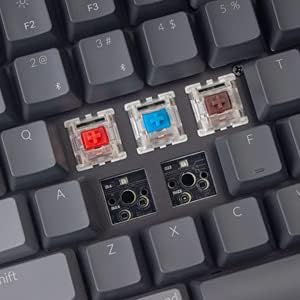
Image: This image demonstrates the hot-swappable capability of the Keychron K4, showing various Gateron switches detached from the keyboard's PCB, allowing for easy customization or replacement.
2.1. Reemplazo de interruptores
- Utilice el extractor de teclas provisto para quitar con cuidado la tecla deseada.
- Use the provided switch puller to carefully grip the switch from its top and bottom clips. Pull straight up to remove the switch from the PCB.
- Alinee los pines del nuevo interruptor con los orificios de la placa de circuito impreso. Asegúrese de que estén rectos.
- Presione suavemente el nuevo interruptor hasta que encaje en su lugar. No lo fuerce.
- Reemplace la tecla.
3. Reemplazo de teclas
Keycaps can be removed and replaced using the keycap puller. This is useful for cleaning or for installing custom keycap sets. Ensure proper alignment when replacing keycaps.
Solución de problemas
- El teclado no se conecta mediante Bluetooth:
- Ensure the keyboard's mode switch is set to "BT".
- Verify the keyboard is in pairing mode (Fn + 1/2/3 key flashing).
- Verifique la configuración de Bluetooth de su dispositivo y asegúrese de que Bluetooth esté habilitado.
- Intente olvidar el dispositivo en su computadora/teléfono y volver a emparejarlo.
- Asegúrese de que el teclado esté suficientemente cargado.
- Bluetooth connection lag or disconnection:
- Acerque el teclado a su dispositivo para reducir la interferencia.
- Asegúrese de que no haya otras señales inalámbricas fuertes que interfieran.
- Verifique el nivel de batería; una batería baja puede afectar el rendimiento inalámbrico.
- Consider using the wired USB connection for critical tasks or gaming if wireless performance is inconsistent.
- La luz de fondo no funciona o está atascada:
- Ensure the backlight is not turned off (Fn + Light Bulb key).
- Adjust brightness using Fn + Left/Right Arrow keys.
- A full charge might resolve minor power-related issues.
- Las teclas no responden:
- If using wireless, check battery and connection.
- If using wired, ensure the USB cable is securely connected.
- For specific keys, consider the hot-swappable feature: remove the keycap and switch, inspect the switch pins for bending, straighten if necessary, and reinsert. If the switch is faulty, replace it.
- Teclado no reconocido por la computadora:
- Pruebe con un puerto o cable USB diferente.
- Ensure the OS switch on the keyboard matches your computer's operating system.
- Reinicie su computadora.
Presupuesto
| Característica | Detalle |
|---|---|
| Marca | Clavechrono |
| Número de modelo | Keychron K4J3 |
| Disposición | 96% (100 teclas) |
| Conectividad | Bluetooth 5.1 (up to 3 devices) & USB Type-C Wired |
| Interruptores | Gateron G Pro Brown (Hot-Swappable) |
| Iluminar desde el fondo | RGB (15+ types of flashing light mode) |
| Capacidad de la batería | 4000 mAh |
| Duración de la batería | Up to 240 hours (backlight disabled) |
| Cambio de clave N (NKRO) | Wired Mode: NKRO; Wireless Mode: 6KRO |
| Compatibilidad del sistema operativo | MacOS, Windows |
| Dimensiones (LxAnxAl) | 14.8 x 5.08 x 1.5 pulgadas |
| Peso del artículo | 2.05 libras |
Garantía y soporte
Keychron products are designed for durability and performance. For specific warranty terms and conditions, please refer to the warranty information provided with your purchase or visit the official Keychron website. For technical support, troubleshooting assistance, or inquiries regarding your Keychron K4 keyboard, please contact Keychron customer service directly.
Keychron oficial Websitio: www.keychron.com


