1. Introducción
The SINOTIMER TM919B is a 30A 7-day programmable electronic timer switch designed for automatic control of various electrical equipment. It allows you to set specific ON/OFF times over a 24-hour or 7-day cycle, providing convenience and energy efficiency for applications such as streetlights, lamps, water heaters, air conditioners, and more.
Características principales:
- Ideal for household use in DB Boards.
- High capacity: 5000 Watt / 30 Amps.
- Flexible programming: 24 Hours / 7 Days a Week Programmable.
- Automatic time error correction: +/- 30 seconds weekly.
- Multiple programs: Repeat programs with 16 ON/OFF settings.
- Control manual de encendido y apagado.
2. Producto terminadoview
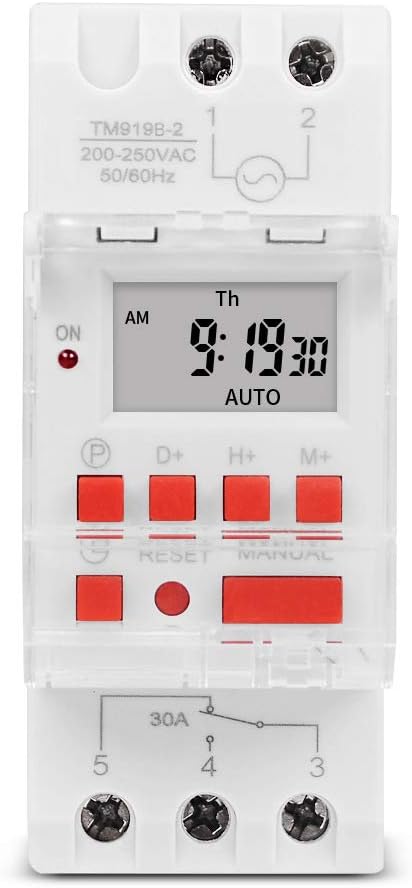
Figura 1: Frente view of the TM919B timer switch, displaying the LCD screen with time and day, and the array of control buttons including P, D+, H+, M+, RESET, and MANUAL.

Figura 2: Angulado view of the TM919B timer switch, showing its side profile and the clear protective cover over the buttons.

Figura 3: Lado view of the TM919B timer switch, detailing the wiring terminals (L, N, 1, 2, 3, 4, 5) and product specifications like voltage y calificaciones actuales.
3. Especificaciones
| Parámetro | Valor |
|---|---|
| Rango de temperatura | -20°C a +50°C |
| Vol de funcionamientotage (ui) | 110 V |
| Consumo de energía | 4.5 VA (MÁX.) |
| Mostrar | Pantalla LCD |
| Contacto de conmutación | 1 interruptor de cambio |
| Programas | 16 configuraciones de encendido/apagado por día o semana |
| Histéresis | 2 segundos/día (a 25 °C) |
| Intervalo mínimo | 1 minuto |
| Capacidad | 30A 250V AC |
| Memoria apagada | 60 días |
| Rango del temporizador | 1 minuto a 168 horas |
| Error promedio | 1 second/24 hours (at 25°C) |
| Peso del artículo | 5.3 ounces (0.2kg) |
| Dimensiones del paquete | 3.95 x 3.2 x 2 pulgadas |
| Tamaño de pantalla | 1.5 pulgadas |
4. Instalación y cableado
The TM919B timer switch is designed for DIN rail mounting, making it suitable for integration into electrical distribution boards. Ensure all power is disconnected before attempting installation.
Diagrama de cableado:

Figure 4: Wiring diagram for the TM919B. Terminals 1 and 2 are for power input (L and N). Terminals 3, 4, and 5 are for the output, typically used for NO (Normally Open) and NC (Normally Closed) connections to control the load.
- Entrada de energía: Connect the live (L) and neutral (N) wires to terminals 1 and 2 respectively. Ensure the voltage matches the timer's specification (110V for this model).
- Conexión de carga: The timer has a single changeover switch.
- Terminal 3: Normally Closed (NC) contact.
- Terminal 4: Common (COM) contact.
- Terminal 5: Normally Open (NO) contact.
- Connect your load (e.g., lamp, motor) between the common terminal (4) and either the NO (5) or NC (3) terminal, depending on whether you want the load to be ON or OFF when the timer is in its default state.
- Securely fasten all wires to prevent loose connections.
- Once wiring is complete, restore power and proceed with programming.
5. Operating Instructions and Programming
The TM919B timer allows for up to 16 ON/OFF programs. Follow these steps to set the current time and program the timer.
Funciones de los botones:
- P (Programa): Entra en modo de programación.
- D+ (Día): Ajusta el día de la semana.
- H+ (Hora): Ajusta la hora.
- M+ (Minuto): Ajusta los minutos.
- REINICIAR: Resets all settings to factory defaults. Use a pointed object to press.
- MANUAL: Alterna entre los modos ENCENDIDO, AUTOMÁTICO y APAGADO.
Configuración de la hora actual:
- Presione el D+ para configurar el día de la semana actual.
- Presione el H+ para configurar la hora actual.
- Presione el M+ para configurar el minuto actual.
- The time will automatically save after a few seconds of inactivity.
Programming ON/OFF Times (Up to 16 Programs):
- Presione el P Presione el botón una vez. La pantalla mostrará "1 ON". Esto permite configurar la hora de encendido inicial.
- Prensa H+ y M+ to set the desired hour and minute for the first ON event.
- Prensa D+ to select the days of the week for this program. Options include: every day, specific days (e.g., MO-FR, MO-SA, SA-SU), or individual days. If you want the same setting every day, you do not need to press D+.
- Presione el P button again. The display will show "1 OFF". This is for setting the first OFF time.
- Prensa H+ y M+ to set the desired hour and minute for the first OFF event.
- Prensa D+ again if you need to specify different days for the OFF event, or leave it if it matches the ON event's days.
- Repeat steps 1-6 for programs 2 through 16 (e.g., "2 ON", "2 OFF", etc.).
- Después de configurar todos los programas deseados, presione el botón MANUAL button repeatedly until "AUTO" is displayed. This ensures the timer operates according to your programmed schedule.
Control manual:
Presione el MANUAL Botón para recorrer los modos de funcionamiento:
- EN: La salida está continuamente encendida, anulando las configuraciones programadas.
- OFF: La salida está continuamente APAGADA, anulando las configuraciones programadas.
- COCHE: The timer operates according to the programmed ON/OFF schedules. Ensure the timer is in AUTO mode for automatic operation.
6. Mantenimiento
The TM919B timer switch requires minimal maintenance. Keep the device clean and free from dust. Do not expose it to excessive moisture or extreme temperatures. If the display becomes dim or unresponsive, check the power supply. The internal battery provides backup for settings during power outages por hasta 60 días.
7. Solución de problemas
| Problema | Posible causa | Solución |
|---|---|---|
| El temporizador no se enciende ni se apaga en los horarios programados. | Not in AUTO mode; incorrect programming; power issue. | Press MANUAL until "AUTO" is displayed. Review programming steps carefully. Check power supply to the timer. |
| La pantalla está en blanco o tenue. | No power supply; internal battery low (unlikely for display). | Check power connections. Ensure the timer is receiving power. |
| No se puede configurar la hora ni los programas. | Buttons unresponsive; unit frozen. | Press the RESET button using a pointed object. This will clear all settings, so you will need to reprogram. |
| Load not switching. | Incorrect wiring; faulty load; timer output issue. | Verify wiring according to the diagram. Test the load independently. If issues persist, contact support. |
8. Garantía y soporte
This SINOTIMER product is covered by a standard manufacturer's warranty against defects in materials and workmanship. For warranty claims or technical support, please contact your retailer or the manufacturer directly. Keep your purchase receipt as proof of purchase.
For further assistance, visit the official SINOTIMER store: Tienda SINOTIMER en Amazon


