1. Configuración
1.1 Qué está incluido
El paquete contiene los siguientes elementos:
- 1 Smart Security Camera (CAM/PAN/WIFI)
- Adaptador de corriente 1
- 1 USB Cord (1 meter)

Figure 1: Packaging for the Feit Electric Smart Indoor Camera with Pan & Tilt, illustrating included components.
1.2 Antes de comenzar
Ensure you have the following before proceeding with installation:
- A stable 2.4 GHz Wi-Fi network. The camera is not compatible with 5 GHz networks.
- A smartphone or tablet with the Feit Electric App installed (available on Android and iOS app stores).
- An available standard electrical outlet for power.
- Optional: A Micro-SD card (up to 128GB) for local video storage (not included).
1.3 pasos de instalación
- Descargue la aplicación Feit Electric: Buscar "Feit Electric" in your device's app store and install the application.
- Crear una cuenta: Abra la aplicación y siga las instrucciones en pantalla para crear una nueva cuenta de usuario o iniciar sesión si ya tiene una.
- Encienda la cámara: Connect the provided USB cord to the camera and the power adapter. Plug the power adapter into a standard electrical outlet. The camera will power on and indicate readiness for pairing (refer to the camera's LED indicator for status).
- Agregar dispositivo en la aplicación: In the Feit Electric App, tap the "+" icon to add a new device. Select the "Security Camera" category and follow the app's instructions to connect your camera to your 2.4 GHz Wi-Fi network. You may need to scan a QR code displayed on your phone with the camera lens.
- Colocación: Position the camera indoors on a flat surface or mount it using appropriate hardware (not included) in your desired location. Ensure it has a clear line of sight to the area you wish to monitor.
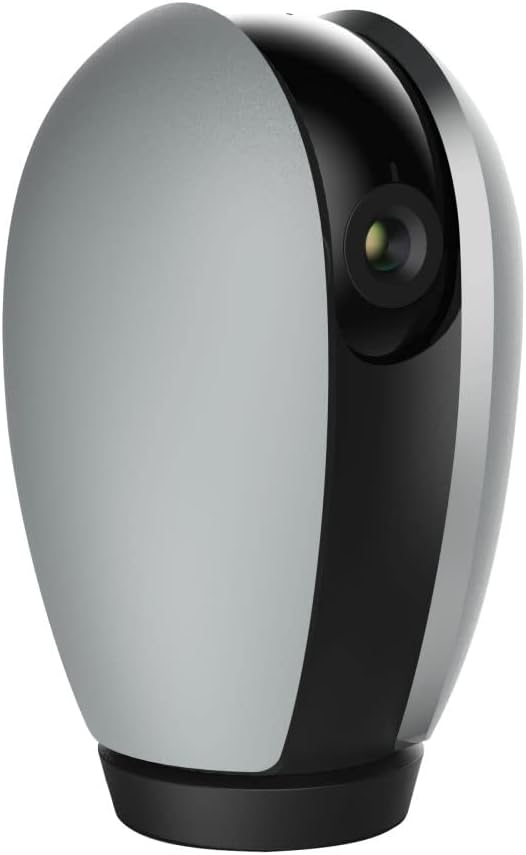
Figura 2: Frente view of the Feit Electric Indoor Security Camera, ready for placement.
2. Operación de la cámara
2.1 App Control and Live View
Once connected, you can access your camera from anywhere using the Feit Electric App. Open the app and select your camera from the device list to view a live feed. Multiple users can be granted access to control the camera through app sharing features.
2.2 Funcionalidad de panorámica e inclinación
The camera features remote pan and tilt capabilities, allowing you to adjust the field of vision. Within the live view in the Feit Electric App, use the directional controls to:
- Pan: Rotate the camera horizontally from 0° to 355°.
- Inclinación: Ajuste la cámara verticalmente de -10° a 75°.
2.3 Detección de movimiento y visión nocturna
The camera is equipped with advanced motion detection, capable of detecting activity up to 32 feet away. You can configure the app to send push notifications to your mobile device when motion is detected. The camera also features night vision, providing clear visibility in low-light conditions up to 30 feet using Night Color technology.
2.4 Audio bidireccional
Utilize the built-in microphone and speaker for two-way communication. This allows you to listen to audio from the camera's location and speak through the camera from your mobile device via the app.
2.5 Grabación y almacenamiento de vídeo
The camera records video in 1080p HD resolution. Recorded events can be stored locally on a Micro-SD card (up to 128GB, sold separately). A 128GB card can store approximately 14,400 minutes (10 days) of video. There are no monthly fees or subscriptions required for local storage. Videos can be downloaded wirelessly through the Feit Electric App.
2.6 Integración de casas inteligentes
The Feit Electric Indoor Security Camera is compatible with Amazon Alexa and Google Assistant. Follow the instructions within the Feit Electric App or your smart home assistant's app to link your devices and enable voice control for certain camera functions.

Figure 3: The camera integrates with Amazon Alexa and Google Assistant for enhanced smart home control.
3. Mantenimiento
3.1 Limpieza
To maintain optimal performance, periodically clean the camera lens and body with a soft, dry cloth. Avoid using liquid cleaners or abrasive materials that could damage the camera's surfaces.
3.2 Actualizaciones de software
Regularly check the Feit Electric App for available firmware updates for your camera. Keeping the firmware updated ensures you have the latest features, security enhancements, and bug fixes.
3.3 Gestión de tarjetas SD
If using a Micro-SD card for storage, it is recommended to periodically format the card through the Feit Electric App to ensure stable recording and prevent data corruption. Replace the SD card if you experience consistent recording issues or if the card reaches its end of life.
4. Solución de problemas
If you encounter issues with your Feit Electric Indoor Security Camera, refer to the following common troubleshooting steps:
- La cámara no se conecta a Wi-Fi:
- Asegúrese de que su red Wi-Fi sea de 2.4 GHz. La cámara no admite redes de 5 GHz.
- Verifique que su contraseña de Wi-Fi esté ingresada correctamente en la aplicación.
- Acerque la cámara a su enrutador Wi-Fi para mejorar la intensidad de la señal.
- Reinicie su enrutador Wi-Fi y la cámara.
- Sin vida View or Offline Status:
- Comprueba tu conexión a Internet de casa.
- Asegúrese de que la cámara esté encendida y que el adaptador de corriente esté conectado de forma segura.
- Restart the Feit Electric App.
- Recording Issues (with SD Card):
- Ensure the Micro-SD card is correctly inserted into the camera.
- Check if the SD card is full. Format the card via the app if necessary (this will erase all data).
- Verify the SD card is not damaged or faulty.
- La detección de movimiento no funciona:
- Check the motion detection settings in the Feit Electric App to ensure it is enabled and sensitivity is adjusted appropriately.
- Asegúrese de que no haya obstrucciones que bloqueen la cámara. view.
- Problemas de audio bidireccional:
- Ensure your phone's microphone and speaker permissions are granted to the Feit Electric App.
- Verifique la configuración del volumen en su teléfono y dentro de la aplicación.
For further assistance, consult the help section within the Feit Electric App or contact customer support.
5. Especificaciones
| Característica | Especificación |
|---|---|
| Número de modelo | CAM/PAN/WIFI |
| Uso en interiores y exteriores | Interior |
| Fuente de poder | Eléctrico con cable (120 voltios, 10 vatios) |
| Protocolo de conectividad | Wi-Fi (solo 2.4 GHz) |
| Resolución de captura de video | 1080p HD (25 frames per second) |
| Rango de visión nocturna | 30 Feet (Night Color technology) |
| Viewángulo de ing | 115 grados |
| Rango de Pan | 0° - 355° |
| Rango de inclinación | -10° - 75° |
| Audio bidireccional | Sí |
| Sensor de movimiento | Yes (up to 32ft detection) |
| Almacenamiento | Micro-SD card (up to 128GB, not included) |
| Dimensiones (L x An x Al) | 6.6 x 3.6 x 3.7 pulgadas |
| Peso del artículo | 11.2 onzas |
| Dispositivos compatibles | Teléfono inteligente, Amazon Alexa, Asistente de Google |
| Código Postal | 017801722208 |
| Material | Plástico |
| Proceso de dar un título | ETL |
6. Garantía y soporte
6.1 Información de garantía
This Feit Electric Indoor Security Camera comes with a one-year warranty from the date of purchase. Please retain your proof of purchase for warranty claims.
6.2 Atención al cliente
For technical support, warranty inquiries, or any questions regarding your Feit Electric product, please contact Feit Electric customer service:
- Correo electrónico: info@feit.com
- Teléfono gratuito: 1-866-326-BULB (1-866-326-2852)
También puedes visitar la página oficial Tienda Feit Electric en Amazon Para obtener más información sobre el producto y recursos.


