1. Másview
The Spigen 40W Dual USB C GaN Wall Charger is designed for efficient and safe charging of your electronic devices. Featuring Gallium Nitride (GaN) technology, this charger offers a compact size with high power output, ensuring faster charging speeds and reduced heat dissipation compared to traditional silicon chargers. It includes two USB-C Power Delivery (PD) ports, capable of delivering up to 30W when a single port is in use, or a total of 40W (20W per port) when both ports are utilized simultaneously.
This charger is equipped with IntelligentSafety Technology, managing 15 safety standards to protect your devices from potential damage caused by unstable power or excessive heat. Its foldable design enhances portability, making it an ideal companion for both home and travel.

Figure 1: Spigen 40W GaN Charger highlighting cooler operation, faster charging, 40W power, and 40% smaller size.
2. Configuración
- Despliega las puntas: Extraiga con cuidado las puntas plegables del cuerpo del cargador.
- Conéctelo a un tomacorriente de pared: Inserte el cargador en una toma de corriente de pared estándar.
- Conecte su dispositivo: Use a compatible USB-C charging cable (not included) to connect your device to one of the USB-C ports on the charger.
- Verificar carga: Confirm that your device indicates it is charging. The charger features a charging indicator light.
The package includes the Spigen 40W USB C GaN Charger and a welcome guide. Charging cables are not included and must be purchased separately.

Figure 2: Spigen 40W Dual USB C GaN Wall Charger with foldable prongs extended.
3. Instrucciones de funcionamiento
The Spigen 40W Dual USB C GaN Wall Charger intelligently distributes power to connected devices. Understanding its power output capabilities will help optimize your charging experience:
- Uso de puerto único: When only one USB-C port is in use, it can deliver up to 30W Power Delivery output. This is ideal for fast-charging devices like MacBooks, iPads, and compatible smartphones.
- Uso de puerto dual: When both USB-C ports are in use, the total 40W output is distributed, providing up to 20W for each port. This allows for simultaneous fast charging of two devices, such as two iPhones or an iPhone and a MagSafe charger.
Dispositivos compatibles: This charger supports a wide range of USB-C powered devices, including:
- iPhones: iPhone 15 series, iPhone 14 series, iPhone 13 series, iPhone 12 series, iPhone 11 series, iPhone X/XS/XR/XS Max, iPhone SE 2020, iPhone 8/8 Plus.
- iPads: iPad Air, iPad mini, iPad Pro.
- MacBooks: MacBook Air.
- Samsung galaxia: S23 series, S22 series, S21 series, S20, Note 20, Note 10, Z Fold/Flip series.
- Google Pixel: Pixel Fold, Pixel 7a/7/6 Pro/6/5a/5/4/4 XL.
- Other USB-C devices like AirPods Max, AirPods Pro 2nd gen, and Nintendo Switch.

Figure 3: Simultaneous charging of two devices with the Spigen 40W charger.
Video 1: Official product video demonstrating the Spigen ArcStation Pro USB C Dual Port 40W Wall Charger's features and usage.
4. Mantenimiento
To ensure the longevity and optimal performance of your Spigen 40W Dual USB C GaN Wall Charger, follow these maintenance guidelines:
- Mantener limpio y seco: Regularly wipe the charger with a dry, soft cloth. Avoid exposure to liquids, moisture, or extreme humidity.
- Evite el daño físico: Handle the charger with care. Do not drop it, expose it to strong impacts, or attempt to disassemble it. The foldable prongs should be retracted when not in use or during travel to prevent bending or damage.
- Entorno operativo óptimo: Use the charger in a well-ventilated area. While GaN technology is designed to reduce heat, prolonged use in enclosed spaces or high ambient temperatures can affect performance.
- Cuidado de cables: Always use high-quality, undamaged USB-C cables. Frayed or damaged cables can compromise charging efficiency and safety.
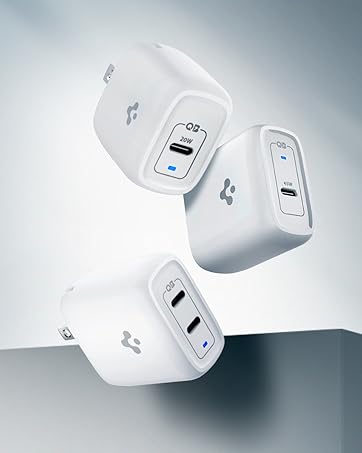
Figure 4: Power Quality Technology minimizes ripple noise for stable power and reduced device damage.
5. Solución de problemas
If you encounter issues with your Spigen 40W Dual USB C GaN Wall Charger, please refer to the following common troubleshooting steps:
- El dispositivo no se carga:
- Asegúrese de que el cargador esté enchufado de forma segura a un tomacorriente de pared que funcione.
- Verifique que el cable USB-C esté conectado correctamente tanto al cargador como al dispositivo.
- Intente utilizar un cable USB-C diferente para descartar que el cable sea defectuoso.
- Pruebe el cargador con un dispositivo diferente para confirmar la funcionalidad del cargador.
- Carga lenta:
- Confirm your device supports fast charging and that you are using a compatible fast-charging cable.
- If two devices are connected, remember that the 40W total output is split (20W per port). For maximum speed on a single device, ensure only one device is connected.
- Cierre todas las aplicaciones que consumen mucha energía y que se estén ejecutando en segundo plano en su dispositivo.
- Calentamiento excesivo:
- It is normal for chargers to become warm during operation. However, if the charger becomes excessively hot, disconnect it immediately.
- Asegúrese de que el cargador esté en un área bien ventilada y no cubierto por nada que pueda atrapar el calor.
- Avoid charging in direct sunlight or extremely hot environments.
- Charging Indicator Not Lit:
- Check the power connection to the wall outlet and ensure the charger is receiving power.
- If the indicator remains off, the charger may be faulty.
Video 2: An influencer's guide on how to use USB C GaN Tech Wall Chargers, providing general usage tips.
6. Especificaciones
| Característica | Detalle |
|---|---|
| Dimensiones del producto | 1.91 x 1.09 x 1.86 pulgadas |
| Peso del artículo | 2.47 onzas |
| Número de modelo del artículo | PE2013UJ |
| Tecnologías de conectividad | USB |
| Características especiales | Charging Indicator, Fast Charging, Lightweight Design, Retractable Plug, Short Circuit Protection |
| Color | Blanco |
| Fabricante | Spigen |
| Tipo de conector | USB tipo C |
| Vol de entradatage | 240 voltios |
| Puertos USB totales | 2 |
| Quétage | 40 vatios |
7. Garantía y soporte
The Spigen 40W Dual USB C GaN Wall Charger comes with a Garantía de 24 meses. For any product-related inquiries, technical assistance, or warranty claims, please contact Spigen customer service. Our friendly customer service team is available to assist you.
Please refer to the contact information provided in your product packaging or visit the official Spigen websitio para detalles de soporte.


