1. Introducción
Thank you for choosing the MEDION MD19601 Robot Vacuum Cleaner. This device is designed to provide efficient and automated cleaning for your home, combining vacuuming and mopping functionalities. This manual provides essential information for the safe and effective use, setup, operation, and maintenance of your robot vacuum cleaner. Please read it thoroughly before first use and keep it for future reference.

The MEDION MD19601 Robot Vacuum Cleaner on a wooden floor, showcasing its sleek design and low profile.
2. Instrucciones de seguridad
- Lea atentamente todas las instrucciones antes de utilizar el aparato.
- This appliance is for indoor household use only. Do not use outdoors or on commercial or industrial surfaces.
- Do not allow children to operate the robot vacuum cleaner. Supervise children and pets when the robot is operating.
- Ensure the power adapter and charging station are placed in a dry area, away from water or moisture.
- Do not use the robot vacuum cleaner to pick up large debris, liquids, burning or smoking objects, or sharp objects.
- Before use, clear the area of loose cables, small objects, rugs with long fringes, and anything that could entangle the brushes.
- Do not operate the robot vacuum cleaner if it is damaged or malfunctioning. Contact customer support for assistance.
- Only use the original charging station and power adapter provided with the device.
3. Contenido del paquete
Por favor, revise el contenido del paquete al desembalarlo. Si falta algún artículo o está dañado, contacte con atención al cliente.
- MEDION MD19601 Robot Vacuum Cleaner
- Estación de carga
- Adaptador de corriente
- 2 cepillos laterales (preinstalados)
- 2 x Spare Side Brushes
- Tanque de agua
- 2 x Almohadillas para fregona
- 1 x Spare Filter
- Cepillo de limpieza

All components included with the MEDION MD19601 Robot Vacuum Cleaner: the robot, charging station, power adapter, cleaning brush, spare side brushes, spare filter, water tank, and mop pads. Dimensions are indicated as 325mm diameter and 80mm height.
4. Producto terminadoview
Características principales:
- Limpieza 2 en 1: Combines powerful vacuuming with effective mopping for comprehensive floor cleaning.
- Control inteligente Control your robot via the dedicated MEDION Robots app (Android/iOS), or through voice commands using Amazon Alexa and Google Assistant.
- Navegación inteligente: Equipped with sensors and bumpers for collision detection, obstacle avoidance, and stair detection, protecting both your furniture and the robot.
- Limpieza eficiente: Features powerful side and main brushes for thorough dirt and dust collection.
- Batería de larga duración: A powerful battery allows for up to 100 minutes of continuous cleaning on a single charge, with automatic return to the charging station.
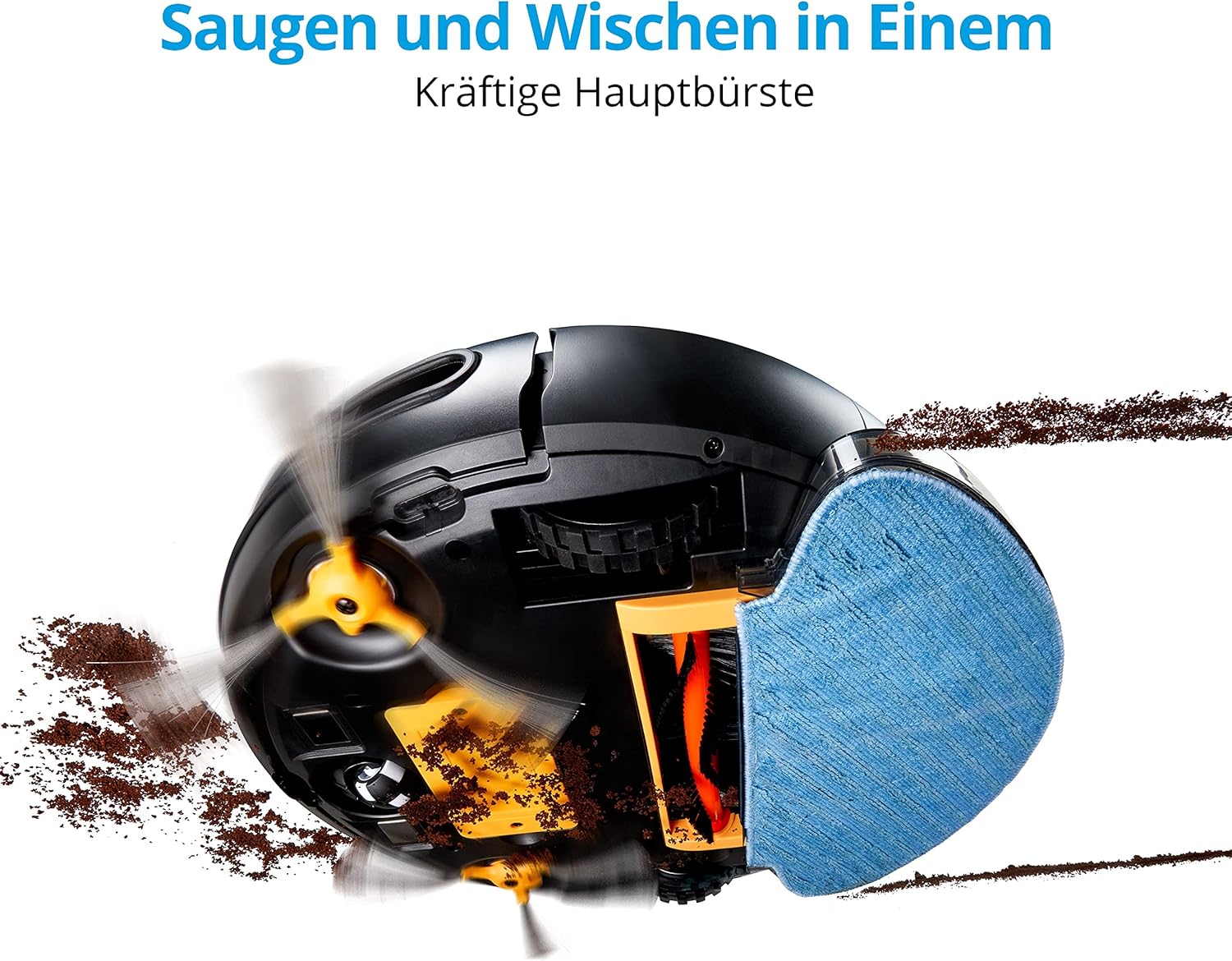
Envés view of the MEDION MD19601 Robot Vacuum Cleaner demonstrating its powerful main brush and side brushes for simultaneous vacuuming and mopping.

De arriba hacia abajo view of the MEDION MD19601 Robot Vacuum Cleaner, highlighting its clean white and black design with the power button and MEDION logo.
5. Configuración
5.1 Ubicación de la estación de carga
- Place the charging station against a wall in an open area, ensuring at least 0.5 meters (1.6 feet) of clear space on both sides and 1.5 meters (5 feet) in front.
- Connect the power adapter to the charging station and plug it into a power outlet. Ensure the indicator light on the charging station is on.
5.2 Carga inicial
- Place the robot vacuum cleaner onto the charging station, aligning its charging contacts with those on the station.
- Allow the robot to charge completely before its first use. The indicator light on the robot will change to indicate a full charge (refer to the robot's LED indicator guide for details).
5.3 Instalación y emparejamiento de la aplicación
- Download the "MEDION Robots" app from the App Store (iOS) or Google Play Store (Android).
- Abra la aplicación y cree una cuenta o inicie sesión.
- Follow the in-app instructions to add your MD19601 robot vacuum cleaner. This typically involves connecting your smartphone to a 2.4GHz Wi-Fi network and then connecting the robot to the same network.
- Once paired, you can control the robot, set schedules, and monitor its status via the app.

A smartphone screen displaying the MEDION Robots app interface, showing options for manual control, scheduling, cleaning modes, push notifications, and suction power adjustment.
6. Instrucciones de funcionamiento
6.1 Inicio/detención de la limpieza
- Inicio manual: Presiona el botón de encendido del robot una vez para comenzar a limpiar. Presiónalo de nuevo para pausar.
- Control de la aplicación: Use the "Start" or "Clean" button within the MEDION Robots app to initiate or stop a cleaning cycle.
6.2 Modos de limpieza
El robot ofrece varios modos de limpieza accesibles a través de la aplicación:
- Modo automático: El robot navega de forma inteligente y limpia toda el área accesible.
- Modo de borde: El robot limpia a lo largo de las paredes y los bordes de los muebles.
- Spot/Circle Mode: El robot limpia un área específica en un patrón en espiral para una limpieza concentrada.
6.3 Programación
Use the MEDION Robots app to set cleaning schedules for specific times and days. The robot will automatically start cleaning according to your programmed schedule.
6.4 Función de fregado
- Fill the water tank with clean water. You may add a small amount of neutral floor cleaner suitable for robot vacuums (avoid foaming detergents).
- Attach a clean mop pad securely to the water tank.
- Insert the filled water tank with the mop pad into the designated slot on the robot.
- Inicia un ciclo de limpieza. El robot aspirará y fregará simultáneamente.
- Después de fregar, retire el depósito de agua y vacíe el agua restante. Limpie la mopa.
6.5 Control de voz
Integrate your MEDION MD19601 with Amazon Alexa or Google Assistant for convenient voice control. Follow the instructions in the MEDION Robots app or your smart home assistant app to link the devices. Common commands include:
- "Alexa, start MEDION Robot cleaning."
- "Hey Google, tell MEDION Robot to stop."

The MEDION MD19601 Robot Vacuum Cleaner with a speech bubble indicating voice control compatibility with Alexa and Google Assistant.

Una sobrecarga view of the MEDION MD19601 Robot Vacuum Cleaner on a wooden floor, illustrating its intelligent navigation system mapping a cleaning path around obstacles like a laptop.
7. Mantenimiento
El mantenimiento regular garantiza un rendimiento óptimo y prolonga la vida útil de su robot aspirador.
7.1 Limpieza del depósito de basura y del filtro
- Abra la cubierta superior del robot y retire el cubo de basura.
- Vacíe el contenido del cubo de basura en un bote de basura.
- Remove the filter assembly (HEPA filter and sponge filter). Tap them gently to remove dust. Do not wash the HEPA filter with water.
- Enjuague el depósito de basura con agua si es necesario, asegurándose de que esté completamente seco antes de volver a insertarlo.
- Vuelva a montar los filtros y el depósito de polvo y luego colóquelos nuevamente en el robot.
7.2 Brush Cleaning (Side and Main)
- Dé la vuelta al robot.
- Remove the side brushes by gently pulling them upwards. Remove any hair or debris wrapped around them.
- Remove the main brush cover and then the main brush. Use the provided cleaning tool to cut and remove tangled hair or fibers.
- Reinstall the main brush and cover, then reattach the side brushes.

Detallado view of the underside of the MEDION MD19601 Robot Vacuum Cleaner, showing the main brush, side brushes, and wheels.
7.3 Limpieza del sensor
Wipe the cliff sensors (located on the bottom of the robot) and the bumper sensors (on the front) with a clean, dry cloth to ensure proper operation.
7.4 Mantenimiento del tanque de agua y la mopa
- Después de cada sesión de limpieza, vacíe el agua restante del tanque.
- Rinse the water tank thoroughly and allow it to air dry.
- Remove the mop pad and wash it by hand or machine. Allow it to dry completely before reuse.
8. Solución de problemas
| Problema | Posible causa | Solución |
|---|---|---|
| El robot no arranca ni responde. | Batería baja; Interruptor de encendido apagado; Robot atascado. | Cargue el robot; asegúrese de que el interruptor de encendido esté encendido; elimine los obstáculos. |
| El robot no puede regresar a la estación de carga. | Charging station blocked; Robot too far from station. | Ensure clear space around charging station; Manually place robot closer. |
| Bajo rendimiento de limpieza. | Cubo de basura lleno; cepillos enredados; filtro obstruido. | Vaciar el depósito de polvo; limpiar los cepillos; limpiar o sustituir el filtro. |
| Problemas de conexión de la aplicación. | Contraseña de Wi-Fi incorrecta; enrutador demasiado lejano; red Wi-Fi de 5 GHz. | Verificar la contraseña de Wi-Fi; acercar el robot al enrutador; asegurarse de que se utilice Wi-Fi de 2.4 GHz. |
| La función de trapeador no funciona. | Tanque de agua vacío; la almohadilla del trapeador no está colocada correctamente. | Fill water tank; Attach mop pad securely. |
9. Especificaciones
| Característica | Especificación |
|---|---|
| Marca | MEDION |
| Número de modelo | MD19601 |
| Color | Blanco |
| Nivel de ruido | 44 decibelios |
| Duración de la batería | Hasta 100 minutos |
| Dimensiones del producto (L x An x Al) | 32.5 x 32.5 x 8 cm |
| Peso del artículo | 2.9 kilogramos |
| Característica especial | Sin cable |
| Compatibilidad | Amazon Echo (Alexa), Asistente de Google |
| Tipo de filtro | Filtro HEPA |
10. Garantía y soporte
MEDION offers a commitment to quality and support for its products.
- Disponibilidad de repuestos: Spare parts for the MEDION MD19601 are available for a period of 2 years from the date of purchase.
- For further assistance, troubleshooting, or to inquire about warranty services, please refer to the official MEDION websitio o comuníquese directamente con su servicio de atención al cliente.


