Producto terminadoview
The UGREEN 90-Degree USB C to USB 3.0 Cable is designed for efficient charging and high-speed data transfer. Featuring a durable braided nylon exterior and a convenient right-angle USB-C connector, this cable provides a stable and secure connection for various compatible devices. It supports fast charging up to 18W and data transfer speeds of up to 5Gbps.

Image: The UGREEN 90-Degree USB C to USB 3.0 cable, showcasing its braided design and right-angle connector.
Instrucciones de instalación
To set up your UGREEN 90-Degree USB C to USB 3.0 Cable, follow these simple steps:
- Identificar conectores: One end of the cable has a standard USB-A (USB 3.0) connector, and the other end has a 90-degree USB-C connector.
- Connect to Power Source or Host Device: Insert the USB-A connector into a compatible USB-A port on a wall charger, power bank, computer, or other host device.
- Conéctese a su dispositivo: Insert the 90-degree USB-C connector into the USB-C port of your smartphone, tablet, or other compatible device. The right-angle design helps reduce strain on the cable and device port, especially in tight spaces or during use.
- Verificar conexión: Ensure both connectors are fully inserted. Your device should indicate that it is charging or connected for data transfer.
Instrucciones de funcionamiento
Carga rápida
This cable supports fast charging up to 18W, provided your device and power adapter also support fast charging protocols. For optimal fast charging performance, use a compatible 18W or higher power adapter.

Image: An illustration demonstrating the 18W fast charging capability, showing a device charging from 0% to 70% in 60 minutes.
Transferencia de datos a alta velocidad
The UGREEN cable supports USB 3.0 standards, enabling data transfer speeds of up to 5Gbps. This allows for quick synchronization of files, photos, and videos between your USB-C device and a computer with a USB 3.0 port.
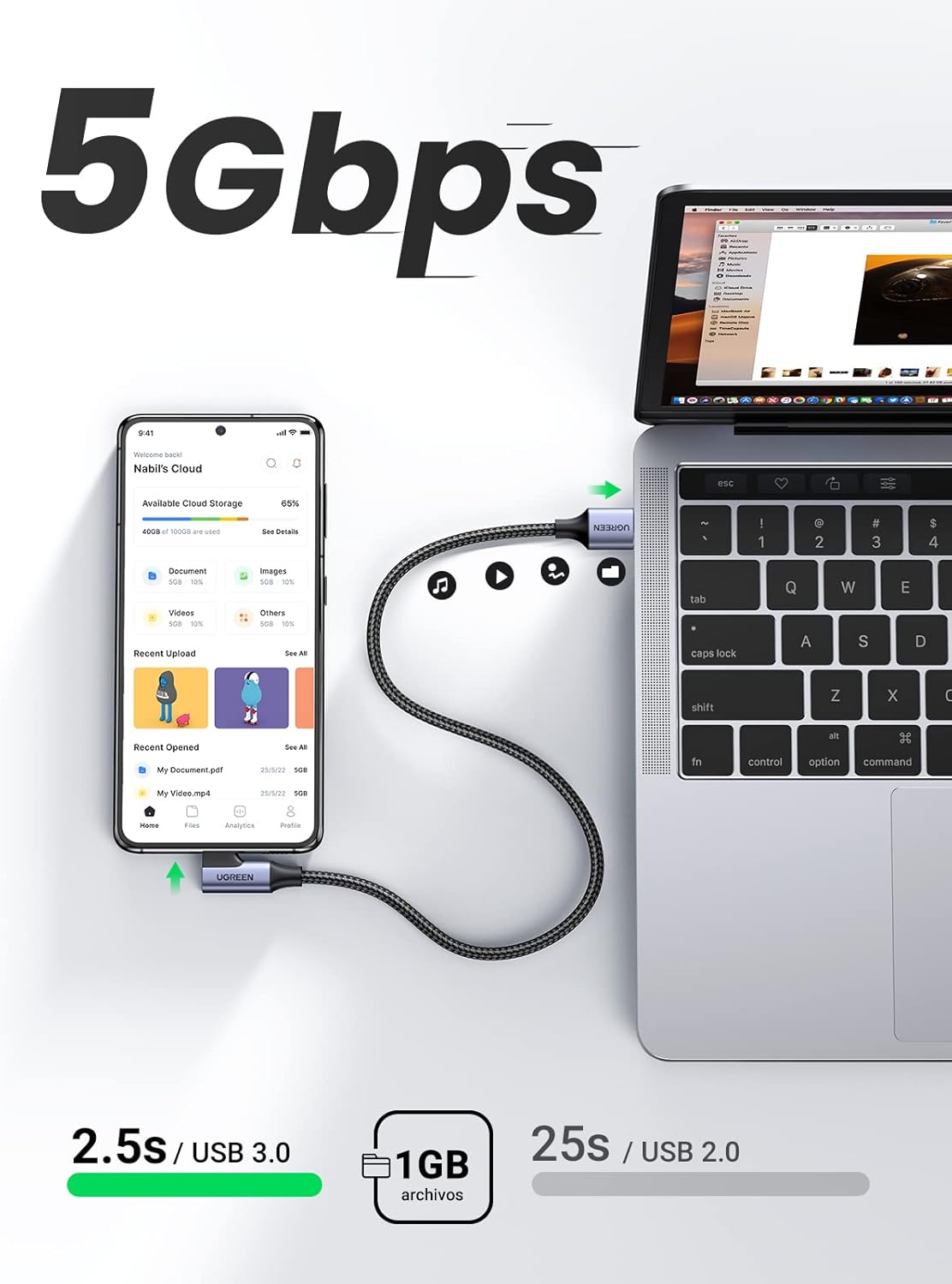
Image: A visual representation of 5Gbps data transfer speed, showing a phone connected to a laptop for file sincronización.
90-Degree Connector Benefits
The 90-degree (right-angle) USB-C connector is designed for enhanced convenience and durability. It allows the cable to sit flush against your device, preventing awkward bends and reducing strain on the cable and port. This is particularly useful when using your device while charging, such as during gaming or in a car.

Imagen: Examples of the 90-degree connector in use, including a phone mounted in a car and a user holding a phone horizontally for gaming.
Mantenimiento
Proper maintenance ensures the longevity and optimal performance of your UGREEN cable.
- Evite las flexiones extremas: While the cable is designed to be flexible and durable, avoid sharp or excessive bends, especially near the connectors, to prevent internal wire damage.
- Conservar adecuadamente: When not in use, coil the cable loosely. Avoid tangling or tightly wrapping it around objects.
- Manténlo limpio: Periodically wipe the cable and connectors with a dry, soft cloth to remove dust and debris. Do not use liquid cleaners directly on the connectors.
- Tratar con cuidado: Al desconectarlo de un dispositivo o fuente de alimentación, tire siempre del cabezal del conector, no del cable en sí.

Image: A close-up of the UGREEN braided cable and connector, highlighting its durable and flexible construction, designed to withstand over 10,000 bend tests.
Solución de problemas
If you encounter issues with your UGREEN cable, consider the following troubleshooting steps:
- El dispositivo no se carga:
- Asegúrese de que ambos extremos del cable estén bien conectados.
- Pruebe con un adaptador de corriente o toma de corriente diferente.
- Pruebe el cable con otro dispositivo compatible para descartar un problema específico del dispositivo.
- Check the device's charging port for any obstructions or damage.
- Carga lenta:
- Verify that your power adapter supports fast charging (e.g., 18W or higher).
- Ensure your device also supports fast charging.
- Cierre todas las aplicaciones que consumen mucha energía y que se estén ejecutando en segundo plano en su dispositivo.
- Data Transfer Issues or Slow Speed:
- Confirm that the USB-A port on your computer or host device is a USB 3.0 port (often blue inside).
- Ensure your device's USB-C port is functioning correctly for data transfer.
- Intente conectarse a un puerto USB diferente en su computadora.
- Reinicie tanto el dispositivo como la computadora.
- Conexión intermitente:
- Inspeccione el cable y los conectores para detectar cualquier daño visible.
- Asegúrese de que los conectores estén limpios y libres de residuos.
- Avoid putting strain on the cable while connected.

Image: A diagram illustrating the superior internal protections of the UGREEN cable, including 56KΩ resistance and multi-protections for stable voltage, garantizando un funcionamiento seguro y fiable.
Presupuesto
| Marca | UGREEN |
| Número de modelo | 20300 |
| Tipo de conector | USB-A to USB-C (90-Degree) |
| Velocidad de transferencia de datos | Hasta 5 Gbps (estándar USB 3.0) |
| Potencia de carga | Hasta 18W |
| Material del cable | Nailon trenzado |
| Longitud del cable | 2 metros |
| Dimensiones del producto | 19.05 x 12.7 x 1.02 cm |
| Peso del producto | 60 gramos |
Compatibilidad
This cable is widely compatible with devices featuring a USB-C port, including but not limited to:
- Samsung Galaxy S23/S22/S21/A73/A72/A53 series
- LG smartphones
- Huawei P50/P40 series
- Google Pixel 7/6/5 series
- Xiaomi Redmi Note 11/10 series
- Galaxy Tab S6 Lite/S6 and other USB-C tablets
- Gaming controllers (e.g., PS4, PS5) with USB-C ports
- Devices compatible with Android Auto

Image: A graphic illustrating the universal compatibility of the UGREEN cable with various devices, including Samsung Galaxy, Huawei, Google Pixel, Xiaomi, and tablets.
Garantía y soporte
UGREEN products are manufactured to high-quality standards. For information regarding warranty, technical support, or customer service, please refer to the official UGREEN webSitio web o contacte a su vendedor. Conserve el recibo de compra para reclamaciones de garantía.
También puedes visitar el Tienda de la marca UGREEN Para obtener más información sobre el producto y recursos de soporte.


