1. Introducción
Gracias por la compraasing the JOYTRIP Auto Tracking Phone Holder, Model T2. This device is designed to enhance your video recording experience by automatically tracking your face or body, providing stable and dynamic footage without the need for manual adjustment or additional applications. It is ideal for video calls, live streaming, vlogging, and other hands-free video activities. Please read this manual thoroughly before use to ensure proper operation and maintenance.
2. Producto terminadoview
2.1 Características principales
- Seguimiento automático: Recognizes and tracks faces or bodies with 360° rotation.
- No se requiere aplicación: Features a built-in camera system for intelligent tracking, eliminating the need for external applications.
- Rotación versátil: Offers 360° horizontal rotation and adjustable clip for various angles.
- Batería recargable: Integrated 2200 mAh lithium battery provides 6-8 hours of continuous operation.
- Compatibilidad con trípode: Equipped with a standard 1/4" screw thread for mounting on tripods.
- Diseño portátil: Compact and detachable for easy transport.
2.2 Contenido del paquete
Por favor revise el paquete para ver los siguientes artículos:
- JOYTRIP Auto Tracking Phone Holder (Model T2)
- USB Charging Cable (Type-C, inferred)
- Manual de usuario (este documento)

Image 2.1: The JOYTRIP Auto Tracking Phone Holder with a smartphone mounted, showing a family video call. The device is black with a silver band.

Image 2.2: An illustration detailing the key functions of the phone holder, such as 360° rotation, face/body tracking, and tripod compatibility.
3. Configuración
3.1 Carga del dispositivo
- Locate the charging port on the device (usually at the back or side).
- Conecte el cable de carga USB provisto al dispositivo y un adaptador de corriente USB adecuado (no incluido).
- The charging indicator light will illuminate (e.g., red) during charging and turn off or change color (e.g., green) when fully charged.
- A full charge typically takes approximately 3-4 hours and provides 6-8 hours of usage.
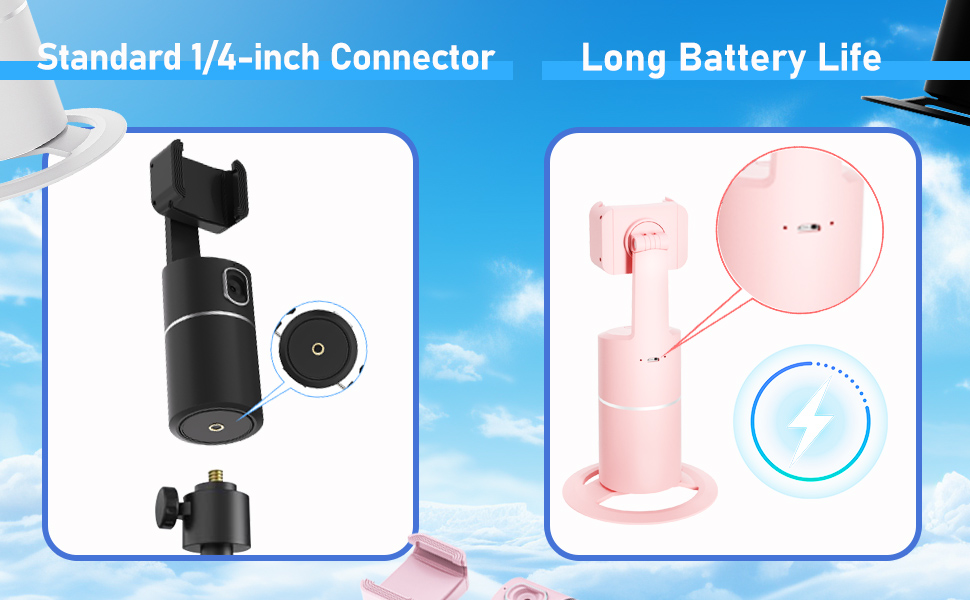
Image 3.1: Detail of the charging port and battery life indicator on the device.
3.2 Montaje de su teléfono inteligente
- Gently pull open the phone clip on the top of the holder.
- Place your smartphone into the clip, ensuring it is securely held. The clip supports phones between 2 to 3.2 inches in width.
- Adjust the phone's position within the clip for optimal balance and camera alignment.

Image 3.2: Dimensions of the phone holder and how to adjust the phone clip.
3.3 Encendido / Apagado
- To power on: Press and hold the power button (usually located on the front or top of the base) for a few seconds until the indicator light illuminates.
- Para apagar: Mantenga presionado el botón de encendido nuevamente hasta que la luz indicadora se apague.
4. Instrucciones de funcionamiento
4.1 Seguimiento automático
- Ensure the device is powered on and your phone is securely mounted.
- Position yourself in front of the device's built-in camera. The device will automatically detect and begin tracking your face or body.
- The holder will rotate 360° horizontally to follow your movements.
- The device operates independently of your phone's camera or any specific app, allowing you to use any application for video calls, streaming, or recording.

Image 4.1: The phone holder automatically tracking a person during an exercise session.
4.2 Cambio entre los modos horizontal y vertical
The phone holder allows for easy switching between horizontal (landscape) and vertical (portrait) orientations. Simply rotate your phone within the clip to the desired orientation. The device will continue to track.

Image 4.2: Demonstrates the phone holder supporting both horizontal and vertical phone orientations.
4.3 Montaje en trípode
The base of the JOYTRIP Auto Tracking Phone Holder features a standard 1/4-inch screw thread. This allows you to mount the device onto most tripods or stands for increased height and stability.
- Locate the 1/4-inch screw thread at the bottom of the device.
- Screw the device onto your tripod's mounting plate until secure.
- Ensure the device is stable before mounting your phone.

Image 4.3: Detail of the 1/4-inch screw thread for tripod compatibility.
5. Mantenimiento
5.1 Limpieza
- Limpie el dispositivo con un paño suave y seco.
- No utilice limpiadores abrasivos, disolventes o productos químicos fuertes, ya que pueden dañar la superficie o los componentes internos.
- Keep the camera lens clean for optimal tracking performance.
5.2 Cuidado de la batería
- Para prolongar la vida útil de la batería, evite descargarla por completo con frecuencia.
- Cargue el dispositivo periódicamente, incluso si no lo utiliza durante períodos prolongados (por ejemplo, una vez cada 3 meses).
- Guarde el dispositivo en un lugar fresco y seco, alejado de la luz solar directa y de temperaturas extremas.
6. Solución de problemas
| Problema | Posible causa | Solución |
|---|---|---|
| El dispositivo no se enciende. | Batería baja. | Cargue el dispositivo completamente usando el cable USB provisto. |
| El seguimiento es inconsistente o se detiene. |
|
|
| El teléfono no está bien sujeto. | Phone width exceeds clip capacity or is too small. | Ensure your phone's width is between 2 and 3.2 inches. Adjust the phone carefully within the clip. |
| Device does not rotate. | Tracking not activated or device malfunction. | Ensure the device is powered on and a subject is clearly in view of the camera. If the issue persists, contact customer support. |
7. Especificaciones
| Característica | Detalle |
|---|---|
| Número de modelo | T2 |
| Marca | VIAJE DE ALEGRIA |
| Dimensiones del producto | 3.93 x 3.93 x 7.75 pulgadas (10 x 10 x 19.7 cm) |
| Peso del artículo | 6.6 onzas (187 gramos) |
| Batería | Batería de iones de litio de 2200 mAh (incluida) |
| Duración de la batería | 6-8 horas (uso continuo) |
| Ángulo de rotación | 360 ° horizontal |
| Campo de View (Lente) | 105° |
| Velocidad de rotación | 42° por segundo |
| Ancho de teléfono compatible | 2 - 3.2 pulgadas (aprox. 5 - 8.1 cm) |
| Hilo de trípode | Rosca de tornillo estándar de 1/4 de pulgada |
| Código Postal | 797550711288 |
8. Garantía y soporte
For information regarding warranty coverage, please refer to the warranty card included with your purchase or contact the retailer where the product was acquired.
If you encounter any issues or have questions about your JOYTRIP Auto Tracking Phone Holder, please contact JOYTRIP customer support through their official websitio o la información de contacto proporcionada con el embalaje de su producto.


