1. Introducción
The Flycatcher smART Sketcher 2.0 Projector is an educational tool designed to assist users in drawing and tracing. This device projects images onto paper, allowing for easy tracing and creative development. It features pre-loaded activities and can connect to a mobile application for custom image projection.
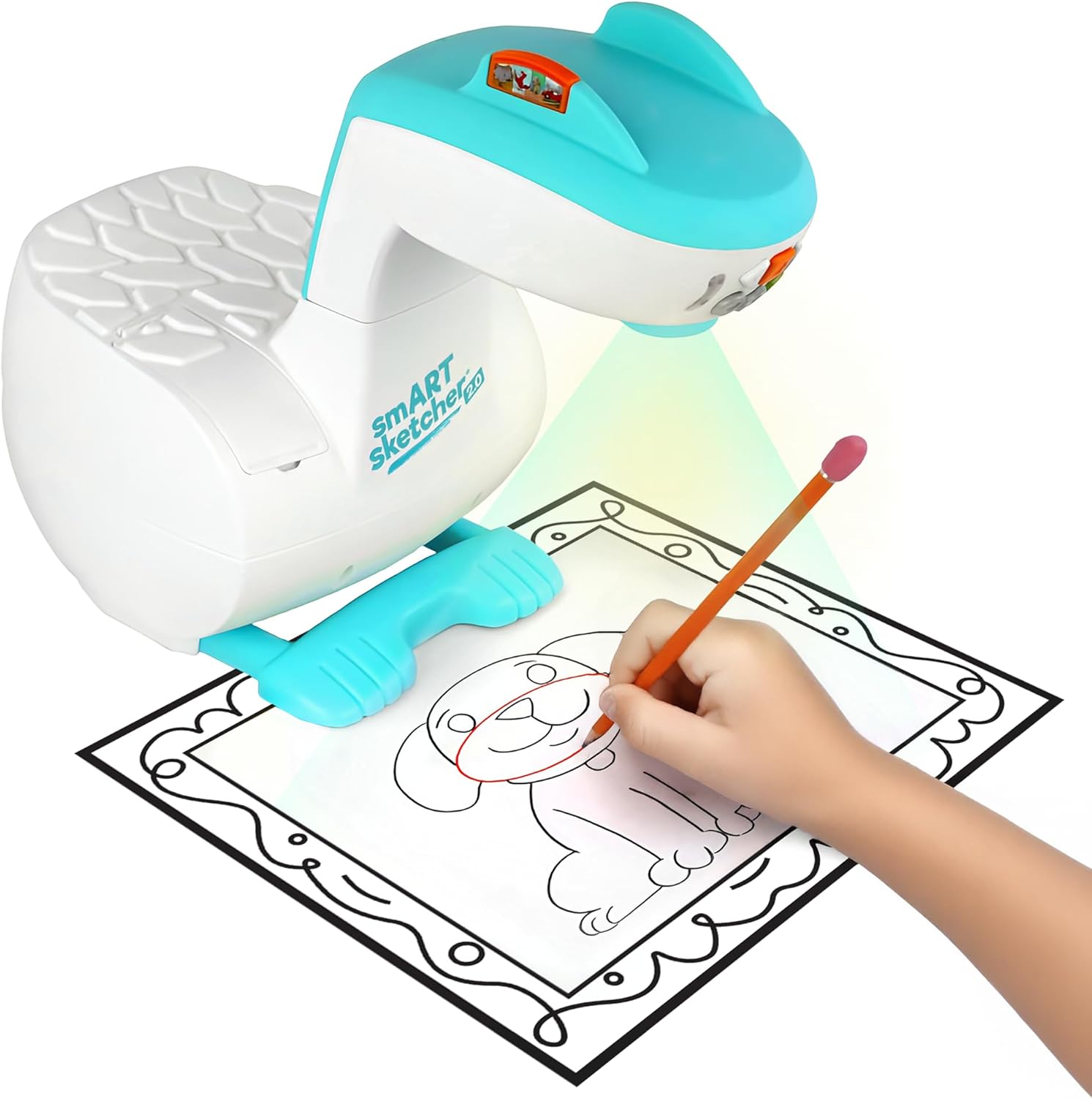
Image 1.1: The smART Sketcher 2.0 Projector in operation, demonstrating a child tracing a projected image.
2. Información de seguridad
ADVERTENCIA: PELIGRO DE ASFIXIA - Piezas pequeñas. No apto para niños menores de 3 años.
Please ensure all small components are kept out of reach of young children to prevent choking hazards. Adult supervision is recommended during use.
3. ¿Qué hay en la caja?
Verifique que todos los componentes estén presentes antes del ensamblaje y uso:
- smART Sketcher 2.0 Projector Unit
- Cable USB
- Activity Cartridge with 60+ pre-loaded step-by-step drawing activities
- Manual de instrucciones (este documento)
Note: Drawing materials such as paper, pencils, and markers are not included.

Image 3.1: Packaging contents, including the projector, USB cable, and activity cartridge.
4. Montaje
Follow these steps to assemble your smART Sketcher 2.0 Projector:
- Preparar la base: Place the main projector base unit on a stable, flat surface. Ensure the base is oriented correctly with the feet facing downwards.
- Attach the Projector Head: Take the projector head unit. Align the connector on the projector head with the corresponding slot on the main base unit.
- Asegure la cabeza: Gently push the projector head down into the base until it clicks securely into place. Ensure it is firmly attached and does not wobble.

Image 4.1: The projector base unit, ready for head attachment.

Image 4.2: The detachable projector head unit.

Image 4.3: Projector head securely attached to the base.
5. Fuente de alimentación
The smART Sketcher 2.0 Projector can be powered via the included USB cable. Connect the USB cable to the projector and to a compatible USB power source (e.g., a wall adapter, computer USB port, or power bank). The projector can also operate on batteries (not included) for portable use, though battery life may vary.
6. Funcionamiento básico
Once assembled and powered, the projector is ready for use.
- Encendido/apagado: Locate the power button on the projector head. Press it to turn the device on or off.
- Botones de navegacion: Use the arrow buttons (left, right, up, down) to navigate through the pre-loaded activities or app content. The 'Select' button (often a central button) confirms your choice.
- Ajuste de enfoque: If the projected image appears blurry, gently rotate the lens on the projector head to adjust the focus until the image is clear.

Image 6.1: The projector's control panel and projection area.
7. Using Pre-loaded Activities
The smART Sketcher 2.0 comes with an activity cartridge containing over 60 step-by-step drawing activities.
- Insertar cartucho: Locate the cartridge slot on the projector. Gently insert the activity cartridge until it clicks into place.
- Seleccionar actividad: Use the navigation buttons to browse through the available activities. Each activity provides step-by-step instructions for drawing.
- Empezar a dibujar: Place a piece of paper under the projector lens. The selected image will be projected onto the paper. Follow the projected lines to trace and draw.

Image 7.1: The activity cartridge displaying a selection of pre-loaded drawing options.
8. Conectividad de la aplicación
Enhance your drawing experience by connecting the projector to the smART Sketcher 2.0 app on your smartphone or tablet.
- Descargar la aplicación: Download the free smART Sketcher 2.0 app from the App Store (for iOS devices) or Google Play Store (for Android devices).
- Habilitar Bluetooth: Asegúrese de que Bluetooth esté habilitado en su dispositivo móvil.
- Connect to Projector: Open the smART Sketcher 2.0 app. The app will search for nearby projectors. Select your projector from the list to establish a Bluetooth connection.
- Project Custom Images: Within the app, you can take photos or select images from your device's gallery. The app will process the image, allowing you to project it onto your paper for tracing.

Image 8.1: Demonstrating Bluetooth connectivity between a smartphone and the projector for custom image projection.
9. Ajuste de proyección
For optimal tracing, ensure the projected image is clear and appropriately sized.
- Enfocar: Utilice el anillo de enfoque en la lente del proyector para enfocar la imagen.
- Tamaño: Adjust the distance between the projector and the paper to change the size of the projected image. Moving the projector closer will make the image smaller, and moving it further away will make it larger.
- Iluminación: For best visibility, use the projector in a dimly lit room.
10. Mantenimiento
Proper care will extend the life of your smART Sketcher 2.0 Projector.
- Limpieza: Limpie el exterior del proyector con un paño suave y seco. No utilice limpiadores abrasivos ni disolventes.
- Cuidado de la lente: If the projector lens becomes dusty, gently clean it with a lens cleaning cloth. Avoid touching the lens directly with your fingers.
- Almacenamiento: Guarde el proyector en un lugar fresco y seco, alejado de la luz solar directa y de temperaturas extremas.
11. Solución de problemas
| Problema | Posible causa | Solución |
|---|---|---|
| El proyector no se enciende. | No power supply or low batteries. | Ensure USB cable is securely connected to a power source, or replace batteries. |
| La imagen proyectada está borrosa. | Lens is out of focus. | Gire el anillo de enfoque en la lente del proyector hasta que la imagen esté clara. |
| No se puede conectar a la aplicación a través de Bluetooth. | Bluetooth is off on mobile device or app issue. | Ensure Bluetooth is enabled on your device. Restart the app and the projector. Check app permissions. |
| Image is too small/large or off the paper. | Incorrect distance from paper. | Adjust the projector's distance from the paper to achieve the desired image size and position. |
12. Especificaciones
- Marca: Mosquero
- Nombre del modelo: smART sketcher 2.0
- Número de modelo del artículo: smART Sketcher 2.0 Projector
- Dimensiones (L x An x Al): 8 x 9.25 x 11 pulgadas
- Peso del artículo: 2.7 libras (aproximadamente 1.22 kg)
- Material: Plástico
- Característica especial: Conectividad Bluetooth
- Componentes incluidos: Projector, USB Cable, Activity Cartridge
- Código postal: 810099030082
13. Garantía y soporte
For warranty information and customer support, please refer to the official Flycatcher webSitio web o contacte directamente con el servicio de atención al cliente. Conserve su recibo de compra como comprobante para cualquier reclamación de garantía.
Para obtener más ayuda, visite el Flycatcher Store on Amazon.


