Introducción
This manual provides detailed instructions for the setup, operation, maintenance, and troubleshooting of your DAREU EK815s Mechanical Gaming Keyboard. Please read this manual thoroughly before using the product to ensure optimal performance and longevity.
The DAREU EK815s is a full-size mechanical gaming keyboard featuring durable blue switches, customizable rainbow backlighting, and anti-ghosting technology for a responsive and reliable user experience.

Image: DAREU EK815s Mechanical Gaming Keyboard, showcasing su disposición y diseño completo.
Contenido del paquete
Verifique que todos los artículos estén presentes en el paquete:
- DAREU EK815s Mechanical Gaming Keyboard
- Cable USB
- Manual de usuario (este documento)
Configuración
- Desembalaje del teclado: Carefully remove the DAREU EK815s keyboard and its accessories from the packaging.
- Conecte el cable USB: Insert the USB-C end of the provided cable into the port on the keyboard. Connect the standard USB-A end to an available USB port on your computer.
- Instalación del controlador: The keyboard is plug-and-play and typically does not require additional drivers for basic functionality. For advanced features like programmable keys and custom lighting effects, download the dedicated software from the official DAREU websitio.
- Colocación: Position the keyboard on a stable, flat surface. Adjust the integrated foot pads at the rear of the keyboard for your preferred typing angle.

Image: The keyboard features three cable routing outlets for organized cable management.
Instrucciones de funcionamiento
Características principales
- Interruptores mecánicos azules: The EK815s uses blue mechanical switches, known for their tactile bump and audible click, providing distinct feedback for each keystroke. These switches have a 4mm key stroke travel, 50 ± 4G key elastic force, and a lifespan of 65 million keystrokes.
- Anti-efecto fantasma: Advanced anti-ghosting technology ensures that multiple simultaneous key presses are registered accurately without conflict, crucial for gaming.
- Teclas de doble disparo: The keycaps are made using a double-shot injection molding process, ensuring legends do not fade over time and are easy to clean.
- Panel de aleación de aluminio: The keyboard features an aluminum alloy metal panel, providing durability and resistance against rust, impacts, sweat, and corrosion.

Image: Detailed diagram of the blue mechanical switches, highlighting their specifications.
Control de iluminación
The DAREU EK815s features adjustable rainbow backlighting with multiple effects. Use the following shortcut keys to control the lighting:
- FN + F1 to F5: Some characters are illuminated and can be customized.
- FN+F6: Cycle through Wave effect / Shuttle effect.
- FN+F7: Cycle through Point light effect / Ripples effect.
- FN+F11: Change Light up mode.
- FN + Inicio: Activate Sidelight mode.
- FN + '=' / '-': Ajustar el brillo.
- FN + Re Pág / Av Pág: Adjust Lighting speed.
- FN + Ins / Del: Adjust Sidelight speed.

Image: The keyboard displaying its RGB flank rainbow backlighting.

Image: The keyboard's durable aluminum alloy metal panel construction.
Funciones multimedia
The keyboard includes dedicated multimedia function keys for quick access to common controls. Refer to the keyboard layout for specific key assignments, typically accessed via the Function (FN) key in combination with F-keys.
Teclas programables
For advanced customization, the DAREU EK815s supports programmable keys. Download the official DAREU software from their website to customize key functions and create personalized macros and lighting profiles.
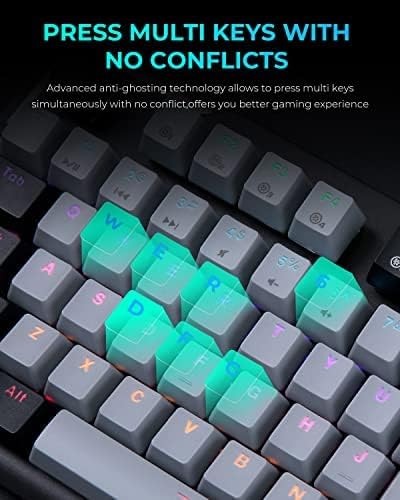
Image: A close-up of the keyboard demonstrating its anti-ghosting feature, allowing multiple keys to be pressed simultaneously.
Mantenimiento
- Limpieza general: Regularly clean the keyboard to prevent dust and debris buildup. Use a soft, dry cloth to wipe the surface. For deeper cleaning, use compressed air to clear debris from between the keycaps.
- Limpieza de teclas: The double-shot keycaps are designed for easy cleaning. If necessary, gently remove keycaps using a keycap puller (not included) and clean them with a mild soap solution and a soft brush. Ensure keycaps are completely dry before reattaching.
- Prevención de derrames: While the aluminum alloy panel offers some resistance to liquids, avoid spilling liquids directly onto the keyboard. In case of a spill, immediately disconnect the keyboard from your computer and allow it to dry completely before reconnecting.
- Almacenamiento: Cuando no utilice el teclado durante períodos prolongados, guárdelo en un entorno seco y sin polvo.
Solución de problemas
| Problema | Posible causa | Solución |
|---|---|---|
| Teclado no responde | Conexión USB suelta, puerto USB defectuoso, problema con el controlador. | Asegúrese de que el cable USB esté bien conectado. Pruebe con otro puerto USB. Reinicie el ordenador. Compruebe si hay problemas con los controladores en el Administrador de dispositivos. |
| Teclas que no se registran o se escriben dos veces | Escombros debajo de la tecla, interruptor defectuoso. | Clean under the affected keycap using compressed air. If the issue persists, the switch may be faulty and require professional service. |
| La retroiluminación no funciona o es incorrecta | Configuración de iluminación, falla del software. | Use FN key combinations to adjust brightness and mode. Restart the keyboard by unplugging and replugging. Reinstall the DAREU software if applicable. |
| Las teclas programables no funcionan | El software no está instalado o configurado correctamente. | Ensure DAREU software is installed and running. Verify key assignments within the software. Update software to the latest version. |
Presupuesto
- Modelo: EK815s
- Dimensiones: 17.72 x 5.51 x 1.57 pulgadas (450 x 140 x 40 mm)
- Peso: 2.9 libras (1.3 kg)
- Tipo de interruptor: Interruptores mecánicos azules
- Recorrido de la pulsación de tecla: 4 mm
- Fuerza elástica clave: 50 ± 4G
- Vida útil de las pulsaciones de teclas: 65 millones de veces
- Conectividad: USB-C
- Contraluz: Arcoíris RGB
- Material: Aluminio, Plástico
- Dispositivos compatibles: Consola de juegos, PC
- Características especiales: Backlit, Customizable Display Keys, Ergonomic, Water Resistant (panel), Wrist Rest (optional/model dependent)
- Fecha de primera disponibilidad: 26 de marzo de 2021
Garantía y soporte
The DAREU EK815s Mechanical Gaming Keyboard comes with a Garantía de 1 años A partir de la fecha de compra. Esta garantía cubre defectos de fabricación y problemas derivados del uso normal.
If you encounter any quality problems with your product within the 1-year warranty period, please contact DAREU customer support. Provide your purchase details and a description of the issue for assistance. Our support team is committed to helping you resolve any concerns.
For further assistance, product registration, or to download the latest software and drivers, please visit the official DAREU websitio o comuníquese directamente con su servicio de atención al cliente.


