1. Introducción
Thank you for choosing the LITIONITE Capsule 65W / 30,000mAh Power Bank. This portable power solution is designed to provide reliable and efficient charging for a wide range of devices, including laptops, smartphones, and tablets. Featuring Power Delivery (PD) 3.0 via USB-C and Quick Charge (QC) 3.0 via USB-A, it ensures fast and versatile charging capabilities. Please read this manual carefully to understand the product's features, operation, and maintenance.
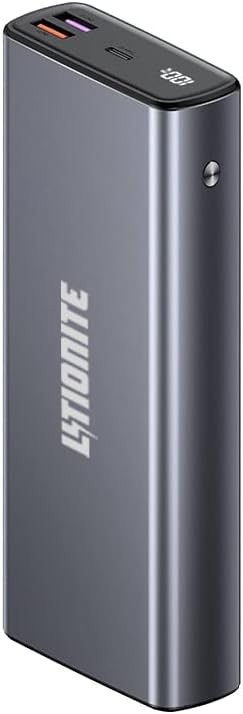
Image 1.1: LITIONITE Capsule 65W 30000mAh Power Bank, front view with LED display showing 100% charge.
2. Producto terminadoview
The LITIONITE Capsule Power Bank is a high-capacity portable charger with a robust aluminum casing. It integrates advanced charging technologies to support various devices.
Características principales:
- Alta capacidad: 30,000 mAh battery, capable of charging a smartphone multiple times or powering a laptop for extended periods.
- Power Delivery (PD) 3.0: One bidirectional USB-C port (65W output, 45W input) for fast charging of laptops and other high-power devices.
- Quick Charge (QC) 3.0: Two USB-A ports (18W and 22.5W) for rapid charging of compatible smartphones and tablets.
- Pantalla digital inteligente: Shows the remaining battery charge percentage.
- Modo de baja corriente: Optimized for charging small devices like smartwatches and Bluetooth headphones.
- Carga de transferencia: Allows simultaneous charging of the power bank and connected devices.
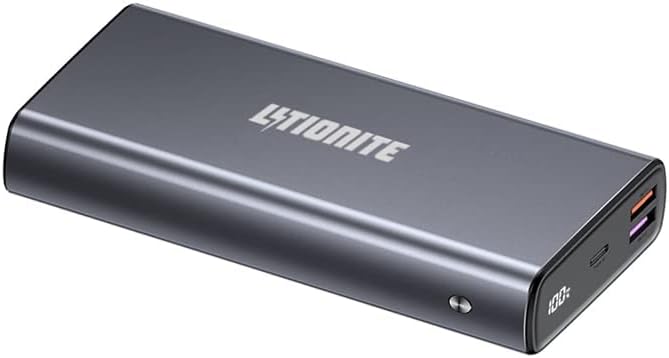
Imagen 2.1: En ángulo view of the LITIONITE Capsule Power Bank, highlighting its USB-C and USB-A ports.
3. Configuración
Carga inicial:
Before first use, fully charge your LITIONITE Capsule Power Bank. The power bank can be completely charged in approximately 3 hours using a 45W Power Delivery (PD) wall charger (not included). Alternatively, you can recharge the power bank using the original USB-C PD power supply of your laptop, smartphone, or tablet.
- Conecte un cable de carga USB-C al puerto USB-C del banco de energía.
- Connect the other end of the USB-C cable to a compatible 45W PD wall charger or device power supply.
- La pantalla digital mostrará el progreso de la carga. La batería externa estará completamente cargada cuando la pantalla muestre el 100 %.

Image 3.1: LITIONITE Capsule Power Bank shown with a USB-C to USB-C charging cable, illustrating the connection for charging.
4. Instrucciones de funcionamiento
Dispositivos de carga:
The power bank features one USB Type-C PD 3.0 port (65W output) and two USB-A ports with Quick Charge 3.0 technology (18W and 22.5W). All ports intelligently detect the connected device to deliver the fastest possible charge.
- Carga de un solo dispositivo: Connect your device to any available port using a compatible charging cable. The power bank will automatically begin charging.
- Carga de múltiples dispositivos: You can charge 2 or 3 devices simultaneously. When charging multiple devices, the total charging power is distributed, and the power output for each port may decrease to 15W (5V-3A).

Image 4.1: The LITIONITE Capsule Power Bank actively charging both a laptop and a smartphone.

Image 4.2: The LITIONITE Capsule Power Bank simultaneously charging multiple smartphones, demonstrating its multi-device capability.
Modo de baja corriente:
This mode is designed for charging small electronic devices that require very low current, such as smartwatches, fitness trackers, and Bluetooth headphones. To activate this mode:
- Double-click the power button on the power bank.
- Connect your low-current device. The power bank will provide a stable, low-power output.
- To exit low current mode, double-click the power button again.
Carga de transferencia:
The LITIONITE Capsule Power Bank supports pass-through charging. This feature allows you to charge the power bank itself while simultaneously charging other devices connected to it. This is useful for managing power when you have limited wall outlets.
Pantalla digital LED:
The intelligent digital display shows the remaining battery charge percentage. The display activates when you press the power button or connect a device for charging. It will automatically turn off after a short period of inactivity to conserve power.

Image 4.3: LITIONITE Capsule Power Bank charging a smartphone, with the phone screen indicating 66% charge.
5. Mantenimiento
El cuidado y mantenimiento adecuados prolongarán la vida útil de su banco de energía.
- Almacenamiento: Guarde el banco de energía en un lugar fresco y seco, alejado de la luz solar directa y de temperaturas extremas.
- Limpieza: Utilice un paño suave y seco para limpiar el exterior de la batería externa. No utilice limpiadores líquidos ni productos abrasivos.
- Evite las gotas: Proteja el dispositivo de caídas e impactos, que pueden dañar los componentes internos.
- Exposición al agua: No exponga el banco de energía al agua o la humedad.
- Uso regular: For optimal battery health, use and recharge the power bank at least once every three months.
6. Solución de problemas
If you encounter issues with your LITIONITE Capsule Power Bank, please refer to the following common solutions:
- El dispositivo no se carga:
- Asegúrese de que la batería externa tenga suficiente carga. Compruebe la pantalla LED.
- Verifique que el cable de carga esté conectado de forma segura tanto al banco de energía como a su dispositivo.
- Pruebe con un cable o puerto de carga diferente.
- Asegúrese de que su dispositivo sea compatible con las especificaciones de salida del banco de energía.
- Carga lenta:
- Asegúrese de estar utilizando un cable de carga rápida compatible y de que su dispositivo admita la carga rápida.
- If charging multiple devices, the output per port may be reduced. Try charging a single device.
- Check if the power bank is in Low Current Mode (double-click the power button to toggle).
- El banco de energía no carga:
- Ensure the wall charger is functioning correctly and provides sufficient power (e.g., 45W PD charger).
- Verify the charging cable is not damaged and is securely connected.
- Try a different wall charger or USB-C power source.
7. Especificaciones
| Característica | Especificación |
|---|---|
| Marca | Litionite |
| Modelo | Cápsula |
| Capacidad de la batería | 30,000 mAh |
| Composición de la batería | Iones de litio |
| USB-C Port (PD 3.0) | Output: 65W Max; Input: 45W Max |
| USB-A Port 1 (QC 3.0) | Salida: 18W Max |
| USB-A Port 2 (QC 3.0) | Salida: 22.5W Max |
| Volumentage | 20 Volts (Max Output) |
| Tipo de conector | USB tipo A, USB tipo C |
| Características especiales | Fast Charging, Compact, Digital LED Display, Low Current Mode, Pass-Through |
| Usos recomendados | Laptops (Macbook, Surface), Smartphones, Tablets, Cameras, Smartwatches |
| Fuente de poder | Cable eléctrico |
| Peso del artículo | 610 gramos |
| Color | Negro |
8. Garantía y soporte
LITIONITE products come with a European warranty. For any technical assistance or support inquiries, please contact our French support team. Refer to the product packaging or the LITIONITE official webSitio para obtener detalles de contacto específicos.


