1. Introducción
This manual provides instructions for the Sharp Digital Alarm Clock, Model SPC547AJAMZ. This device features an easy-to-read LED display, a high-speed USB charging port, and essential alarm functions. Please read this manual thoroughly before use to ensure proper operation and to maximize the product's lifespan.

Figure 1: Sharp Digital Alarm Clock (Model SPC547AJAMZ) front view.
2. Características del producto
The Sharp Digital Alarm Clock offers the following key features:
- Pantalla de fácil lectura: Large, clear green LED digits for visibility from a distance.
- High-Speed USB Charging Port: Un 2 AMP USB port for rapid charging of compatible devices such as smartphones and tablets.
- Volumen de alarma ajustable: Select between high and low alarm volume settings.
- Operación sencilla: Intuitive button controls for setting time and alarm.
- Copia de seguridad de la batería: Mantiene la configuración de tiempo y alarma durante cortes de energíatages (requires 2 AAA batteries, not included). The display will be blank during battery backup mode, but the internal clock will continue to run, and the alarm will sound at the set time.

Figure 2: Alarm clock with a smartphone connected to the USB charging port.
3. Contenido del paquete
Verifique que todos los artículos estén presentes en el paquete:
- Sharp Digital Alarm Clock (Model SPC547AJAMZ)
- Adaptador de corriente alterna
- Manual de usuario (este documento)
Nota: Las 2 baterías AAA de respaldo no están incluidas y deben comprarse por separado.
4. Información de seguridad
Tenga en cuenta las siguientes precauciones de seguridad:
- No exponga la unidad al agua ni a la humedad excesiva.
- Evite colocar la unidad cerca de fuentes de calor o bajo la luz solar directa.
- Utilice únicamente el adaptador de corriente CA proporcionado.
- No intente desmontar ni modificar la unidad.
- Mantener fuera del alcance de los niños.
- Asegure una ventilación adecuada alrededor de la unidad.
5. Configuración
5.1 Conexión de alimentación
- Plug the AC power adapter into the DC IN jack located on the back of the alarm clock.
- Conecte el otro extremo del adaptador de corriente CA a una toma de pared estándar (120 V CA, 60 Hz).
- The display will illuminate, and the clock will be ready for time setting.
5.2 Instalación de la batería de respaldo
Para garantizar que la configuración de la hora y la alarma se mantenga durante un corte de energíatage:
- Localice el compartimiento de la batería en la parte inferior de la unidad.
- Abra la tapa del compartimiento de la batería.
- Inserte dos (2) baterías AAA nuevas, observando la polaridad correcta (+ y -) como se indica dentro del compartimiento.
- Cierre bien la tapa del compartimento de la batería.
Note: Batteries are for backup only. The clock display will not be lit during a power outage when operating on battery backup, but the internal clock will continue to run, and the alarm will sound at the set time.
6. Instrucciones de funcionamiento
Familiarize yourself with the control buttons located on the top of the unit:
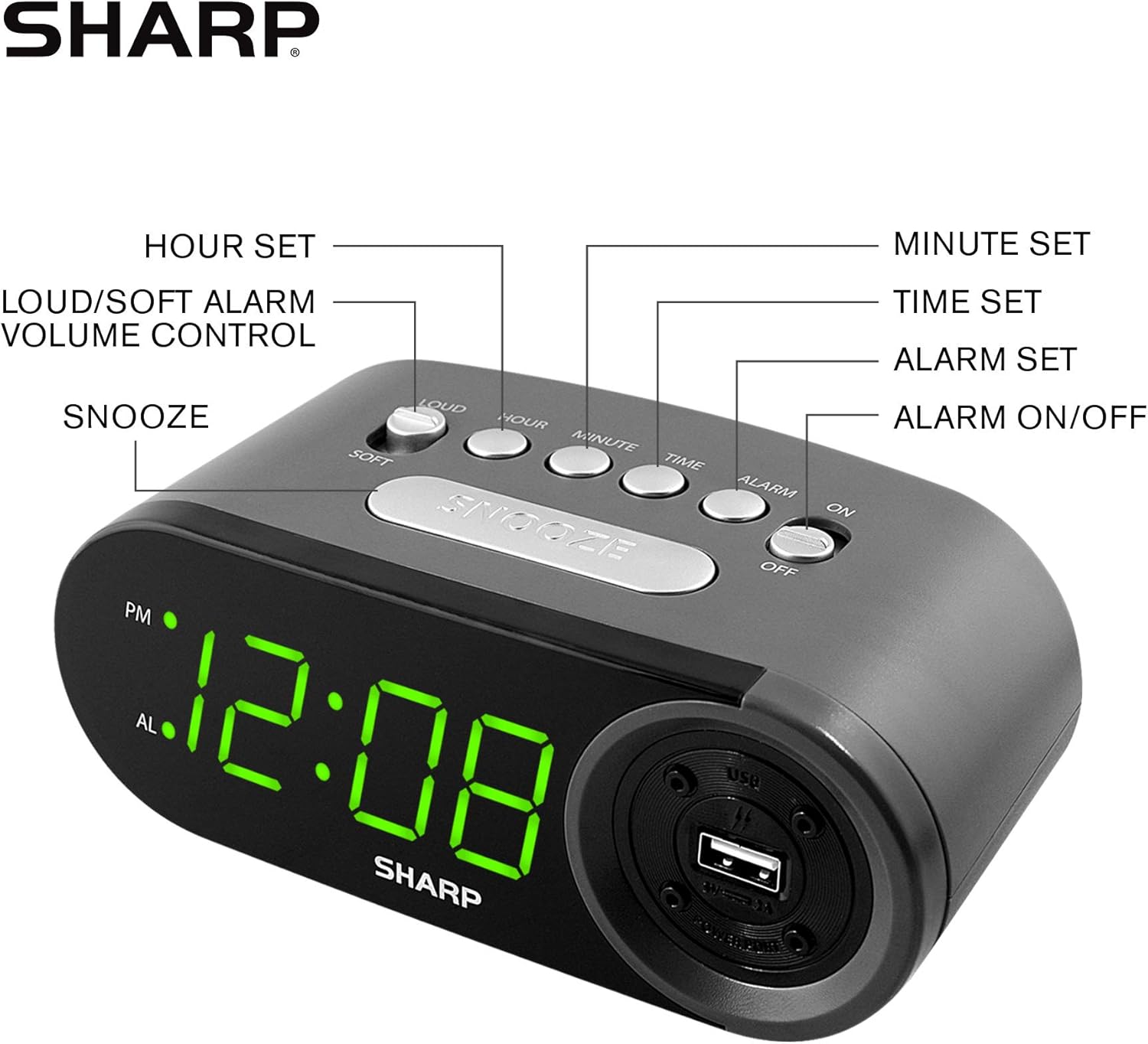
Figure 3: Top panel controls and their functions.
6.1 Configuración de la hora actual
- Mantenga pulsado el TIEMPO botón hasta que la pantalla comience a parpadear.
- Presione el HORA Presione el botón repetidamente para ajustar la hora. Observe el indicador PM para las horas de la tarde.
- Presione el MINUTO Botón repetidamente para configurar los minutos.
- Una vez configurado el tiempo deseado, presione el botón TIEMPO Presione nuevamente el botón para confirmar y salir del modo de configuración de la hora.
6.2 Configuración de la hora de la alarma
- Mantenga pulsado el ALARMA button until the alarm time display begins to flash. The "AL" indicator will also flash.
- Presione el HORA button repeatedly to set the alarm hour. Observe the PM indicator.
- Presione el MINUTO Botón repetidamente para configurar los minutos de la alarma.
- Una vez configurada la hora de alarma deseada, presione el botón ALARMA Presione nuevamente el botón para confirmar y salir del modo de configuración de alarma.
6.3 Activación/desactivación de la alarma
- Para activar la alarma ON, deslice el ALARMA ENCENDIDA / APAGADA switch to the "ON" position. The "AL" indicator will appear on the display.
- Para activar la alarma APAGADO, deslice el ALARMA ENCENDIDA / APAGADA switch to the "OFF" position. The "AL" indicator will disappear.
6.4 Función de repetición
Cuando suene la alarma, presione el botón grande DORMITAR Botón. La alarma se detendrá temporalmente y sonará nuevamente después de aproximadamente 9 minutos.
6.5 Detener la alarma
To stop the alarm completely after it sounds (without using snooze), slide the ALARMA ENCENDIDA / APAGADA switch to the "OFF" position. The alarm will reset for the next day if the switch is moved back to "ON".
6.6 Ajuste del volumen de la alarma
Presione el FUERTE/SUAVE button to toggle between high and low alarm volume settings.
6.7 Uso del puerto de carga USB
Los 2 AMP USB charging port is located on the right side of the unit.
- Connect your device's USB charging cable (not included) to the USB port on the alarm clock.
- Connect the other end of the cable to your smartphone, tablet, or other compatible USB-powered device.
- Ensure the alarm clock is connected to AC power for the USB port to function.
Note: Charging speed may vary depending on your device and cable.
7. Mantenimiento
To keep your alarm clock in optimal condition:
- Limpieza: Limpie la unidad con un paño suave y seco. No utilice limpiadores abrasivos ni disolventes.
- Reemplazo de batería: Replace AAA backup batteries annually or when the battery low indicator (if present) appears, to ensure reliable backup functionality.
- Almacenamiento: Si va a almacenar la unidad durante un período prolongado, retire las baterías de respaldo para evitar fugas.
8. Solución de problemas
| Problema | Posible causa | Solución |
|---|---|---|
| La pantalla del reloj está en blanco. | No hay alimentación de CA; corte de energíatage; unidad desenchufada. | Ensure AC adapter is securely plugged into the unit and a working wall outlet. Check for power outages. |
| La alarma no suena. | Alarm is not activated; alarm time is incorrect; volume is too low. | Slide ALARM ON/OFF switch to "ON". Verify alarm time is set correctly. Adjust alarm volume using the LOUD/SOFT button. |
| El puerto de carga USB no funciona. | Clock not connected to AC power; device not compatible; faulty cable. | Ensure the clock is plugged into AC power. Try a different USB cable or device to confirm compatibility. |
| La configuración de hora y alarma se pierde después de un corte de energíatage. | Las baterías de respaldo están agotadas o no están instaladas. | Install two fresh AAA batteries in the battery compartment, ensuring correct polarity. |
9. Especificaciones
- Marca: Afilado
- Modelo: SPC547AJAMZ
- Tipo de pantalla: LED digital (verde)
- Fuente de energía: Eléctrico con cable (CA 120 V, 60 Hz)
- Copia de seguridad de la batería: 2 pilas AAA (no incluidas)
- Puerto de carga USB: 2 AMP (5V)
- Dimensiones del producto: Aproximadamente 6.2" de ancho x 2.3" de alto x 3.25" de profundidad
- Peso del artículo: Aproximadamente 9.6 onzas
- Material: Plástico
- Código postal: 049353006000

Figura 4: Dimensiones del producto.
10. Garantía y soporte
10.1 Información de garantía
This Sharp product is covered by a limited manufacturer's warranty. For specific warranty terms and conditions, please refer to the warranty card included with your purchase or visit the official Sharp webSitio. Conserve su recibo de compra como comprobante de compra.
10.2 Atención al cliente
If you have any questions, require assistance, or need to report an issue with your Sharp Digital Alarm Clock, please contact Sharp customer support. Contact details can typically be found on the official Sharp websitio o en el embalaje del producto.
Para obtener más información, visite el Tienda Sharp en Amazon.


