1. Introducción
This manual provides comprehensive instructions for the installation, operation, and maintenance of your CALEX Smart Mini Indoor IP Camera. Please read this manual thoroughly before using the product to ensure proper functionality and safety.
The CALEX Smart Mini Indoor IP Camera is a Wi-Fi surveillance camera offering 1080P Full HD resolution, night vision capabilities, two-way audio communication, and flexible storage options via MicroSD card or cloud.
2. Contenido del paquete
Verifique que todos los artículos estén presentes en el paquete:
- 1 x CALEX Smart Mini Indoor IP Camera
- 1 x Power Adapter (AC 220-240 V, 50/60 Hz input; DC 5 V output)
- 1 x cable USB
- 1 x Manual de usuario (este documento)
- Mounting accessories (if applicable, not explicitly listed but common for cameras)

Figure 2.1: CALEX Smart Mini Indoor IP Camera and its retail packaging. The packaging highlights 1080P Full HD, Wi-Fi 2.4 GHz, and compatibility with the Calex Smart app.
3. Producto terminadoview
Familiarize yourself with the components of your CALEX Smart Mini Indoor IP Camera.
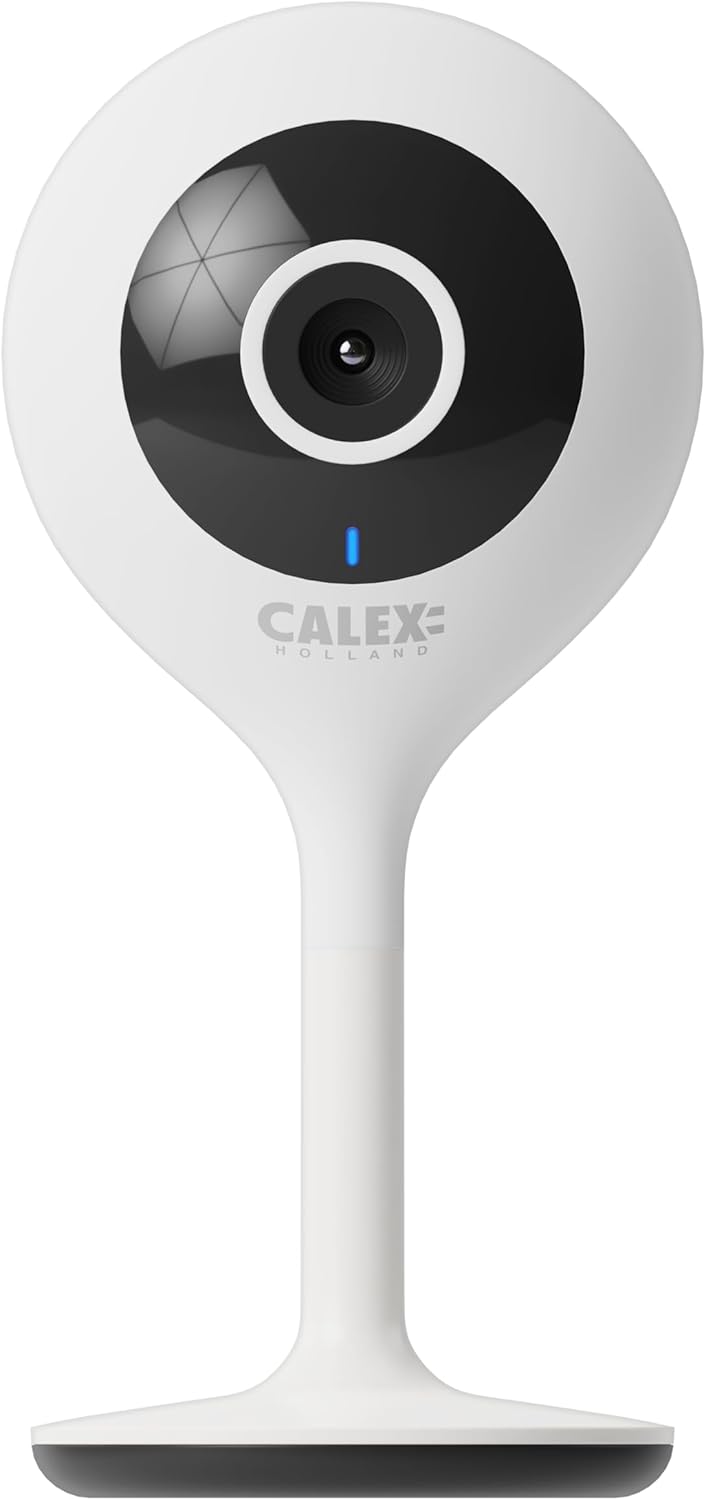
Figura 3.1: Frente view of the CALEX Smart Mini Indoor IP Camera. It features a central lens, an indicator light, and the CALEX HOLLAND logo.

Figura 3.2: Posterior view of the CALEX Smart Mini Indoor IP Camera. This view shows the speaker grille, a reset button, and the MicroSD card slot. The USB power input is located at the base.
Características principales:
- Resolución Full HD 1080P: Proporciona información de video clara y detallada.tage.
- Visión nocturna: Equipped with infrared LEDs for clear monitoring in low-light or dark conditions.
- Audio bidireccional: Micrófono y altavoz incorporados para comunicación.
- Conectividad Wi-Fi: Connects to your home Wi-Fi network (2.4 GHz only).
- Almacenamiento local: Supports MicroSD card for continuous recording or event-triggered recording.
- Almacenamiento en la nube: Servicio de almacenamiento en la nube opcional para grabación segura fuera del sitio.
- Detección de movimiento: Alertas y registros al detectar movimiento.
- Control de aplicaciones móviles: Gestionar y view live feed via the Calex Smart app.
- Compatibilidad del asistente de voz: Funciona con Amazon Alexa y Google Home.
4. Configuración e instalación
4.1 Antes de comenzar
- Asegúrese de que su red Wi-Fi sea de 2.4 GHz. La cámara no es compatible con Wi-Fi de 5 GHz.
- Tenga a mano el nombre de su red Wi-Fi (SSID) y la contraseña.
- Download the "Calex Smart" app from your mobile device's app store.
- Coloque la cámara dentro del alcance de su enrutador Wi-Fi.

Figure 4.1: QR codes for downloading the Calex Smart app. Scan the appropriate QR code for your device (iOS or Android) to download the application.
Download the Calex Smart app here: Tienda de aplicaciones iOS | Tienda Google Play
4.2 Pasos de configuración inicial
- Encendido: Connect the camera to a power outlet using the provided USB cable and power adapter. The camera's indicator light will begin to flash, indicating it is ready for pairing.
- Open Calex Smart App: Launch the Calex Smart app on your smartphone. If you are a new user, register an account. If you already have an account, log in.
- Agregar dispositivo: Tap the "+" icon in the top right corner of the app to add a new device. Select "Security & Video Surveillance" and then "Smart Camera".
- Confirmar el estado del indicador: Follow the in-app instructions. Confirm that the indicator light on your camera is flashing rapidly.
- Introduzca los detalles de Wi-Fi: Ingrese el nombre y la contraseña de su red Wi-Fi de 2.4 GHz cuando se le solicite.
- Escanear código QR: The app will generate a QR code. Hold your phone with the QR code approximately 15-20 cm (6-8 inches) in front of the camera lens. The camera will emit a sound when it successfully scans the QR code.
- Conexión: Tap "I heard a prompt" in the app. The camera will then attempt to connect to your Wi-Fi network. Once connected, the indicator light will turn solid blue.
- Nombre del dispositivo: Once connected, you can name your camera (e.g., "Living Room Camera", "Nursery Camera").


Figura 4.2: Examples of the Calex Smart app interface. The left image shows a live camera feed with options for screenshot, speaking, and recording. The right image shows a settings screen within the app.
5. Operación de la cámara
5.1 en vivo View
Open the Calex Smart app and select your camera from the device list to access the live video feed. You can view el feed en modo vertical u horizontal.

Figura 5.1: Un usuario viewing the live feed from the CALEX Smart Mini Indoor IP Camera on their smartphone.
5.2 Audio bidireccional
mientras esta en vivo viewToca el ícono del micrófono para hablar por el altavoz de la cámara. Toca el ícono del altavoz para escuchar el audio del micrófono de la cámara.
5.3 Grabación y reproducción
- Grabación manual: Tap the "Record" button in the live view interface to start or stop manual recording. Recordings are saved to your phone's gallery.
- Captura de pantalla: Tap the "Screenshot" button to capture a still image from the live feed.
- Grabación en tarjeta MicroSD: Insert a MicroSD card (up to 128GB, not included) into the camera's slot for continuous or event-triggered recording. Ensure the card is formatted within the app settings.
- Almacenamiento en la nube: Subscribe to the cloud storage service via the app for secure, off-site storage of event recordings.
- Reproducción: Acceder a foo grabadotage from the "Playback" section within the camera's settings in the app.

Figure 5.2: The Calex Smart app interface displaying options for cloud storage and video playback. This allows users to review eventos registrados.
5.4 Detección de movimiento y alertas
Configure motion detection sensitivity and alert settings in the app. You will receive push notifications on your smartphone when motion is detected.
5.5 Control por voz (Alexa/Google Home)
To integrate your camera with Amazon Alexa or Google Home, follow the instructions in the respective voice assistant app to enable the "Calex Smart" skill/action. You can then use voice commands to view La cámara se alimenta en pantallas inteligentes compatibles.

Figure 5.3: A couple using voice commands with an Amazon Echo device, demonstrating the camera's compatibility with smart home ecosystems like Alexa and Google Home.
6. Mantenimiento
- Limpieza: Utilice un paño suave y seco para limpiar la lente y el cuerpo de la cámara. No utilice limpiadores líquidos ni aerosoles.
- Actualizaciones de firmware: Periodically check the Calex Smart app for available firmware updates for your camera. Keeping the firmware updated ensures optimal performance and security.
- Restablecimiento de la cámara: If you experience connectivity issues or need to reconfigure the camera, locate the reset button on the back of the device (refer to Figure 3.2). Use a pin or a straightened paperclip to press and hold the reset button for approximately 5-10 seconds until the indicator light flashes rapidly. This will restore the camera to factory settings.
7. Solución de problemas
| Problema | Posible causa | Solución |
|---|---|---|
| La cámara no puede conectarse al Wi-Fi. | Incorrect Wi-Fi password; 5 GHz Wi-Fi network; camera too far from router; Wi-Fi signal interference. |
|
| No hay transmisión de video en vivo. | Camera offline; poor internet connection; app issue. |
|
| Tarjeta microSD no reconocida. | Card not inserted correctly; card corrupted; unsupported card size/format. |
|
| El audio bidireccional no funciona. | Microphone/speaker muted in app; low volume; app permissions. |
|
8. Especificaciones
| Característica | Detalle |
|---|---|
| Nombre del modelo | Seguridad inteligente |
| Número de modelo | 5501000300 |
| Resolución | 1080p Full HD |
| Conectividad | Wi-Fi (solo 2.4 GHz) |
| Entrada de potencia | AC 220-240 Volts, 50/60 Hz |
| Potencia de salida (adaptador) | DC 5 voltios |
| Consumo de energía | 5 vatios |
| Dimensiones (L x An x Al) | 3.2 x 5.3 x 11 cm (1.26 x 2.09 x 4.33 pulgadas) |
| Peso | 167 gramos (0.37 libras) |
| Material | Plástico |
| Color | Blanco |
| Opciones de almacenamiento | MicroSD (hasta 128 GB), almacenamiento en la nube |
| Características especiales | Night Vision, Two-Way Audio, Motion Detection, Compatible with Alexa/Google Home |
| Entorno de uso | Interior |
9. Garantía y soporte
CALEX products are designed and manufactured to the highest quality standards. For warranty information and technical support, please refer to the official CALEX websitio o comuníquese directamente con su servicio de atención al cliente.
Fabricante: CALEX
Para obtener más ayuda, visite el Oficial de CALEX Websitio.
10. Información de seguridad
- No exponga la cámara al agua ni a la humedad. Este producto está diseñado solo para uso en interiores.
- No intente desmontar ni reparar la cámara usted mismo. Deje todas las reparaciones a personal cualificado.
- Use only the provided power adapter and cable to prevent damage or fire.
- Mantenga la cámara alejada de la luz solar directa, fuentes de calor y campos magnéticos fuertes.
- Ensure the camera is placed on a stable surface to prevent it from falling.


