1. Introducción
Thank you for choosing the AULA F809 Wired USB Backlit Gaming Mouse. This manual provides detailed instructions on how to set up, operate, and maintain your new gaming mouse to ensure optimal performance and an enhanced gaming experience. Please read this manual thoroughly before use.
2. Producto terminadoview
The AULA F809 is a high-performance wired gaming mouse designed for precision and comfort. It features adjustable DPI settings, customizable macro programming, and vibrant LED backlighting to suit various gaming styles and preferences.
Características principales:
- Conectividad: USB con cable
- Botones: 7 botones programables
- Sensor: Optical Movement Detection
- DPI: Multi-DPI Adjustable Sensitivity
- Iluminación: Backlit with LED Color Lights (7-color breathing light)
- Material: Plástico duradero
- Orientación de la mano: Diseño ambidiestro
- Compatibilidad: PC y portátil
Componentes del producto:
The package includes the AULA F809 Wired USB Backlit Gaming Mouse with an integrated USB cable.

The mouse features a comfortable ergonomic design suitable for extended gaming sessions. Its surface is made from durable plastic, ensuring longevity.
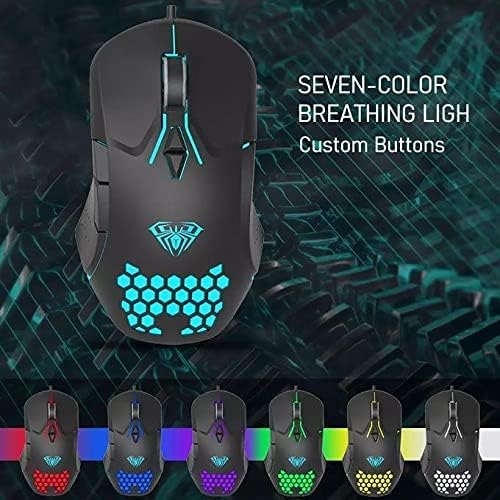
The mouse is equipped with 7 programmable buttons, allowing for personalized control and macro assignments to enhance gameplay efficiency.

3. Instrucciones de configuración
Setting up your AULA F809 Gaming Mouse is a simple plug-and-play process.
- Desempaquetar el ratón: Retire con cuidado el ratón de su embalaje.
- Localizar un puerto USB: Identify an available USB port on your computer or laptop.
- Conectar el ratón: Insert the USB connector of the AULA F809 mouse into the USB port.
- Instalación del controlador: Su sistema operativo detectará e instalará automáticamente los controladores necesarios. Este proceso puede tardar unos instantes.
- Listo para usar: Once the drivers are installed, the mouse will be ready for immediate use. The LED backlighting will illuminate, indicating it is powered on.
4. Instrucciones de funcionamiento
4.1 Ajuste de ppp
The AULA F809 mouse features multi-DPI adjustable sensitivity, allowing you to change the cursor speed to match your preference or game requirements. The DPI button is typically located near the scroll wheel. Pressing this button cycles through different DPI settings, often indicated by changes in the LED lighting color or pattern.
- DPI más bajo: Ideal for precise movements, such as sniping in first-person shooter games.
- DPI más alto: Suitable for fast-paced action or navigating multiple monitors quickly.
4.2 Programación de macros
The mouse is equipped with 7 programmable buttons. To utilize macro programming, you will typically need to download the specific driver software from the AULA official webSitio. Este software le permite:
- Assign custom functions to each of the 7 buttons.
- Create and save complex macro sequences for in-game actions.
- Adjust other mouse settings such as polling rate and lift-off distance.
Refer to the software's user interface for detailed instructions on creating and assigning macros.
4.3 Retroiluminación LED
The AULA F809 features dynamic LED backlighting with a 7-color breathing light effect. This lighting enhances the aesthetic appeal of the mouse and can be particularly useful for night gaming. While specific controls for lighting modes are usually managed through the driver software, some mice may have a dedicated button to cycle through effects or turn the lighting on/off.

5. Mantenimiento
To ensure the longevity and optimal performance of your AULA F809 Gaming Mouse, follow these simple maintenance guidelines:
- Limpieza: Utilice un paño suave y seco para limpiar la superficie del ratón. Para la suciedad difícil, limpie ligeramenteampEnjuague el paño con agua o una solución limpiadora suave. Evite productos químicos agresivos.
- Cuidado del sensor: Mantenga el sensor óptico de la parte inferior del ratón limpio y sin polvo ni residuos. Utilice un hisopo de algodón o aire comprimido si es necesario.
- Sistema de organización de cables: Evite doblar o tirar bruscamente del cable USB para evitar daños internos.
- Almacenamiento: Cuando no esté en uso, guarde el mouse en un entorno limpio y seco, alejado de temperaturas extremas.
6. Solución de problemas
If you encounter any issues with your AULA F809 Gaming Mouse, please refer to the following common troubleshooting steps:
- El ratón no responde:
- Asegúrese de que el cable USB esté conectado de forma segura a un puerto USB que funcione.
- Intente conectar el mouse a un puerto USB diferente en su computadora.
- Reinicie su computadora.
- Las luces LED no funcionan:
- Check if the mouse is properly connected and receiving power.
- If using custom software, ensure the lighting effects are enabled.
- El movimiento del cursor es errático:
- Limpie el sensor óptico en la parte inferior del mouse.
- Asegúrese de utilizar el mouse sobre una superficie limpia y no reflectante o sobre una alfombrilla.
- Ajuste la configuración de DPI a un nivel cómodo.
- Los botones no funcionan correctamente:
- If buttons are programmed, check the macro software settings.
- Asegúrese de que no haya residuos que obstruyan los botones.
If the issue persists after trying these steps, please contact AULA customer support for further assistance.
7. Especificaciones
| Característica | Especificación |
|---|---|
| Nombre de marca | AULA |
| Nombre del modelo | F809 |
| Color | Negro |
| Tecnología de conectividad | USB |
| Detección de movimiento | Óptico |
| Cantidad de botones | 7 |
| Orientación de la mano | Ambidextro |
| Usos recomendados | Juego de azar |
| Dispositivos compatibles | Computadora personal, computadora portátil |
| Características especiales | Portable, Backlit, Macro Programming, Multi DPI |
8. Garantía y soporte
For warranty information and customer support, please refer to the documentation included with your purchase or visit the official AULA webSitio. Conserve su comprobante de compra para cualquier reclamación de garantía.


