Introducción
This manual provides detailed instructions for the Google Pixel Buds A-Series wireless earbuds. These earbuds are designed to deliver high-quality audio and feature a comfortable, secure fit with multiple eartip sizes and a stabilizer arc. They are compatible with Android, iOS, and other Bluetooth 4.0+ devices.
¿Qué hay en la caja?
- Google Pixel Buds A-Series Earbuds
- Estuche de carga
- Cable de carga USB-C
- Puntas para los oídos (pequeñas, medianas, grandes)
- Guía de inicio rápido (no incluida en este manual digital)

Image: Google Pixel Buds A-Series earbuds securely placed within their white charging case, which is open to reveal the earbuds.
Configuración
1. Emparejamiento inicial
For Android Devices (One-Tap Pairing):
- Ensure your Android device is unlocked and has Bluetooth enabled.
- Open the charging case of your Pixel Buds A-Series next to your Android device.
- A pairing notification will appear on your device's screen. Tap to connect.
- Follow any on-screen prompts to complete the setup, including installing the Pixel Buds app for additional features.
For iOS and Other Bluetooth 4.0+ Devices:
- Con los auriculares en el estuche de carga, abra la tapa.
- Press and hold the pairing button on the back of the charging case until the status light begins to pulse white.
- On your device, navigate to Bluetooth settings and select "Pixel Buds A-Series" from the list of available devices.
- Confirme el emparejamiento en su dispositivo.
2. Lograr un ajuste seguro
The Pixel Buds A-Series come with three sizes of eartips (small, medium, large) and a flexible stabilizer arc to ensure a comfortable and secure fit.
- Experiment with different eartip sizes to find the best seal for your ears. A good seal is crucial for optimal sound quality and bass response.
- Gently insert each earbud into your ear, rotating slightly until the stabilizer arc tucks comfortably into your ear's concha.

Imagen: Un primer plano view of a single Google Pixel Bud A-Series earbud, highlighting its ergonomic design, eartip, and stabilizer arc.
Instrucciones de funcionamiento
1. Controles táctiles
The Pixel Buds A-Series feature touch controls on the outer surface of each earbud.
- Solo toque: Reproducir/Pausar audio, Responder/Finalizar llamada.
- Doble toque: Skip forward a track, Decline call.
- Triple Tap: Skip backward a track.
- Mantener presionado: Activate Google Assistant (Android only), or hear notifications.
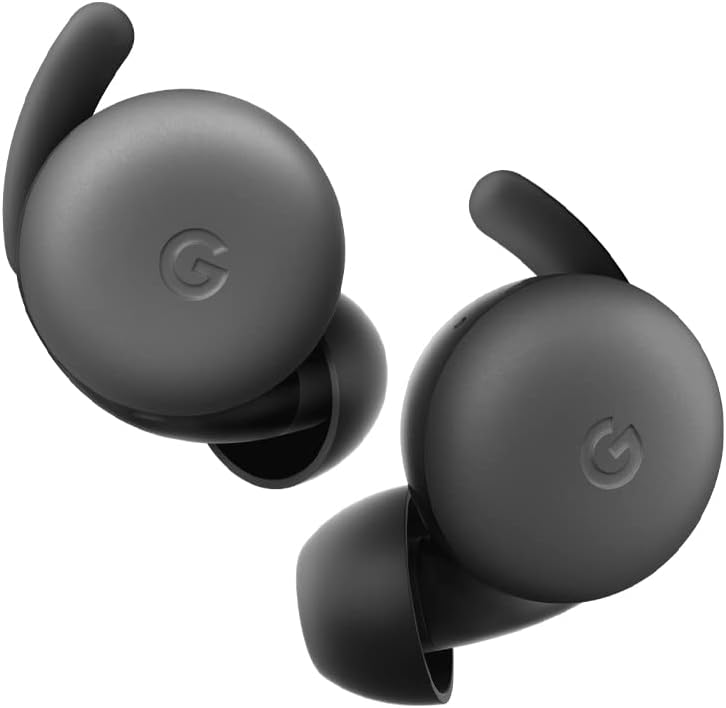
Image: A pair of Google Pixel Buds A-Series earbuds, showcasing their compact design and the 'G' logo on the touch-sensitive surface.
2. Integración con el Asistente de Google
With a compatible Android device, you can access Google Assistant directly from your Pixel Buds A-Series.
- Say "Hey Google" or "Ok Google" to activate the Assistant hands-free.
- Alternatively, press and hold either earbud to speak to Google Assistant.
- You can ask for directions, check weather, control music, or have notifications read aloud.
3. Carga
The Pixel Buds A-Series provide up to 5 hours of listening time or 2.5 hours of talk time on a single charge. The charging case extends this to up to 24 hours of total listening time.
- To charge the earbuds, place them inside the charging case. The indicator light on the case will show their charging status.
- To charge the case, connect it to a USB-C power source using the provided cable. The case's indicator light will show its charging status.
Mantenimiento
1. Limpieza
- Regularly clean your earbuds and charging case to maintain performance and hygiene.
- Use a soft, dry, lint-free cloth to wipe the exterior of the earbuds and case.
- For eartips, gently remove them and clean with a mild soap solution and water, then rinse and dry thoroughly before reattaching.
- Evite el uso de materiales abrasivos o productos químicos agresivos.
2. Almacenamiento
- Always store the Pixel Buds A-Series in their charging case when not in use to protect them and keep them charged.
- Conservar en un lugar fresco y seco, alejado de temperaturas extremas y de la luz solar directa.
Solución de problemas
If you encounter issues with your Pixel Buds A-Series, try the following steps:
- Sin sonido o conexión intermitente:
- Asegúrese de que ambos auriculares estén cargados.
- Verifique que el Bluetooth esté habilitado en su dispositivo y que los auriculares estén conectados.
- Try placing the earbuds back in the case, closing the lid for a few seconds, then reopening to reset the connection.
- Olvide el dispositivo en la configuración de Bluetooth de su teléfono y vuelva a emparejarlo.
- Asegúrese de que su dispositivo esté dentro del alcance de Bluetooth (hasta 10 metros).
- Los auriculares no se cargan:
- Asegúrese de que el estuche de carga esté cargado.
- Verifique que los auriculares estén colocados correctamente en el estuche de carga.
- Limpie los contactos de carga de ambos auriculares y del interior del estuche con un hisopo de algodón seco.
- Pruebe con un cable USB-C y un adaptador de corriente diferentes.
- Mala calidad de sonido:
- Ensure you have a secure fit with the correct eartip size.
- Clean the earbud mesh and eartips.
- Verifique la configuración de audio y el ecualizador de su dispositivo.
Presupuesto
| Nombre del modelo | Pixel Buds A-Series |
| Tecnología de conectividad | Inalámbrico (Bluetooth 5.0) |
| Dispositivos compatibles | Android, iOS, and Bluetooth 4.0+ devices |
| Duración de la batería (auriculares) | Hasta 5 horas de escucha, 2.5 horas de conversación |
| Duración de la batería (con estuche de carga) | Up to 24 hours listening |
| Nivel de resistencia al agua | Water Resistant (IPx4 rating for earbuds) |
| Tipo de control | Touch (Media Control, Google Assistant) |
| Peso del artículo | 1.9 onzas (total) |
| Dimensiones (auriculares) | 0.81 x 1.15 x 0.69 pulgadas |
| Rango de frecuencia | 20 Hz - 20,000 Hz |
| Alcance de Bluetooth | 10 metros |
Garantía y soporte
For detailed warranty information and customer support, please refer to the official Google Pixel Buds support websitio. Normalmente, puede encontrar recursos de soporte, preguntas frecuentes y opciones de contacto en g.co/pixelbuds/help.
The Pixel Buds A-Series are designed to be repairable, but any repair, disassembly, or damage may affect the water resistance rating.


