Introducción
Thank you for choosing the PHEANOO D6 Sound Bar System. This 2.1 channel soundbar with a dedicated wired subwoofer is designed to enhance your audio experience, providing clear dialogue, powerful bass, and immersive sound for your home entertainment. This manual provides detailed instructions for setup, operation, maintenance, and troubleshooting to ensure optimal performance and longevity of your device.
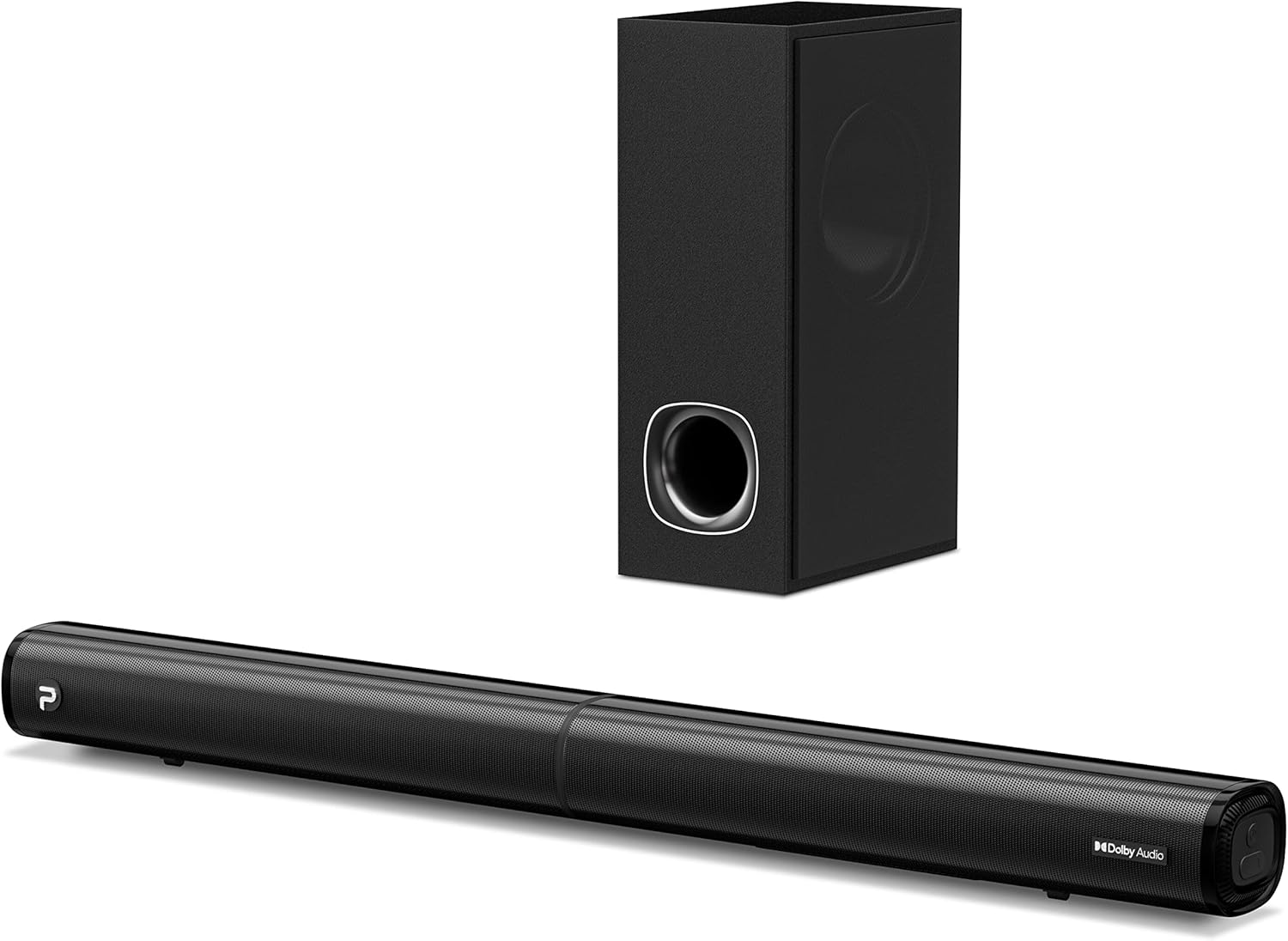
Image: The PHEANOO D6 Sound Bar and its accompanying wired subwoofer, showcasing su elegante diseño negro.
¿Qué hay en la caja?
Revise cuidadosamente el contenido del paquete. Si falta algún artículo o está dañado, contacte con atención al cliente.
- Soundbar and Wired Subwoofer
- Cable HDMI
- Cable de audio RCA
- Kit de montaje en pared (tornillos y anclajes)
- Control remoto (pilas no incluidas)
- Adaptador de corriente

Image: All components included in the PHEANOO D6 Sound Bar package, laid out for clear identification, including the soundbar, subwoofer, cables, remote, and wall mount kit.
Configuración
1. Assembling the Soundbar (Detachable Design)
The PHEANOO D6 soundbar features a unique detachable design for flexible placement. Follow these steps to assemble it:
- Align the audio connector from one half of the soundbar with the corresponding port on the other half.
- Gently push the two halves together until they click into place.
- Twist the two halves to secure the connection, ensuring the soundbar is firmly assembled.

Image: A three-step visual guide demonstrating how to connect the two halves of the detachable soundbar, ensuring proper alignment and secure locking.
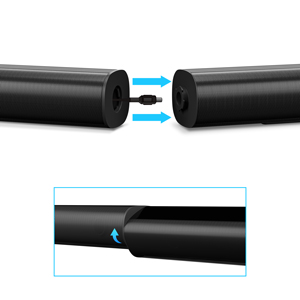
Imagen: Un primer plano view of the soundbar's detachable connection point, showing the male and female connectors.
2. Conexión del altavoz de graves
Conecte el subwoofer con cable a la barra de sonido mediante el cable específico. Asegúrese de que la conexión sea segura.
3. Opciones de colocación
You can place the soundbar on a tabletop or mount it on a wall.
- Colocación de la mesa: Place the soundbar directly in front of your TV, ensuring it does not obstruct the TV's remote sensor.
- Montaje en pared: Use the included wall mount kit. It is recommended to measure and mark the drilling points accurately, rather than relying solely on the paper stencil, to ensure a level installation.
4. Conexiones de audio
The PHEANOO D6 offers multiple connectivity options. Choose the best one for your device:
- HDMI (ARCO): For the best audio quality and control, connect an HDMI cable from the soundbar's HDMI (ARC) port to your TV's HDMI (ARC) port. This allows your TV remote to control the soundbar's volume.
- Óptico: Connect an optical cable from the soundbar's Optical port to your TV's Optical Digital Audio Out port.
- Auxiliar: Use the 3.5mm AUX cable to connect to devices with a 3.5mm audio output.
- Bluetooth 5.0: For wireless connection, pair your device via Bluetooth.

Image: The rear panel of the PHEANOO D6 Sound Bar, highlighting the HDMI (ARC), Bluetooth, Optical, and AUX input ports with corresponding icons.

Imagen: Un detalle view of the soundbar's input panel, showing the AUX, Optical, and HDMI (ARC) ports clearly labeled.
5. Conexión de alimentación
Connect the power adapter to the soundbar and then plug it into a wall outlet.
Instrucciones de funcionamiento
Mando a distancia
The included remote control allows you to manage all functions of the soundbar. Insert two AAA batteries (not included) into the remote before use.

Image: The remote control for the PHEANOO D6 Sound Bar, showing its buttons and an indicator light.
Encendido/apagado
Press the power button on the remote or the soundbar to turn the unit on or off.
Selección de entrada
Press the "Input" button on the remote to cycle through available input sources: HDMI (ARC), Optical, AUX, and Bluetooth.
Emparejamiento Bluetooth
Para emparejar un dispositivo Bluetooth:
- Select Bluetooth input on the soundbar. The indicator light will flash.
- Enable Bluetooth on your device (smartphone, tablet, etc.) and search for "PHEANOO D6".
- Select the soundbar from the list to pair. Once connected, the indicator light will be solid.

Image: A smartphone displaying a music app, wirelessly connected to the PHEANOO D6 Sound Bar via Bluetooth, indicated by a Wi-Fi like symbol.
Modos de sonido
La barra de sonido ofrece varios modos de sonido para optimizar tu experiencia auditiva:
- Modo de diálogo: Mejora la claridad vocal, haciendo que el habla sea más fácil de entender.
- Modo música: Optimizado para la reproducción de música, proporcionando audio equilibrado.
- Modo de película Delivers an immersive cinematic experience with enhanced effects.
- Modo 3D: Creates a wider, more enveloping soundstage.

Image: Icons representing different sound modes: Dialogue, Music, Movie, and 3D, indicating the soundbar's versatility.
Ajuste de graves
Use the dedicated bass control buttons on the remote to increase or decrease the subwoofer's output level to your preference.

Image: A close-up of the subwoofer, with a visual effect suggesting powerful bass emanating from it.
Dolby Digital Support
The PHEANOO D6 Sound Bar supports Dolby Digital decoding, providing a rich and dynamic audio experience for compatible content.

Image: A living room setup with the soundbar and TV, overlaid with a grid pattern indicating premium 3D surround sound powered by Dolby Audio.

Image: The Dolby Audio logo accompanied by visual representations of sound waves, emphasizing the enhanced audio quality.
Listo para TV Roku
This soundbar is certified to work seamlessly with your Roku TV. Enjoy smooth setup, easy access to sound settings, and compatibility with any Roku TV remote.

Image: A television screen displaying the "Roku TV Ready" setup interface, with the PHEANOO Soundbar and subwoofer positioned below it, illustrating seamless integration.
Mantenimiento
- Limpieza: Utilice un paño suave y seco para limpiar las superficies de la barra de sonido y el subwoofer. No utilice limpiadores líquidos ni aerosoles.
- Ventilación: Asegúrese de que la barra de sonido y el subwoofer estén bien ventilados para evitar el sobrecalentamiento. No bloquee las aberturas de ventilación.
- Almacenamiento: Si va a almacenar la unidad durante un período prolongado, desconéctela de la alimentación y guárdela en un lugar fresco y seco.
Solución de problemas
| Problema | Posible causa | Solución |
|---|---|---|
| Sin poder | Cable de alimentación no conectado; la toma de corriente no funciona. | Asegúrese de que el cable de alimentación esté bien conectado. Pruebe con otra toma de corriente. |
| Sin sonido | Entrada incorrecta seleccionada; Volumen demasiado bajo; Cables no conectados correctamente. | Seleccione la fuente de entrada correcta. Suba el volumen. Compruebe todas las conexiones de los cables de audio. |
| El emparejamiento de Bluetooth falló | La barra de sonido no está en modo de emparejamiento; Dispositivo demasiado lejos; Interferencia. | Ensure soundbar is in Bluetooth input and indicator is flashing. Move device closer. Turn off other Bluetooth devices. |
| Mala calidad de sonido | Incorrect sound mode; Source audio quality is low. | Try different sound modes (Music, Movie, Dialogue). Ensure the audio source is high quality. |
| El control remoto no funciona | Batteries dead or incorrectly inserted; Obstruction between remote and soundbar. | Reemplace las pilas, asegurándose de que la polaridad sea correcta. Retire cualquier obstrucción. |
For more detailed troubleshooting, refer to the official Troubleshooting Guide PDF available on the product page or contact PHEANOO customer support.
Presupuesto
| Característica | Detalle |
|---|---|
| Modelo | D6 |
| Marca | FEANOO |
| Tipo de altavoz | Barra de sonido con subwoofer con cable |
| Configuración de canal | 2.1 canales |
| Tecnología de conectividad | HDMI (ARC), Bluetooth 5.0, Optical, AUX |
| Alcance de Bluetooth | Hasta 100 metros (aprox. 328 pies) |
| Potencia máxima de salida del altavoz | 240 vatios |
| Dimensiones del producto (barra de sonido) | 29.5" de ancho x 2.4" de alto x 2.8" de profundidad |
| Peso del artículo | 11.57 libras |
| Tipo de controlador | Mando a distancia |
| Características especiales | Dolby Digital Decoding, Dialogue Enhancement, Bass Adjustable, Detachable Design, Roku TV Ready |
Garantía y soporte
The PHEANOO D6 Sound Bar System comes with a Garantía limitadaConsulte la tarjeta de garantía incluida en su paquete para conocer los términos y condiciones específicos.
For technical support, warranty claims, or further assistance, please visit the official PHEANOO website or contact their customer service department. You can also find additional resources like the Guía del usuario (PDF) y Guía de solución de problemas (PDF) en línea.


