
Introducción
The Poly DA75 is a versatile USB-A/USB-C digital adapter designed to connect Poly Quick Disconnect (QD) headsets to computers. It ensures clear audio quality for call center environments, supporting both USB-A and USB-C connections for compatibility with various systems. This adapter is engineered to work seamlessly with platforms such as Avaya, Genesys, and Cisco, providing a reliable audio solution for professionals.
Las características principales incluyen:
- Conectividad universal: Equipped with both USB-A and USB-C connectors on the cable for broad compatibility with new and legacy equipment.
- Intelligent Headset Recognition: Automatically adjusts audio performance to the specific Poly Quick Disconnect headset for optimized call quality.
- Protección acústica: Incorporates features to manage safe volume levels, protecting user hearing.
- Integración de plataformas: Fully compatible with leading call center platforms including Avaya, Genesys, and Cisco.
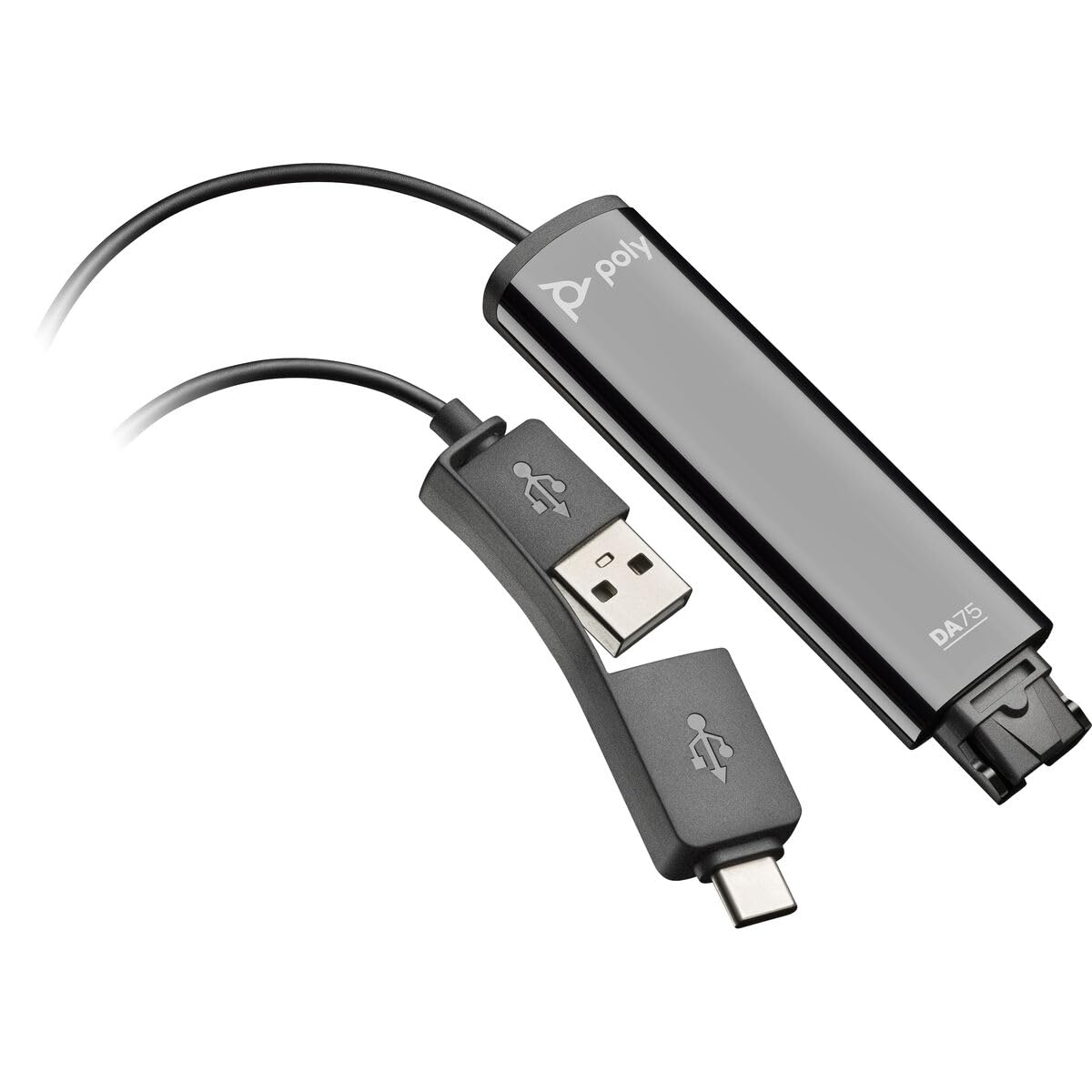
Image: The Poly DA75 USB-A/USB-C Digital Adapter, showing its dual USB-A and USB-C connectors and the Quick Disconnect port for headsets.
¿Qué hay en la caja?
The Poly DA75 package typically includes the following items:
- Poly DA75 USB-A/USB-C Digital Adapter
- Documentación (Guía de inicio rápido, Información de seguridad)
Note: Headsets are sold separately and are not included with the DA75 adapter.
Configuración
Follow these steps to set up your Poly DA75 Digital Adapter:
- Conectar auriculares: Connect your Poly Quick Disconnect (QD) headset to the QD port on the Poly DA75 adapter. Ensure the connection is secure.
- Conectar a la computadora:
- If your computer has a USB-A port, use the USB-A connector on the DA75 cable.
- If your computer has a USB-C port, use the USB-C connector on the DA75 cable.
Plug the appropriate USB connector into an available USB port on your computer.
- Instalación del controlador: The DA75 is a plug-and-play device. Your operating system (Windows, macOS) should automatically detect the device and install the necessary drivers. This process may take a few moments.
- Verificar el reconocimiento del dispositivo:
- Ventanas: Ir a Configuración > Sistema > Sonido or Panel de control> Sonido. The Poly DA75 should appear as an audio input and output device.
- Mac OS: Ir a System Settings > Sound. The Poly DA75 should appear as an input and output device.
Select the Poly DA75 as your default communication device for both playback and recording.
- Configuración de software: If you are using communication software (e.g., Avaya, Genesys, Cisco, Microsoft Teams, Zoom), ensure that the Poly DA75 is selected as the audio device within the application's settings.
Instrucciones de funcionamiento
The Poly DA75 adapter facilitates audio communication through your connected Poly QD headset. Its operation is primarily managed through your computer's operating system and communication software.
- Realizar/Recibir llamadas: Use your communication software to initiate or answer calls. The audio will be routed through your connected Poly QD headset via the DA75 adapter.
- Control de volumen: Adjust the listening volume using your computer's system volume controls or the volume controls within your communication application.
- Silencio del micrófono: Mute and unmute your microphone using the controls provided by your communication software.
- Optimización de audio: The DA75 automatically optimizes audio for your specific Poly QD headset. No manual adjustments are typically required for audio profiles.
Mantenimiento
To ensure the longevity and optimal performance of your Poly DA75 Digital Adapter, follow these maintenance guidelines:
- Limpieza: Gently wipe the adapter with a soft, dry, anti-static cloth. Do not use liquid cleaners or abrasive materials.
- Almacenamiento: Guarde el adaptador en un lugar fresco y seco, alejado de la luz solar directa y de temperaturas extremas.
- Manejo: Evite doblar o torcer excesivamente el cable, especialmente cerca de los conectores, para evitar daños internos.
- Conectividad: Ensure the Quick Disconnect (QD) connection and USB connections are clean and free of debris before connecting.
Solución de problemas
If you encounter issues with your Poly DA75 Digital Adapter, refer to the following troubleshooting steps:
| Problema | Posible causa | Solución |
|---|---|---|
| No hay audio de los auriculares |
|
|
| El micrófono no funciona |
|
|
| Adaptador no reconocido por la computadora |
|
|
Presupuesto
| Característica | Detalle |
|---|---|
| Número de modelo | 218266-01 |
| Marca | ESCUELA POLITÉCNICA |
| Tipo de conector | USB-A, USB-C (dual connector) |
| Dispositivos compatibles | Poly Quick Disconnect (QD) Headsets |
| Usos específicos | PC, Call Center Platforms (Avaya, Genesys, Cisco) |
| Color | Negro |
| Dimensiones del artículo (largo x ancho x alto) | 0.98 x 0.39 x 2.95 pulgadas |
| Peso del artículo | 30 gramos |
| Número de puertos | 2 (USB-A/USB-C to QD) |
| Código Postal | 197029650054, 017229175112 |
Garantía y soporte
Información de garantía: The Poly DA75 Digital Adapter comes with a Garantía limitada del fabricante de 2 añoEsta garantía cubre defectos de materiales y mano de obra en condiciones normales de uso. Conserve su comprobante de compra para reclamaciones de garantía.
Apoyo técnico: For technical assistance, product inquiries, or warranty service, please contact Poly customer support. Visit the official Poly website for the most up-to-date support contact information, FAQs, and additional resources.
Recursos en línea: Soporte polivinílico Websitio