1.1. Contenido del paquete
Por favor verifique que su paquete contenga los siguientes artículos:
- Beafon SL720 Mobile Phone
- Batería
- Cable de carga
- Charging Cradle (optional, may vary by region)
- Manual de usuario
This manual provides detailed instructions for setting up, operating, maintaining, and troubleshooting your Beafon SL720 Silver Line mobile phone.
Por favor verifique que su paquete contenga los siguientes artículos:
Before first use, fully charge your Beafon SL720. Connect the charging cable to the phone or place the phone in the charging cradle. The battery indicator on the screen will show charging status.

Image: Beafon SL720 flip phone placed in its charging cradle, showing an incoming call with a photo contact on the external display.
The Beafon SL720 features a large XXL 2.8-inch color display and large, illuminated keys for easy navigation. Use the directional keys to move through menu options and the central OK para confirmar las selecciones.
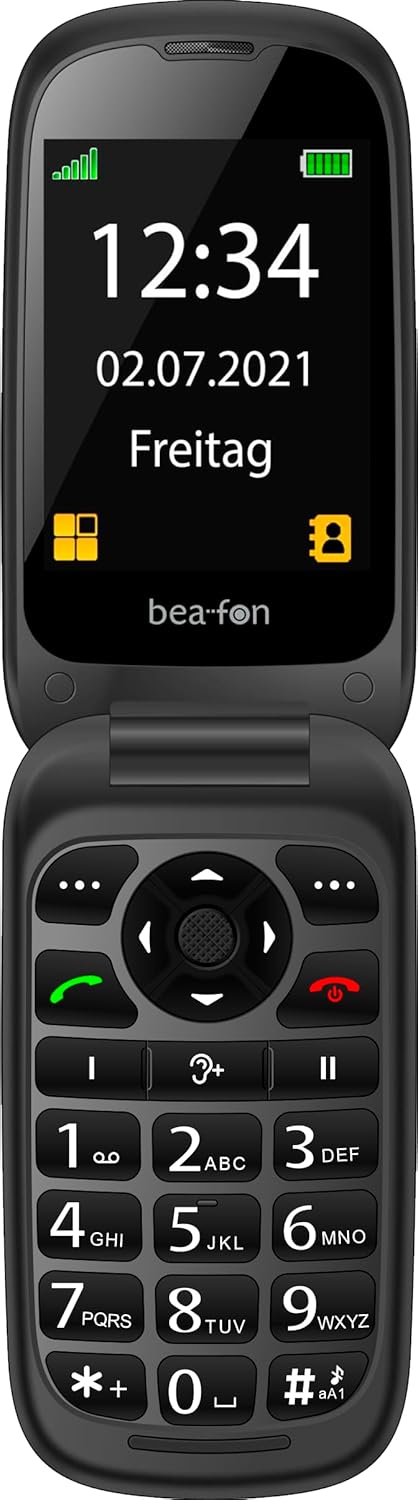
Image: The Beafon SL720 flip phone open, showing the main display with time and date.
You can store frequently used numbers in your phone's contact list. The Beafon SL720 supports photo contacts, allowing you to assign a picture to a contact for easier identification during incoming calls on both the internal and external screens.

Image: The Beafon SL720 flip phone displaying a photo contact on its main screen.

Image: The Beafon SL720 flip phone closed, showing an incoming call with a photo contact on the external 1.44-inch display.
The Beafon SL720 is equipped with a programmable SOS emergency call button located on the back of the device. In an emergency, pressing this button will initiate a call to pre-programmed emergency contacts or send an SOS message with location information (if GPS is active).
This phone offers enhanced accessibility features:

Image: Visual representation of key features including hearing aid compatibility, sound amplification, loud ringtone, SOS button, and display sizes.
Utilice un paño suave y seco para limpiar el exterior del teléfono. Evite usar limpiadores líquidos o materiales abrasivos, ya que podrían dañar el dispositivo.
To prolong battery life, avoid exposing the phone to extreme temperatures. Do not leave the phone fully charged or fully discharged for extended periods.
When storing the phone for an extended period, ensure it is partially charged (around 50%) and kept in a cool, dry place.
| Característica | Detalle |
|---|---|
| Marca | Beafon |
| Nombre del modelo | SL720 |
| Color | Negro |
| Tipo de producto | Teléfono plegable |
| Sistema operativo | Android (Simplified OS) |
| Tamaño de la pantalla principal | 2.8 pulgadas (7.11 cm) |
| Tamaño de la pantalla externa | 1.44 pulgadas (4.49 cm) |
| Tecnología celular | 2G |
| Tecnología de conectividad | GPS |
| Características especiales | Hearing Aid Compatible (M4/T4), SOS Emergency Button, +25 dB Sound Amplification, 95 dB Ringtone |
| Batería | 1 batería de iones de litio (incluida) |

Image: Physical dimensions of the Beafon SL720 phone.
Your Beafon SL720 mobile phone comes with a standard manufacturer's warranty. Please refer to the warranty card included in your package or contact your retailer for specific details regarding warranty coverage and duration.
If you encounter any issues not covered in this manual or require further assistance, please contact your point of purchase or the official Beafon customer support. Contact details can usually be found on the manufacturer's websitio web o en la documentación de su producto.
 |
Teléfono móvil Beafon SL495 Silver Line: especificaciones y características detallada sobreview Este documento describe el teléfono móvil Beafon SL495 Silver Line, incluyendo sus especificaciones, funciones, características de seguridad y contenido del paquete. Proporciona información completa para los usuarios potenciales. |
 |
beafon SL605 Feature Phone - Specifications and Features Detailed information about the beafon SL605 feature phone, including its specifications, functions, safety features, and package contents. Discover its large display, SOS button, and ease of use. |
 |
Teléfono móvil Beafon SL860 Silver Line: características y especificaciones Especificaciones detalladas del teléfono móvil Beafon SL860 Silver Line, incluyendo 4G LTE, WhatsApp, funciones SOS, detalles de la cámara y capacidades multimedia. Conozca su interfaz de usuario, pantalla y opciones de conectividad. |
 |
beafon Router MR1 Data Act Informationsblatt Dieses Informationsblatt erläutert die Datenerfassung und -nutzung für den beafon Router MR1 gemäß der EU-Verordnung 2023/2854 (Data Act), einschließlich Nutzerrechten und Herstellerangaben. |
 |
Bea-fon SL720 Guía del Usuario: Funciones y Operación Manual de usuario detallado para el teléfono móvil Bea-fon SL720, cubriendo la configuración inicial, funciones de llamada, mensajes, contactos, multimedia, seguridad y solución de problemas. |
 |
Teclado Slimline Hama SL720: Guía del usuario e instrucciones de conexión Guía del usuario del teclado Hama SL720 Slimline, que detalla la conexión USB, las funciones especiales de las teclas y la exención de garantía. Aprenda a conectar y usar su teclado. |