1. Introducción
Thank you for choosing the AULA S606 Wired Gaming Headset. This manual provides detailed instructions for the proper setup, operation, maintenance, and troubleshooting of your new headset. Please read this manual thoroughly before using the product to ensure optimal performance and longevity.
2. Producto terminadoview
The AULA S606 is a wired over-ear gaming headset designed for clear audio communication and immersive sound. It features an omnidirectional microphone with active noise cancellation for clear voice pickup and reduced background noise.
2.1 Características principales
- Conectividad por cable mediante conector de 3.5 mm
- Micrófono omnidireccional
- Cancelación activa de ruido
- Over-Ear Design for Comfort
- Control de volumen integrado
- Construcción de plástico duradero
2.2 Componentes
The package includes the AULA S606 Wired Gaming Headset with an integrated microphone and headband.
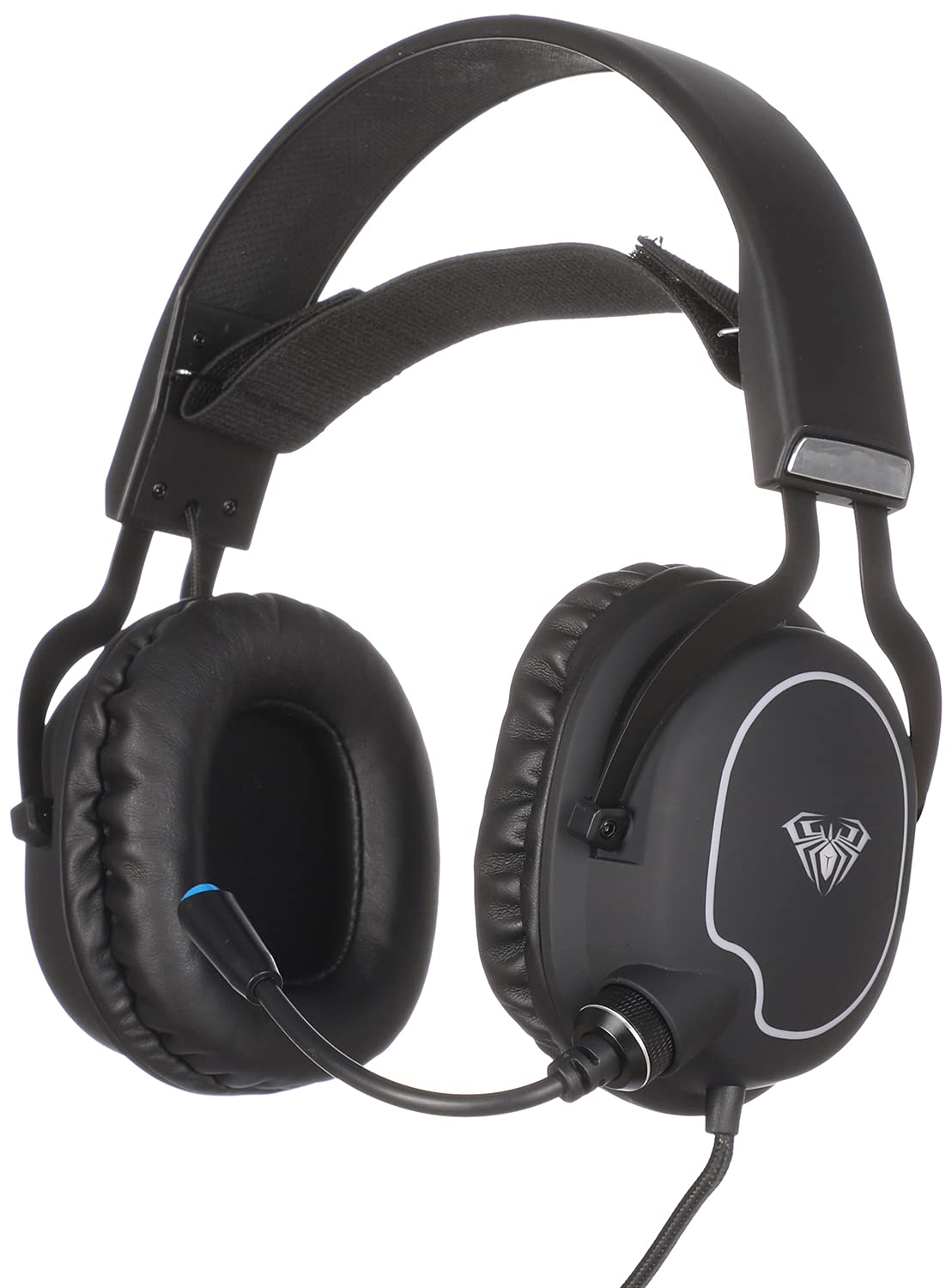
Figura 1: Frente view of the AULA S606 Wired Gaming Headset.

Figure 2: Close-up of the AULA S606 headset's earcup and flexible microphone.

Figura 3: detallada view of the AULA S606 headset's earcup, highlighting the volume control dial.
3. Configuración
Follow these steps to set up your AULA S606 headset:
- Conectar los auriculares: Plug the 3.5mm jack of the headset cable into the corresponding audio port on your device (PC, gaming console controller, smartphone, etc.). Ensure the connection is secure.
- Ajuste la diadema: Place the headset on your head and adjust the headband for a comfortable and secure fit. The earcups should fully cover your ears.
- Coloque el micrófono: Adjust the flexible microphone boom to a position near your mouth, typically 2-3 centimeters away, for optimal voice clarity.
- Configurar los ajustes de audio (si es necesario): On your device, ensure the AULA S606 is selected as the default audio output and input device in your sound settings.
4. Instrucciones de funcionamiento
4.1 Control de volumen
The AULA S606 headset features an integrated volume control dial located on one of the earcups (refer to Figure 3). Rotate the dial to increase or decrease the audio volume to your desired level.
4.2 Uso del micrófono
The omnidirectional microphone captures sound from all directions, making it effective for voice communication. The active noise cancellation feature helps to reduce ambient background noise, ensuring your voice is heard clearly by others.
- Silenciar/Activar silencio: If your headset or device has a mute function, use it to temporarily disable the microphone.
- Posicionamiento óptimo: For best results, keep the microphone positioned consistently near your mouth.
5. Mantenimiento
El cuidado adecuado prolongará la vida útil de sus auriculares:
- Limpieza: Utilice un paño suave y seco para limpiar los auriculares y la diadema. Para la suciedad difícil de eliminar, utilice un paño ligeramente seco.amp Se puede usar un paño, pero asegúrese de que no entre humedad en las rejillas del altavoz ni en el micrófono. No utilice productos químicos agresivos ni limpiadores abrasivos.
- Almacenamiento: Store the headset in a clean, dry place away from extreme temperatures and direct sunlight. Avoid placing heavy objects on top of the headset.
- Cuidado de cables: Avoid sharp bends, twists, or excessive pulling on the cable. Always grasp the plug, not the cable, when disconnecting from a device.
- Cuidado del micrófono: Manipule el brazo flexible del micrófono con cuidado. Evite doblarlo excesivamente o forzarlo en posiciones extremas.
6. Solución de problemas
If you encounter issues with your AULA S606 headset, refer to the following common problems and solutions:
| Problema | Posible causa | Solución |
|---|---|---|
| No hay sonido en los auriculares |
|
|
| El micrófono no funciona |
|
|
| Distorsión del sonido o estática |
|
|
7. Especificaciones
| Marca | AULA |
| Número de modelo | S606 |
| Tecnología de conectividad | Cableado |
| Toma de auriculares | Conector de 3.5 mm |
| Factor de forma de los auriculares | Sobre la oreja |
| Micrófono | Integrated, Omnidirectional |
| Control de ruido | Cancelación activa de ruido |
| Tipo de control | Control de volumen |
| Dispositivos compatibles | All devices with a 3.5mm audio jack |
| Color | Negro |
| Material | Plástico |
| Componentes incluidos | Venda |
| Dimensiones de envío | 24.6 x 21.2 x 13.2 cm |
| Peso | 560 gramos |
8. Garantía y soporte
Specific warranty information for the AULA S606 headset is not provided in this manual. For details regarding warranty coverage, technical support, or service inquiries, please refer to the documentation included with your purchase or contact your retailer or the manufacturer directly.


