1. Introducción
The D-Link DGS-105GL is a 5-Port Gigabit Unmanaged Desktop Switch designed to provide a simple and efficient solution for expanding network connectivity in small office/home office (SOHO) and small to medium-sized business (SMB) environments. This device offers plug-and-play functionality, requiring no complex configuration. Its fanless design ensures silent operation, and the metal housing provides durability. The DGS-105GL incorporates energy-efficient features, including IEEE 802.3az Energy-Efficient Ethernet, to reduce power consumption without compromising performance.
2. Contenido del paquete
Verifique que su paquete contenga los siguientes elementos:
- D-Link DGS-105GL 5-Port Gigabit Unmanaged Desktop Switch
- Adaptador de corriente
Si falta algún artículo o está dañado, comuníquese con su distribuidor local de D-Link.
3. Producto terminadoview
The DGS-105GL switch features a compact, low-profile design with a durable metal housing. It is equipped with five Gigabit Ethernet ports for high-speed network connections.
3.1 Panel frontal

Imagen: Frente view of the D-Link DGS-105GL switch, showing the D-Link logo, model number DGS-105GL, a power LED, five port status LEDs (1-5), and five RJ45 Gigabit Ethernet ports (1-5).
The front panel includes the following indicators and ports:
- LED de encendido: Indica el estado de alimentación del interruptor.
- LED de puerto (1-5): Each port has an LED that indicates link status and activity. A solid light indicates a successful connection, and a blinking light indicates data transmission.
- RJ45 Gigabit Ethernet Ports (1-5): These ports are used to connect network devices such as computers, servers, and other switches.
3.2 Panel trasero

Imagen: Trasera view of the D-Link DGS-105GL switch, showing the power input port labeled '5V --- 1A'.
The rear panel contains the power input port, where the included power adapter is connected.
4. Configuración
The DGS-105GL is a plug-and-play device, making installation straightforward. Follow these steps to set up your switch:
- Conecte el adaptador de corriente: Plug the included power adapter into the power input port on the rear panel of the DGS-105GL switch. Then, plug the other end of the adapter into a standard electrical outlet. The Power LED on the front panel should illuminate.
- Conectar dispositivos de red: Connect your network devices (e.g., computers, network-attached storage, routers) to any of the five RJ45 Gigabit Ethernet ports on the front panel using standard Ethernet cables.
- Verificar conexiones: Once a device is connected and powered on, the corresponding Port LED on the switch's front panel should light up, indicating a successful link. If there is network activity, the LED will blink.

Image: The D-Link DGS-105GL switch placed on a desk in an office setting, connected to a laptop and other peripherals, demonstrating a typical setup.
5. Funcionamiento del interruptor
The DGS-105GL operates automatically once connected. It supports auto-negotiation for speed and duplex mode, and auto-MDI/MDIX, eliminating the need for crossover cables. The switch automatically detects the speed of the connected device (10/100/1000 Mbps) and adjusts accordingly.
5.1 Indicadores LED
The LEDs provide visual feedback on the switch's status:
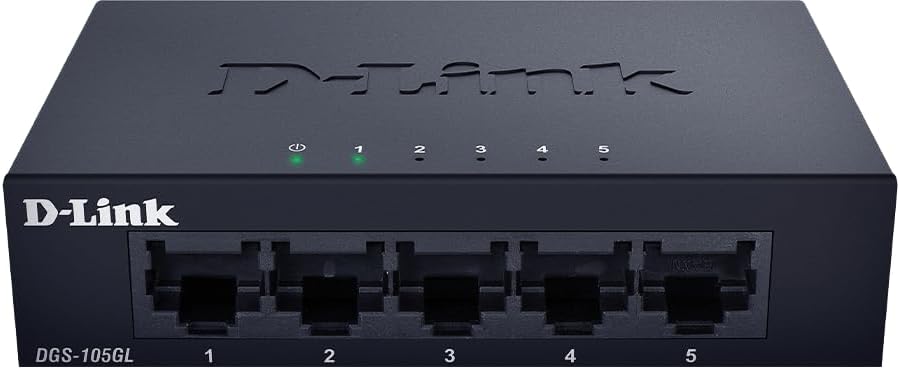
Imagen: Frente view of the D-Link DGS-105GL switch with the green power LED and green port LEDs 1-5 illuminated, indicating active connections.
| CONDUJO | Estado | Descripción |
|---|---|---|
| Fuerza | Verde sólido | El interruptor está encendido. |
| Fuerza | Apagado | El interruptor no recibe energía. |
| Puerto (1-5) | Verde sólido | A device is successfully connected to the port. |
| Puerto (1-5) | Verde parpadeante | Se están transmitiendo o recibiendo datos a través del puerto. |
| Puerto (1-5) | Apagado | No hay ningún dispositivo conectado al puerto o el dispositivo conectado está apagado. |
6. Mantenimiento
To ensure optimal performance and longevity of your DGS-105GL switch, consider the following maintenance guidelines:
- Limpieza: Periodically clean the exterior of the switch with a soft, dry cloth. Avoid using liquid or aerosol cleaners directly on the device.
- Condiciones ambientales: Ensure the switch is placed in a well-ventilated area, away from direct sunlight, heat sources, and excessive moisture. Maintain operating temperatures within the specified range (refer to specifications).
- Sistema de organización de cables: Keep network cables neatly organized to prevent strain on ports and improve airflow around the device.
- Ciclo de potencia: If you experience network issues, a simple power cycle (unplugging the power adapter, waiting 10 seconds, and plugging it back in) can often resolve minor problems.
7. Solución de problemas
If you encounter issues with your DGS-105GL switch, refer to the following common troubleshooting steps:
- Sin LED de encendido:
- Asegúrese de que el adaptador de corriente esté conectado de forma segura tanto al interruptor como a una toma de corriente eléctrica que funcione.
- Verifique que el tomacorriente eléctrico funcione enchufando otro dispositivo.
- No Link LED for a Connected Device:
- Compruebe que el cable Ethernet esté conectado de forma segura tanto al puerto del conmutador como al dispositivo de red.
- Asegúrese de que el dispositivo de red conectado esté encendido y funcionando correctamente.
- Pruebe con un cable Ethernet diferente para descartar que el cable esté defectuoso.
- Intente conectar el dispositivo a un puerto diferente en el conmutador.
- Velocidad de red lenta:
- Asegúrese de que todos los dispositivos y cables conectados admitan Gigabit Ethernet (Cat5e o superior).
- Compruebe si hay tráfico de red excesivo o aplicaciones que consumen mucho ancho de banda ejecutándose en los dispositivos conectados.
- Perform a power cycle on the switch and connected devices.
8. Especificaciones
Key technical specifications for the D-Link DGS-105GL switch:
| Característica | Especificación |
|---|---|
| Número de modelo | DGS-105GL |
| Número de puertos | 5 Gigabit Ethernet (RJ45) |
| Velocidad de transferencia de datos | 1 Gbps per port |
| Tipo de interfaz | RJ45 |
| Material de la caja | Metal |
| Diseño sin ventilador | Sí |
| Eficiencia energética | IEEE 802.3az Ethernet de eficiencia energética (EEE) |
| Entrada de potencia | 5 Volts (DC), 1 Amps |
| Peso del artículo | 160 gramos (5.6 onzas) |
| Dimensiones del producto | 39.37" de largo x 25.2" de ancho x 0.94" de alto (aproximado) |
| Código Postal | 790069458606 |
9. Garantía y asistencia técnica
D-Link products are backed by a limited warranty. For specific warranty terms and conditions, please refer to the warranty information included with your product or visit the official D-Link websitio.
For technical assistance, product documentation, or to download the latest software and firmware updates, please visit the D-Link support portal or contact D-Link technical support directly. Contact information can typically be found on the D-Link websitio para su región.


