1. Introducción
Gracias por la compraasing the Kimwood Bluetooth Headset. This manual provides detailed instructions on how to set up, operate, and maintain your headset. Please read this manual carefully before use to ensure optimal performance and longevity of your device.

Figure 1.1: Kimwood Bluetooth Headset with its charging case.
2. Información de seguridad
- No exponga los auriculares a temperaturas extremas, humedad o sustancias corrosivas.
- Evite dejar caer o someter los auriculares a impactos fuertes.
- No desmonte ni modifique los auriculares. Esto anulará la garantía y podría causar daños.
- Mantenga los auriculares fuera del alcance de los niños y las mascotas.
- Utilice únicamente el cable de carga proporcionado y un adaptador de corriente compatible.
3. Contenido del paquete
Por favor revise el paquete para ver los siguientes artículos:
- Kimwood Bluetooth Headset
- Estuche de carga
- Cable de carga USB-C
- Manual de usuario

Figura 3.1: Elementos incluidos en el paquete.
4. Producto terminadoview
Familiarize yourself with the components of your Kimwood Bluetooth Headset:
| No. | Componente | Función |
|---|---|---|
| 1 | Botón de encendido/multifunción | Power On/Off, Play/Pause, Answer/End Call, Voice Assistant |
| 2 | Subir volumen / Pista siguiente | Increase volume, skip to next track (long press) |
| 3 | Bajar volumen / Pista anterior | Decrease volume, go to previous track (long press) |
| 4 | Micrófono | Picks up your voice for calls |
| 5 | Puerto de carga (tipo C) | Connects to charging cable |
| 6 | Indicador LED | Shows power, pairing, and charging status |
5. Configuración
5.1 Carga de los auriculares y el estuche
Before first use, fully charge the headset and its charging case.
- Connect the USB Type-C cable to the charging port on the case.
- Conecte el otro extremo del cable a una fuente de alimentación USB (por ejemplo, computadora, adaptador de pared).
- La pantalla digital en el estuche de carga mostrará el porcentaje de batería.tage. When fully charged, it will display "100".
- Place the headset into the charging case. The headset will automatically begin charging.
The charging case has a 500mAh battery, and the earphone has a 100mAh battery. A full charge takes approximately 1.5 hours.

Figure 5.1: Charging the headset and case.
5.2 Emparejamiento con un dispositivo Bluetooth
The headset supports Bluetooth 5.1 for stable and automatic connections.
- Take the headset out of the charging case. It will automatically power on and enter pairing mode (LED indicator will flash blue).
- En su dispositivo (teléfono inteligente, tableta, PC), habilite Bluetooth.
- Buscar available Bluetooth devices and select "VYK-B26" from the list.
- Once connected, the LED indicator on the headset will stop flashing and remain solid blue. A voice prompt will confirm the connection.
After the initial pairing, the headset will automatically connect to the last paired device when taken out of the case.

Figura 5.2: Proceso de emparejamiento automático.
5.3 Cómo usar los auriculares
The ear-hook design allows for comfortable wear on either the left or right ear. The microphone and ear hook can be rotated to fit your preference.
- Adjust the ear hook to fit securely around your ear.
- Rotate the microphone arm up to 180 degrees and the ear hook up to 360 degrees to find the optimal position for comfort and clear voice pickup.

Figure 5.3: Adjusting the headset for left or right ear use.
6. Instrucciones de funcionamiento
6.1 Encendido y apagado
- Encendido: Take the headset out of the charging case, or long-press the Multi-function Button for 3 seconds.
- Apagado: Place the headset back into the charging case, or long-press the Multi-function Button for 5 seconds.
6.2 Funciones de llamada
- Responder/Finalizar llamada: Presione brevemente el botón multifunción.
- Rechazar llamada: Mantenga presionado el botón multifunción durante 2 segundos.
- Silenciar/activar micrófono: During a call, long press the Volume Up or Volume Down button for approximately 3 seconds.

Figure 6.1: Mute function and unidirectional microphone for clear calls.
6.3 Reproducción de música
- Reproducir/Pausa: Presione brevemente el botón multifunción.
- Pista siguiente: Presione brevemente el botón para subir el volumen.
- Pista anterior: Presione brevemente el botón para bajar el volumen.
6.4 Control de volumen
- Aumenta el volumen: Presione brevemente el botón para subir el volumen.
- Disminuir volumen: Presione brevemente el botón para bajar el volumen.
6.5 Asistente de voz
Activate your device's voice assistant (Siri, Google Assistant, etc.) directly from the headset.
- Activar asistente de voz: While the headset is connected and in standby mode, long press the Multi-function Button for 2 seconds.
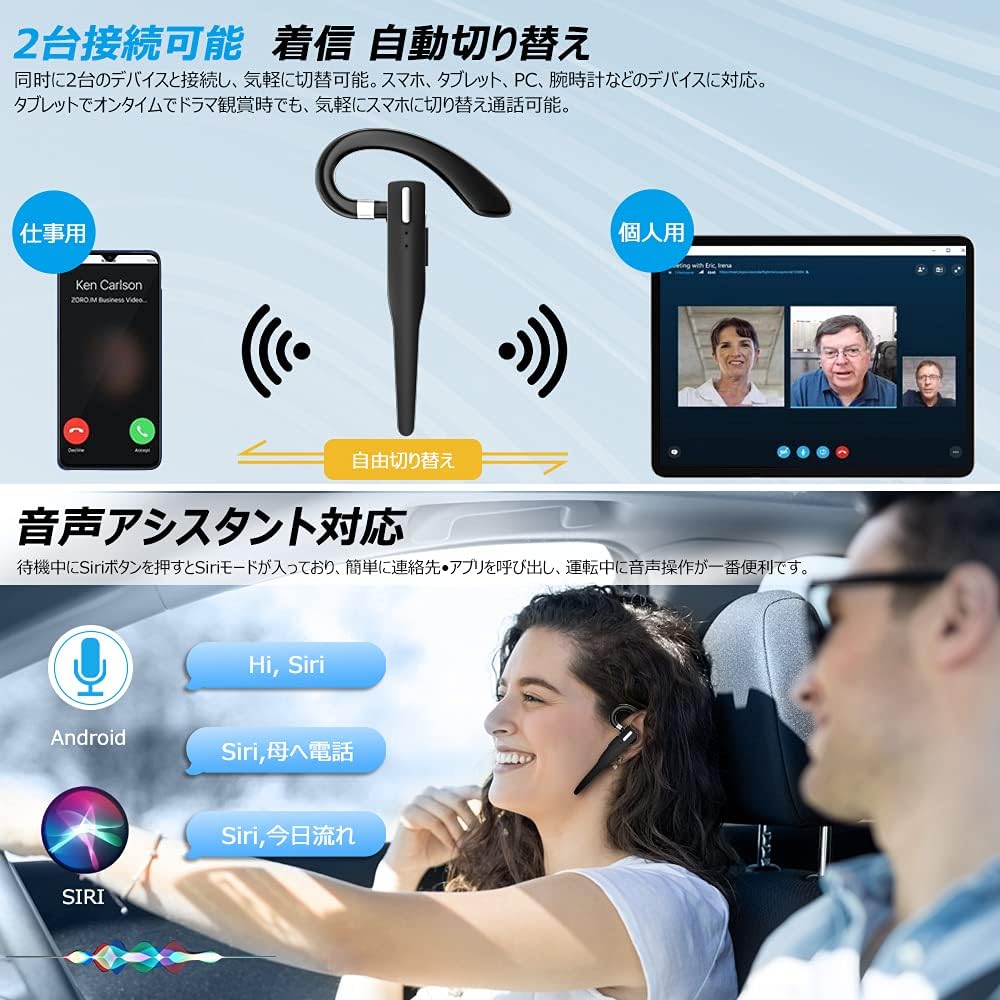
Figure 6.2: Multi-device connectivity and voice assistant features.
6.6 Conexión multidispositivo
The headset can connect to two Bluetooth devices simultaneously, allowing for seamless switching between them.
- Empareje los auriculares con el primer dispositivo como se describe en la Sección 5.2.
- Turn off Bluetooth on the first device. The headset will re-enter pairing mode.
- Empareje el auricular con el segundo dispositivo.
- Turn on Bluetooth on the first device. The headset should now be connected to both devices.
- The headset will automatically switch audio output to the device that is actively playing media or receiving a call.
7. Mantenimiento
7.1 Limpieza
- Wipe the headset and charging case with a soft, dry, lint-free cloth.
- No utilice productos químicos agresivos, disolventes de limpieza ni detergentes fuertes.
7.2 Almacenamiento
- Cuando no esté en uso, guarde los auriculares en su estuche de carga para protegerlos del polvo y otros daños.
- Guarde el dispositivo en un lugar fresco y seco, alejado de la luz solar directa y de temperaturas extremas.

Figure 7.1: The compact charging case provides convenient storage.
8. Solución de problemas
Si tiene problemas con sus auriculares, consulte los siguientes problemas y soluciones comunes:
| Problema | Posible causa | Solución |
|---|---|---|
| El auricular no se enciende. | Batería baja. | Charge the headset and charging case. |
| No se puede emparejar con el dispositivo. | El Bluetooth está desactivado en el dispositivo; el auricular no está en modo de emparejamiento; está demasiado lejos del dispositivo. | Ensure Bluetooth is on; take headset out of case to enter pairing mode; keep within 10 meters. |
| No hay sonido o volumen bajo. | Volume too low; headset not connected; sound output set to another device. | Increase volume on headset and device; re-pair headset; check device's audio output settings. |
| El micrófono no funciona. | Microphone muted; incorrect audio input settings on device. | Unmute microphone (long press Volume Up/Down); check device's audio input settings. |
| Connection unstable or drops. | Interferencia; demasiado lejos del dispositivo; batería baja. | Move closer to device; avoid strong electromagnetic interference; charge headset. |
9. Especificaciones
| Característica | Detalle |
|---|---|
| Modelo | VYK-B26 |
| Versión de Bluetooth | 5.1 |
| Cancelación de ruido | CVC8.0 |
| Capacidad de la batería del auricular | 100 mAh |
| Capacidad de la batería del estuche de carga | 500 mAh |
| Tiempo de conversación | Hasta 12 horas |
| Tiempo de reproducción de música | Hasta 12 horas |
| Tiempo total de uso (con estuche) | Hasta 72 horas |
| Tiempo de espera | Hasta 400 horas |
| Tiempo de carga | Aproximadamente 1.5 horas |
| Puerto de carga | USB tipo C |
| Clasificación de impermeabilidad | IPX7 (resistente al sudor) |
| Compatibilidad | iOS, Android, Windows (Bluetooth-enabled devices) |

Figure 9.1: Advanced Bluetooth 5.1 and CVC8.0 Noise Cancelling features.
10. Garantía y soporte
Kimwood products are designed for reliability and performance. For warranty information and technical support, please refer to the contact details provided on the product packaging or visit the official Kimwood webSitio web. Conserve su comprobante de compra para reclamaciones de garantía.


