Introducción
The Muse M-195 BT is a 1-DIN car radio featuring a front USB port and a multi-function MCD display. This car radio includes integrated Bluetooth and an SD/MMC card reader, allowing for audio streaming from compatible devices such as laptops, tablets, or smartphones. The integrated hands-free system enables easy call management. The output power is 4 x 40 W.
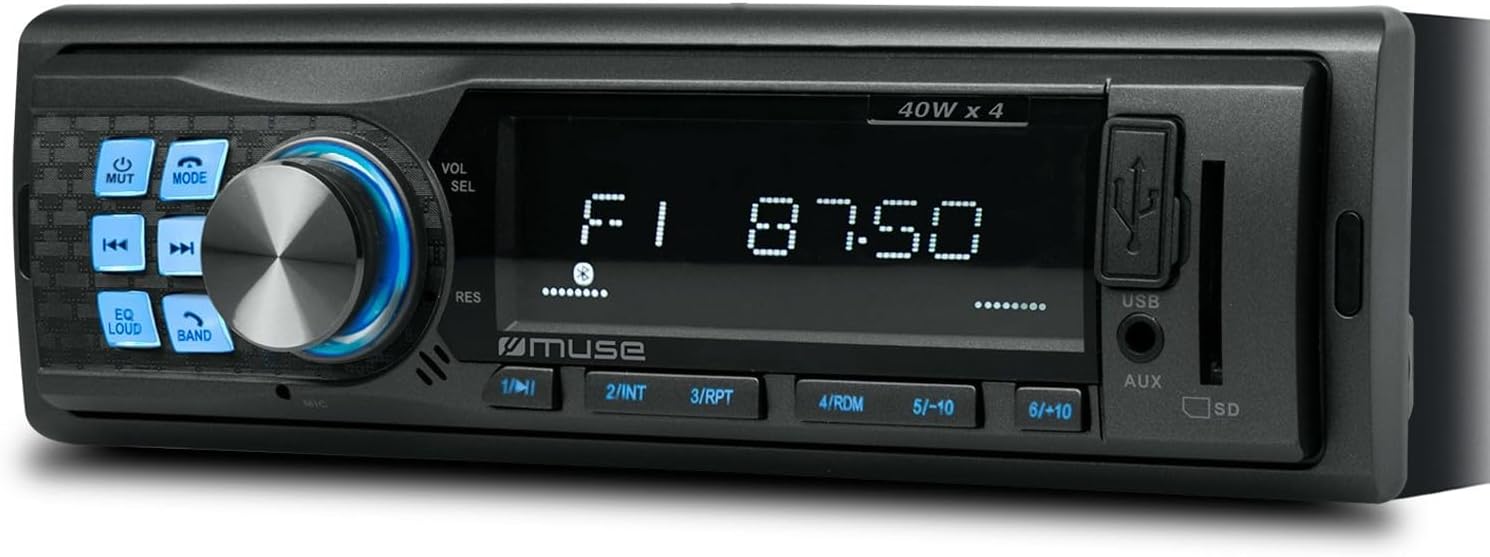
Figura 1: Frente view of the Muse M-195 BT car radio. This image displays the main unit with its central display, a large rotary knob for volume and selection, various function buttons (Mute, Mode, EQ, Loud, Band, Skip), and front-facing USB and AUX inputs, along with an SD card slot.
Información de seguridad
- Lea todas las instrucciones cuidadosamente antes de la instalación y operación.
- Ensure proper wiring to prevent short circuits or damage. Consult a professional if unsure.
- No opere el dispositivo de una manera que lo distraiga de la conducción.
- Evite exponer la unidad a temperaturas extremas, luz solar directa o humedad.
- No intente desmontar ni modificar la unidad. Esto podría anular la garantía y causar daños.
- Mantenga el volumen a un nivel que le permita escuchar sonidos externos, como los de los vehículos de emergencia.
Contenido del paquete
Por favor, compruebe que todos los artículos estén presentes en el paquete:
- Muse M-195 BT Car Radio Unit
- Manga de montaje
- Arnés de cableado (conector ISO)
- Removal Keys (2x)
- Manual de usuario (este documento)
Configuración e instalación
1. Instalación
The M-195 BT is designed for a standard 1-DIN dashboard opening (180x50mm). Ensure sufficient space behind the dashboard for wiring and ventilation.

Figure 2: Dimensions of the Muse M-195 BT car radio. The diagram illustrates the standard 1-DIN size, with a width of 185mm and a height of 58mm, crucial for proper fitment in a vehicle's dashboard.
- Prepare la apertura del tablero: Remove the existing car radio or blanking plate from the 1-DIN slot.
- Install the Mounting Sleeve: Insert the supplied metal mounting sleeve into the dashboard opening. Bend the tabs on the sleeve outwards with a screwdriver to secure it firmly.
- Conectar el cableado: Connect the car's wiring harness to the supplied ISO connector. Ensure correct connections for power (constant 12V, ignition 12V, ground), speaker outputs, and antenna.
- Alambre amarillo: 12 V constantes (batería)
- Cable rojo: Ignition 12V (ACC)
- Cable negro: Suelo
- Alambre azul: Antena de poder / Amplifier Remote (Output)
- Cables de altavoz: Conéctese a los altavoces del vehículo correspondientes (por ejemplo, blanco/blanco-negro para delantero izquierdo, gris/gris-negro para delantero derecho, verde/verde-negro para trasero izquierdo, morado/morado-negro para trasero derecho).
- Diapositiva en la Unidad: Carefully slide the M-195 BT unit into the mounting sleeve until it clicks into place.
- Funcionalidad de prueba: Turn on the car ignition and test all functions of the radio (power, radio, USB, Bluetooth, sound output).
2. Encendido inicial
After successful installation, press the POTENCIA / MODO button to turn on the unit. The display will illuminate. The unit will typically start in the last used mode (e.g., FM radio).
Instrucciones de funcionamiento
1. Controles básicos
- POWER/MODE Button: Press to turn the unit ON/OFF. Short press to cycle through modes (FM, USB, SD, AUX, Bluetooth).
- Volume Knob (VOL/SEL): Rotate to adjust volume. Press to enter menu settings (e.g., Bass, Treble, Balance, Fader, EQ).
- Botón de silencio: Silencia o activa el sonido de la salida de audio.
- Botón EQ: Cycles through preset equalizer settings (e.g., Pop, Rock, Classic, Flat).
- Botón LOUD: Activates/deactivates loudness compensation for enhanced bass and treble at low volumes.
- Botón BAND: En el modo FM, recorre las bandas FM (FM1, FM2, FM3).
- Botones SKIP (◀◀ / ►►): In radio mode, short press to seek previous/next station. Long press for manual tuning. In USB/SD/BT mode, short press for previous/next track.
- Botones numéricos (1-6): In radio mode, short press to recall preset stations. Long press to save current station to a preset.
2. Funcionamiento de la radio (FM)
- Prensa MODO hasta que aparezca "FM".
- Prensa BANDA to select FM1, FM2, or FM3.
- Pulsación corta ◀◀ or ►► para buscar automáticamente la siguiente estación fuerte.
- Pulsación larga ◀◀ or ►► para sintonizar manualmente la frecuencia.
- To save a station: Tune to the desired station, then long press one of the numeric buttons (1-6) until the display confirms saving.
3. USB / SD Card Playback
- Insert a USB flash drive into the front USB port or an SD/MMC card into the SD card slot.
- La unidad cambiará automáticamente al modo USB/SD y comenzará a reproducir audio compatible. files (MP3). If not, press MODO Para seleccionar.
- Usar ◀◀ or ►► para saltar pistas.
- Use numeric buttons for specific functions like 1/►►I (Play/Pause), 2/INT (Intro scan), 3/RPT (Repeat), 4/RDM (Random).
4. Operación Bluetooth
The M-195 BT supports Bluetooth for audio streaming and hands-free calling.
- Emparejamiento:
- Asegúrese de que Bluetooth esté habilitado en su dispositivo móvil.
- Prensa MODO on the car radio until "BT" or "Bluetooth" is displayed. The unit will enter pairing mode.
- On your mobile device, search for available Bluetooth devices. Select "M-195 BT" from the list.
- If prompted for a PIN, enter "0000" (default).
- Once paired, the display will show "CONNECTED" or similar confirmation.
- Transmisión de audio (A2DP):
- After pairing, play music on your mobile device. Audio will stream through the car speakers.
- Usar ◀◀ or ►► on the car radio to skip tracks.
- Llamadas manos libres (HFP):
- When a call comes in, the radio display will show "CALL" or the caller ID.
- Presione el Respuesta button (often the Play/Pause button or a dedicated call button if available) to answer.
- Presione el Finalizar llamada botón para colgar.
- The built-in microphone will be used for conversations.
5. Entrada AUX
Connect an external audio device (e.g., MP3 player, smartphone) to the front 3.5mm AUX input using an audio cable.
- Connect the audio cable from your device to the AUX port on the car radio.
- Prensa MODO hasta que se muestre "AUX".
- Controle la reproducción desde su dispositivo externo.
Mantenimiento
- Limpieza: Utilice un paño suave y seco para limpiar la superficie de la unidad. Para la suciedad difícil, dampHumedezca ligeramente el paño con agua. No utilice limpiadores abrasivos ni disolventes.
- Evite los líquidos: No permita que entren líquidos en la unidad, ya que esto puede causar daños.
- Temperatura: Evite exponer la unidad a temperaturas extremas, luz solar directa o alta humedad.
- USB/SD Slot Care: Mantenga las ranuras para tarjetas USB y SD libres de polvo y residuos.
Solución de problemas
| Problema | Posible causa | Solución |
|---|---|---|
| Sin poder | Cableado incorrecto; fusible quemado; conexión suelta. | Check power (yellow, red) and ground (black) wire connections. Check vehicle's fuse box and the unit's fuse. Ensure connections are secure. |
| Sin sonido | Volumen demasiado bajo; Silencio activado; Cableado de altavoz incorrecto; Altavoces dañados. | Increase volume. Press MUTE button. Check speaker wire connections. Test with different speakers if possible. |
| Mala recepción de radio | Antena no conectada; Señal débil; Antena dañada. | Asegúrese de que la antena esté bien conectada. Intente sintonizar una estación con mayor potencia. Compruebe si la antena está dañada. |
| USB/SD no reproduce | Incompatible file formato; tarjeta USB/SD dañada; modo incorrecto seleccionado. | Asegurar files are MP3 format. Try a different USB/SD card. Press MODE to select USB/SD. |
| El emparejamiento de Bluetooth falló | Bluetooth not enabled on device; Device too far; Incorrect PIN; Previous connection interference. | Ensure Bluetooth is ON on your device. Bring device closer. Re-enter PIN "0000". Delete previous pairings on your device and try again. |
Presupuesto
- Modelo: M-195BT
- Potencia de salida: 4 x 40 W
- Mostrar: MCD Multi-function
- Conectividad: Bluetooth, USB, SD/MMC, AUX (3.5mm Jack)
- Formatos de audio compatibles: MP3
- Sintonizador de radio: FM (18 presintonías)
- Llamadas manos libres: Micrófono integrado
- Dimensiones (L x An x Al): 14 x 18.5 x 5.8 cm (approx. 1-DIN standard)
- Peso: 550 gramos
- Pre-ampSalidas certificadas: 1 pair (RCA audio rear or sub)
Garantía y soporte
This product comes with a standard manufacturer's warranty. For detailed warranty terms and conditions, please refer to the warranty card included with your purchase or visit the official Muse website. For technical support, troubleshooting assistance beyond this manual, or service inquiries, please contact your retailer or the Muse customer service department.
Conserve su comprobante de compra para reclamos de garantía.


