Manual de instrucciones de la cámara para salpicadero AZDOME 4K (M63H)
Model: M63H | Brand: AZDOME
1. Introducción
Welcome to the AZDOME 4K Dash Cam (M63H) user manual. This guide provides detailed instructions on how to set up, operate, and maintain your dash cam to ensure optimal performance and longevity. Please read this manual thoroughly before using the device.
2. ¿Qué hay en la caja?
Carefully unpack your AZDOME M63H Dash Cam and verify that all items listed below are included:
- 1 x AZDOME M63H 4K Dash Cam
- 1 x Rear Camera (6m/19.7FT cable)
- 1 x 11.5FT/3.5M Power Supply Cable with Car Charger
- 1 x receptor GPS
- 1 x 64GB AZDOME SD Card
- 2 x Static Clings Sticker
- 5 x Cable Hiding Clips
- 1 x Car Wiring Tool
- 1 x Manual de usuario

Image: All components included in the AZDOME M63H Dash Cam package.
3. Producto terminadoview
Características principales
- Grabación frontal 4K + trasera 1080P: Captures clear video at 2880x2160P (front) and 1080P (rear) with WDR and F1.8 large aperture.
- WiFi y GPS integrados: Connects wirelessly to your smartphone via the AZDOME APP for remote control, real-time viewing, y file management. GPS records position and speed.
- Súper visión nocturna: Dual Sony Sensor and 170°+150° super wide-angle lens with Night Mode and WDR for clear recording in low light.
- Multifuncionalidad: Includes G-sensor for automatic video locking, seamless loop recording, parking monitoring, motion detection, time lapse, and screen saver.
- Durable Metal Rear Camera: IP68 waterproof design for reliable outdoor use.
- Monitor de estacionamiento 24 horas: Requires optional hardwire kit (B09LVD8XF9) for continuous power.
- Súper condensador: Operates reliably in extreme temperatures (-4°F to 158°F / -20°C to +70°C) without a battery.
Identificación de componentes

Image: The main AZDOME M63H Dash Cam unit, featuring the front lens and display screen.

Image: Visual representation of the wide 170-degree front and 150-degree rear field of view provided by the dash cam system.

Image: Illustrates the difference in clarity between the 4K front camera and 1080P rear camera video resolution.
4. Configuración
4.1 Montaje de la Dash Cam
- Limpie la zona del parabrisas donde se instalará la cámara del tablero. Asegúrese de que esté libre de polvo y grasa.
- Apply one of the static cling stickers to the chosen area on the windshield. This helps protect your windshield and makes removal easier.
- Attach the adhesive mount to the static cling sticker. Press firmly for 30 seconds to ensure a secure bond.
- Deslice la cámara del tablero sobre el soporte hasta que encaje en su lugar.
- Ajuste el ángulo de la cámara para garantizar una imagen clara. view del camino por delante, evitando obstrucciones desde atrásview espejo o limpiaparabrisas.
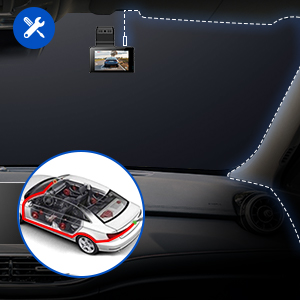
Image: A diagram illustrating the recommended cable routing for a neat and secure dash cam installation along the car's interior trim.
4.2 Conexión de la alimentación
Connect the provided car charger to the dash cam's power input port and plug the other end into your vehicle's cigarette lighter socket. The dash cam will automatically power on when the vehicle starts.
4.3 Inserción de la tarjeta SD
Insert the included 64GB SD card into the dash cam's SD card slot until it clicks. Ensure the card is inserted correctly with the contacts facing the camera's screen. It is recommended to format the SD card within the dash cam settings before first use.
4.4 Instalación de la cámara trasera
Connect the rear camera cable to the main dash cam unit. Mount the rear camera on your vehicle's rear windshield using the adhesive mount. Route the cable neatly along the vehicle's interior trim to the front unit. Ensure the rear camera has a clear view and is properly aligned.
5. Instrucciones de funcionamiento
5.1 Encendido / Apagado
- Encendido/apagado automático: La cámara para tablero se encenderá y comenzará a grabar automáticamente al conectarla a la corriente y arrancar el vehículo. Se apagará automáticamente al apagar el vehículo.
- Encendido/apagado manual: Press and hold the power button for a few seconds to manually turn the dash cam on or off.
5.2 Modos de grabación
- Grabación en bucle: La cámara para tablero graba videos continuamente en segmentos cortos (por ejemplo, 1, 3 o 5 minutos). Cuando la tarjeta SD está llena, se guarda la tarjeta desbloqueada más antigua. fileLos archivos se sobrescriben automáticamente.
- Sensor G (grabación de emergencia): The built-in G-sensor detects sudden impacts or collisions. When triggered, the current video segment is automatically locked and saved to prevent it from being overwritten by loop recording.
5.3 Conexión Wi-Fi y uso de aplicaciones
The AZDOME M63H features built-in Wi-Fi for easy connection to your smartphone via the AZDOME app. This allows for live view, reproducción de vídeo, ajuste de configuración y file descargar.
- Descargue la aplicación "AZDOME" desde la App Store (iOS) o Google Play Store (Android).
- En la cámara del tablero, habilite Wi-Fi desde el menú de configuración.
- On your smartphone, go to Wi-Fi settings and connect to the AZDOME dash cam's Wi-Fi network (e.g., "M63"). The default password is 12345678.
- Abre la aplicación AZDOME. Ya puedes... view vivir footage, browse recorded videos, and manage settings.

Image: A step-by-step guide showing how to connect the AZDOME dash cam to your smartphone using the Wi-Fi feature for app control and live viewEn.
5.4 Funcionalidad GPS
The integrated GPS module records your driving route, location, and speed. This data can be viewed junto con tu video footage using the AZDOME app or the dedicated AZDOME GPS Player software on a computer.

Image: A laptop screen displaying the AZDOME GPS Player interface, showing a recorded route on a map and live speed data, demonstrating the GPS tracking feature.
5.5 Monitor de estacionamiento
The parking monitor feature provides surveillance when your vehicle is parked. If the dash cam detects a collision or motion (depending on settings), it will automatically start recording. For 24-hour parking monitoring, a hardwire kit (sold separately, e.g., B09LVD8XF9) is required to provide continuous power to the dash cam.
5.6 Reproducción y File Gestión
Videos can be played back directly on the dash cam's screen, or by connecting the SD card to a computer, or through the AZDOME smartphone app. Files are organized into normal, locked (emergency), and parking mode folders. Regularly back up important footage and format the SD card to ensure optimal recording performance.
6. Mantenimiento
- Limpieza: Utilice un paño suave y seco para limpiar la lente y la pantalla de la cámara de tablero. Evite usar limpiadores abrasivos o solventes.
- Formateo de tarjeta SD: It is recommended to format the SD card every 2-4 weeks to prevent data corruption and ensure smooth operation. This can be done through the dash cam's settings menu.
- Actualizaciones de firmware: Consulta el AZDOME oficial webVisite el sitio periódicamente para obtener actualizaciones de firmware. Mantener el firmware de su cámara de tablero actualizado puede mejorar el rendimiento y añadir nuevas funciones.
- Temperatura: While the dash cam is designed for extreme temperatures, avoid prolonged exposure to direct sunlight in very hot conditions when parked, if possible.
7. Solución de problemas
If you encounter issues with your AZDOME M63H Dash Cam, please refer to the following table for common problems and solutions:
| Problema | Posible solución |
|---|---|
| La cámara del tablero no se enciende. | Ensure the power cable is securely connected to both the dash cam and the car's power outlet. Check the car's cigarette lighter fuse. |
| Dash cam reboots frequently. | Ensure the power connection is stable. Try a different power source or cable. Format the SD card. If the issue persists, the SD card might be faulty; try a new high-quality U3 speed SD card. |
| Vídeo footage está borrosa o poco clara. | Limpie la lente de la cámara. Asegúrese de haber retirado la película protectora. Verifique la configuración de resolución de video. |
| Error de tarjeta SD / No se puede grabar. | Format the SD card in the dash cam's settings. Ensure you are using a high-speed (U3 or higher) SD card. The card might be full or corrupted; replace if necessary. |
| Problemas de conexión Wi-Fi. | Ensure Wi-Fi is enabled on the dash cam. Double-check the Wi-Fi password (default: 12345678). Keep your phone close to the dash cam. Restart both the dash cam and your phone. |
| Mounting clips do not stick. | Ensure the mounting surface is clean, dry, and smooth. Apply firm pressure for an extended period. Consider using alternative adhesive solutions if the provided ones are insufficient. |
| Dash cam requires a password. | If you did not set a password, try the default password (if any) or consult the manufacturer's support for a reset procedure. |
8. Especificaciones
| Característica | Detalle |
|---|---|
| Modelo | M63H |
| Resolución de la cámara frontal | 4K (2880x2160P) |
| Resolución de la cámara trasera | 1080P |
| Campo de visión frontal | 170° |
| Campo de visión trasero | 150° |
| Mostrar | 3" UHD Display |
| Sensor | Sony Sensor (IMX415) |
| Conectividad | Wi-Fi, GPS |
| Almacenamiento | Admite tarjeta Micro SD (64 GB incluida) |
| Fuente de poder | Super Capacitor (no internal battery for operation) |
| Temperatura de funcionamiento | -4 °F a 158 °F (-20 °C a +70 °C) |
| Rear Camera Waterproof Rating | IP68 |
| Peso del artículo | 1.59 libras |
| Dimensiones del paquete | 10 x 4.84 x 2.64 pulgadas |
9. Garantía y soporte
9.1 Información de garantía
AZDOME offers an 18-month after-sales service for the M63H Dash Cam. Please retain your proof of purchase for warranty claims. For specific warranty terms and conditions, refer to the official AZDOME websitio o póngase en contacto con el servicio de atención al cliente.
9.2 Atención al cliente
If you have any questions, require technical assistance, or need to report an issue that is not covered in this manual, please contact AZDOME customer support through their official website or the contact information provided with your product packaging. They also offer free firmware upgrade services.


