Introducción
Thank you for choosing the iHome AutoVac Halo Robot Vacuum and Mop Combo. This manual provides essential information for the safe operation, maintenance, and troubleshooting of your device. Please read it thoroughly before first use and keep it for future reference.
Qué incluye
Verifique que todos los componentes estén presentes en el paquete:
- iHome AutoVac Halo Robot Vacuum
- Base de vaciado automático
- Almohadillas de trapeador
- Replacement Side Brush
- PowerMop Attachment
- Herramienta de limpieza de cepillo
- Filtro HEPA de repuesto
- Mando a distancia
- Bolsa de polvo
- Cable de alimentación

Image: All components of the iHome AutoVac Halo, including the robot vacuum, auto-empty base, mop pads, side brush, PowerMop attachment, cleaning tool, HEPA filter, remote control, dust bag, and power cable.
Guía de configuración
1. Prepare the Robot Vacuum
- Remove any protective film from the robot's surface.
- Remove and discard any bumper guards or packing materials.

Imagen: Arriba view of the iHome AutoVac Halo Robot Vacuum, showing its clean, minimalist design.
2. Place the Auto-Empty Base
Choose an ideal location for the auto-empty base:
- Cerca de una toma eléctrica.
- Away from obstructions (ensure at least 2 feet on either side and 5 feet in front).
- In an area with a strong Wi-Fi signal.

Image: The iHome AutoVac Halo Robot Vacuum docked with its auto-empty base, illustrating proper placement.
3. Carga inicial
Connect the power cable to the auto-empty base and plug it into an outlet. Place the AutoVac Halo onto the base. The robot's LED indicators will light up. Allow the robot to fully charge before its first cleaning cycle (up to 5 hours). The LED will turn solid green when charging is complete.
Video: Demonstrates the initial setup and charging process for the iHome AutoVac Halo, including connecting the base and docking the robot.
4. Connect to Wi-Fi and App Setup
Download the "iHome Clean" app from your device's app store. Follow the in-app instructions to connect your AutoVac Halo to your home Wi-Fi network and add it as a device. This enables smart mapping, scheduling, and remote control features.

Image: Screenshot of the iHome Clean app displaying a mapped floor plan, illustrating the smart mapping capabilities.
Instrucciones de funcionamiento
1. Preparing Your Home for Cleaning
Before starting a cleaning cycle, ensure the area is free of small objects, loose cables, and anything that could obstruct the robot or get tangled in its brushes. This helps prevent the robot from getting stuck and ensures efficient cleaning.
2. Iniciar un ciclo de limpieza
Puedes iniciar un ciclo de limpieza de varias maneras:
- En el dispositivo: Press the Power button on the robot.
- Mando a distancia: Use the provided remote control to start/stop cleaning.
- iHome Clean App: Use the app for advanced control, including auto-clean, region cleaning, area cleaning, and spot cleaning.
- Control de voz: Connect to Amazon Echo or Google Home for voice commands.
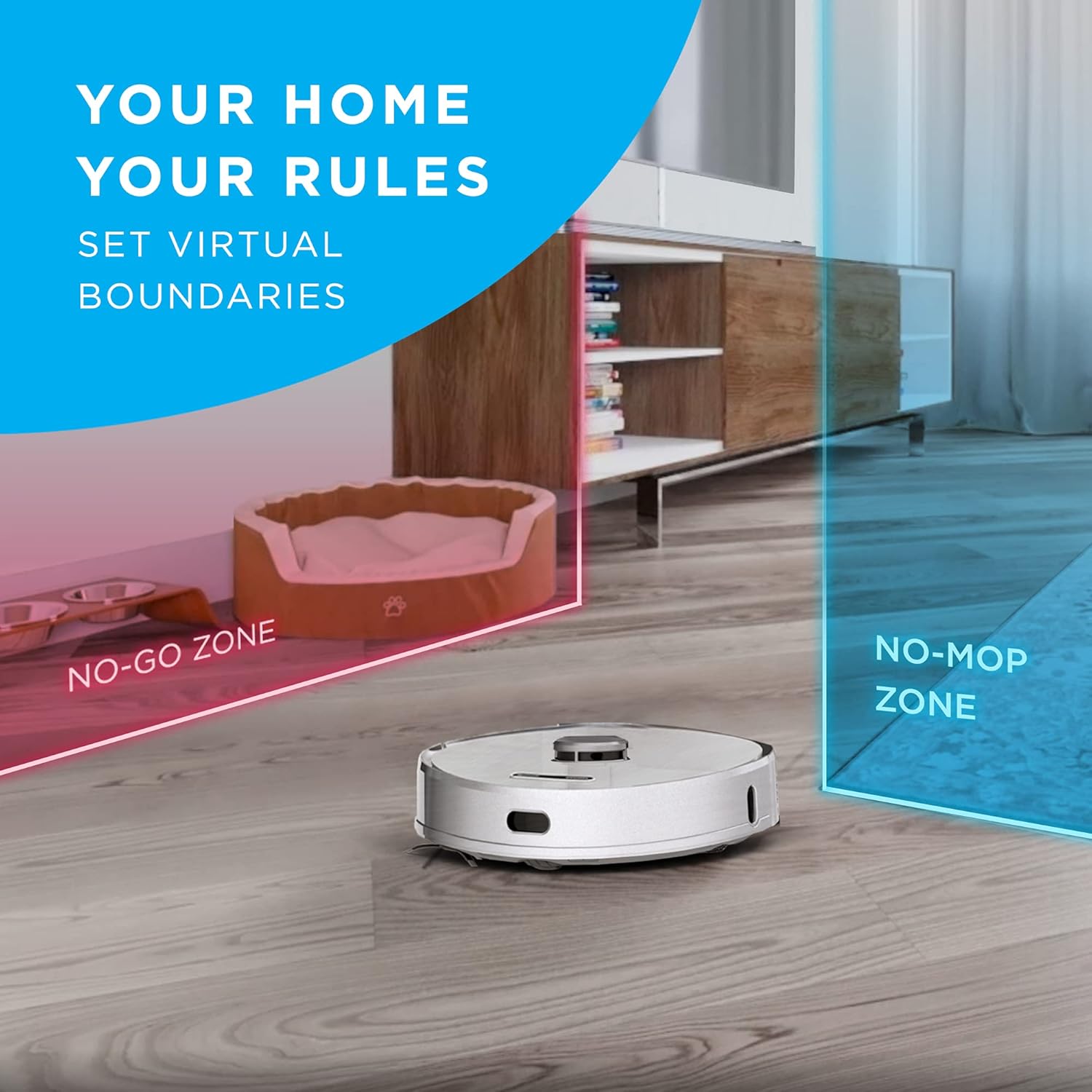
Image: The iHome AutoVac Halo actively cleaning a hard floor, demonstrating its operation.
3. Mapeo y navegación inteligentes
The AutoVac Halo uses LiDAR Visual Navigation Technology to map your home. During its first few runs, it will create a detailed floor plan. This map allows for efficient, systematic cleaning and enables features like:
- Virtual Boundaries: Set "No-Go Zones" or "No-Mop Zones" via the app to restrict cleaning in specific areas.
- Limpieza programada: Schedule cleaning for specific rooms or times.
- Seguimiento en tiempo real: Monitor the robot's progress and location on the map in the app.
Image: The iHome AutoVac Halo navigating a room, with virtual boundaries (No-Go Zone, No-Mop Zone) overlaid on a floor plan.
4. Vacuum and Mop Functions
The AutoVac Halo offers both vacuuming and mopping capabilities. It is suitable for hardwood floors, tile, and low-pile carpets. For mopping, attach the PowerMop attachment and fill the water tank (if applicable, specific instructions for mop attachment are in the full manual). Adjust suction and mop settings via the app.

Image: The iHome AutoVac Halo demonstrating its mopping function on a hard floor, leaving a clean path.
Mantenimiento
Regular maintenance ensures optimal performance and extends the lifespan of your AutoVac Halo.
1. Auto-Empty Base Dust Bag
The auto-empty base automatically transfers dirt from the robot's dustbin into a disposable dust bag. Replace the dust bag when the indicator light on the base signals it is full, or approximately every 30-60 days depending on usage.

Image: A hand removing a full dust bag from the iHome Auto-Empty Base, ready for disposal.
2. Robot Dustbin and Filter
Although the base self-empties, periodically check and clean the robot's internal dustbin and HEPA filter. Tap out loose debris and rinse the filter under running water (ensure it's completely dry before re-inserting). Replace the HEPA filter every 3-6 months.
3. Brushes and Wheels
Regularly inspect and clean the main brush, side brushes, and wheels. Use the provided cleaning tool to remove tangled hair or debris. Replace worn-out side brushes as needed.
4. Mop Pads
After each mopping cycle, remove and clean the mop pads. They can be hand-washed or machine-washed. Ensure they are dry before reattaching.
Solución de problemas
If you encounter issues with your iHome AutoVac Halo, refer to the following common solutions:
| Problema | Posible causa | Solución |
|---|---|---|
| El robot no se carga | Not properly docked; power cable loose; charging contacts dirty. | Ensure robot is correctly aligned on the base. Check power cable connection. Clean charging contacts on both robot and base. |
| El robot se queda atascado con frecuencia | Loose cables, small objects, or thick carpets. | Clear the cleaning area of obstructions. Use virtual boundaries in the app for problem areas. |
| Pobre rendimiento de limpieza | Depósito de polvo lleno; filtro obstruido; cepillos desgastados. | Empty dustbin/replace dust bag. Clean or replace filter. Clean or replace brushes. |
| Problemas de conexión wifi | Weak Wi-Fi signal; incorrect network password; router issues. | Ensure strong Wi-Fi signal near the base. Re-enter Wi-Fi credentials in the app. Restart your router. |
| Main Wheel Error | Debris caught in wheels; wheel malfunction. | Check wheels for obstructions and clean them. If the error persists, contact customer support. |
Presupuesto
- Marca: iInicio
- Nombre del modelo: iHRV7
- Características especiales: LiDAR Navigation, Self-Emptying, Smart Mapping
- Color: Blanco
- Tipo de filtro: Cartucho
- Duración de la batería: Hasta 3 horas
- Fuente de energía: Funciona con pilas
- Baterías: Se requiere 1 batería de iones de litio (incluida)
- Método de control: Voz, aplicación, control remoto
- Dispositivos compatibles: Amazon Echo, Google Inicio
- Factor de forma: Robótico
- Código postal: 860004017271
- Dimensiones del producto: 13 x 13 x 4 pulgadas
- Peso del artículo: 5 libras
- Recomendación de superficie: Hardwood floors, tile, low-pile carpets
Garantía y soporte
For warranty information, technical support, or service inquiries, please refer to the warranty card included in your product packaging or visit the official iHome webSitio. Conserve su recibo de compra como comprobante para reclamaciones de garantía.
Soporte en línea: www.ihome.com/soporte
Documentos relacionados - iHRV7
 |
Manual del usuario del robot aspirador y trapeador iHome AUTOVAC Eclipse Series Este manual del usuario proporciona instrucciones completas para el robot aspirador y trapeador 2 en 1 iHome AUTOVAC Eclipse Series, que cubren la configuración, el funcionamiento, la seguridad, la conectividad de aplicaciones y el mantenimiento para una limpieza eficiente del hogar. |
 |
Guía del propietario de iHome Autovac Halo IHRV7 Guía del usuario del robot aspirador iHome Autovac Halo, modelo IHRV7. Incluye instrucciones de seguridad y una descripción del producto.view, configuración, uso, mantenimiento, solución de problemas e información de la FCC. |
 |
iHome Autovac Android Setup: Wi-Fi Connection Guide (Quick Start) Quick start guide for setting up your iHome Autovac robot vacuum on Android. This guide details step-by-step Wi-Fi connection using the iHome Clean 2.0 app, including app download and device pairing instructions. |
 |
Guía del propietario de iHome AUTOVAC NOVA S1 PRO: configuración, mantenimiento y solución de problemas Guía completa del usuario del robot aspirador iHome AUTOVAC NOVA S1 PRO. Aprenda sobre la configuración, el uso de la app, el mantenimiento, la resolución de problemas y la garantía de su dispositivo de limpieza iHome. |
 |
iHome Autovac Eclipse iHRV2 Owner's Guide: Setup, Operation, and Maintenance Comprehensive owner's guide for the iHome Autovac Eclipse robot vacuum cleaner (Model iHRV2). Learn how to set up, use, maintain, and troubleshoot your device. Includes product overview, cleaning modes, app connection, safety instructions, and FCC statement. |
 |
Manual del usuario de la aspiradora robot iHome AutoVac Juno (modelo iHRV9) Manual del propietario del robot aspirador iHome AutoVac Juno (modelo iHRV9), que proporciona instrucciones detalladas sobre la configuración, el funcionamiento, el mantenimiento, la solución de problemas y la información sobre la garantía. |