1. Introducción
This manual provides essential instructions for the safe and efficient use of your Xiaomi Mi Portable Bluetooth Speaker. Please read this manual thoroughly before using the product and retain it for future reference. The speaker features high-quality sound, True Wireless Stereo (TWS) capability, Bluetooth 5.0 connectivity, and IPX7 waterproofing, making it suitable for various environments.

Imagen: En ángulo view of the Xiaomi Mi Portable Bluetooth Speaker, highlighting its compact design and control panel.
2. Contenido del paquete
Asegúrese de que todos los artículos estén presentes en el paquete:
- Xiaomi Mi Portable Bluetooth Speaker x1
- Charging Cable x1 (USB-C)
- Manual de usuario x1
3. Características del producto
- Sonido de alta calidad: Delivers clear and balanced audio.
- Estéreo inalámbrico verdadero (TWS): Connect two speakers for an immersive stereo experience.
- Bluetooth 5.0: Conectividad inalámbrica estable y eficiente.
- IPX7 a prueba de agua: Protegido contra inmersión en agua hasta 1 metro durante 30 minutos.
- Tiempo de juego prolongado: Approximately 13 hours of playback at 50% volume.
- Micrófono incorporado: Para llamadas manos libres.
- Entrada auxiliar: Para conexión de audio por cable.
4. Controles e indicadores
Familiarize yourself with the speaker's control buttons and indicators:
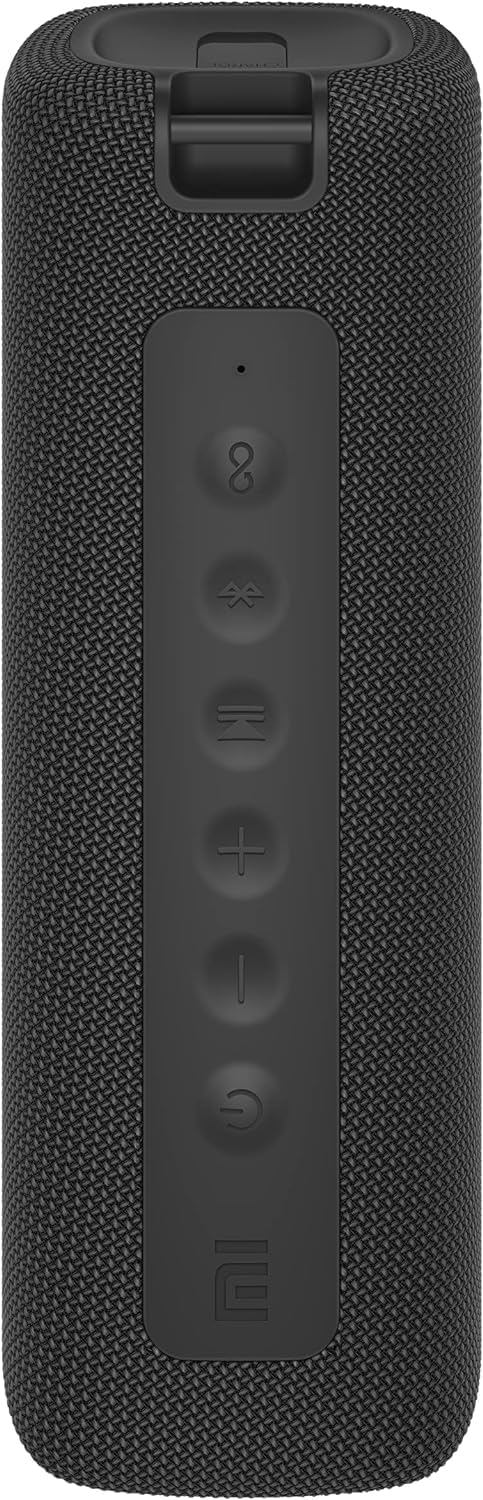
Imagen: Frente view of the speaker with clearly visible control buttons.
| Botón / indicador | Función |
|---|---|
| Botón de encendido (⏻) | Press and hold for 2 seconds to power on/off. Short press to play/pause music or answer/end calls. |
| Bajar volumen (−) | Pulsación corta para bajar el volumen. Mantén pulsado para ir a la pista anterior. |
| Subir volumen (+) | Pulsación corta para subir el volumen. Mantén pulsado para pasar a la siguiente pista. |
| Botón Bluetooth (Ⓑ) | Presione brevemente para ingresar al modo de emparejamiento Bluetooth. |
| Botón TWS (∞) | Press to initiate True Wireless Stereo pairing with another Mi Portable Bluetooth Speaker. |
| Indicador LED | Indica el estado de energía, el estado de carga y el estado de emparejamiento de Bluetooth. |
5. Configuración
5.1 Carga del altavoz
- Conecte el cable de carga USB-C provisto al puerto de carga del altavoz.
- Connect the other end of the cable to a 5V 1A USB power adapter (not included) or a computer's USB port.
- El indicador LED mostrará el estado de carga (por ejemplo, rojo durante la carga, apagado cuando está completamente cargado).
- Una carga completa tarda aproximadamente 4 horas.
5.2 Encendido y apagado
- Para encender: Press and hold the Power button for 2 seconds. You will hear an audible prompt, and the LED indicator will light up.
- Para apagar: Press and hold the Power button for 2 seconds. You will hear an audible prompt, and the LED indicator will turn off.
5.3 Emparejamiento Bluetooth
- Ensure the speaker is powered on. The LED indicator will flash blue, indicating it's in pairing mode.
- En su dispositivo (teléfono inteligente, tableta, computadora), habilite Bluetooth y busque los dispositivos disponibles.
- Select "Mi Portable Bluetooth Speaker" from the list of devices.
- Una vez emparejado, el indicador LED se volverá azul fijo y escuchará un sonido de confirmación.
- El altavoz se conectará automáticamente al último dispositivo emparejado cuando se encienda, si está dentro del alcance.
5.4 Emparejamiento estéreo inalámbrico verdadero (TWS)
To pair two Xiaomi Mi Portable Bluetooth Speakers for stereo sound:
- Asegúrese de que ambos altavoces estén encendidos y no conectados a ningún otro dispositivo Bluetooth.
- On one speaker (this will be the primary speaker), short press the TWS button (∞). The LED indicator will flash.
- On the second speaker, short press the TWS button (∞).
- The two speakers will automatically connect to each other. You will hear a confirmation sound, and the LED indicators on both speakers will turn solid blue.
- Now, connect your device to the primary speaker via Bluetooth as described in section 5.3. The sound will play in stereo through both speakers.
5.5 Conexión AUX
Para reproducción de audio con cable:
- Connect a 3.5mm audio cable (not included) from your audio source to the AUX IN port on the speaker.
- El altavoz cambiará automáticamente al modo AUX.
- Control playback and volume from your audio source device.
6. Instrucciones de funcionamiento
6.1 Reproducción de música
- Reproducir/Pausa: Presione brevemente el botón de encendido.
- Sube el volumen: Presione brevemente la tecla Subir volumen (+) botón.
- Bajar volumen: Short press the Volume Down (−) botón.
- Pista siguiente: Press and hold the Volume Up (+) botón.
- Pista anterior: Press and hold the Volume Down (−) botón.
6.2 Gestión de llamadas
- Responder/Finalizar llamada: Short press the Power button when a call comes in or during a call.
- Rechazar llamada: Mantenga presionado el botón de encendido durante 2 segundos cuando entre una llamada.
7. Mantenimiento
- Limpieza: Limpie el altavoz con un paño suave, damp Paño. No utilice limpiadores abrasivos ni disolventes.
- Almacenamiento: Guarde el altavoz en un lugar fresco y seco, alejado de la luz solar directa y de temperaturas extremas.
- Resistencia al agua: The speaker is IPX7 waterproof. Ensure the charging port cover is securely closed before exposure to water. Do not submerge the speaker for extended periods or beyond specified depths.
- Cuidado de la batería: Para prolongar la vida útil de la batería, evite descargar completamente el altavoz con frecuencia. Cárguelo regularmente, incluso si no lo usa durante períodos prolongados.
8. Solución de problemas
| Problema | Posible solución |
|---|---|
| El altavoz no se enciende. | Asegúrese de que la batería esté cargada. Conéctela a una fuente de alimentación y vuelva a intentarlo. |
| No se puede emparejar a través de Bluetooth. |
|
| No hay sonido o volumen bajo. |
|
| El emparejamiento de TWS falla. |
|
| Mala calidad de sonido. |
|
9. Especificaciones

Imagen: Abajo view of the speaker, displaying model number and certifications.
| Parámetro | Valor |
|---|---|
| Modelo | MDZ-36-DB |
| Dimensiones del producto | W 213 x D 74 x H 74 mm (approx. 8 x 3 x 3 inches) |
| Conectividad | Bluetooth 5.0, 3.5mm AUX IN |
| Potencia nominal | 2 x 8 W (16 W en total) |
| Relación señal a ruido | ≥ 70 dB |
| Rango de conexión TWS | ≤ 5 m |
| Clasificación de impermeabilidad | IPX7 |
| Tipo de batería | Iones de litio, 3.7 V |
| Capacidad de la batería | 2600 mAh |
| Tiempo de carga de la batería | Aproximadamente 4 horas |
| Tiempo de reproducción | Aprox. 13 horas (al 50% del volumen) |
| Rango de frecuencia | 80 Hz a 20 KHz |
| Impedancia nominal | 4 ohmios |
| Distancia de transmisión | 15 m |
| Entrada nominal | 5 V 1 A |
| Peso del artículo | 500 gramos (1.1 libras) |
10. Garantía y soporte
Para obtener información detallada sobre la garantía, consulte la tarjeta de garantía incluida con su producto o visite el sitio web oficial de Xiaomi. websitio.
If you encounter any issues not covered in this manual, please contact Xiaomi customer support or visit their official support channels for assistance.


