1. Producto terminadoview
The Anderic OEM NSRCFNA21 Smart Remote is an original equipment manufacturer (OEM) replacement remote control specifically designed for various Insignia TV models. This remote provides seamless functionality and user-friendly operation, ensuring reliable control over your television.
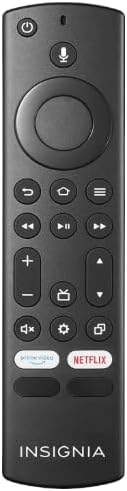
Imagen 1.1: The Anderic OEM NSRCFNA21 Smart Remote. This image displays the front view of the black remote control, featuring various buttons for power, voice control, navigation, volume, channel, and dedicated streaming service buttons.
Las características principales incluyen:
- Original Quality: An authentic OEM product, ensuring performance and reliability comparable to the remote originally supplied with your TV.
- Diseño fácil de usar: Intuitive buttons and controls for easy navigation, volume adjustment, channel changes, and access to various TV functions.
- Rendimiento confiable: Provides a stable and responsive connection for accurate command execution.
2. Instrucciones de configuración y emparejamiento
To ensure proper functionality, the remote control must be paired with your Insignia TV. Follow these steps carefully:
- Restablecer televisor: Unplug your Insignia TV from its power source. Wait for approximately 30 seconds.
- Encender el televisor: Plug the TV back into the power source and turn it on. Allow the TV to fully boot up.
- Iniciar emparejamiento: Once the TV has completely booted up and is displaying content, press and hold the Hogar button on the Anderic NSRCFNA21 remote control for up to 30 seconds.
- Remote Update (if prompted): Your TV may display a message indicating that the remote needs an update. If prompted, allow the TV to proceed with the update. This process may take 1 to 3 minutes to complete.
- Verificación: After the update (if any) and pairing process, test the remote's functions (e.g., volume, channel, navigation) to confirm successful pairing.
If the remote does not pair after following these steps, repeat the process or refer to the troubleshooting section.
3. Operar el control remoto
The Anderic NSRCFNA21 remote control features an intuitive layout for easy operation of your Insignia TV. Below are the general functions of the primary buttons:
- Botón de encendido: Enciende o apaga el televisor.
- Botón de control de voz: Activa los comandos de voz para buscar contenido o controlar el televisor.
- Navigation Pad (Directional Buttons and Select): Se utiliza para moverse por los menús y seleccionar elementos.
- Botón de inicio: Regresa a la pantalla de inicio principal del televisor.
- Botón Atrás: Vuelve a la pantalla o menú anterior.
- Botón Menú/Opciones: Accesses additional menu options or settings.
- Subir/Bajar volumen: Ajusta el volumen de audio del televisor.
- Canal arriba/abajo: Cambia los canales de televisión.
- Botón de silencio: Silencia o activa el audio del televisor.
- Botón de configuración: Abre el menú de configuración del televisor.
- Botón de entrada/fuente: Changes the TV's input source (e.g., HDMI 1, HDMI 2).
- Dedicated Streaming Service Buttons: Provides quick access to popular streaming applications (e.g., Amazon Prime Video, Netflix).
4. Compatibilidad
The Anderic OEM NSRCFNA21 Smart Remote is compatible with the following Insignia TV models:
- NS24DF310NA21
- NS39DF310NA21
- NS50DF710NA21
- NS55DF710NA21
This remote also replaces the following models:
- NSRCFNA19 Rev B Fire
- NSRCFNA19revB
- NSRCFNA21 Fire
- NSRCFNA21 Rev E
- NSRCFNA21-Rev-E
Ensure your TV model is listed above for optimal performance.
5. Mantenimiento
Proper maintenance can extend the life and functionality of your remote control.
- Reemplazo de batería: The remote requires two AAA batteries. Replace batteries when the remote's responsiveness decreases or it stops functioning. Ensure correct polarity when inserting new batteries.
- Limpieza: Utilice un paño suave y seco para limpiar la superficie del control remoto. Evite usar limpiadores líquidos o materiales abrasivos, ya que pueden dañarlo.
- Almacenamiento: Guarde el control remoto en un lugar seco, alejado de temperaturas extremas y de la luz solar directa.
6. Solución de problemas
If you encounter issues with your Anderic NSRCFNA21 Smart Remote, try the following troubleshooting steps:
- El control remoto no responde:
- Check the batteries. Replace them with fresh AAA batteries, ensuring correct polarity.
- Asegúrese de que no haya obstrucciones entre el control remoto y el sensor del televisor.
- Vuelva a intentar el proceso de emparejamiento como se describe en la Sección 2.
- Funcionalidad intermitente:
- Esto podría indicar que la batería está baja. Reemplace las baterías.
- Asegúrese de estar dentro del rango efectivo del sensor del televisor.
- Pairing Fails:
- Confirm your TV model is listed in the compatibility section (Section 4).
- Ensure the TV is fully booted up before attempting to hold the Home button.
- Try unplugging the TV for a longer period (e.g., 1-2 minutes) before plugging it back in and re-attempting pairing.
Si los problemas persisten después de intentar estos pasos, comuníquese con el servicio de atención al cliente para obtener más ayuda.
7. Especificaciones
| Marca | Andérico |
| Número de modelo | NSRCFNA21 Rev B |
| Dispositivos compatibles | Insignia Televisions |
| Fuente de poder | 2 pilas AAA (requeridas) |
| Peso del artículo | 1.76 onzas |
| Dimensiones del paquete | 6.3 x 2.95 x 0.67 pulgadas |
| Color | Negro |
| Fabricante | Dan's Electronics Etc., Inc. |
8. Garantía y soporte
For warranty information or technical support, please contact the manufacturer, Anderic (Dan's Electronics Etc., Inc.). Refer to the product packaging or the official Anderic webSitio para obtener detalles de contacto específicos y términos de garantía.
Puedes visitar el Anderic Store on Amazon Para más información.


