1. Introducción y másview
The Acer Predator XB323QK UHD display offers a 31.5-inch (3840 x 2160) screen with an Agile-Splendor IPS panel. Designed for high-performance gaming, it supports a 144Hz refresh rate and is NVIDIA G-SYNC Compatible, ensuring smooth gameplay. This monitor delivers rich colors with DCI-P3 90% coverage and a Delta E<1 color accuracy, providing an immersive visual experience.
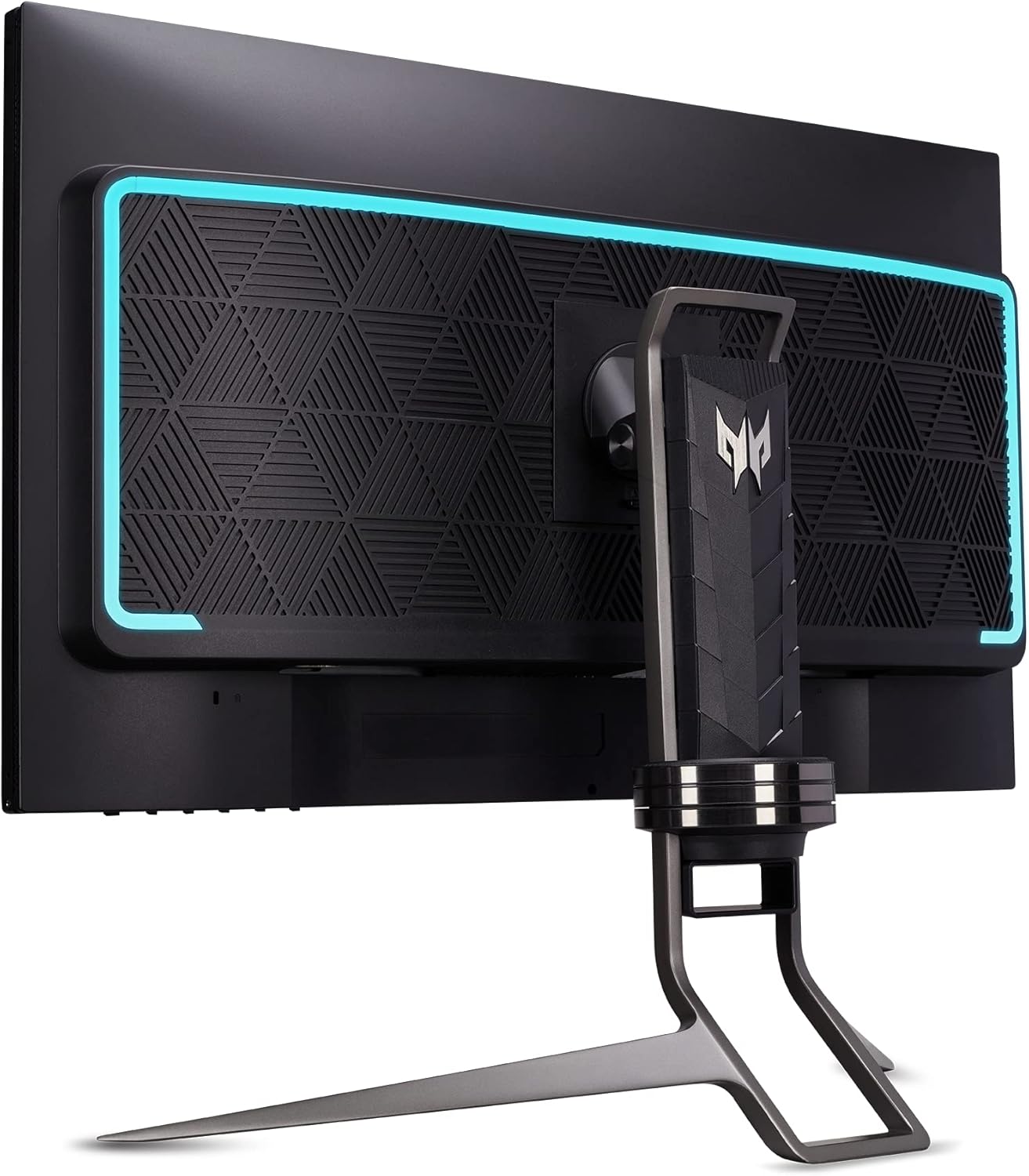
Frente view of the Acer Predator XB323QK Gaming Monitor, showcasing its sleek design and Predator branding.
2. ¿Qué hay en la caja?
Your Acer Predator XB323QK monitor package includes the following items:
- Acer Predator XB323QK 31.5" UHD Gaming Monitor
- Monitor Stand (pre-assembled)
- Cable de alimentación
- 1 x Display Port 1.4 Cable
- 1 cable HDMI 2.1
- 1 x USB Cable (for USB 3.0 hub functionality)
- Guía de inicio rápido e información de garantía
3. Configuración
3.1 Monitor Assembly and Placement
The monitor stand is typically pre-assembled. Place the monitor on a stable, flat surface. Ensure adequate ventilation around the monitor. The ergonomic stand allows for tilt, height adjustment, and swivel to optimize your viewExperiencia de aprendizaje.
3.2 Conexión a una fuente de alimentación
Connect the power cable to the monitor's power input and then to a wall outlet. The monitor supports 240 Volts.
3.3 Conexión a una computadora o dispositivo
Connect your computer or gaming console to the monitor using one of the provided cables. The monitor offers versatile connectivity options:
- Display Port 1.4: For high refresh rate and resolution connections.
- HDMI 2.1 (x2): Supports high refresh rates and resolutions, ideal for modern gaming consoles and PCs.
- USB 3.1 Tipo-C (Gen 1): Supports data transfer, DisplayPort over USB-C, and up to 65W power delivery for compatible devices.
- Puertos USB 3.0 (x4): Use the included USB cable to connect the monitor's USB upstream port to your computer to enable the monitor's built-in USB hub for peripherals.

Detallado view of the monitor's rear panel, highlighting the DisplayPort, HDMI, USB-C, and USB 3.0 ports for comprehensive connectivity.
4. Funcionamiento del monitor
4.1 Encendido y apagado
Press the power button, usually located on the bottom or rear of the monitor, to turn it on or off. The power LED will indicate the monitor's status.
4.2 Menú de visualización en pantalla (OSD)
Navigate the OSD menu using the joystick or buttons typically found on the monitor's rear or bottom. The OSD allows you to adjust various settings:
- Configuración de imagen: Brightness, Contrast, Gamma, Color Temperature, Picture Mode (e.g., sRGB, HDR600).
- Configuración del juego: Overdrive, Refresh Rate, G-SYNC, Variable Refresh Rate (VRR).
- Selección de entrada: Cambie manualmente entre las entradas DisplayPort, HDMI y USB-C.
- Configuración del sistema: Language, OSD timeout, Power-saving options.
4.3 G-SYNC and High Refresh Rate
Ensure your graphics card drivers are up to date and G-SYNC is enabled in your NVIDIA control panel for tear-free gaming. The monitor supports up to a 144Hz refresh rate for incredibly smooth visuals.

Visual comparison demonstrating the elimination of screen tearing with NVIDIA G-SYNC technology.

Illustration emphasizing the 144Hz refresh rate for fluid motion in gaming.
5. Características
The Acer Predator XB323QK is packed with features to enhance your gaming and viewExperiencia:
- Resolución UHD (3840 x 2160): Experience stunning clarity and detail on a 31.5-inch screen.
- Agile-Splendor IPS Panel: Delivers vibrant colors, wide viewángulos de inclinación y tiempos de respuesta rápidos.
- Frecuencia de actualización de 144 Hz y tiempo de respuesta de 0.5 ms: Garantiza un movimiento ultra suave y un efecto fantasma mínimo para juegos competitivos.
- Compatible con NVIDIA G-SYNC: Synchronizes the display's refresh rate with your GPU for fluid, tear-free gameplay.
- DisplayHDR 400 con certificación VESA: Provides enhanced contrast and brightness for a more dynamic visual experience.
- DCI-P3 90% Color Gamut & Delta E<1 Color Accuracy: Offers exceptional color reproduction for lifelike images.
- Diseño de marco cero: Maximizes screen space and allows for seamless multi-monitor setups.
- Altavoces integrados: Two 4-watt speakers provide convenient audio output.
- TUV/Eyesafe Certification: Reduces harmful blue light emissions without compromising color accuracy, promoting eye comfort during long sessions.
- Soporte ergonómico: Offers a wide range of adjustments including tilt (-5° to 25°), height (5.12" range), and swivel (+/- 30°) for personalized comfort.
- Conectividad versátil: Includes USB-C with 65W Power Delivery, DisplayPort 1.4, two HDMI 2.1 ports, and a 4-port USB 3.0 hub.

Explanation of Agile-Splendor IPS technology, highlighting its fast liquid crystal and wide color gamut for premium viewEn.

TUV/Eyesafe certification for low blue light and color accuracy, promoting eye comfort.
6. Especificaciones
| Característica | Detalle |
|---|---|
| Tamaño de pantalla | 31.5 pulgadas |
| Resolución | UHD (3840 x 2160) |
| Tipo de panel | IPS Agile-Splendor |
| Frecuencia de actualización | 144 Hz |
| Tiempo de respuesta | Hasta 0.5 ms (G a G) |
| Certificación HDR | Pantalla con certificación VESA HDR 400 |
| Gama de colores | DCI-P3 90% |
| Precisión del color | Delta E<1 |
| Compatibilidad con G-SYNC | Compatible con NVIDIA G-SYNC |
| Conectividad | 1x USB-C (65W PD), 1x DisplayPort 1.4, 2x HDMI 2.1, 4x USB 3.0 |
| Oradores | 2 x 4 vatios |
| Ergonomía | Tilt (-5° to 25°), Height (5.12" range), Swivel (+/- 30°) |
| Dimensiones (LxAnxAl) | 28.18 x 12.16 x 21 pulgadas |
| Peso | 31.8 libras |
| Número de modelo | UM.JX3AA.V01 |
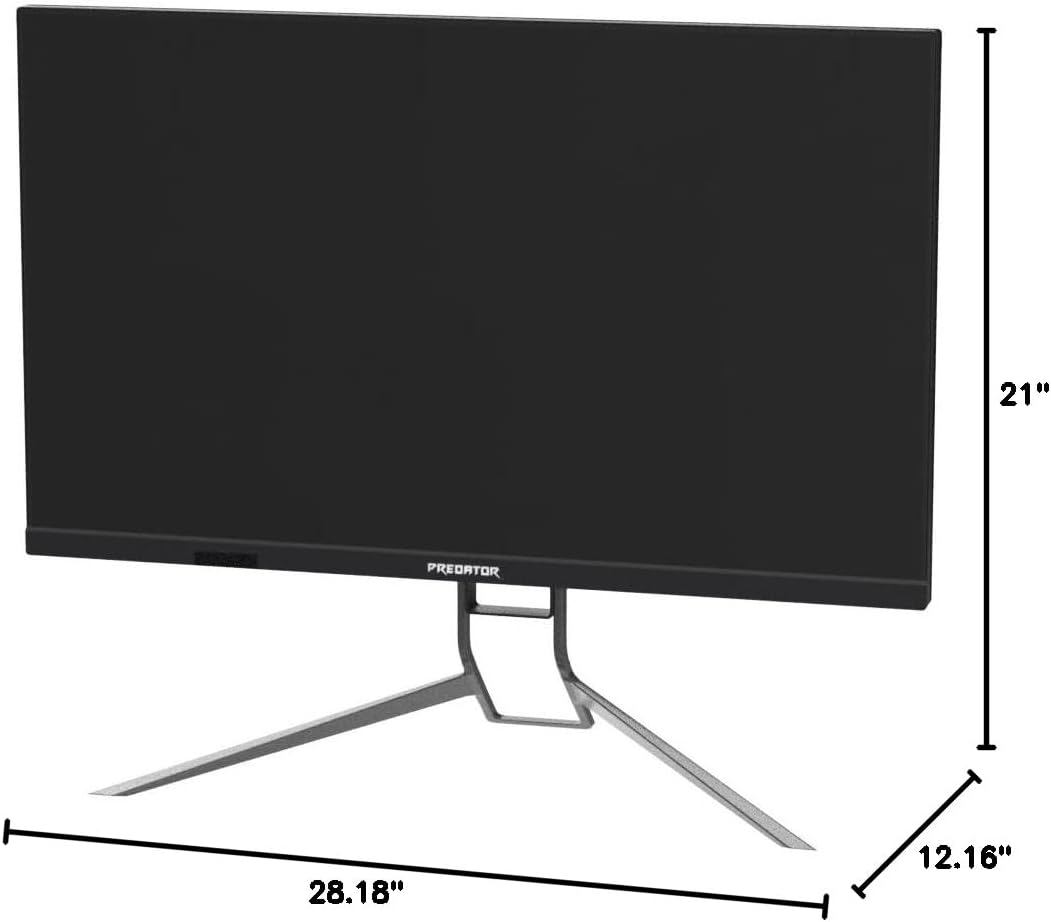
Dimensional sobreview of the Acer Predator XB323QK monitor.
7. Mantenimiento
Para garantizar la longevidad y el rendimiento óptimo de su monitor, siga estas pautas de mantenimiento:
- Limpieza de la pantalla: Gently wipe the screen with a soft, lint-free cloth. For stubborn smudges, use a monitor-specific cleaning solution applied to the cloth, not directly to the screen.
- Limpieza de la Casing: Utilice un paño suave y seco para limpiar el monitor.asing. Evite los limpiadores abrasivos.
- Ventilación: Asegúrese de que las aberturas de ventilación del monitor estén limpias y no obstruidas para evitar el sobrecalentamiento.
- Características de cuidado de OLED: This monitor may include features like Pixel Shift, Panel Protect, and Pixel Refresh designed to mitigate potential OLED burn-in. Consult the OSD menu for these settings and enable them as recommended for optimal panel health.
8. Solución de problemas
Si tiene problemas con su monitor, consulte los siguientes pasos de solución de problemas comunes:
- Sin energía: Compruebe que el cable de alimentación esté bien conectado tanto al monitor como a la toma de corriente. Asegúrese de que la toma de corriente funcione.
- Sin señal: Verify that the video cable (DisplayPort, HDMI, or USB-C) is correctly connected to both the monitor and your computer/device. Ensure the correct input source is selected in the OSD menu.
- Flickering/Image Issues: Check your graphics card drivers for updates. Ensure the video cable is not damaged. Try a different cable or port. For OLED-specific flickering, especially with Variable Refresh Rate (VRR), ensure your monitor's firmware is updated to the latest version (e.g., version 011 or newer, as mentioned in some reviews, for optimal input lag and VRR performance).
- Mala calidad de imagen: Adjust brightness, contrast, and color settings in the OSD menu. Ensure the monitor is set to its native resolution (3840 x 2160) and desired refresh rate (144Hz).
- Burn-in/Image Retention: While OLED technology has advanced, static images displayed for extended periods can still pose a risk. Utilize the monitor's built-in OLED care features (Pixel Shift, Panel Protect, Pixel Refresh) to minimize this risk. Avoid displaying static elements (like taskbars or desktop icons) for prolonged durations.
9. Garantía y soporte
For warranty information, please refer to the warranty card included in your product packaging or visit the official Acer support website. For technical assistance, driver downloads, or further troubleshooting, please contact Acer customer support.
10. Vídeos oficiales del producto
No official seller videos directly pertaining to the Acer Predator XB323QK NVbmiiphuzx monitor were found in the provided data. Please refer to the Acer official website or authorized channels for product videos.