1. Producto terminadoview
The idinio® Smart Ceiling Light is an innovative lighting solution designed to integrate seamlessly with your smart home ecosystem. It features an integrated docking station compatible with Amazon Echo Dot (3rd/4th Gen) and Google Nest Mini (2nd Gen), allowing for voice control of both the light and your smart home devices. Its central placement in a room provides optimal conditions for the smart speaker.
This versatile light offers adjustable color temperature from extra warm white (2000K) to neutral white (4000K) for the main light. Additionally, it includes a separately controllable RGB backlight, enabling you to create dynamic color accents on your ceiling. Advanced features such as music synchronization, scheduled on/off times, and simulated sunrise for a biorythmic alarm are also available through the idinio app.

Image: Three idinio smart ceiling lights, showcasing their modern design and how they appear when installed.
2. ¿Qué hay en la caja?
Revise cuidadosamente el contenido del paquete. Si falta algún artículo o está dañado, contacte con atención al cliente.
- idinio® Smart Ceiling Light (x3 for this set)
- Estación de acoplamiento integrada
- Accesorios de montaje (tornillos, tacos)
- Manual de usuario (este documento)
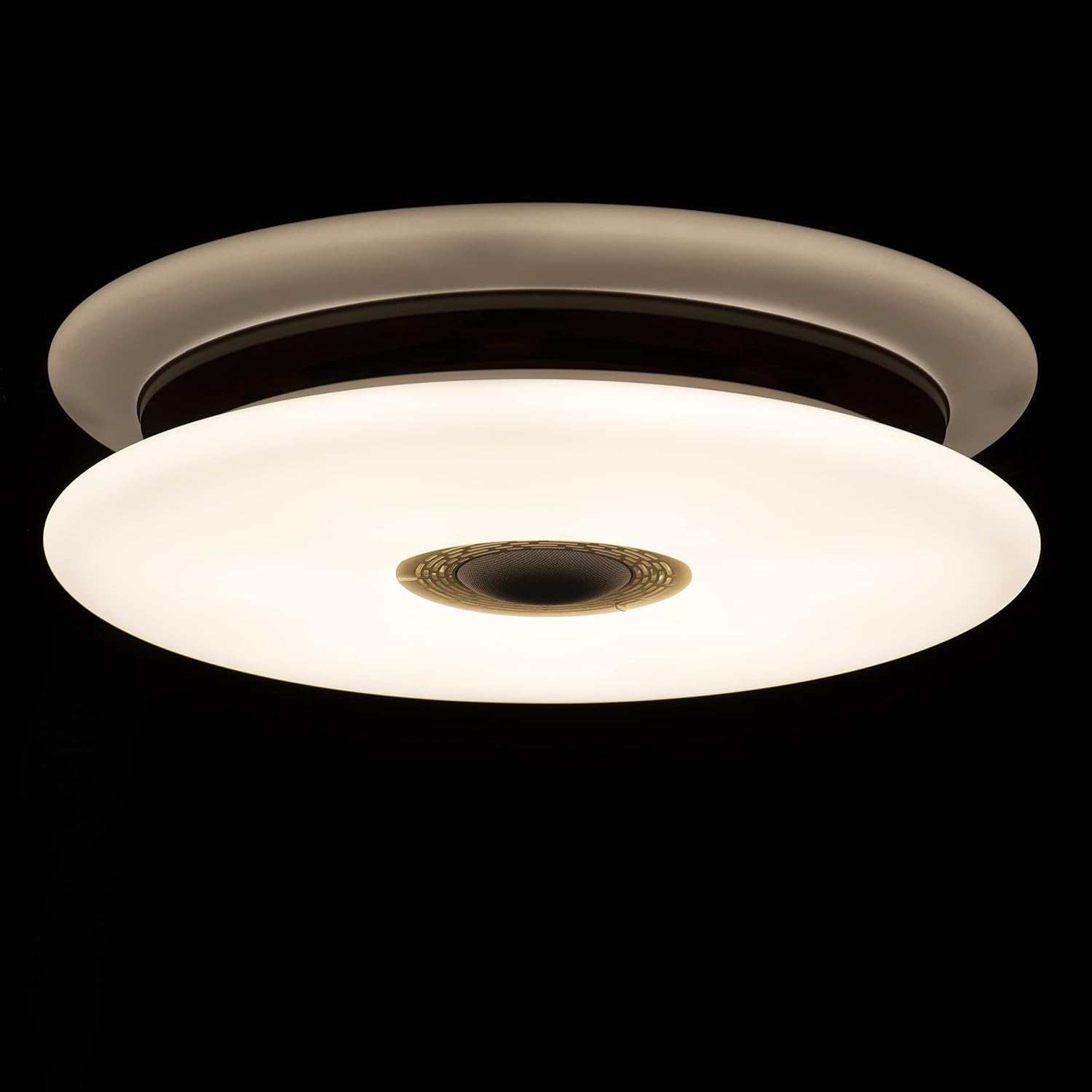
Image: Packaging of the idinio smart ceiling lights, indicating the contents of the set.
3. Configuración e instalación
3.1 Precauciones de seguridad
- Asegúrese de que la energía esté apagada en el disyuntor antes de la instalación.
- La instalación debe ser realizada por un electricista calificado si no está seguro.
- Do not connect the light to a dimmer switch not designed for smart lighting.
3.2 Mounting the Ceiling Light
- Apague el suministro de energía principal en el disyuntor.
- Attach the mounting bracket to the ceiling using the provided screws and wall plugs.
- Connect the electrical wires (Live, Neutral, Earth) from your ceiling to the corresponding terminals on the light fixture. Ensure connections are secure.
- Fije la luminaria al soporte de montaje.
- Encienda la fuente de alimentación principal.
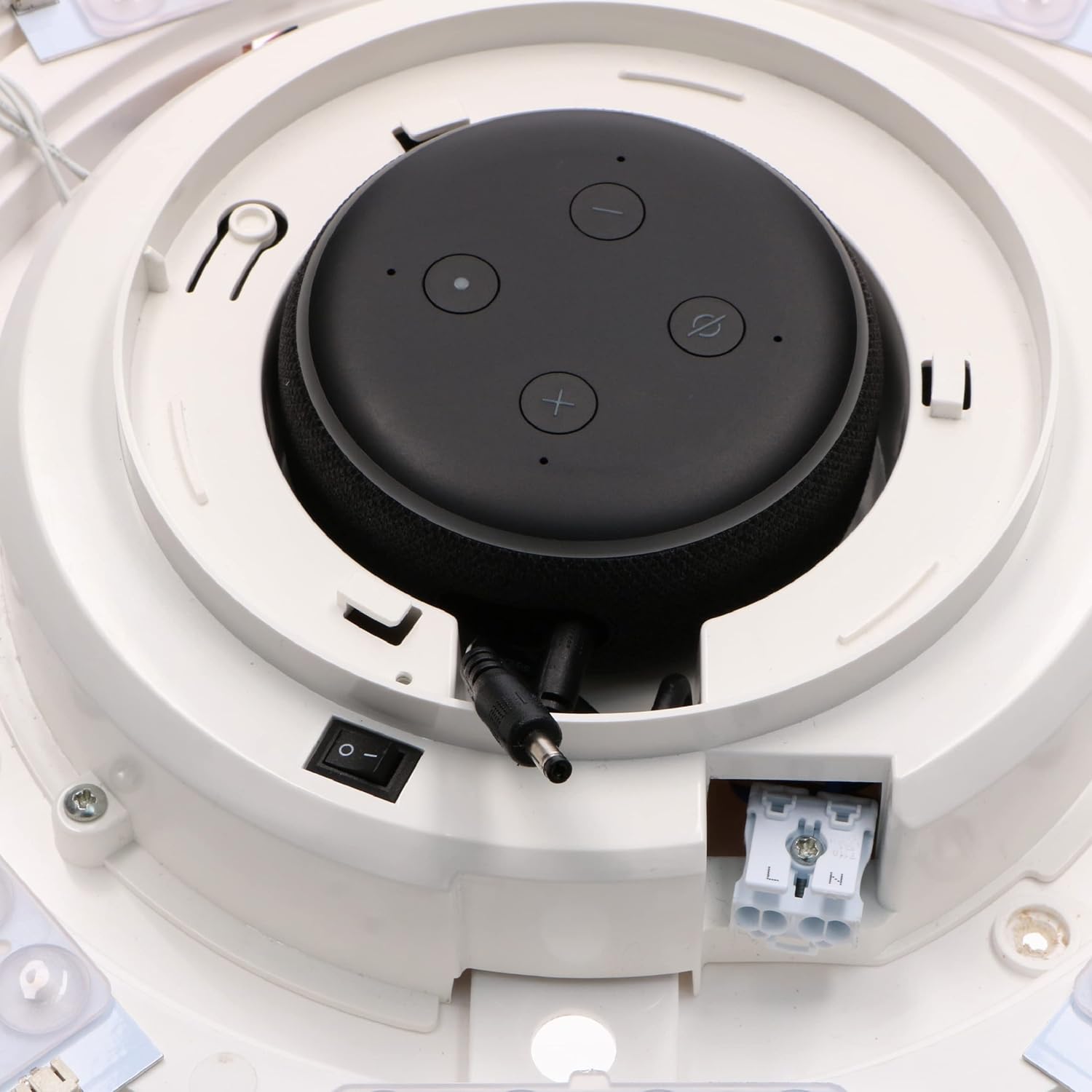
Imagen: interna view of the light fixture showing wiring terminals and LED arrangement.
3.3 Integrating Your Smart Speaker
The idinio Smart Ceiling Light is designed with a central docking station for compatible smart speakers. Different diaphragms are included to ensure a perfect fit and aesthetic integration.
- Select the appropriate diaphragm for your smart speaker (Echo Dot 3rd/4th Gen or Nest Mini 2nd Gen).
- Carefully place your smart speaker into the docking station. Ensure it sits securely.
- Connect the smart speaker's power cable to the integrated power output within the docking station.

Image: Echo Dot 3rd Generation installed.

Image: Echo Dot 4th Generation installed.

Image: Google Nest Mini 2nd Generation installed.

Imagen: interna view with smart speaker installed and connected.
3.4 Conexión de la aplicación
To unlock the full potential of your idinio Smart Ceiling Light, download the idinio app from the App Store (iOS) or Google Play Store (Android).
- Download and install the "idinio" app on your smartphone or tablet.
- Regístrese para una nueva cuenta o inicie sesión si ya tiene una.
- Asegúrese de que su red Wi-Fi sea de 2.4 GHz.
- Follow the in-app instructions to add your new idinio Smart Ceiling Light. This typically involves putting the light into pairing mode (often by cycling power) and confirming its discovery in the app.
- Once connected, you can control the light and integrate it with Amazon Alexa or Google Assistant through the app's settings.
4. Instrucciones de funcionamiento
4.1 Control básico de la iluminación
- Encendido/apagado: Use the idinio app or voice commands via your integrated smart speaker to turn the light on or off.
- Atenuación: Adjust the brightness level from 1% to 100% using the app or voice commands.
4.2 Color Temperature Adjustment (Main Light)
The main light can be adjusted from a warm white to a neutral white tone.
- Open the idinio app and select your ceiling light.
- Navigate to the "White Light" or "Color Temperature" section.
- Adjust the slider or select a preset to change the color temperature between 2000K (warm white) and 4000K (neutral white).

Image: The idinio smart ceiling light emitting light, showcasing sus capacidades de iluminación.
4.3 Control de retroiluminación RGB
The light features a separate RGB backlight to create ambient color effects on your ceiling.
- In the idinio app, select your ceiling light.
- Go to the "RGB" or "Color" section.
- Choose from a wide spectrum of colors or select dynamic scenes.
4.4 Funciones inteligentes a través de la aplicación
- Horarios: Set timers for the light to turn on/off automatically at specific times.
- Simulated Sunrise: Configure a gradual increase in light intensity to simulate a sunrise for a gentle wake-up.
- Control de música: Synchronize the light's effects with music playing through your smart speaker.
- Creación de escena: Create custom lighting scenes for different moods or activities.
- Compartir dispositivo: Share control of the light with family members through the idinio app.
4.5 Voice Control (with Smart Speaker)
Once your smart speaker is integrated and connected to the idinio app (via Alexa Skill or Google Home integration), you can use voice commands:
- "Alexa, enciende la luz de la sala".
- "Hey Google, set the kitchen light to 50% brightness."
- "Alexa, change the bedroom light to warm white."
- "Hey Google, make the office light blue."
5. Mantenimiento
5.1 Limpieza de la luminaria
To maintain the appearance and performance of your idinio Smart Ceiling Light, follow these cleaning guidelines:
- Always turn off the power supply to the light fixture before cleaning.
- Use un suave, seco o ligeramente damp cloth to wipe the surface of the light.
- No utilice limpiadores abrasivos, disolventes o productos químicos agresivos, ya que pueden dañar el acabado.
- Asegúrese de que la luz esté completamente seca antes de restablecer la energía.
6. Solución de problemas
| Problema | Posible causa | Solución |
|---|---|---|
| La luz no se enciende. | No power supply; loose wiring; light not paired. | Check circuit breaker. Ensure wiring is secure. Re-pair the light with the app. |
| No se puede conectar al wifi. | Incorrect Wi-Fi password; 5GHz network; too far from router. | Verify password. Ensure 2.4GHz network. Move router closer or use a Wi-Fi extender. |
| El control de voz no funciona. | Smart speaker not connected; idinio skill/action not enabled; microphone off. | Check smart speaker connection. Enable idinio skill/action in Alexa/Google Home app. Ensure smart speaker microphone is on. |
| La luz parpadea o se comporta de manera errática. | Unstable power; interference; faulty unit. | Check power supply stability. Reduce interference from other devices. Contact support if problem persists. |
7. Especificaciones
| Característica | Detalle |
|---|---|
| Marca | idinio |
| Modelo | Smart Ceiling Light with Integrated Smart Speaker Dock |
| Consumo de energía | LED max. 24W / Total max. 45W |
| Volumentage | 120 voltios |
| Temperatura de color | 2000K (Warm White) - 4000K (Neutral White) |
| Índice de reproducción cromática (IRC) | 80 |
| Flujo luminoso | 1700 lúmenes |
| Ángulo del haz | 120° |
| Vida útil (LED) | 30,000 horas |
| Tipo de protección | IP20 |
| Material | Aluminio |
| Conectividad | Wi-Fi (802.11b, 802.11g, 802.11n) 2.4GHz |
| Plataforma de hogar inteligente | idinio-App, Google Assistant, Amazon Alexa |
| Protocolo de casa inteligente | Tuya |
| Compatible Smart Speakers | Amazon Echo Dot (3rd/4th Gen), Google Nest Mini (2nd Gen) |
8. Información sobre reciclaje
This product contains electronic components and should not be disposed of with household waste. Please follow local regulations for the proper recycling of electronic products and light bulbs. For more information on recycling light bulbs, please consult your local waste management authority or recycling centers.
9. Garantía y soporte
For warranty information and technical support, please refer to the warranty card included with your product or visit the official idinio website. You can also contact idinio customer service directly for assistance with product setup, operation, or troubleshooting.
Contacto de atención al cliente: Please refer to the contact details provided on the idinio packaging or official websitio.


