1. Introducción
This manual provides comprehensive instructions for the Rebel KOM1060 USB DVB-T2 H.265 HEVC Digital TV Tuner. This device allows you to receive digital television and radio broadcasts on your personal computer. It supports DVB-T, DVB-T2, and DVB-C standards, along with H.265 HEVC decoding for high-quality video. Key features include Full HD channel support, recording capabilities, TimeShift functionality, and EPG (Electronic Program Guide) support.

Imagen 1.1: Arriba view of the Rebel KOM1060 USB Digital TV Tuner.
Lea este manual detenidamente antes de utilizar el producto para garantizar una instalación y un funcionamiento adecuados.
2. Contenido del paquete
Verifique que todos los artículos enumerados a continuación estén incluidos en su paquete:
- Rebel KOM1060 USB Digital TV Tuner
- Mando a distancia
- Antena extensible
- CD de controladores
- Manual de usuario (este documento)

Image 2.1: Rebel KOM1060 USB Digital TV Tuner, antenna, and connecting cable.
3. Requisitos del sistema
To ensure optimal performance, your computer system should meet the following specifications:
- Sistema operativo: Windows XP / Vista / 7 / 8 / 10
- Procesador: Intel Pentium 4 2.0 GHz or equivalent AMD Athlon XP (minimum)
- RAM: 512 MB (1 GB recommended for Full HD viewen)
- Capacidad de almacenamiento: 300 MB free space (1 GB recommended)
- Tarjeta gráfica: Compatible con DirectX 9.0
- Tarjeta de sonido: Requerido
- Puerto USB: Puerto USB 2.0
- Unidad óptica: CD drive for driver installation
- Conexión a Internet: Recommended for software updates and EPG data
4. Guía de configuración
4.1 Instalación del hardware
- Conecte la antena: Attach the extendable antenna to the BLC antenna connection port on the USB TV tuner. For best reception, position the antenna in an area with clear signal.
- Insert the Tuner: Plug the Rebel KOM1060 USB Digital TV Tuner into an available USB 2.0 port on your computer.

Image 4.1: Rebel KOM1060 USB Digital TV Tuner with its protective cap removed, showing the USB connector.
4.2 Instalación del software
- Inserte el CD del controlador: Place the provided Driver CD into your computer's CD drive.
- Configuración de ejecución: Follow the on-screen instructions to install the necessary drivers and application software. If auto-run does not start, navigate to the CD drive in 'My Computer' or 'This PC' and run the 'setup.exe' file.
- Instalación completa: Reinicie su computadora si se le solicita después de completar la instalación.
- Actualizaciones de software: It is recommended to check the manufacturer's website for the latest software updates to ensure compatibility and access to new features.
5. Instrucciones de funcionamiento
5.1 Lanzamiento de la aplicación
After successful installation, launch the TV application from your desktop shortcut or Start Menu. The application interface will appear, allowing you to control the tuner.
5.2 Escaneo de canales
- Upon first launch, the software will typically prompt you to perform a channel scan. If not, locate the 'Channel Scan' or 'Settings' menu within the application.
- Select your region and the type of broadcast (DVB-T, DVB-T2, or DVB-C) you wish to scan for.
- Initiate the scan. This process may take several minutes.
- Once complete, the available TV and radio channels will be listed.
5.3 Watching TV and Listening to Radio
- Selección de canal: Use the channel list within the application or the provided remote control (Image 5.1) to navigate between channels.
- Control de volumen: Adjust the volume using the application's controls or the remote control.
- Soporte Full HD: The tuner supports Full HD channels, providing high-resolution viewing where available.
- Recepción de radio: Switch to radio mode within the application to access FM, DAB, DAB+, VHF, and UHF radio stations.
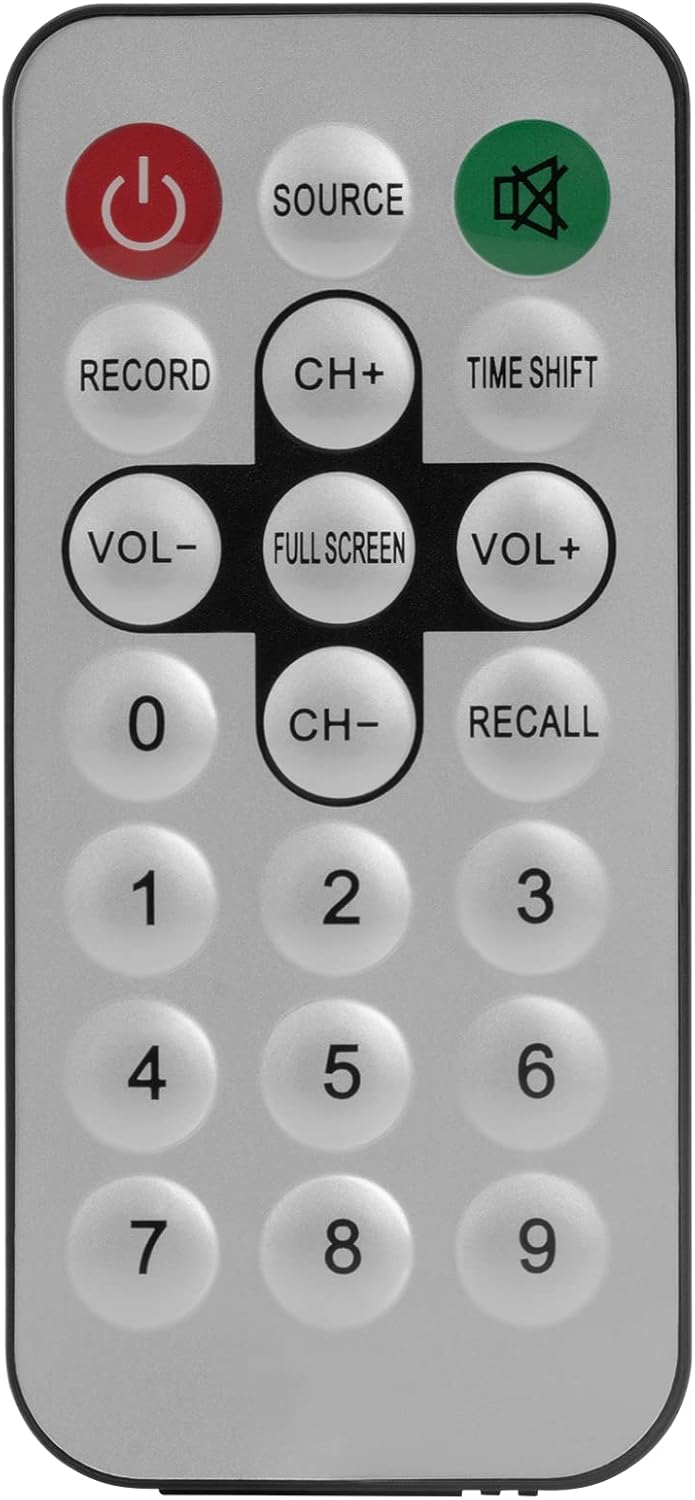
Image 5.1: The included remote control for the Rebel KOM1060 tuner.
5.4 Recording and TimeShift
- Función de grabación: Use the 'Record' button on the remote control or the corresponding option in the software to record live TV programs. Ensure you have sufficient storage space on your computer.
- TimeShift Function: The TimeShift feature allows you to pause live TV and resume watching later. Activate TimeShift via the remote control or software interface.
- Grabación de vídeo: The device supports direct video recording of broadcasts.
5.5 EPG and Teletext
- EPG (Guía electrónica de programación): Access the EPG through the software to view upcoming program schedules and information.
- Teletexto: The tuner supports teletext services, which can be accessed via the software interface.
6. Mantenimiento
- Mantenga el dispositivo limpio y sin polvo. Utilice un paño suave y seco para limpiarlo.
- Evite exponer el sintonizador a temperaturas extremas, humedad o luz solar directa.
- No intente desmontar ni reparar el dispositivo usted mismo. Consulte a personal de servicio técnico cualificado.
- Ensure the antenna connection is secure for optimal signal reception.
7. Solución de problemas
- Sin señal/mala recepción:
- Ensure the antenna is properly connected and positioned for best reception.
- Perform a channel scan again.
- Consulte la disponibilidad de transmisión local en su área.
- El software no se inicia o se bloquea:
- Verifique que su sistema cumpla con los requisitos mínimos.
- Reinstall the drivers and software from the provided CD or the manufacturer's websitio.
- Asegúrese de que su sistema operativo esté actualizado.
- No Audio/Video Issues:
- Check your computer's sound settings.
- Ensure the correct codecs are installed (usually included with the software).
- Actualice los controladores de su tarjeta gráfica.
- El control remoto no funciona:
- Ensure there are no obstructions between the remote and the tuner's IR receiver.
- Check if the remote control requires batteries and if they are correctly inserted and charged.
8. Especificaciones
| Característica | Detalle |
|---|---|
| Marca | Rebelde |
| Número de modelo | KOM1060 |
| Color | Negro |
| Interfaz | USB 2.0 |
| Conjunto de chips | R828D |
| Conexión de antena | BLC |
| Supported TV Standards | DVB-T, DVB-T2, DVB-C |
| Supported Radio Standards | FM, DAB, DAB+, VHF, UHF |
| Códecs compatibles | MPEG-2, H.264, H.265, HEVC |
| Soporte Full HD | Sí |
| Función de grabación | Sí |
| TimeShift Function | Sí |
| Soporte EPG | Sí |
| Teletext Support | Sí |
| Control remoto incluido | Sí |
| Dispositivos compatibles | PC (Windows XP/Vista/7/8/10) |
9. Garantía y soporte
Rebel products are designed for reliability and performance. For warranty information, please refer to the documentation included with your purchase or visit the official Rebel website. For technical support, driver updates, or further assistance, please visit the manufacturer's support page or contact their customer service.
Guarde su comprobante de compra para reclamos de garantía.


