PPLEE Extra Loud Vibrating Alarm Clock with Bed Shaker
Model: CR1018I
1. Producto terminadoview
The PPLEE Extra Loud Vibrating Alarm Clock is designed to provide effective wake-up solutions for deep sleepers, individuals with hearing impairment, and the deaf. It features multiple wake-up modes, a large digital display, dual alarm settings, and convenient charging capabilities.

Image 1.1: The PPLEE Extra Loud Vibrating Alarm Clock with its bed shaker accessory.
Características principales:
- Strong Bed Shaker & Loud Alarm Buzzer: Offers three wake-up modes: loud buzzer, strong bed shaker, or a combination of both.
- 8.7" Large Mirror LED Display: Provides clear time visibility and can also function as a makeup mirror.
- Alarmas duales con función de repetición: Allows setting two independent alarms with a 9-minute snooze option.
- Adjustable Brightness & Volume: Features 8 levels of display brightness and 7 levels of alarm volume.
- Puerto de carga USB: Conveniently charge your mobile devices directly from the clock.
- Copia de seguridad de la batería: Mantiene la configuración de tiempo y alarma durante cortes de energíatages (CR2032 battery included).
- 12/24H Mode & DST Function: Supports both 12-hour and 24-hour time formats, along with Daylight Saving Time adjustment.
2. Contenido del paquete
Por favor, marque la casilla correspondiente a los siguientes artículos:
- 1 x PPLEE Mirror Alarm Clock
- 1 x Bed Shaker
- 1 x Power Plug with USB Cable
- 1 x Manual de instrucciones
- 1 x CR2032 Cell Coin Battery (pre-installed or separate)

Imagen 2.1: Todos los componentes incluidos en el paquete del producto.
3. Guía de configuración
3.1 Conexión de alimentación
- Connect the USB cable to the alarm clock's power input port.
- Conecte el adaptador de corriente a una toma de corriente estándar. La pantalla del reloj se iluminará.
- Ensure the CR2032 backup battery is installed in its compartment. This battery preserves time and alarm settings during power interruptions.

Imagen 3.1: Trasera view of the alarm clock showing the AC power input and backup battery compartment.
3.2 Bed Shaker Placement
The bed shaker provides a strong vibration to assist in waking. For optimal effectiveness, place the bed shaker in one of the following locations:
- Under your pillow.
- Under your fitted sheet.
- Between your mattress and box spring.

Image 3.2: Recommended placements for the bed shaker to maximize vibration effectiveness.
4. Instrucciones de funcionamiento
4.1 Configuración de la hora
- Mantenga pulsado el TIEMPO ESTABLECIDO botón hasta que los dígitos de la hora comiencen a parpadear.
- Utilice el HORA y MINUTO Botones para ajustar la hora.
- Prensa TIEMPO ESTABLECIDO nuevamente para confirmar y salir del modo de configuración de la hora.
4.2 Configuración de alarmas (Alarma 1 y Alarma 2)
El reloj admite dos alarmas independientes.
- Mantenga pulsado el ALARMA 1 or ALARMA 2 Botón hasta que los dígitos de la hora de la alarma parpadeen.
- Utilice el HORA y MINUTO Botones para configurar la hora de alarma deseada.
- Prensa ALARMA 1 or ALARMA 2 nuevamente para confirmar la hora de la alarma.
- Para activar o desactivar una alarma, presione brevemente el botón correspondiente. ALARMA 1 or ALARMA 2 Botón. Un icono de alarma aparecerá/desaparecerá en la pantalla.

Image 4.1: The dual alarm feature allows setting two separate wake-up times.
4.3 Función de repetición
Cuando suene una alarma, presione el DORMITAR Botón para silenciar la alarma temporalmente durante 9 minutos. La alarma volverá a sonar después del periodo de repetición.
4.4 Turning Off Alarms
- Temporary Turn Off: Presione el ALARMA APAGADA button once when the alarm is sounding to stop it for the current day. It will reactivate the next day.
- Permanent Turn Off: Mantenga pulsado el ALARMA APAGADA button to deactivate the alarm permanently. The alarm icon will disappear from the display.
4.5 Ajuste del brillo de la pantalla
The display has 8 levels of brightness. Short press the REGULADOR DE INTENSIDAD button repeatedly to cycle through the brightness levels (OFF, Level 1-7). When in 'OFF' mode, the red indicator on top will remain on.
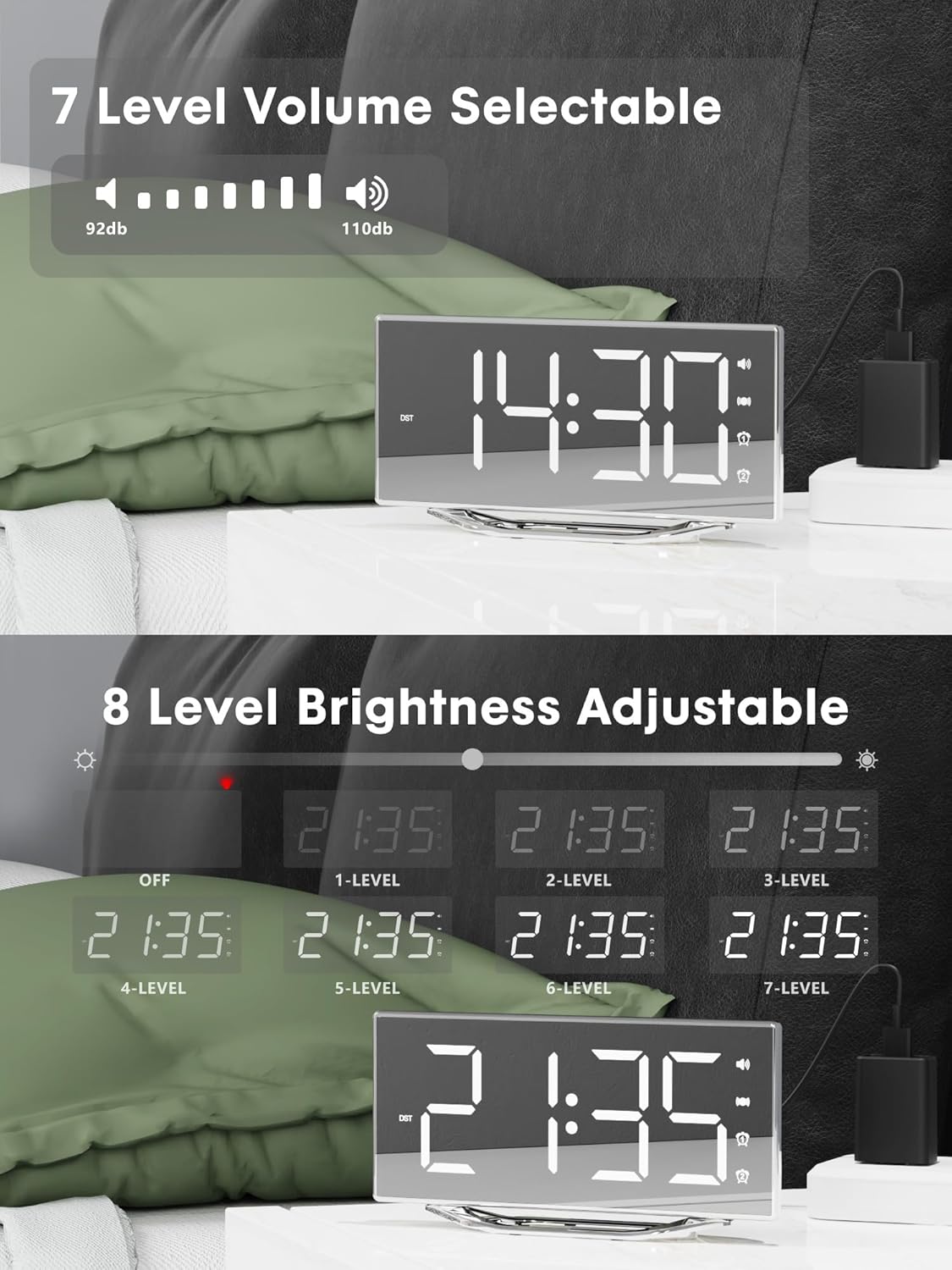
Image 4.2: Visual representation of the 8-level brightness adjustment for the LED display.
4.6 Ajuste del volumen de la alarma
The alarm buzzer has 7 adjustable volume levels. Short press the VOLUMEN button repeatedly to cycle through the volume levels.

Image 4.3: The alarm volume can be adjusted across 7 levels, from 92dB to 110dB.
4.7 Selecting Wake-Up Mode
Presione el BUZZ/VIB button to select your preferred wake-up method:
- Loud Buzzer only
- Strong Bed Shaker only
- Both Buzzer and Shaker

Image 4.4: The alarm clock offers three distinct wake-up modes for personalized use.
4.8 Formato de 12/24 horas y horario de verano
- Formato de 12/24 horas: Presione brevemente el 12/24 horas button to switch between 12-hour and 24-hour time display.
- Función de horario de verano: Presione brevemente el Horario de verano button to activate or deactivate Daylight Saving Time.

Image 4.5: The clock supports both 12-hour and 24-hour time formats, and features a USB charging port.
4.9 puertos de carga USB
The integrated USB charging port allows you to charge your smartphone or other USB-powered devices directly from the alarm clock. Simply connect your device's USB charging cable to the port on the clock.
5. Mantenimiento
- Limpie la superficie del reloj con un paño suave y seco. Evite usar limpiadores abrasivos o disolventes.
- Mantenga el reloj alejado del agua y de la humedad alta.
- Do not expose the clock to direct sunlight or extreme temperatures.
- If the clock will not be used for an extended period, consider removing the backup battery to prevent leakage.
6. Solución de problemas
| Problema | Posible causa | Solución |
|---|---|---|
| La pantalla del reloj está apagada. | No power supply; power cable loose. | Ensure the power adapter is securely plugged into the clock and a working outlet. Check if the dimmer is set to 'OFF'. |
| La alarma no suena/vibra. | Alarm not activated; volume too low; bed shaker not connected or placed incorrectly. | Verify alarm is activated (icon visible). Increase alarm volume. Ensure bed shaker is securely plugged in and properly placed. |
| La hora y la configuración se restablecen después de apagar el dispositivo.tage. | La batería de respaldo está muerta o no está instalada. | Replace the CR2032 backup battery. Ensure it is installed correctly. |
| La carga USB no funciona. | Device not compatible; cable faulty; clock not powered. | Ensure the clock is powered. Try a different USB cable. Verify your device is compatible with standard USB charging. |
7. Especificaciones
| Característica | Detalle |
|---|---|
| Marca | PPLEEE |
| Número de modelo | CR1018I |
| Color | Silver Surface (with Bed Shaker) |
| Tipo de pantalla | LED digitales |
| Dimensiones del producto | 8.7"W x 8.7"H (Display size) |
| Fuente de poder | Eléctrico con cable |
| Batería de respaldo | 1 x CR2032 (incluido) |
| Material | Plástico |
| Peso del artículo | 7 onzas (0.2 kilogramos) |
| Modos de alarma | Buzzer, Vibration, Buzzer + Vibration |
| Brillo de la pantalla | 8 Levels (including OFF) |
| Volumen de alarma | 7 niveles |
| Formato de hora | 12H/24H seleccionable |
| Características especiales | Dual Alarms, Snooze, USB Charging Port, DST Function, Mirror Surface |
8. Garantía y soporte
PPLEE is committed to providing high-quality products and customer satisfaction.
- Garantía de 1 años: The product is covered by a 1-year warranty from the date of purchase against manufacturing defects.
- Garantía de devolución de dinero de 90 días: If you are unsatisfied with the product, you may be eligible for a full refund within 90 days of purchase.
- Lifetime Free Support: PPLEE offers free lifetime user support for any questions or concerns regarding the product.
- 24-Hour Response Service: For any inquiries, please contact us via Amazon. We aim to respond within 24 hours.

Image 8.1: Summary of warranty and support offerings.


