1. Introducción
The AODELAN E4 is a TTL transmitter designed for wireless synchronization of AODELAN flashes with compatible Sony cameras. It supports both TTL (Through-The-Lens) automatic exposure control and manual exposure adjustment, offering flexibility for various photographic needs. This device is also compatible with Profoto Air system flashes, allowing for integrated control.
This manual provides essential information for the proper setup, operation, and maintenance of your AODELAN E4 Wireless Flash Remote Trigger.
2. Producto terminadoview
2.1 Características principales
- Sincronización de alta velocidad (HSS): Supports shutter speeds up to 1/8000s, enabling flash photography in bright ambient light.
- Modo TTL: Provides automatic flash exposure control for convenient point-and-shoot operation.
- Control inalámbrico: Operates on a 2.4 GHz frequency with a triggering range of up to 200m (656ft) and remote control range up to 100m (330ft) for TTL.
- Multiple Channels and Groups: Features 8 digital channels and 3 groups (A, B, C) per channel for independent flash control.
- Profoto Compatibility: Wirelessly triggers and manually controls Profoto lights with built-in Air system, including flash power and modeling light control.
- Six Functions: Includes High-Speed Sync, remote control (lamp head, modeling lamp, energy adjustment), power saving, relay state, and firmware update via USB.
2.2 Contenido del paquete
Verifique que todos los artículos estén presentes en el paquete:
- AODELAN E4 Wireless Flash Remote Trigger
- Acollador
- Manual de usuario

Figure 1: Package contents including the AODELAN E4 trigger, lanyard, and user manual.
2.3 Identificación de componentes

Figura 2: Frente view of the AODELAN E4 with labeled controls. Key elements include the Display, Mode Button, Sync Button, Channel/Beeper Button, Head Button, Model Button, Energy Adjustment Buttons, Group Buttons (A, B, C), Test Button, Indicator, and Power Button.
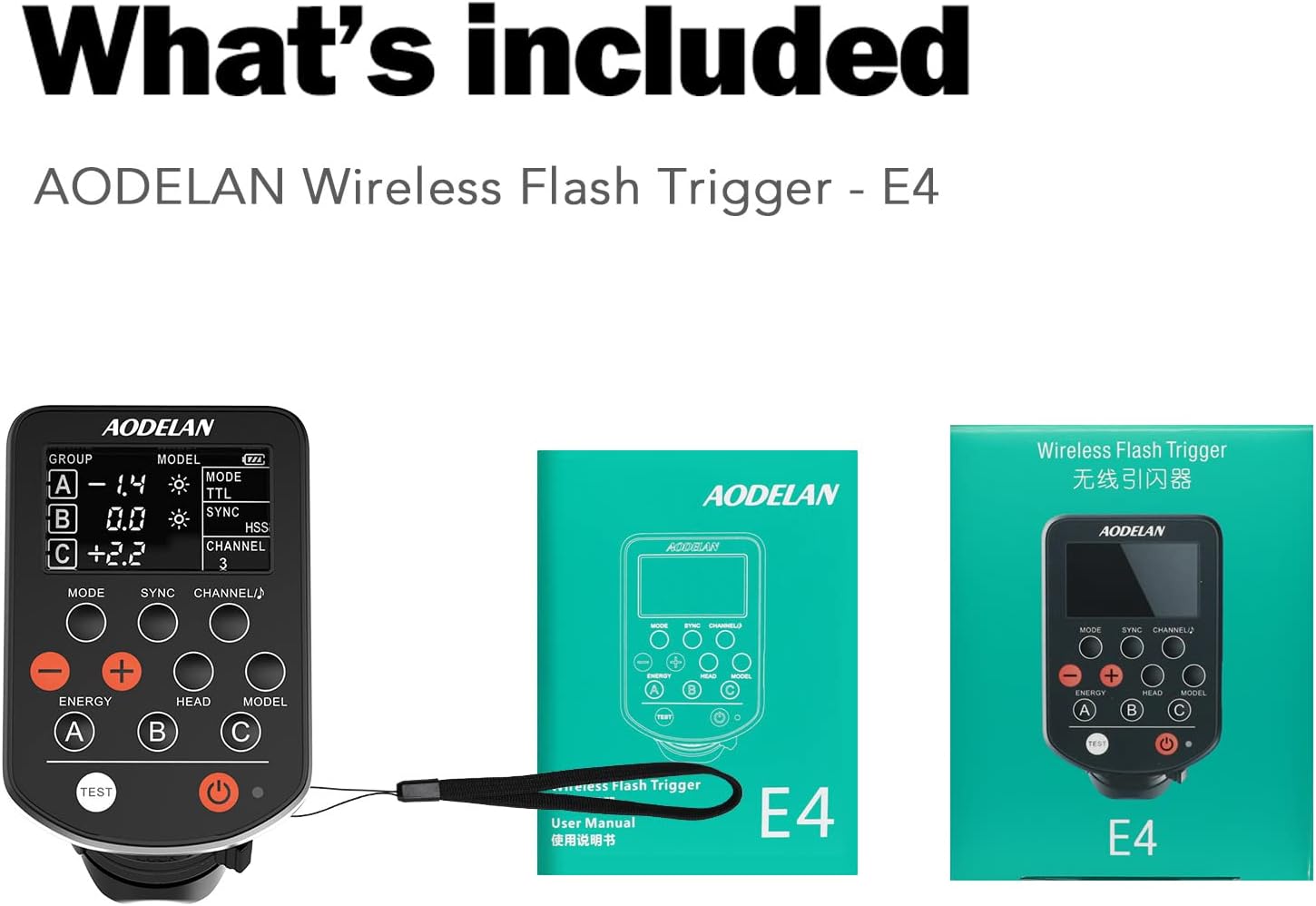
Figura 3: Lateral y parte inferior view of the AODELAN E4. This image highlights the Battery Compartment, USB Port, Strap Hole, Hot Shoe Mounting Foot, and Mounting Foot Lock Lever. The display shows Group, Energy, Modeling Light Status, Battery Level, Mode, Sync, and Channel indicators.
3. Configuración
3.1 Instalación de la batería
- Locate the battery compartment on the side of the AODELAN E4 (refer to Figure 3).
- Abra la tapa del compartimiento de la batería.
- Inserte dos pilas AAA, asegurándose de la polaridad correcta (+/-).
- Cierre bien la tapa del compartimento de la batería.
3.2 Montaje en la cámara
The AODELAN E4 is designed to be mounted on the camera's hot shoe.
- Slide the hot shoe mounting foot of the E4 into the camera's hot shoe.
- Secure the trigger by rotating the mounting foot lock lever (refer to Figure 3) until it is firmly attached.
Figure 4: The AODELAN E4 trigger shown mounted on a camera hot shoe, indicating compatibility with standard single pin contact hot shoe mounts.
4. Instrucciones de funcionamiento
4.1 Encendido y apagado
Press and hold the Power Button (refer to Figure 2) to turn the E4 on or off. The indicator light will illuminate when the device is powered on.
4.2 Mode Selection (TTL / Manual)
Presione el Botón de modo (refer to Figure 2) to switch between TTL (Through-The-Lens, Automatic) and M (Manual) modes. The selected mode will be displayed on the screen.
- Modo TTL: The camera automatically determines the flash output for correct exposure.
- Modo manual: Allows for manual adjustment of flash power using the Energy Adjustment Buttons.
Video 1: Demonstration of the AODELAN TTL HSS wireless flash trigger in operation, showcasing its features and compatibility.
4.3 Channel and Group Selection
The E4 supports 8 channels and 3 groups (A, B, C) per channel. This allows for independent control of multiple flashes without interference.
- Presione el Channel/Beeper Button (refer to Figure 2) to cycle through available channels (1-8).
- Utilice el Group Buttons (A, B, C) to select and adjust individual flash groups.

Figure 5: Illustration of the AODELAN E4's ability to control multiple flashes independently across 8 frequency channels and 3 groups (A, B, C) in a studio environment.
4.4 Sincronización de alta velocidad (HSS)
The E4 supports HSS up to 1/8000s. This feature allows you to use wider apertures in bright conditions or freeze fast motion with flash.
- Ensure your camera and flash units support HSS.
- The E4 will automatically engage HSS when the camera's shutter speed exceeds the normal flash sync speed (typically 1/250s).
4.5 Funciones de control remoto
The E4 allows for remote control of connected Profoto flashes, including:
- Energy Adjustment: Utilice el Energy Adjustment Buttons (refer to Figure 2) to increase or decrease flash power.
- Modelado Lamp Control: Utilice el Botón modelo (refer to Figure 2) to control the modeling lamp on compatible flashes.
- Lamp Control de cabeza: Utilice el Botón de cabeza (refer to Figure 2) for specific lamp head adjustments if supported by the flash.
4.6 Prueba de Flash
Presione el Botón de prueba (refer to Figure 2) to fire a test flash and confirm connectivity with your flash units.
5. Mantenimiento
To ensure the longevity and optimal performance of your AODELAN E4:
- Mantenga el dispositivo limpio y libre de polvo y humedad. Utilice un paño suave y seco para limpiarlo.
- Evite exponer el dispositivo a temperaturas extremas o a la luz solar directa durante períodos prolongados.
- Retire las baterías si el dispositivo no se utilizará durante un período prolongado para evitar fugas.
- Guarde el dispositivo en un lugar fresco y seco.
6. Solución de problemas
If you encounter issues with your AODELAN E4, refer to the following common troubleshooting steps:
- El dispositivo no enciende: Compruebe que las pilas AAA estén correctamente insertadas y tengan suficiente carga. Reemplácelas si es necesario.
- El flash no se activa:
- Ensure the E4 is securely mounted on the camera's hot shoe.
- Verify that the E4 and the flash unit are set to the same channel and group.
- Check the flash unit's power and readiness.
- Confirm that the camera's flash settings are appropriate for external flash use.
- Incorrect exposure in TTL mode: Ensure the flash unit is compatible with TTL and that its settings are not overriding the E4's commands. Check for any exposure compensation set on the camera or flash.
- HSS no funciona: Confirm that both your camera and flash unit support High-Speed Sync. Ensure the camera's shutter speed is set above its normal sync speed.
- Alcance limitado o interferencia: Ensure there are no major obstructions between the E4 and the flash units. Avoid environments with strong 2.4 GHz interference.
If problems persist after attempting these steps, please contact AODELAN customer support for further assistance.
7. Especificaciones
| Característica | Especificación |
|---|---|
| Frecuencia | 2.4 GHz |
| Range (Triggering) | Hasta 200 m (656 pies) |
| Range (Remote Control & TTL) | Hasta 100 m (330 pies) |
| Número de canales | 8 canales (1-8) |
| Number of Groups per Channel | 3 groups (A/B and C) |
| Fuente de poder | 2 pilas AAA |
| Modos de funcionamiento | TTL (Through the lens, Automatic), M (Manual) |
| Max. Sync Speed (1st or 2nd sync) | 1/250 s |
| Max. Sync Speed (HSS) | 1/8000 s |
| Antena | Antena interna |
| Interfaz | Multi contacts hot shoe mounting foot x 1; Micro-USB B port x 1 |
| Dimensiones (aprox.) | 91 x 57 x 37mm (3.6 x 2.2 x 1.2 en) |
| Weight (Approx., without batteries) | 80 g (2.8 onza) |
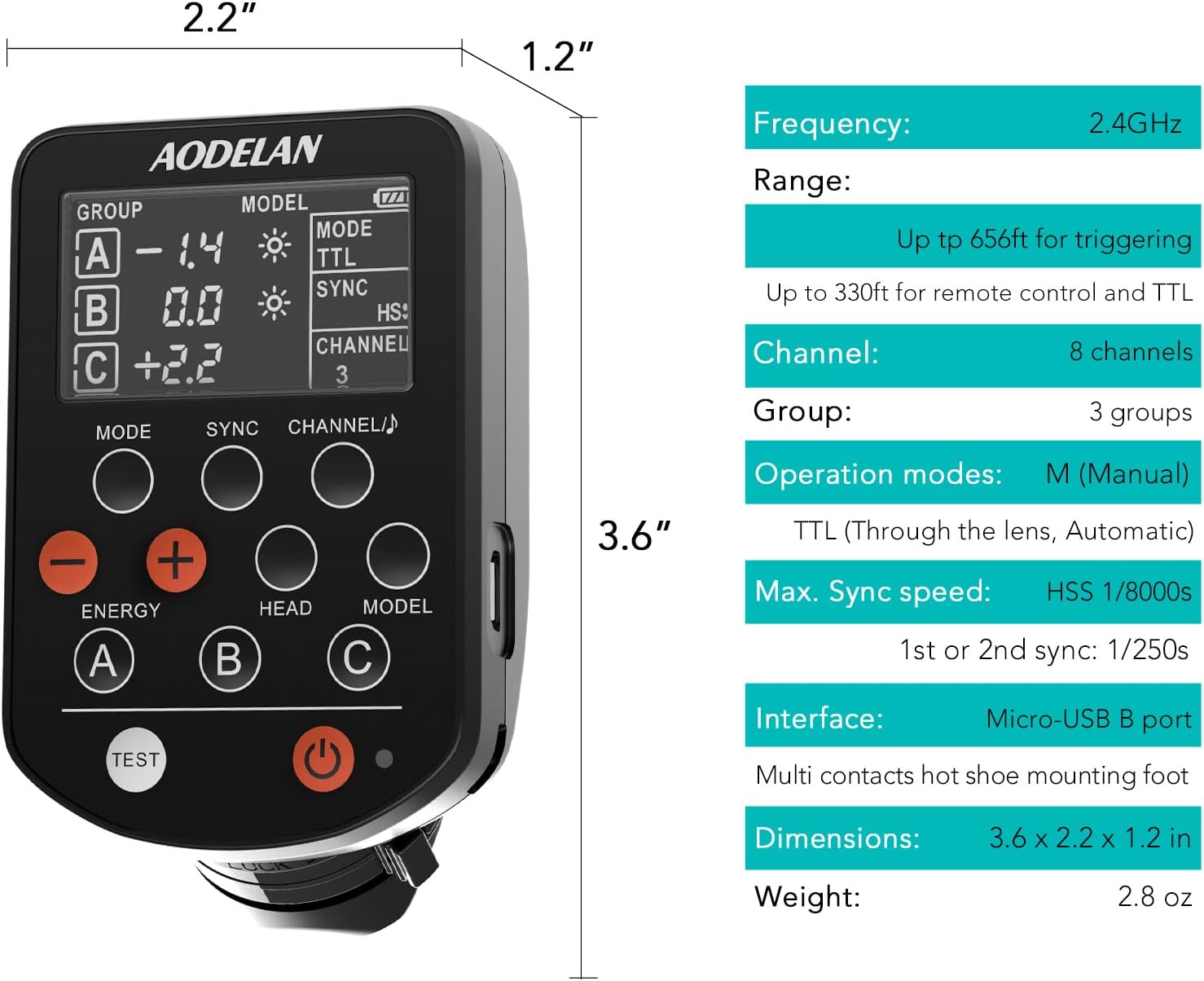
Figure 6: Visual representation of the AODELAN E4's dimensions and a summary of its technical specifications.
8. Garantía y soporte
AODELAN products are designed for reliability and performance. For warranty information, please refer to the warranty card included with your product or visit the official AODELAN websitio.
For technical support, troubleshooting assistance, or service inquiries, please contact AODELAN customer support through their official channels. Keep your purchase receipt as proof of purchase for warranty claims.


