Introducción
Thank you for choosing the Aiwa BST-650 Bluetooth Speaker. This manual provides essential information for setting up, operating, and maintaining your speaker. Please read it carefully before use to ensure optimal performance and longevity of your device.
The Aiwa BST-650 is a compact, durable, and powerful TWS Bluetooth speaker featuring Hyper Bass technology, 20W RMS audio output, RGB LED lighting with 9 modes, a Micro-SD card reader, and an IPX6 waterproof rating. It is designed for superior sound quality and robust performance in various environments.
Contenido del paquete
Por favor, marque la casilla correspondiente a los siguientes artículos:
- Aiwa BST-650 Bluetooth Speaker
- 3.5mm to 3.5mm Stereo AUX Cable
- Braided Nylon USB Type-C Charging Cable with Leather Belt
- Correa de muñeca
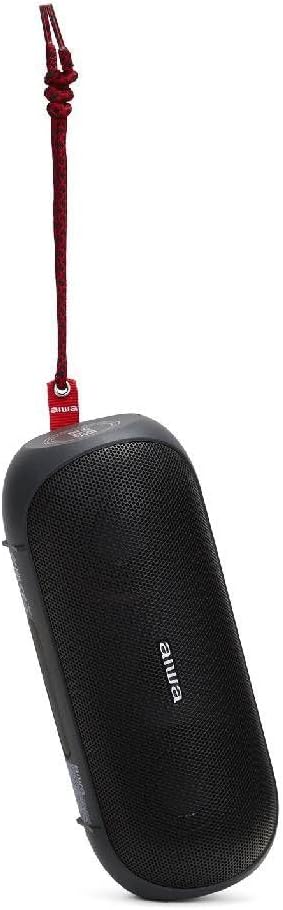
Image: Aiwa BST-650 speaker shown with the included wrist strap.
Producto terminadoview
The Aiwa BST-650 features a robust rubber casing with twin metallic grilles, housing two 45mm high-performance speakers and a passive HyperBASS radiator. It includes intuitive controls for power, volume, playback, and LED lighting.
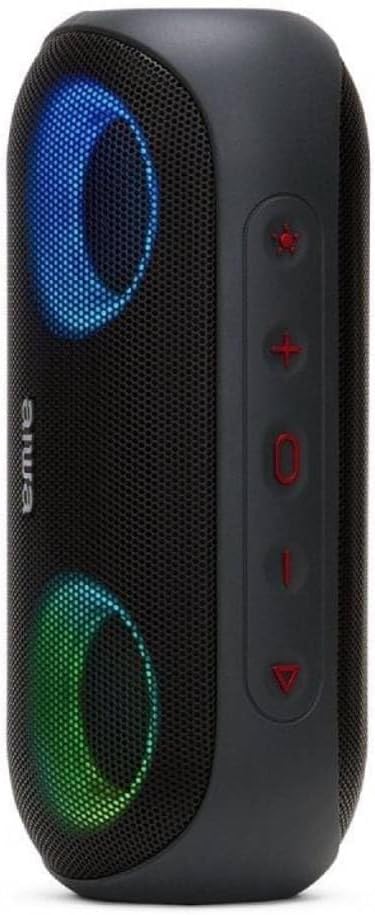
Imagen: Lateral view of the Aiwa BST-650 speaker, highlighting the control buttons.
Controles y Puertos
- Botón de encendido: Mantenga presionado para encender o apagar el altavoz.
- Subir volumen (+): Aumentar el volumen.
- Bajar volumen (-): Disminuir el volumen.
- Botón de reproducción/pausa: Play or pause music, answer or end calls.
- Botón de luz LED: Cycle through 9 RGB lighting modes or turn off lights.
- Micro-SD (TF) Card Slot: For MP3 playback from a memory card.
- Puerto AUX-IN (3.5 mm): Para conexión por cable a dispositivos de audio externos.
- Puerto de carga USB tipo C: Para cargar la batería interna del altavoz.
Configuración
1. Carga del altavoz
- Conecte el cable de carga USB tipo C suministrado al puerto de carga del altavoz.
- Conecte el otro extremo del cable a un adaptador de corriente USB compatible (no incluido) o al puerto USB de una computadora.
- El indicador LED mostrará el estado de carga. Una carga completa tarda aproximadamente 4 horas.
- The speaker provides approximately 8.5 hours of music playback on a full charge.
2. Encendido / apagado
- Para encender, mantenga presionado el botón de encendido hasta que escuche un aviso audible y se activen las luces LED.
- Para apagar, mantenga presionado el botón de encendido nuevamente hasta que el altavoz se apague.
3. Emparejamiento Bluetooth
- Asegúrese de que el altavoz esté encendido y en modo de emparejamiento Bluetooth (indicado por un LED parpadeante).
- En su dispositivo móvil (teléfono inteligente, tableta, etc.), habilite Bluetooth y busque los dispositivos disponibles.
- Select "Aiwa BST-650" from the list of devices.
- Una vez emparejado, el altavoz emitirá una confirmación audible y el LED dejará de parpadear.
- The speaker supports Bluetooth V5.0 with a wireless range of up to 10 meters (30 feet).
4. Emparejamiento TWS (estéreo inalámbrico verdadero)
The BST-650 supports TWS, allowing two BST-650 speakers to connect wirelessly for a stereo sound experience.
- Ensure both Aiwa BST-650 speakers are powered on and not connected to any Bluetooth device.
- On one speaker, press and hold the Play/Pause button for 2-3 seconds. The speaker will enter TWS pairing mode.
- Los dos altavoces se conectarán automáticamente. Escuchará un tono de confirmación una vez conectados.
- Once TWS is established, connect your mobile device to one of the speakers via Bluetooth as described in step 3. Both speakers will then play audio in stereo.
5. Using Micro-SD Card
- Insert a Micro-SD (TF) card containing MP3 audio files en la ranura de la tarjeta.
- The speaker will automatically switch to Micro-SD mode and begin playing music.
- Use the Play/Pause, Volume Up, and Volume Down buttons to control playback.
6. Using AUX-IN
- Connect one end of the 3.5mm AUX cable to the speaker's AUX-IN port.
- Conecte el otro extremo del cable al conector de auriculares o a la salida de audio de su dispositivo externo.
- El altavoz cambiará automáticamente al modo AUX.
- Controle la reproducción y el volumen desde su dispositivo externo.
Operante
1. Reproducción de música
- Reproducir/Pausa: Pulse el botón Reproducir/Pausar.
- Pista siguiente: Mantenga presionado el botón Subir volumen (+).
- Pista anterior: Mantenga presionado el botón para bajar el volumen (-).
- Control de volumen: Presione brevemente los botones Subir volumen (+) o Bajar volumen (-).
2. Call Management (Hands-free Function)
Cuando se conecta a través de Bluetooth, el micrófono incorporado del altavoz permite realizar llamadas con manos libres.
- Responder llamada: Presione el botón Reproducir/Pausa una vez.
- Finalizar llamada: Presione el botón Reproducir/Pausa una vez durante una llamada.
- Rechazar llamada: Mantenga presionado el botón Reproducir/Pausar durante 2 segundos.
3. RGB LED Lighting Modes
The speaker features dual RGB LED lighting with 9 dynamic effects.

Image: Aiwa BST-650 speaker with its RGB LED lights active, displaying blue and green colors.
- Press the LED Light button to cycle through the 9 different lighting modes.
- Continúe presionando para apagar las luces.
4. Información sobre resistencia al agua (IPX6)
The Aiwa BST-650 has an IPX6 water protection rating, meaning it is protected against high-pressure water jets from any direction. This makes it suitable for outdoor use and resistant to splashes and rain.
- No sumerja el altavoz en agua.
- Asegúrese de que todas las cubiertas de los puertos estén bien cerradas antes de exponer el altavoz al agua.
- Después de la exposición al agua, seque el altavoz antes de cargarlo.
Mantenimiento
Limpieza
- Limpie el altavoz con un paño suave, damp paño.
- No utilice limpiadores abrasivos, alcohol ni disolventes químicos.
Almacenamiento
- Guarde el altavoz en un lugar fresco y seco, alejado de la luz solar directa y de temperaturas extremas.
- Si va a almacenarlo durante un período prolongado, cargue la batería periódicamente para mantener su vida útil.
Solución de problemas
| Problema | Posible causa | Solución |
|---|---|---|
| El altavoz no se enciende. | Batería baja. | Cargue el altavoz durante al menos 30 minutos. |
| No se puede emparejar a través de Bluetooth. | El altavoz no está en modo de emparejamiento; el Bluetooth del dispositivo está desactivado; demasiado lejos del altavoz. | Ensure speaker is in pairing mode. Turn Bluetooth on/off on your device. Move device closer to speaker (within 10m). |
| No hay sonido. | Volumen demasiado bajo; modo de entrada incorrecto; el dispositivo no reproduce. | Increase speaker and device volume. Check if correct mode (Bluetooth, AUX, SD) is active. Ensure audio is playing on the connected device. |
| El emparejamiento de TWS falla. | Los altavoces ya están emparejados con otro dispositivo; están demasiado separados. | Disconnect speakers from any other Bluetooth devices. Ensure both speakers are BST-650 models. Place speakers closer together. |
Presupuesto
| Característica | Especificación |
|---|---|
| Potencia de salida de audio | Potencia efectiva de 20 W |
| Tamaño del altavoz | 2 x 45 mm |
| Versión de Bluetooth | V5.0 |
| alcance inalámbrico | Hasta 10 metros (30 pies) |
| Respuesta de frecuencia | 60 Hz - 20,000 Hz |
| Clasificación de protección del agua | IPX6 |
| Tipo de batería | Batería de litio recargable |
| Capacidad de la batería | 7.4 V, 2000 mAh |
| Tiempo de carga | Aproximadamente 4 horas |
| Tiempo de reproducción de música | Aproximadamente 8.5 horas |
| Puerto de carga | USB tipo C |
| Dimensiones (L x An x Al) | 200 x 85 x 83 mm |
| Peso | 613 gramos |
| Dispositivos compatibles | Smartphones, Tablets (Android, iOS, Windows) |
| Características especiales | DSP for superior sound, HyperBASS passive radiator, TWS function, Hands-free with microphone, Micro-SD (TF) card reader, 3.5mm AUX-IN, RGB LED lighting (9 modes) |
Garantía y soporte
The Aiwa BST-650 Bluetooth Speaker comes with a limited warranty. For specific warranty terms and conditions, please refer to the warranty card included in your package or contact Aiwa customer support.
For technical assistance or support, please visit the official Aiwa websitio o comuníquese con su departamento de servicio al cliente.