Introducción
Welcome to the VTech Bluey Ring Ring Phone user manual. This guide provides essential information for setting up, operating, and maintaining your new electronic learning toy. Designed for children aged 3-6 years, this interactive phone allows kids to engage in pretend play with characters from the popular Bluey series, fostering imaginative and educational experiences.

Imagen: Frente view of the VTech Bluey Ring Ring Phone, displaying Bluey on the screen and various character buttons.
Configuración
1. ¿Qué hay en la caja?
- Bluey Ring Ring Teléfono
- Guía de inicio rápido
2. Instalación de la batería
The VTech Bluey Ring Ring Phone requires 2 AAA batteries. Batteries are included for demonstration purposes only. For regular use, new batteries are recommended.
- Localice el compartimento de la batería en la parte posterior del teléfono.
- Usando un destornillador, abra la tapa del compartimiento de la batería.
- Inserte 2 pilas AAA nuevas, asegurándose de la polaridad correcta (+/-).
- Vuelva a colocar la tapa del compartimiento de la batería y asegúrela con el tornillo.
Instrucciones de funcionamiento
1. Encendido y apagado
Press the power button (usually located on the top or side) to turn the phone on or off.
2. Funciones básicas
- Botones de personaje: Press the buttons featuring pictures of Bluey, her family, and friends to hear phrases about each character.
- Botones numéricos: Use the number buttons for various activities, including playing music.
- Activación por voz: Engage in interactive pretend play with Bluey and Bingo using the voice-activated chat-and-reply feature.
- Ajustes: Adjust the ringtone, brightness, and other phone-like features to customize the play experience.
3. Games and Activities
The phone includes four interactive games based on themes from different Bluey episodes:
- Cheer Up Bingo: If Bingo is in a bad mood, press the number buttons to play music she can dance to.
- Bingo's Handstand: Use the arrow buttons to help Bingo do a handstand.
- Bluey the Fruit Bat: When Bluey pretends to be a fruit bat, press the arrows to help her catch fruit to eat.
- Bluey's Bubbles: Help Bluey blow bubbles by blowing into the microphone.
Explore these games to watch character animations and listen to popular phrases from the show.
Video: Official VTech Bluey Ring Ring Phone Demo, showcasing various interactive features and games.
Características
- Four interactive games featuring Bluey and Bingo.
- Animations of characters and popular phrases from the show.
- Buttons with character images for specific phrases.
- Voice-activated chat-and-reply for interactive conversations.
- Adjustable ringtone and brightness settings.
- Durable design for children aged 3-6 years.
Mantenimiento
- Limpie el teléfono con un paño suave y húmedo.amp Paño. No sumergir en agua.
- Evite exponer el teléfono a temperaturas extremas o a la luz solar directa.
- Retire las baterías si el juguete no se utilizará durante un período prolongado para evitar fugas.
Solución de problemas
No Power or Intermittent Operation
- Asegúrese de que las baterías estén instaladas correctamente con la polaridad adecuada.
- Reemplace las baterías viejas con baterías AAA nuevas.
- Si el problema persiste, intente apagar y encender nuevamente la unidad.
Problemas de sonido
- Check if the volume setting is too low. While there isn't an explicit volume control button, some modes might have varying sound levels.
- Asegúrese de que el altavoz no esté obstruido.
Si los problemas persisten, consulte la sección de Garantía y soporte para obtener información de contacto.
Presupuesto
- Dimensiones del producto: 0.98 x 3.27 x 6.69 pulgadas
- Peso del artículo: 4.8 onzas
- Número de modelo del artículo: 80-554600
- Edad recomendada por el fabricante: 36 meses - 6 años
- Baterías: Se requieren 2 pilas AAA (incluidas para fines de demostración)
- Fabricante: VTech
- Fecha de lanzamiento: 1 de diciembre de 2021
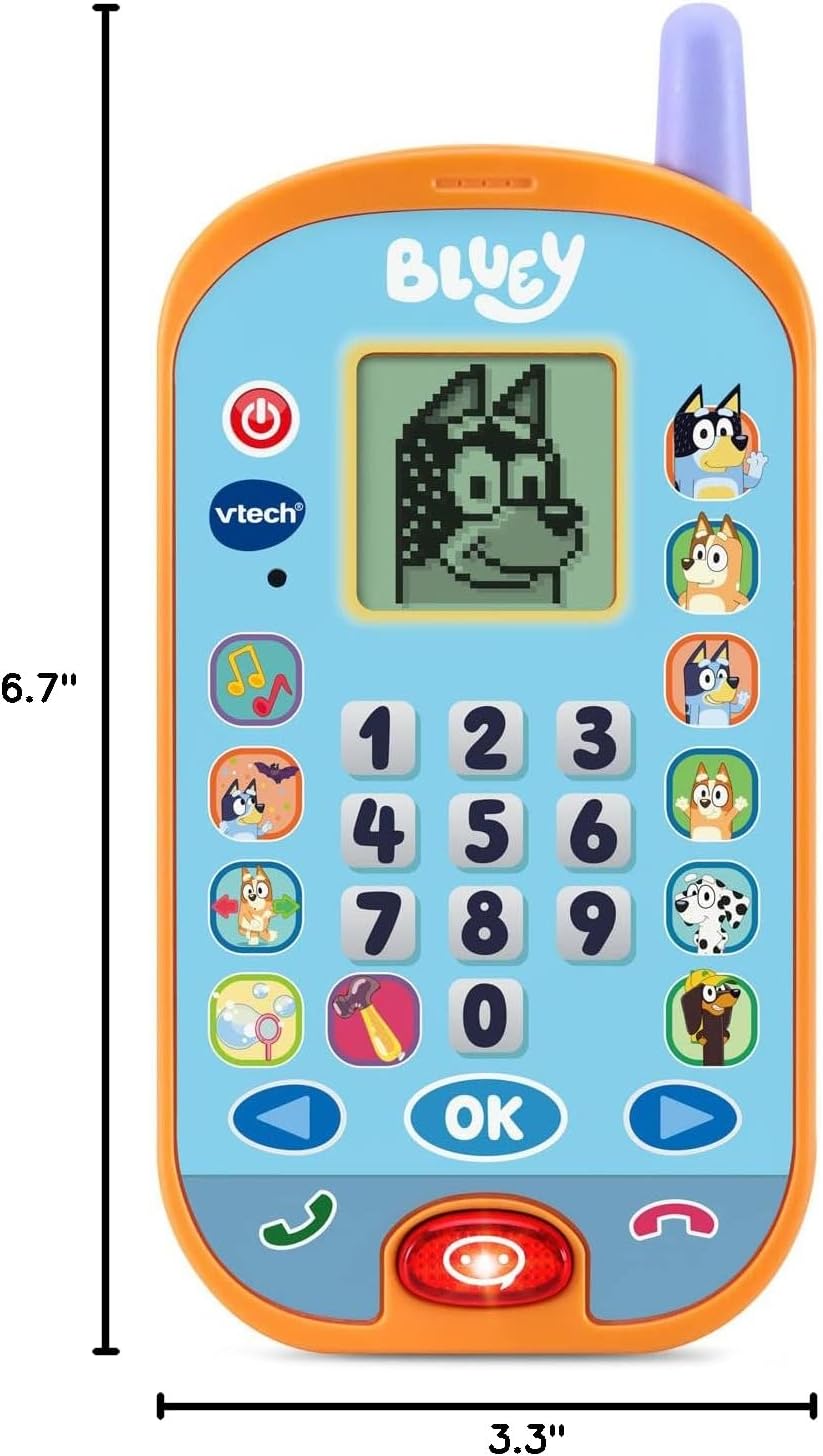
Image: VTech Bluey Ring Ring Phone with labeled dimensions.
Garantía y soporte
This VTech product is covered by the manufacturer's standard warranty. For detailed warranty information, product support, or to inquire about replacement parts, please visit the official VTech website or contact their customer service department. Contact details can typically be found in the Quick Start Guide included with your product or on the VTech brand store page.
VTech Store: Visit the VTech Store on Amazon


