1. Producto terminadoview
The iTOMA CKS209 is a versatile alarm clock radio designed to enhance your bedside experience. It features dual wireless charging capabilities for your smartphone and earbuds, along with two additional USB ports for other devices. Enjoy your favorite music via Bluetooth 5.1 technology or tune into digital FM radio. The clock includes dual alarms with customizable wake-up modes, a large 1.4-inch orange LED display with auto and manual dimmer control, and a 2-level orange night light.
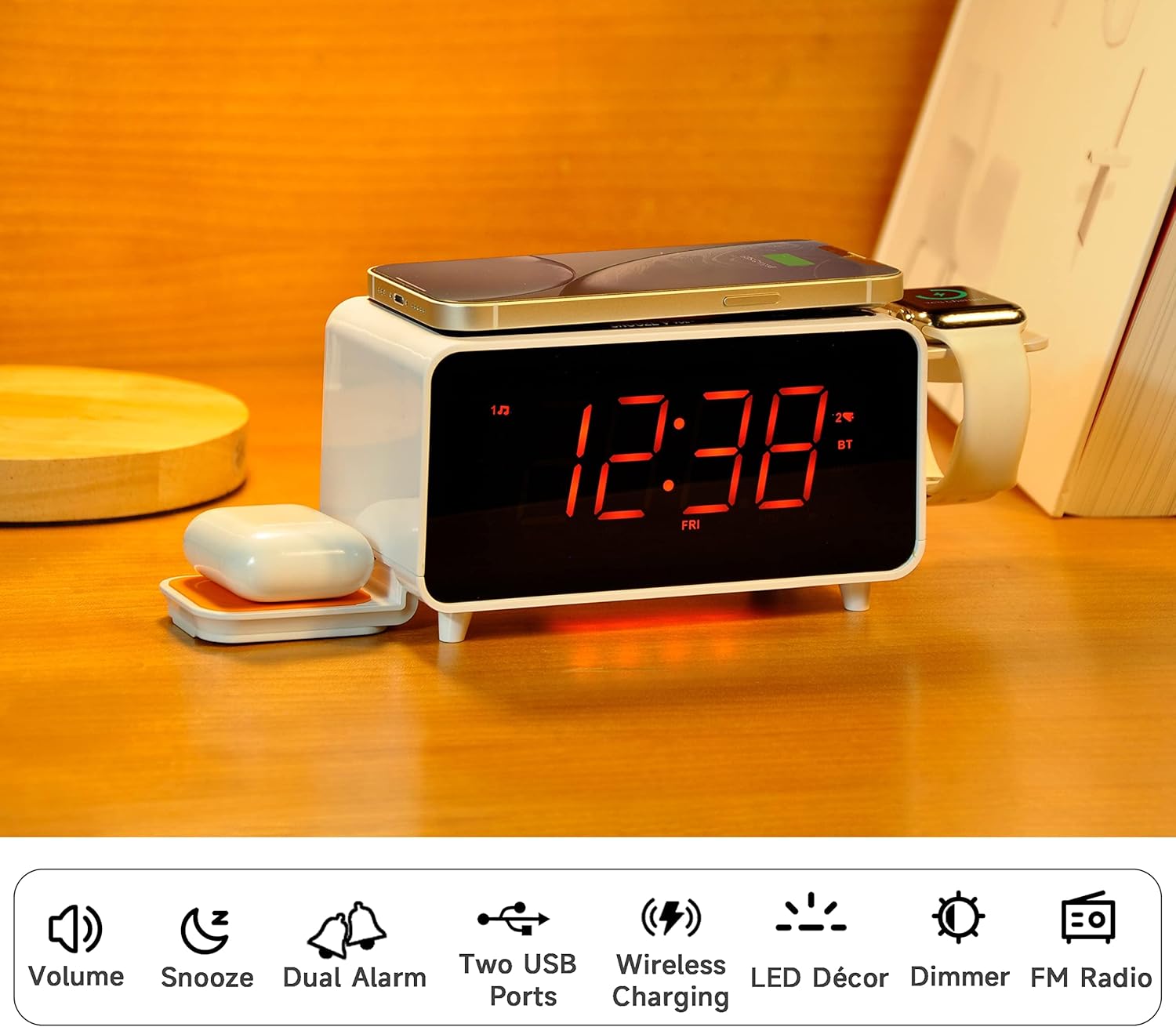
Image: The iTOMA CKS209 alarm clock radio displaying the time, with a smartphone wirelessly charging on top, earbuds on a side wireless charging pad, and a smartwatch on its holder.
Características principales:
- Carga inalámbrica: 15W ultra-fast wireless charger for smartphones and 3W foldable earphone wireless charger. Includes a watch wireless charging support holder (charging cable not included).
- Bluetooth 5.1: Seamless audio streaming from your Bluetooth-enabled devices.
- Puertos USB duales: One USB-A and one USB-C port (5V 2.1A) for additional device charging.
- Smart Dual Alarm: Set two independent alarms with options to wake to radio or buzzer. Features snooze, crescendo wake-up, 15-level volume control, and 4 alarm week modes (Every day, single day, weekdays, weekends).
- Pantalla LED naranja de 1.4": Clear 12/24-hour format display with 3-level dimmer brightness and auto-dimmer function.
- Luz de noche: 2-level orange night light for ambient illumination.
- Radio FM digital: 20 programmable preset stations with external wire antenna for enhanced reception.
- Batería de respaldo: Maintains time and alarm settings during power interruptions.
2. Configuración
2.1 Conexión de alimentación
- Unpack the iTOMA CKS209 unit and all accessories.
- Connect the provided AC adapter to the DC IN jack on the back of the unit.
- Plug the AC adapter into a standard wall outlet. The display will light up, and the clock will automatically set the time.
2.2 Initial Time Setting (Manual)
While the clock features auto-time setting, you can manually adjust the time, date, and year if needed.
- Mantenga pulsado el AJUSTAR RELOJ button located on the top panel until the year flashes on the display.
- Utilice el SINTONIZACIÓN +/- buttons (or rotate the SNOOZE/VOL dial) to adjust the year.
- Prensa AJUSTAR RELOJ again to confirm and move to the month setting. Repeat the process for month, day, hour, and minute.
- Prensa AJUSTAR RELOJ one last time to save your settings.
2.3 Time Zone and Daylight Saving Time (DST)
- Mantenga pulsado el SUEÑO/ZONA HORARIA button to enter time zone setting.
- Utilice el SINTONIZACIÓN +/- buttons (or rotate the SNOOZE/VOL dial) to select your desired time zone.
- Prensa SUEÑO/ZONA HORARIA again to toggle DST ON or OFF.
- Prensa SUEÑO/ZONA HORARIA one last time to confirm and exit.
Video: This video demonstrates the time setting and Bluetooth operation for a similar iTOMA CKS207 model, which shares similar functionalities with the CKS209.
3. Instrucciones de funcionamiento
3.1 Carga inalámbrica
El iTOMA CKS209 cuenta con múltiples opciones de carga inalámbrica:
- Smartphone Wireless Charging: Place your Qi-compatible smartphone on the top charging pad. The charging indicator on the display will illuminate to confirm charging.
- Earbud Wireless Charging: Place your Qi-compatible earbuds on the foldable 3W wireless charging pad located on the side.
- Smartwatch Holder: Utilize the integrated holder for your smartwatch. Note: A separate smartwatch charging cable (not included) is required and connects to one of the USB ports.
Image: A smartphone is placed on the top surface of the iTOMA CKS209, indicating wireless charging in progress.
Image: A close-up of the side of the iTOMA CKS209 showing the integrated holder designed for a smartwatch.
3.2 puertos de carga USB
In addition to wireless charging, the unit provides two USB ports (one Type-A and one Type-C) on the back for wired charging of other devices.
- Connect your device's USB charging cable to either the USB-A or USB-C port on the back of the alarm clock.
- Ensure your device is properly connected and charging.
Image: A smartphone is connected via a USB cable to one of the charging ports on the back of the iTOMA CKS209.
Altavoz Bluetooth 3.3
Transmita audio de forma inalámbrica desde sus dispositivos habilitados para Bluetooth.
- Presione el ENCENDIDO/APAGADO para encender la unidad.
- Presione el MODO button repeatedly until 'BT' appears on the display and starts flashing, indicating pairing mode.
- On your mobile device, enable Bluetooth and search for 'iTOMA CKS209' (or similar model name).
- Select the device to pair. Once connected, 'BT' will stop flashing and remain solid.
- You can now play audio from your device through the alarm clock speaker. Adjust volume using the VOLUMEN +/- buttons or your mobile device.

Image: A smartphone displaying music playback is positioned near the iTOMA CKS209, indicating a Bluetooth connection.
3.4 Radio FM
Escuche sus estaciones de radio FM favoritas.
- Presione el ENCENDIDO/APAGADO para encender la unidad.
- Presione el MODO button repeatedly until the FM frequency appears on the display.
- For automatic station search, press and hold the SINTONIZACIÓN +/- buttons. The radio will scan and save available stations.
- Para la sintonización manual, presione brevemente el botón SINTONIZACIÓN +/- Botones para ajustar la frecuencia paso a paso.
- Ajuste el volumen con el VOLUMEN +/- botones.
3.5 Reloj despertador doble
Configurar hasta dos alarmas independientes.
- Presione el AL1 or AL2 button to select the desired alarm. The alarm time will flash on the display.
- Utilice el SINTONIZACIÓN +/- buttons (or rotate the SNOOZE/VOL dial) to set the desired alarm hour and minute.
- Prensa AL1 or AL2 again to select the wake-up source (Buzzer or FM Radio).
- Prensa AL1 or AL2 again to select the alarm week mode (Every day, single day, weekdays, or weekends).
- Prensa AL1 or AL2 one last time to confirm and activate the alarm. The alarm indicator will appear on the display.
- Para desactivar una alarma, presione el botón correspondiente AL1 or AL2 botón hasta que el indicador de alarma desaparezca de la pantalla.
- Función de repetición: Cuando suene la alarma, presione el DORMITAR Botón para silenciar temporalmente la alarma durante 9 minutos.

Image: The iTOMA CKS209 alarm clock radio displaying the time on a bedside table, ready for use.
3.6 Display & Dimmer Control
Adjust the brightness of the 1.4-inch orange LED display.
- Presione brevemente el REGULADOR DE INTENSIDAD button to cycle through 3 brightness levels (High, Medium, Low).
- The unit also features an auto-dimmer function that adjusts display brightness based on ambient light conditions.
Image: A visual representation of the iTOMA CKS209 display at different brightness levels, from bright to invisible, and the auto-dimmer setting.
3.7 luz de noche
Activate the ambient orange night light.
- Presione el CONDUJO button to turn the night light ON.
- Presione el CONDUJO button again to cycle through 2 brightness levels.
- Presione el CONDUJO button a third time to turn the night light OFF.
4. Mantenimiento
Para garantizar la longevidad y el rendimiento óptimo de su iTOMA CKS209, siga estas pautas de mantenimiento:
- Limpieza: Use a soft, dry cloth to clean the exterior of the unit. Do not use liquid cleaners or abrasive materials, as they may damage the finish.
- Ventilación: Asegúrese de que la unidad esté ubicada en un área bien ventilada para evitar el sobrecalentamiento. No obstruya ninguna abertura de ventilación.
- Cable de alimentación: Inspeccione periódicamente el cable de alimentación para detectar posibles daños. Si está dañado, deje de usarlo y contacte con atención al cliente.
- Almacenamiento: Si va a almacenar la unidad durante un período prolongado, desconéctela del tomacorriente y guárdela en un lugar fresco y seco.
5. Solución de problemas
If you encounter any issues with your iTOMA CKS209, please refer to the following common troubleshooting steps:
- Sin energía/pantalla apagada:
- Asegúrese de que el adaptador de CA esté enchufado de forma segura tanto a la unidad como a un tomacorriente de pared que funcione.
- Compruebe si la toma de corriente funciona enchufando otro dispositivo.
- La carga inalámbrica no funciona:
- Verifique que su dispositivo sea compatible con Qi.
- Asegúrese de que su dispositivo esté centrado correctamente en la plataforma de carga.
- Retire cualquier funda gruesa del teléfono o cualquier objeto metálico que pueda interferir con la carga.
- Confirme que la unidad esté encendida.
- Problemas de emparejamiento de Bluetooth:
- Ensure the alarm clock is in Bluetooth pairing mode ('BT' flashing).
- Asegúrese de que Bluetooth esté habilitado en su dispositivo móvil.
- Move your mobile device closer to the alarm clock.
- Si ya estaba emparejado, intente desvincular y volver a emparejar el dispositivo.
- FM Radio Static/Poor Reception:
- Extend the external wire antenna fully for better reception.
- Reposition the antenna or the unit to find a location with better signal strength.
- La alarma no suena:
- Ensure the alarm (AL1 or AL2) is activated and its indicator is visible on the display.
- Verifique la configuración del volumen de la alarma.
- Verify the alarm time and day settings are correct.
6. Especificaciones
| Característica | Detalle |
|---|---|
| Marca | iToma |
| Número de modelo | CKS209-CA |
| Color | Orange Led Display |
| Dimensiones del producto | 16.8 x 3.81 x 9.1 cm |
| Peso del artículo | 820 gramos |
| Material | Plástico |
| Tipo de pantalla | CONDUJO |
| Características especiales | Auto Dimmable, Charging Port, Charging Station, Foldable, Multiple Time Zone |
| Carga inalámbrica | 15W (Phone), 3W (Earbuds) |
| Carga USB | USB-A, USB-C (5V 2.1A) |
| Versión de Bluetooth | 5.1 |
| Frecuencia FM | 87.5-108 MHz |
7. Garantía y soporte
For warranty information, technical support, or any inquiries regarding your iTOMA CKS209, please refer to the documentation included in your product packaging or visit the official iTOMA webSitio. También puede contactar directamente al vendedor para obtener ayuda.


