Introducción
The Vont RGBIC Smart LED Strip Lights offer an advanced lighting experience with integrated IC chips, enabling multiple colors to display simultaneously on a single strip. This creates dynamic, rainbow-like effects. With 16 million color options and segmented lighting control, these strips provide extensive customization for any home, room, or party setting. They are designed for ease of use, featuring compatibility with voice assistants and a dedicated mobile application.
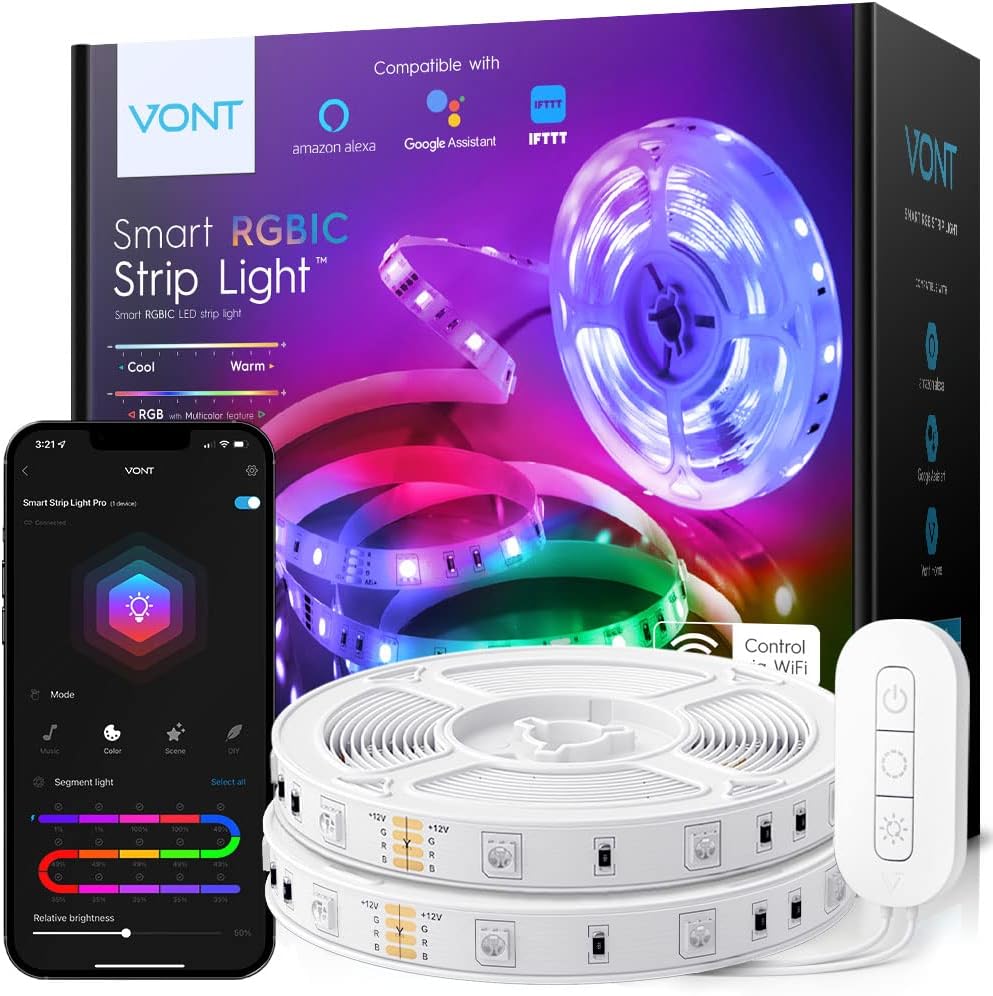
Image: Vont RGBIC Strip Lights, showing the product packaging, two rolls of LED strips, a remote control, and a smartphone displaying the control app.
Guía de configuración
Setting up your Vont RGBIC Strip Lights is a straightforward process. Follow these steps for optimal installation and connectivity:
- Prepare la superficie: Ensure the surface where you intend to install the strip lights is clean, dry, and smooth. Dust or uneven surfaces can affect the adhesive's effectiveness.
- Attach the Strip Lights: Carefully peel off the adhesive backing from the LED strip. Press the strip firmly onto the desired surface, working in sections to avoid bubbles or misalignment. The strips can be cut at designated marks to fit specific lengths.
- Conecte la electricidad: Plug the power adapter into the control box, and then plug the control box into a standard electrical outlet.
- Download the Vont Home App: Buscar "Vont Home" in your smartphone's app store (available for iOS and Android) and download the application.
- Emparejar con la aplicación: Open the Vont Home app and follow the on-screen instructions to add your new device. Ensure your phone's Bluetooth and Wi-Fi are enabled for successful pairing. The app will guide you through connecting the strip lights to your home Wi-Fi network.
- Integración del asistente de voz: For hands-free control, link your Vont Home account with Amazon Alexa or Google Assistant through their respective apps. This allows you to control the lights using voice commands.

Image: Illustration showing the simplicity of setup, highlighting that no additional hub is required for the Vont RGBIC Strip Lights.

Image: A pair of scissors cutting an LED strip light at a marked point, demonstrating the ability to customize length.
Instrucciones de funcionamiento
Your Vont RGBIC Strip Lights offer multiple ways to control your lighting experience:
Using the Vont Home App:
The Vont Home app provides comprehensive control over your strip lights. After pairing, you can:
- Seleccionar colores: Choose from 16 million colors in RGB mode.
- Segmented Lighting: Utilize the advanced IC chip to display multiple colors simultaneously. Control up to 15 segments individually, allowing for unique gradients and custom color blends.
- Ajustar el brillo: Easily dim or brighten the lights to suit your mood or environment.
- Modo música: Activate the built-in microphone to sync the lights with your favorite music, creating a dynamic light show that dances to the beat.
- Escenas preestablecidas: Select from a variety of pre-programmed scenes for different occasions, such as romantic settings or party atmospheres.
- Modo DIY: Crea y guarda tus propios efectos de iluminación y patrones de color personalizados.

Image: A smartphone screen displaying the Vont Home app, illustrating the segmented lighting control and various scene modes.

Image: A person dancing in a room illuminated by Vont RGBIC Strip Lights, demonstrating the music sync feature.
Voice Control (Alexa & Google Assistant):
Once integrated with your smart home system, you can use simple voice commands to control your lights:
- "Alexa, turn on the strip lights."
- "Hey Google, change strip lights to blue."
- "Alexa, set the strip lights to party scene."
- "Ok Google, atenúa las luces de tira al 50%".

Image: A couple relaxing in a living room, with speech bubbles indicating voice commands for controlling the Vont RGBIC Strip Lights via Alexa or Google Assistant.
Using the Physical Controller:
A compact physical controller is included for basic functions:
- Botón de encendido: Turn the lights On or Off.
- Botón de cambio de color: Cycle through various preset colors.
- Mode/Brightness Button: Switch between different lighting modes or adjust brightness levels.

Image: A diagram illustrating the functions of the physical controller buttons for the Vont RGBIC Strip Lights, with corresponding actions shown in a kitchen setting.
Mantenimiento
To ensure the longevity and optimal performance of your Vont RGBIC Strip Lights, follow these simple maintenance guidelines:
- Limpieza: Gently wipe the LED strips with a dry, soft cloth to remove dust. Do not use liquid cleaners or abrasive materials, as this can damage the LEDs or the adhesive.
- Colocación: Avoid installing the strip lights in areas exposed to direct water or high humidity, as they are designed for indoor use only.
- Manejo: Do not excessively bend or twist the LED strips, especially at the connection points, to prevent damage to the internal wiring.
- Apagar cuando no esté en uso: For extended periods of non-use, it is recommended to unplug the power adapter from the wall outlet.
Solución de problemas
If you encounter issues with your Vont RGBIC Strip Lights, refer to the following common troubleshooting steps:
- Las luces no se encienden:
- Check if the power adapter is securely plugged into both the control box and the wall outlet.
- Asegúrese de que el tomacorriente de pared funcione probándolo con otro dispositivo.
- Verifique que la tira de LED esté conectada correctamente a la caja de control.
- Try restarting the lights by unplugging and re-plugging the power adapter.
- Lights Not Responding to App/Controller:
- For app control, ensure your smartphone's Bluetooth and Wi-Fi are active and connected to the same network as the strip lights.
- Check if the Vont Home app is updated to the latest version.
- If using the physical controller, ensure there are no obstructions between the controller and the control box.
- Try re-pairing the device with the Vont Home app if connectivity issues persist.
- Incorrect Colors or Segment Issues:
- Ensure the strip lights are properly connected and not damaged.
- Recalibrate colors through the Vont Home app.
- If a segment is not lighting up correctly, inspect the strip for any physical damage or kinks.
- El control de voz no funciona:
- Confirm that your Vont Home account is correctly linked to your Alexa or Google Assistant app.
- Verifique su conexión a Internet y el estado de su dispositivo asistente de voz.
- Ensure you are using the correct voice commands as specified in the app or voice assistant documentation.
If these steps do not resolve the issue, please contact Vont Customer Care for further assistance.
Presupuesto
| Característica | Detalle |
|---|---|
| Marca | VON T |
| Número de modelo | SSL03 - RIC32V1-X1 |
| Color | Multicolor |
| Uso en interiores y exteriores | Interior |
| Característica especial | Cambio de color |
| Tipo de fuente de luz | CONDUJO |
| Fuente de poder | Eléctrico con cable |
| Volumentage | 12 voltios |
| Quétage | 48 vatios |
| Número de fuentes de luz | 300 |
| Tecnología de conectividad | Wi-Fi, Bluetooth |
| Método de control | Aplicación, Voz (Alexa, Asistente de Google) |
| Peso del artículo | 14.5 onzas |
| Dimensiones del producto (L x An x Al) | 393.6 x 0.5 x 0.2 pulgadas |
| Componentes incluidos | Strip Light, Light kit included |
Garantía y soporte
Vont stands behind the quality of its products. The Vont RGBIC Strip Lights are covered by a Garantía de por vida, protecting against loss, theft, and defects in materials and workmanship for as long as you own the product.
For any questions, technical assistance, or warranty claims, Vont Customer Satisfaction Wizards are available 24/7 to provide support.
También puedes consultar el Manual de usuario oficial en PDF para obtener información más detallada: Descargar Manual de Usuario (PDF)


